
It’s time again, time for another leaked firmware from Samsung for the Galaxy S i9000. This time it’s another 2.3.6 firmware, dubbed as XXJVU, a successor to XXJVT for Open Europe region.
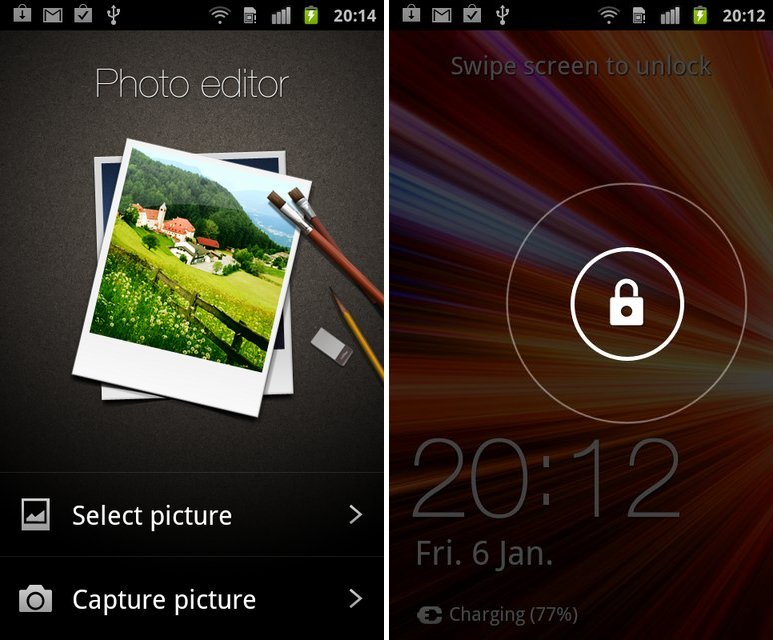
But it’s still not just another firmware for lovely Galaxy S1. Yep! It packs in new Lock Screen from Galaxy Note, a photo editor app from Galaxy S2 and lastly the Ice Cream Sandwich special Face Unlock feature, all besides the usual Android 2.3.6 Gingerbread. Check here to know more about what and what has changed with XXJVU firmware.
We know none of you, if not most of you, are happy with Sammy’s blunt announcement to not support Galaxy S with Android 4.0, but the XXJVU update is a major one which you’ll really enjoy, and should bring smiles on a bit choked faces of many Galaxy S users.
Yeah, we know you wanna try it, so we have a detailed guide right here on how to flash it.
Compatibility
This guide is applicable only for Samsung’s Galaxy S international version (GT-i9000). Check your phone’s version in Settings – About Phone. It has to be “GT-i9000” for this firmware to be compatible with your phone. If it’s not GT-i9000, simply don’t try this ROM on your android handset — don’t even think about it if you care about your android device.
Warning
The methods and procedures discussed here are considered risky and you should not attempt anything if you don’t know completely what it is. If any damage occurs to you or your device, we won’t be held liable — you only will be responsible, you’ve been warned!!!
Pre-Installation Tips:
- Installing/Flashing this ROM will erase your apps and data. So, it’s very important you back them up, before proceeding further. To backup your apps and important data — bookmarks, contacts, SMS, APNs (internet settings), etc. Restore APN settings if Internet isn’t working for you. This Android backup guide would help you. And if you’ve rooted your Galaxy S, you can save application’s data too, using Titanium backup(free app on android market) to backup apps with data. And use this this app only again to restore those apps with data.
- Drivers! — it’s important you’ve the proper drivers installed. Download links below:
- If you have Samsung’s PC software Kies installed, un-install it first because it may interrupt the flashing process. If you’ve installed it for sake of drivers which otherwise weren’t working, make sure you exit the Kies completely before beginning the procedure below.
How To Install XXJVU on Galaxy S i9000 (for experienced users)
Well, it’s pretty easy if you’ve already had fun flashing using Odin a decent number of times already. Download XXJVU (password: samfirmware.com) and install it using Odin3 v1.7. Put the *CODE* file in PDA tab, *Modem* file in Phone tab and *multi CSC* file in CSC tab. Put the .pit file in PIT tab and make sure Re-Partition is ticked too. Hit Start!
If you didn’t get what was said above, don’t worry one bit, a detailed guide for you is just below.
Step-By-Step Guide (for not so experienced users)
Although the guide below is very much detailed, step-by-step and sufficient for you to easily flash the XXJVU firmware on your Galaxy S, but in case if you want to watch a video of how you are going to do it, that is, flashing the XXJVU firmware is flashed using Odin, check out this video showing installation of an earlier firmware ‘XWJVB’ on Galaxy S. The procedure is same, so it would be helpful for those who are new.
- Download XXJVU firmware first. Filename: I9000XXJVU_I9000OXAJVU_OXA.rar. Size: 225.9 MB. Download Link. (password: samfirmware.com)
- Also download this PIT file: s1_odin_20100512.pit
- Extract the downloaded file ‘I9000XXJVU_I9000OXAJVU_OXA.rar’ to get these 3 files:
- CODE_I9000XXJVU_CL851880_REV03_user_low_ship.tar.md5
- GT-I9000-CSC-MULTI-OXAJVU.tar.md5
- MODEM_I9000XXJVU_REV_00_CL1059471.tar.md5
- Download Odin PC Software which we will be using to flash the XXJVU Android 2.3.6 ROM on Galaxy S. Filename: Odin3 v1.7.zip. Size: 192.55 KB. Download Link.
- Extract Odin3 v1.7.zip to get .exe file – Odin3 v1.7.exe. Run it when asked in step 8 below.
- Disconnect your phone if it’s connected to PC. Then Switch it Off. Wait 5-6 seconds for vibration to confirm complete switch off.
- Now, put the Galaxy S in “Download Mode” — press and hold these keys together: Volume_DOWN+Home+Power until a screen saying ‘Download Mode’ comes up.
- Open Odin (from step 5) — Odin3 v1.7.exe.
- Connect your phone to PC now. You should get the message “Added! !” under the Odin’s message box in the bottom left. If you don’t get “Added! !” message, than probably there is a problem with drivers. Make sure you’ve drivers installed (links given above under heading ‘Pre-Installation thoughts’).
- Now, in Odin, select these files at respective tabs (for visual help, see the screenshot at step 11 below):
- Click the PDA Tab, and select CODE_I9000XXJVU_CL851880_REV03_user_low_ship.tar.md5 (from step 3.1)
- Click the Phone Tab, and select MODEM_I9000XXJVU_REV_00_CL1092175.tar.md5 (from step 3.3)
- Click the CSC Tab, and select GT-I9000-CSC-MULTI-OXAJVU.tar.md5 (from step 3.2)
- Click the PIT Tab, and select s1_odin_20100512.pit (from step 2)
- Make sure the ‘Re-Partition’checkbox in ODIN is selected. Also, Auto Reboot and F.Reset Time checkboxes should be selected too. Leave everything else on Odin untouched.
- Double check everything said in step 10 and 11 above. Your Odin’s screen, after selecting all the files and ticking and not-ticking the checkboxes, should look like this:

- Now, hit the START button to begin the flashing process. When it finishes, your phone will automatically reboot, upon which you can unplug the cable. Plus, you’ll get a PASS (with green background) message in the left-most box at the very top of the Odin. (Check screenshot below)

- When it restarts, your Galaxy S will be running the Android OS, v2.3.6 XXJVU firmware.
- Off the screen and then open with the all new Galaxy Note ported lock screen. Find the Photo Editor app in app drawer, a port from Galaxy S2. And check the options for Face Unlock set up — go to Settings » Location and Security » Set Screen Lock. Enjoy!
- Lastly, if internet isn’t working, fill in the correct APN settings under mobile networks settings, under wireless and network settings.
Root and CWM for XXJVU
And before you ask, root for XXJVU isn’t out yet, which it should be in a matter of hours. We’ll update you with same as sson as we come to know of it.
Link to Root Galaxy S on XXJVU (also installs Clockworkmod recovery)
IMPORTANT NOTE: If Odin doesn’t seem to be progressing/doing anything for more than a minute, do the following:
Disconnect the phone from the PC, close ODIN, remove battery, re-insert it, turn phone on in Download mode again, and do the procedure again from Step 6.
Share your thoughts, observations and improvements (and disappointments) you see in the XXJVU firmware in comments below. If you face a problem in installation, don’t hesitate to ask us below.
Via XDA






1,133 responses to “New XXJVU Galaxy S Firmware Leaked. Updates Phone with Value Pack (Face Unlock, Photo Editor and New Lock Screen)”
hey hi, I’ve succeed to upgrade XXJVU 2.3.6 in my Galaxy S, but after showing PASS my phone is not booting I tried Vol Up , Vol Down + Home + Power but its not working either can anyone suggest what should I do ?
Isn’t using the power button only booting up the phone?
Do this: remove the battery for 5 seconds and then place it back. Then, hold the power button until you see the Galaxy S logo to boot the phone.
I did try everything to boot up by using power button, Up Volume key + Home + power button, Down Volume key + Home + power button for recovery mode and download mode but it isn’t responding just dead. My galaxy S is GT-I9003
My phone also too, Is there any thing suggestion for not responding?
I have this problem as well..I tried two other updates before this one, but nothing can make him pass that ‘GALAXY S’ screen…fucking phone….btw I had to switch my mainboard (100$) already because internal memory was busted (it’s welded to a mainboard so when that shit is gone you have to change whole damn thing), because it used to loop S animation endlessly, I just got it back from service and now this. Should I just put it up my ass since it already fucked me so much? Sorry, had to let my anger somewhere. Any solution on all this would be awesome tho.
Hehe, it’s okay you used this page to unleash your anger, and frustration.
Sometimes, this problem could be solved pretty easily by doing this; remove battery for 4-5 seconds and then place it back. Reboot to recovery and do factory reset and wipe cache twice. Now reboot from recovery and it should boot fine. If not, umm, try flashing the latest xxjw4 firmware or maybe the old good firmware xxjvs (you can search both these firmwares on this site to get links and guides). Good luck!!
Hi, thanks for the update. I managed to do everything as mentioned. I now have the face unlock and the like options but a couple of problems…
1. I don’t see the theme option in the settings
2. I can’t get any reception for my 3G sim, but my 2G seem works fine for text and call
P.S it works fine on wifi
Hi, thanks for the update. I managed to do everything as mentioned. I now have the face unlock and the like options but a couple of problems…
1. I don’t see the theme option in the settings
2. I can’t get any reception for my 3G sim, but my 2G seem works fine for text and call
P.S it works fine on wifi
Hi, thanks for the update. I managed to do everything as mentioned. I now have the face unlock and the like options but a couple of problems…
1. I don’t see the theme option in the settings
2. I can’t get any reception for my 3G sim, but my 2G seem works fine for text and call
P.S it works fine on wifi
it says to confirm password?
“samfirmware.com” doesnt wrk
worked it out 🙂
I just installed it and it’s asking for password!! And “samfirmware.com” doesn’t work!!
Try any password again and again until it stops asking password.
it says to confirm password?
“samfirmware.com” doesnt wrk
worked it out 🙂
I just installed it and it’s asking for password!! And “samfirmware.com” doesn’t work!!
Try any password again and again until it stops asking password.
it says to confirm password?
“samfirmware.com” doesnt wrk
worked it out 🙂
I just installed it and it’s asking for password!! And “samfirmware.com” doesn’t work!!
Try any password again and again until it stops asking password.
hi kapil i press vol down+power+home and nothing happen!! it just turn on !! my phone is galaxy s 9000
Maybe then, download mode isn’t available on your phone (by mistake). Btw, you are pressing and holding them 3 buttons together, right? If nothing else works, you can a low-costing small hardware tool called USB Jig, search for it on your local eBay, it should cost you some 3-4 US dollars. Plugging in this tool starts download mode on Galaxy S and other Samsung Android devices.
hi kapil i press vol down+power+home and nothing happen!! it just turn on !! my phone is galaxy s 9000
Maybe then, download mode isn’t available on your phone (by mistake). Btw, you are pressing and holding them 3 buttons together, right? If nothing else works, you can a low-costing small hardware tool called USB Jig, search for it on your local eBay, it should cost you some 3-4 US dollars. Plugging in this tool starts download mode on Galaxy S and other Samsung Android devices.
hi kapil i press vol down+power+home and nothing happen!! it just turn on !! my phone is galaxy s 9000
Maybe then, download mode isn’t available on your phone (by mistake). Btw, you are pressing and holding them 3 buttons together, right? If nothing else works, you can a low-costing small hardware tool called USB Jig, search for it on your local eBay, it should cost you some 3-4 US dollars. Plugging in this tool starts download mode on Galaxy S and other Samsung Android devices.
Now I’ve gotta try!
Now I’ve gotta try!
Now I’ve gotta try!
I have just upgraded my Samsung Galaxy S from Froyo to Gingerbread 2.3.6
, XXJVU, on my GT-I9000 and then rooted XXJVU and installed
Clockworkmod Recovery (CWM). I am with Virgin Mobile. I had NO problems
at all and my phone is working better than ever. I simply followed as above. This was the very first time I had attempted any such update on a mobile phone, albeit I have many times partioned and formatted PC hard drives along with updating and installing operating systems. Most problems arise because we do not read/digest instructions carefully before attempting to do the quest. Take your time, read thoroughly then read thoroughly again and make sure you have all of the files to hand. Then check and double check your progress with the intructions and diagrams provided. You will be suprised how often you will make that one error/mistake because you did not check and double check.
Thanks a lot for sharing your thoughts, man. Really appreciate it. After reading the instructions carefully, it was pretty easy thing, right?
I have just upgraded my Samsung Galaxy S from Froyo to Gingerbread 2.3.6
, XXJVU, on my GT-I9000 and then rooted XXJVU and installed
Clockworkmod Recovery (CWM). I am with Virgin Mobile. I had NO problems
at all and my phone is working better than ever. I simply followed as above. This was the very first time I had attempted any such update on a mobile phone, albeit I have many times partioned and formatted PC hard drives along with updating and installing operating systems. Most problems arise because we do not read/digest instructions carefully before attempting to do the quest. Take your time, read thoroughly then read thoroughly again and make sure you have all of the files to hand. Then check and double check your progress with the intructions and diagrams provided. You will be suprised how often you will make that one error/mistake because you did not check and double check.
Thanks a lot for sharing your thoughts, man. Really appreciate it. After reading the instructions carefully, it was pretty easy thing, right?
I have just upgraded my Samsung Galaxy S from Froyo to Gingerbread 2.3.6
, XXJVU, on my GT-I9000 and then rooted XXJVU and installed
Clockworkmod Recovery (CWM). I am with Virgin Mobile. I had NO problems
at all and my phone is working better than ever. I simply followed as above. This was the very first time I had attempted any such update on a mobile phone, albeit I have many times partioned and formatted PC hard drives along with updating and installing operating systems. Most problems arise because we do not read/digest instructions carefully before attempting to do the quest. Take your time, read thoroughly then read thoroughly again and make sure you have all of the files to hand. Then check and double check your progress with the intructions and diagrams provided. You will be suprised how often you will make that one error/mistake because you did not check and double check.
Thanks a lot for sharing your thoughts, man. Really appreciate it. After reading the instructions carefully, it was pretty easy thing, right?
Good day sirs! :] Just to make sure, that my phone is compatible with
this method, I am on a Samsung Galaxy S i9000 international edition.
with Android version 2.3.3
Gingerbread [ PDA: JV9, PHONE, JV9 , CSC : JV9 (XTC) ] Baseband version: i9000DXJV9
Kernel version 2.6.35.7-i9000DXJV9-CL216763 root@SE-S604 # 2
Buildnumber GINGERBREAD.DXJV9
1) Is it compatible & stable for this upgrade? :]
2) If I want to root my phone, do I need to root first? THEN do this firmware upgrade?
Your phone is compatible. You don’t need root to install a firmware, so simply go ahead and install XXJVU using the instructions above. And btw, the latest firmware is XXJW4 — nerdschalk.com/galaxy-s-gets-official-value-pack-firmware-xxjw4-includes-touchwiz-4/– and I think you should try that in place of XXJVU.
Good day sirs! :] Just to make sure, that my phone is compatible with
this method, I am on a Samsung Galaxy S i9000 international edition.
with Android version 2.3.3
Gingerbread [ PDA: JV9, PHONE, JV9 , CSC : JV9 (XTC) ] Baseband version: i9000DXJV9
Kernel version 2.6.35.7-i9000DXJV9-CL216763 root@SE-S604 # 2
Buildnumber GINGERBREAD.DXJV9
1) Is it compatible & stable for this upgrade? :]
2) If I want to root my phone, do I need to root first? THEN do this firmware upgrade?
Your phone is compatible. You don’t need root to install a firmware, so simply go ahead and install XXJVU using the instructions above. And btw, the latest firmware is XXJW4 — nerdschalk.com/galaxy-s-gets-official-value-pack-firmware-xxjw4-includes-touchwiz-4/– and I think you should try that in place of XXJVU.
Good day sirs! :] Just to make sure, that my phone is compatible with
this method, I am on a Samsung Galaxy S i9000 international edition.
with Android version 2.3.3
Gingerbread [ PDA: JV9, PHONE, JV9 , CSC : JV9 (XTC) ] Baseband version: i9000DXJV9
Kernel version 2.6.35.7-i9000DXJV9-CL216763 root@SE-S604 # 2
Buildnumber GINGERBREAD.DXJV9
1) Is it compatible & stable for this upgrade? :]
2) If I want to root my phone, do I need to root first? THEN do this firmware upgrade?
Your phone is compatible. You don’t need root to install a firmware, so simply go ahead and install XXJVU using the instructions above. And btw, the latest firmware is XXJW4 — nerdschalk.com/galaxy-s-gets-official-value-pack-firmware-xxjw4-includes-touchwiz-4/– and I think you should try that in place of XXJVU.
Is this room support chinesewording?
Is this room support chinesewording?
Is this room support chinesewording?
I update my phone with this soft but i dont why i lost signal for a few times and then comes back….anyone knows what happen??
I update my phone with this soft but i dont why i lost signal for a few times and then comes back….anyone knows what happen??
I update my phone with this soft but i dont why i lost signal for a few times and then comes back….anyone knows what happen??
hi I’ve used this site for all my updates to date , but with this latest updated my gps keeps dropping and losing conection now? any ideas
many thanks
I followed all the steps, odin completed with a pass and the green thing, then the phone stars up and says, “confirm password” and has a qwerty screen up with numbers above it. Just pressing ok doesnt bypass this, what is this? My phone had no pw.
dude is your phone not brand new when u bought it? the phones first user might have encrypted it.
hi I’ve used this site for all my updates to date , but with this latest updated my gps keeps dropping and losing conection now? any ideas
many thanks
hi I’ve used this site for all my updates to date , but with this latest updated my gps keeps dropping and losing conection now? any ideas
many thanks
I followed all the steps, odin completed with a pass and the green thing, then the phone stars up and says, “confirm password” and has a qwerty screen up with numbers above it. Just pressing ok doesnt bypass this, what is this? My phone had no pw.
dude is your phone not brand new when u bought it? the phones first user might have encrypted it.
I followed all the steps, odin completed with a pass and the green thing, then the phone stars up and says, “confirm password” and has a qwerty screen up with numbers above it. Just pressing ok doesnt bypass this, what is this? My phone had no pw.
dude is your phone not brand new when u bought it? the phones first user might have encrypted it.
hii..i m samsung vibrant user..currently using 2.2 froyo..kindly share how can i install stable 2.3 gingerbread on samsung vibrant..
hii..i m samsung vibrant user..currently using 2.2 froyo..kindly share how can i install stable 2.3 gingerbread on samsung vibrant..
hii..i m samsung vibrant user..currently using 2.2 froyo..kindly share how can i install stable 2.3 gingerbread on samsung vibrant..
worked a treat, too easy
Will it work on my Galasy S GT-I9000B that is not the international version?
It should work but you might lose some features specific to Brazilian Galaxy S i9100B.
worked a treat, too easy
worked a treat, too easy
Will it work on my Galasy S GT-I9000B that is not the international version?
It should work but you might lose some features specific to Brazilian Galaxy S i9100B.
Will it work on my Galasy S GT-I9000B that is not the international version?
It should work but you might lose some features specific to Brazilian Galaxy S i9100B.
Hi there! my GT-19000 is running 2.3.4 firmware. and baseband version I9000XXJVQ. is this compatible with this firmware update? Im scared to try it but i would love to. Thanks!
Yes, perfectly compatible. Do take backups as said above under pre-installation tips, point number 1.
Hi there! my GT-19000 is running 2.3.4 firmware. and baseband version I9000XXJVQ. is this compatible with this firmware update? Im scared to try it but i would love to. Thanks!
Yes, perfectly compatible. Do take backups as said above under pre-installation tips, point number 1.
Hi there! my GT-19000 is running 2.3.4 firmware. and baseband version I9000XXJVQ. is this compatible with this firmware update? Im scared to try it but i would love to. Thanks!
Yes, perfectly compatible. Do take backups as said above under pre-installation tips, point number 1.
Hi , i just updated my GT-i1900 galaxy s Vodafone NZ with the xxjvu firmware and it worked fine but when i get a call or make a call the phone leaves a notification in the top left corner that looks like the sd card scanning icon (but smaller and grey) and also leaves a notification in the drop down from the home screen which cannot be deleted and only goes away when the phone is turned on and off ….is there a fix for this ?
Maybe a factory reset from recovery mode would fix it. Try that. To boot into recovery mode, power off phone and then hold Volume UP + Home + Power keys together till you see the Samsung logo.
Thanks for the suggestion Kapil but i still have the same problem ….its annoying having it just sit there and not being able to clear it arrgh
Can’t help!
🙁
Btw, give me a screenshot or pic of that. I’ll see into it later.
Is it possible to go back to gingerbread.xwjvh 2.3.3 ?
Of course you can back to xxjvh, but I would suggest you to go back to one better firmware, XXJVS — nerdschalk.com/download-install-xxjvs-firmware-update-galaxy-s-i9000-to-android-2-3-5/
Hey Kapil …Here is the screen shot …when i turn on the phone its like there is 2 media scans running but both dissapear once they are finished …this grey one only reappears when i make a call or recieve a call …hope that helps …thanks for your help.
Where’s the screenshot? You can upload it on tinypic.com and give me a url of it.
Thanks again …will wait and see if there is a fix otherwise will go to xxjvs as per your advise ..cheers
http://tinypic.com/r/20kzx8j/6
Hmm.. no idea, man. you can try the latest samsung firmware, XXJW4, which includes TouchWiz 4 too from here — nerdschalk.com/galaxy-s-gets-official-value-pack-firmware-xxjw4-includes-touchwiz-4/
ohh stink one ….will give xxjw4 a go.