
Firmware leaks keep on coming in the world Samsung Galaxy devices, and the latest of them is Android 2.3.6 based firmware for Samsung Galaxy S2 ─ XXKL1.
It’s the fourth leak of Android 2.3.6 based firmware, and as always I’ve no idea what’s changed (guess nobody has). Anyway we’re going to update 😉
NOTE:
This guide is applicable only for Samsung’s Galaxy S2 (S II) international version (i9100). Check your phone’s version in Settings – About Phone. It has to be “GT-i9100” for the XXKL1 firmware to be compatible with your device. If it’s not GT-i9100, simply don’t try this ROM on your android handset, don’t even think about it if you care not to brick your device.[/info]
Warning!
The methods and procedures discussed here are considered risky and you should not attempt anything if you don’t know completely what it is. If any damage occurs to you or your device, we won’t be held liable. You only will be responsible — you’ve been warned. Okay!
Pre-Installation tips:
- Backup your Apps and important data — bookmarks, contacts, SMS, APNs (internet settings), etc. This Android backup guide would help you.
- If you have Samsung’s PC software Kies installed, un-install it first because it may interrupt the flashing process.
- Drivers! — it’s important you’ve the proper drivers installed. Download links below:
Installation video
The video given below shows the installation of an earlier firmware (XXKG1), but the steps to update to XXKL1 are all similar, so you can easily follow the video to get some visual guidance.
Video:
Step by Step Instructions:
- Download the Android 2.3.6 Firmware – XXKL1. Filename: I9100XXKL1_I9100OXAKL1.rar. Size: 299.5 MB → Download Link. (password: sampro.pl)
- Extract the downloaded file ‘I9100XXKL1_I9100OXAKL1.rar’ to get these 4 files:
- CODE_I9100XXKL1_CL783870_REV02_eng_mid_ship.tar.md5
- GT-I9100-CSC-MULTI-OXAKL1.tar.md5
- MODEM_I9100XXKL1_REV_02_CL1085162.tar.md5
- u1_02_20110310_emmc_EXT4.pit (we won’t be using it since it’s not essential for flashing the firmware. Read Step 13 below this to know more)
- Download Odin software. Filename: Odin3-v1.85.zip. Size: 198 KB → Download Link. Extract the zip file to folder to get 2 files – Odin3 v1.85.exe and Odin3.ini. Do not delete the .ini file (the second one) since it’s very much required, too. when asked in step 6 below, open Odin by double clicking on the Odin3 v1.85.exe file.
- Disconnect your phone if it’s connected to PC. Switch Off your phone. Wait for vibration to confirm complete switch off.
- Now, put the Galaxy S2 in Download Mode — press and hold these keys together: Volume_DOWN+Home+Power. this is required to install the XXKG1 using Odin PC Software.
- Open Odin (from step 3) — Odin3 v1.85.exe.
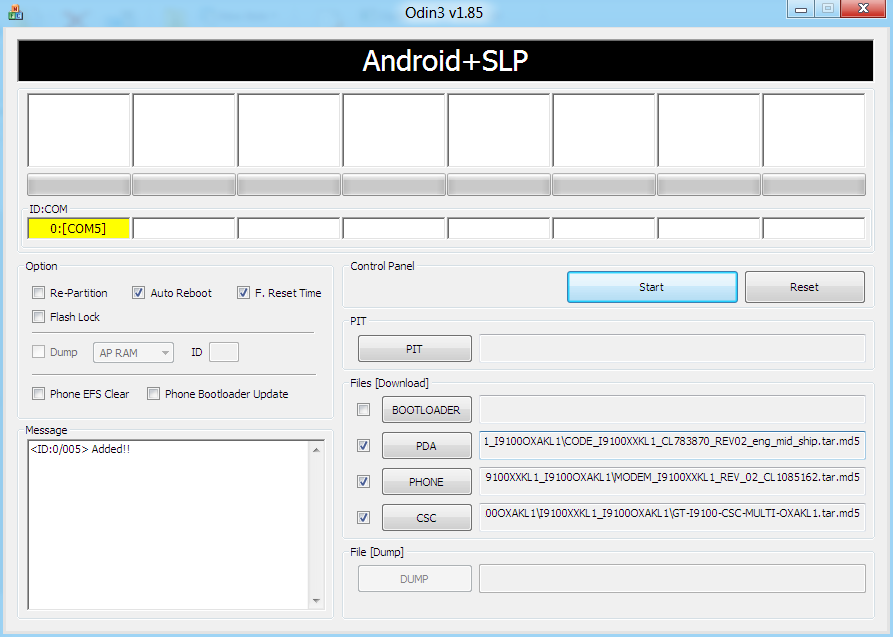
- Connect your phone to PC now. You should get the message “Added! !” under the Odin’s message box in the bottom left. If you don’t get this message, than probably there is a problem with drivers. Make sure you’ve drivers installed.
- Important! On Odin, Do NOT tick the ‘Re-Partition’ checkbox, but keep the ‘Auto Reboot’ & ‘F. Reset Time’ checkboxes ticked. Do not touch any other checkbox or tab or anything, except as required in step 9 below.
- Select these files in Odin at respective tabs (check out the screenshot given at the top for help):
- Click the PDA Tab, and select CODE_I9100XXKL1_CL783870_REV02_eng_mid_ship.tar.md5 (from step 2.1)
- Click the Phone Tab, and select MODEM_I9100XXKL1_REV_02_CL1085162.tar.md5 (from step 2.3)
- Click the CSC Tab, and select GT-I9100-CSC-MULTI-OXAKL1.tar.md5 (from step 2.2)
- Double check everything said in step 8 and 9 above. [And, do not use the file in step 2.4 anywhere in Odin]. Your Odin’s window should look real similar to the image at the very top — which is my Odin’s screen while I flashed the XXKL1 on my Galaxy S.
- Now, hit the START button to let the process begin. When process at Odin finishes your phone will automatically reboot — and you can unplug the cable then. Plus, you’ll get a PASS (with green background) message in the left-most box at the very top of the Odin. If it’s red and with FAIL written over it, the process flashing process wasn’t successful.
- When it restarts, your Galaxy S2 will be running on Android 2.3.6 with Samsung’s custom UI TouchWiz 4 atop it. Check out your S2’s android version here – Settings → About Phone.
- About the .pit file (one you found in step 2.4). The .pit file re-partitions the phone’s internal memory space. You don’t need it often, that’s why we don’t use it generally. But if you are unable to flash the XXKL1 ROM successfully, you can try the whole process again but using the .pit file too this time.
Important: When you use .pit file (ever!) you need to tick the Re-Partition checkbox too (which wasn’t the case earlier – check step 8 when we kept it un-ticked). So, if you are flashing the XXKL1 again, select the .pit file too (from step 2.4 ) in the PIT Tab together with all other files as said in step 9. Then, make sure the Re-Partition button is ticked too along with the Auto Reboot and F. Reset Time checkboxes — that is, all three checkboxes will be ticked if you use the .pit file. - (Optional, of course) If you found this guide useful, share it with others too on webpages, forums, your Facebook/twitter/Google+ pages, etc. That would be helping us grow too!
If before flashing this, you had your phone rooted you would want the root back, right? Well, that’s very obvious. But chainfire hasn’t released a working root for XXKL1 yet. So I’d suggest you to root using SuperOneClick, it may work.
Do let us know about your experience of the XXKL1 ROM in the comments below.






227 responses to “Update Galaxy S2 to Android 2.3.6 XXKL1 Firmware”
the FirmWare Version is 2.3.4 after the Update not 2.3.6 !!!!!
Android 2.3.4 and 2.3.6 is okay, try the Android 4.0 firmware by Samsung, XXLPQ — nerdschalk.com/xxlpq/
the FirmWare Version is 2.3.4 after the Update not 2.3.6 !!!!!
Android 2.3.4 and 2.3.6 is okay, try the Android 4.0 firmware by Samsung, XXLPQ — nerdschalk.com/xxlpq/
Hi there.. After installing I have two problems. One, the battery drain really fast. Two and the most important one, when I off my phone(after waiting for the last vibration) the phone turns off well but suddenly the battery symbol came up and starts to blink with a yellow triangle and a thermometer sign with it. How do I solve these problems?
Here are some fixes for you.
To install an Android 2.3 Gingerbread firmware, use this guide and flash the XXKH3 firmware: nerdschalk.com/how-to-install-xxkh3-on-samsung-galaxy-s-2-ii-i9100/
To install an Android 4.0 Ice Cream Sandwich firmware, use this guide and flash the XXLPQ firmware: https://nerdschalk.com/xxlpq/
Flashing a new firmware should solve these things. Let me know.
Here are some fixes for you.
To install an Android 2.3 Gingerbread firmware, use this guide and flash the XXKH3 firmware: nerdschalk.com/how-to-install-xxkh3-on-samsung-galaxy-s-2-ii-i9100/
To install an Android 4.0 Ice Cream Sandwich firmware, use this guide and flash the XXLPQ firmware: https://nerdschalk.com/xxlpq/
Flashing a new firmware should solve these things. Let me know.
Hi there.. After installing I have two problems. One, the battery drain really fast. Two and the most important one, when I off my phone(after waiting for the last vibration) the phone turns off well but suddenly the battery symbol came up and starts to blink with a yellow triangle and a thermometer sign with it. How do I solve these problems?
Here are some fixes for you.
To install an Android 2.3 Gingerbread firmware, use this guide and flash the XXKH3 firmware: nerdschalk.com/how-to-install-xxkh3-on-samsung-galaxy-s-2-ii-i9100/
To install an Android 4.0 Ice Cream Sandwich firmware, use this guide and flash the XXLPQ firmware: https://nerdschalk.com/xxlpq/
Flashing a new firmware should solve these things. Let me know.
Hi there.. After installing I have two problems. One, the battery drain really fast. Two and the most important one, when I off my phone(after waiting for the last vibration) the phone turns off well but suddenly the battery symbol came up and starts to blink with a yellow triangle and a thermometer sign with it. How do I solve these problems?
Here are some fixes for you.
To install an Android 2.3 Gingerbread firmware, use this guide and flash the XXKH3 firmware: nerdschalk.com/how-to-install-xxkh3-on-samsung-galaxy-s-2-ii-i9100/
To install an Android 4.0 Ice Cream Sandwich firmware, use this guide and flash the XXLPQ firmware: https://nerdschalk.com/xxlpq/
Flashing a new firmware should solve these things. Let me know.
i need ur help man..i updated thru this odin…but it was failed everytime..old os also deleted..i dont know wat to do..but it goes to download mode..it comes added..but the operation failes at the end
Here are some fixes for you.
To install an Android 2.3 Gingerbread firmware, use this guide and flash the XXKH3 firmware: nerdschalk.com/how-to-install-xxkh3-on-samsung-galaxy-s-2-ii-i9100/
To install an Android 4.0 Ice Cream Sandwich firmware, use this guide and flash the XXLPQ firmware: https://nerdschalk.com/xxlpq/
You cna use a new ODin to flash the above firmwares if your current Odin fails to update even after you get “Added” message in Odin.
Link to new Odin 3.04 – http://www.mediafire.com/?189h7dqldccnrq8
Here are some fixes for you.
To install an Android 2.3 Gingerbread firmware, use this guide and flash the XXKH3 firmware: nerdschalk.com/how-to-install-xxkh3-on-samsung-galaxy-s-2-ii-i9100/
To install an Android 4.0 Ice Cream Sandwich firmware, use this guide and flash the XXLPQ firmware: https://nerdschalk.com/xxlpq/
You cna use a new ODin to flash the above firmwares if your current Odin fails to update even after you get “Added” message in Odin.
Link to new Odin 3.04 – http://www.mediafire.com/?189h7dqldccnrq8
i need ur help man..i updated thru this odin…but it was failed everytime..old os also deleted..i dont know wat to do..but it goes to download mode..it comes added..but the operation failes at the end
Here are some fixes for you.
To install an Android 2.3 Gingerbread firmware, use this guide and flash the XXKH3 firmware: nerdschalk.com/how-to-install-xxkh3-on-samsung-galaxy-s-2-ii-i9100/
To install an Android 4.0 Ice Cream Sandwich firmware, use this guide and flash the XXLPQ firmware: https://nerdschalk.com/xxlpq/
You cna use a new ODin to flash the above firmwares if your current Odin fails to update even after you get “Added” message in Odin.
Link to new Odin 3.04 – http://www.mediafire.com/?189h7dqldccnrq8
i need ur help man..i updated thru this odin…but it was failed everytime..old os also deleted..i dont know wat to do..but it goes to download mode..it comes added..but the operation failes at the end
Here are some fixes for you.
To install an Android 2.3 Gingerbread firmware, use this guide and flash the XXKH3 firmware: nerdschalk.com/how-to-install-xxkh3-on-samsung-galaxy-s-2-ii-i9100/
To install an Android 4.0 Ice Cream Sandwich firmware, use this guide and flash the XXLPQ firmware: https://nerdschalk.com/xxlpq/
You cna use a new ODin to flash the above firmwares if your current Odin fails to update even after you get “Added” message in Odin.
Link to new Odin 3.04 – http://www.mediafire.com/?189h7dqldccnrq8
I installed it but it doesnt not display any arabic!!
What to do i tried to reflash it always fail and if i reflash it with the same files it goes fine, Any other ROM it fails.
this is Europe version
I installed it but it doesnt not display any arabic!!
What to do i tried to reflash it always fail and if i reflash it with the same files it goes fine, Any other ROM it fails.
this is Europe version
I installed it but it doesnt not display any arabic!!
What to do i tried to reflash it always fail and if i reflash it with the same files it goes fine, Any other ROM it fails.
this is Europe version
I get this version but I hate it, the wallpaper can’t be scrolled and things like that, it makes this phone boring, is there a way to got the older version back?…thank you
I get this version but I hate it, the wallpaper can’t be scrolled and things like that, it makes this phone boring, is there a way to got the older version back?…thank you
I get this version but I hate it, the wallpaper can’t be scrolled and things like that, it makes this phone boring, is there a way to got the older version back?…thank you
i have tried this but after pass appeares on odin and my samsung galaxy s2 restarts its asking for password. plz plz anyone help why after installing this firmware my phone is asking for password. thanks in advance
i have tried this but after pass appeares on odin and my samsung galaxy s2 restarts its asking for password. plz plz anyone help why after installing this firmware my phone is asking for password. thanks in advance
i have tried this but after pass appeares on odin and my samsung galaxy s2 restarts its asking for password. plz plz anyone help why after installing this firmware my phone is asking for password. thanks in advance
Successfully rooted 😀
Thanks a lot 🙂
Successfully rooted 😀
Thanks a lot 🙂
Successfully rooted 😀
Thanks a lot 🙂
Thanks a ton..Just installed the new version on my s2..
Thanks a ton..Just installed the new version on my s2..
Thanks a ton..Just installed the new version on my s2..
you guys are my heros. after a failed firmware upgrade via Kies (connection timed out twice), I got hold of I9100XWLP3_I9100O2ULP4_O2U and was greatful that my phone worked. However, this put an O2 logo on startup screen and used them as carrier (not too bad considering I am with Tesco mobile). problem was that I couldn’t use mobile data and feared a long call to Tesco helpdesk. Then discovered your very helpful website which helped put my ‘Android’s Soul’ right again. THANK YOU GUYS!!!
Thanks, man!
you guys are my heros. after a failed firmware upgrade via Kies (connection timed out twice), I got hold of I9100XWLP3_I9100O2ULP4_O2U and was greatful that my phone worked. However, this put an O2 logo on startup screen and used them as carrier (not too bad considering I am with Tesco mobile). problem was that I couldn’t use mobile data and feared a long call to Tesco helpdesk. Then discovered your very helpful website which helped put my ‘Android’s Soul’ right again. THANK YOU GUYS!!!
Thanks, man!
you guys are my heros. after a failed firmware upgrade via Kies (connection timed out twice), I got hold of I9100XWLP3_I9100O2ULP4_O2U and was greatful that my phone worked. However, this put an O2 logo on startup screen and used them as carrier (not too bad considering I am with Tesco mobile). problem was that I couldn’t use mobile data and feared a long call to Tesco helpdesk. Then discovered your very helpful website which helped put my ‘Android’s Soul’ right again. THANK YOU GUYS!!!
Thanks, man!
Can some one please post the procedure for installing this firm ware in GT-I9100g
Can some one please post the procedure for installing this firm ware in GT-I9100g
Can some one please post the procedure for installing this firm ware in GT-I9100g
it doesnt contain arabic language any help???
it doesnt contain arabic language any help???
it doesnt contain arabic language any help???
this content is not available in your region i am from India how i can download this file plse help me i am install custom rom install s2 gti9100 and i lost my orignal IMEI
this content is not available in your region i am from India how i can download this file plse help me i am install custom rom install s2 gti9100 and i lost my orignal IMEI