
Firmware leaks keep on coming in the world Samsung Galaxy devices, and the latest of them is Android 2.3.6 based firmware for Samsung Galaxy S2 ─ XXKL1.
It’s the fourth leak of Android 2.3.6 based firmware, and as always I’ve no idea what’s changed (guess nobody has). Anyway we’re going to update 😉
NOTE:
This guide is applicable only for Samsung’s Galaxy S2 (S II) international version (i9100). Check your phone’s version in Settings – About Phone. It has to be “GT-i9100” for the XXKL1 firmware to be compatible with your device. If it’s not GT-i9100, simply don’t try this ROM on your android handset, don’t even think about it if you care not to brick your device.[/info]
Warning!
The methods and procedures discussed here are considered risky and you should not attempt anything if you don’t know completely what it is. If any damage occurs to you or your device, we won’t be held liable. You only will be responsible — you’ve been warned. Okay!
Pre-Installation tips:
- Backup your Apps and important data — bookmarks, contacts, SMS, APNs (internet settings), etc. This Android backup guide would help you.
- If you have Samsung’s PC software Kies installed, un-install it first because it may interrupt the flashing process.
- Drivers! — it’s important you’ve the proper drivers installed. Download links below:
Installation video
The video given below shows the installation of an earlier firmware (XXKG1), but the steps to update to XXKL1 are all similar, so you can easily follow the video to get some visual guidance.
Video:
Step by Step Instructions:
- Download the Android 2.3.6 Firmware – XXKL1. Filename: I9100XXKL1_I9100OXAKL1.rar. Size: 299.5 MB → Download Link. (password: sampro.pl)
- Extract the downloaded file ‘I9100XXKL1_I9100OXAKL1.rar’ to get these 4 files:
- CODE_I9100XXKL1_CL783870_REV02_eng_mid_ship.tar.md5
- GT-I9100-CSC-MULTI-OXAKL1.tar.md5
- MODEM_I9100XXKL1_REV_02_CL1085162.tar.md5
- u1_02_20110310_emmc_EXT4.pit (we won’t be using it since it’s not essential for flashing the firmware. Read Step 13 below this to know more)
- Download Odin software. Filename: Odin3-v1.85.zip. Size: 198 KB → Download Link. Extract the zip file to folder to get 2 files – Odin3 v1.85.exe and Odin3.ini. Do not delete the .ini file (the second one) since it’s very much required, too. when asked in step 6 below, open Odin by double clicking on the Odin3 v1.85.exe file.
- Disconnect your phone if it’s connected to PC. Switch Off your phone. Wait for vibration to confirm complete switch off.
- Now, put the Galaxy S2 in Download Mode — press and hold these keys together: Volume_DOWN+Home+Power. this is required to install the XXKG1 using Odin PC Software.
- Open Odin (from step 3) — Odin3 v1.85.exe.
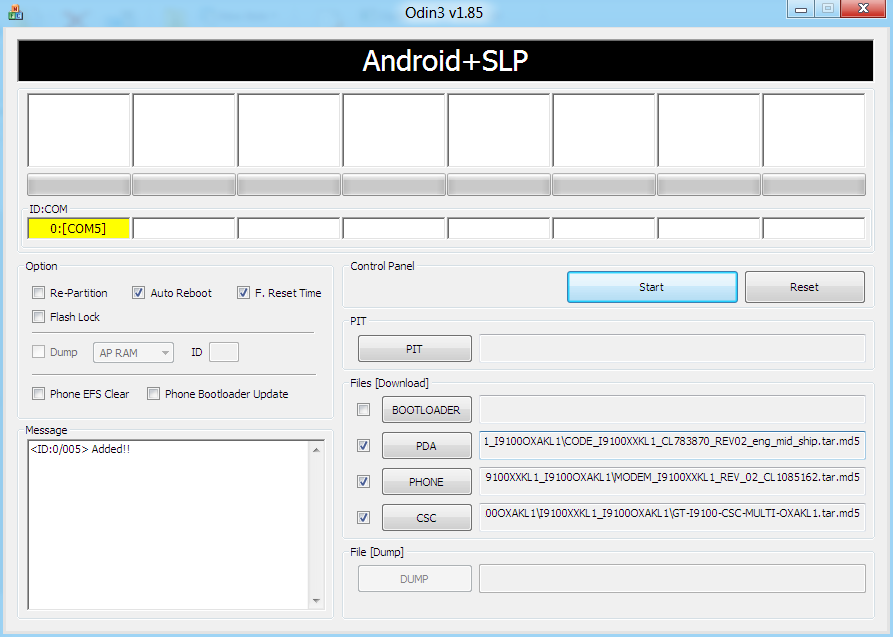
- Connect your phone to PC now. You should get the message “Added! !” under the Odin’s message box in the bottom left. If you don’t get this message, than probably there is a problem with drivers. Make sure you’ve drivers installed.
- Important! On Odin, Do NOT tick the ‘Re-Partition’ checkbox, but keep the ‘Auto Reboot’ & ‘F. Reset Time’ checkboxes ticked. Do not touch any other checkbox or tab or anything, except as required in step 9 below.
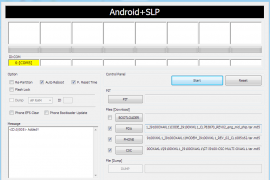
- Select these files in Odin at respective tabs (check out the screenshot given at the top for help):
- Click the PDA Tab, and select CODE_I9100XXKL1_CL783870_REV02_eng_mid_ship.tar.md5 (from step 2.1)
- Click the Phone Tab, and select MODEM_I9100XXKL1_REV_02_CL1085162.tar.md5 (from step 2.3)
- Click the CSC Tab, and select GT-I9100-CSC-MULTI-OXAKL1.tar.md5 (from step 2.2)
- Double check everything said in step 8 and 9 above. [And, do not use the file in step 2.4 anywhere in Odin]. Your Odin’s window should look real similar to the image at the very top — which is my Odin’s screen while I flashed the XXKL1 on my Galaxy S.
- Now, hit the START button to let the process begin. When process at Odin finishes your phone will automatically reboot — and you can unplug the cable then. Plus, you’ll get a PASS (with green background) message in the left-most box at the very top of the Odin. If it’s red and with FAIL written over it, the process flashing process wasn’t successful.
- When it restarts, your Galaxy S2 will be running on Android 2.3.6 with Samsung’s custom UI TouchWiz 4 atop it. Check out your S2’s android version here – Settings → About Phone.
- About the .pit file (one you found in step 2.4). The .pit file re-partitions the phone’s internal memory space. You don’t need it often, that’s why we don’t use it generally. But if you are unable to flash the XXKL1 ROM successfully, you can try the whole process again but using the .pit file too this time.
Important: When you use .pit file (ever!) you need to tick the Re-Partition checkbox too (which wasn’t the case earlier – check step 8 when we kept it un-ticked). So, if you are flashing the XXKL1 again, select the .pit file too (from step 2.4 ) in the PIT Tab together with all other files as said in step 9. Then, make sure the Re-Partition button is ticked too along with the Auto Reboot and F. Reset Time checkboxes — that is, all three checkboxes will be ticked if you use the .pit file. - (Optional, of course) If you found this guide useful, share it with others too on webpages, forums, your Facebook/twitter/Google+ pages, etc. That would be helping us grow too!
If before flashing this, you had your phone rooted you would want the root back, right? Well, that’s very obvious. But chainfire hasn’t released a working root for XXKL1 yet. So I’d suggest you to root using SuperOneClick, it may work.
Do let us know about your experience of the XXKL1 ROM in the comments below.






227 responses to “Update Galaxy S2 to Android 2.3.6 XXKL1 Firmware”
What is the password to I9100XXKL1_I9100OXAKL1.rar?
PASS: sampro.pl
PASS: sampro.pl
Thanks mate :-).
Very informative blog!
plz give me root file
What is the password to I9100XXKL1_I9100OXAKL1.rar?
PASS: sampro.pl
Thanks mate :-).
Very informative blog!
plz give me root file
What is the password to I9100XXKL1_I9100OXAKL1.rar?
PASS: sampro.pl
Thanks mate :-).
Very informative blog!
plz give me root file
Are there any ways to get the customization back after upgrade, like all the personalization, shortcuts added etc?
No, but if you’re rooted you can take a complete backup with “*Titanium backup*” (search for it in the Market) before upgrading to the new firmware. And restore the backup after you upgrade.
No, but if you’re rooted you can take a complete backup with “*Titanium backup*” (search for it in the Market) before upgrading to the new firmware. And restore the backup after you upgrade.
Thanks a lot Shivam
Are there any ways to get the customization back after upgrade, like all the personalization, shortcuts added etc?
No, but if you’re rooted you can take a complete backup with “*Titanium backup*” (search for it in the Market) before upgrading to the new firmware. And restore the backup after you upgrade.
Thanks a lot Shivam
Are there any ways to get the customization back after upgrade, like all the personalization, shortcuts added etc?
No, but if you’re rooted you can take a complete backup with “*Titanium backup*” (search for it in the Market) before upgrading to the new firmware. And restore the backup after you upgrade.
Thanks a lot Shivam
Another question, is there any support for unicode languages like Hindi/Malayalam/Tamil etc with the latest firmware update? If not any idea when android would start supporting unicode?
Thanks
Another question, is there any support for unicode languages like Hindi/Malayalam/Tamil etc with the latest firmware update? If not any idea when android would start supporting unicode?
Thanks
Another question, is there any support for unicode languages like Hindi/Malayalam/Tamil etc with the latest firmware update? If not any idea when android would start supporting unicode?
Thanks
Installed
Update Galaxy S2 to Android 2.3.6 XXKL1 Firmware
Rooted with
SuperOneClick v2.3.1
takes 5 to 10 minutes and gave a message that the phone was already rooted which I ignored and the program said it was not responding several times but just waited and waited until it finally finished installation and shut off. When I restarted my phone was rooted. Installed Titanium Backup and recovered all programs and data.
Great operation by following directions and being patient.
Installed
Update Galaxy S2 to Android 2.3.6 XXKL1 Firmware
Rooted with
SuperOneClick v2.3.1
takes 5 to 10 minutes and gave a message that the phone was already rooted which I ignored and the program said it was not responding several times but just waited and waited until it finally finished installation and shut off. When I restarted my phone was rooted. Installed Titanium Backup and recovered all programs and data.
Great operation by following directions and being patient.
Installed
Update Galaxy S2 to Android 2.3.6 XXKL1 Firmware
Rooted with
SuperOneClick v2.3.1
takes 5 to 10 minutes and gave a message that the phone was already rooted which I ignored and the program said it was not responding several times but just waited and waited until it finally finished installation and shut off. When I restarted my phone was rooted. Installed Titanium Backup and recovered all programs and data.
Great operation by following directions and being patient.
Rooted with SuperOneClick v2.3.1 successfully !!
You must wait 5/10 minutes till the end :p
Restart ,enjoy 🙂
Rooted with SuperOneClick v2.3.1 successfully !!
You must wait 5/10 minutes till the end :p
Restart ,enjoy 🙂
Rooted with SuperOneClick v2.3.1 successfully !!
You must wait 5/10 minutes till the end :p
Restart ,enjoy 🙂
bro 2 yellow light comes in odin…in video i show only 1…it is right…..?
which one is best stable stock firmware for galaxy s2?
bro 2 yellow light comes in odin…in video i show only 1…it is right…..?
which one is best stable stock firmware for galaxy s2?
bro 2 yellow light comes in odin…in video i show only 1…it is right…..?
which one is best stable stock firmware for galaxy s2?
ok i got this problem , once my galaxy s2 color fainted , i rest and its ok now. still testing will let you know..
ok i got this problem , once my galaxy s2 color fainted , i rest and its ok now. still testing will let you know..
ok i got this problem , once my galaxy s2 color fainted , i rest and its ok now. still testing will let you know..
The bar is not progressing. It’s stuck just before the finishing point in thew bar and the message in the box reads data.img
what to do?
need help as son as possible.
Try again. Happens!
The bar is not progressing. It’s stuck just before the finishing point in thew bar and the message in the box reads data.img
what to do?
need help as son as possible.
Try again. Happens!
The bar is not progressing. It’s stuck just before the finishing point in thew bar and the message in the box reads data.img
what to do?
need help as son as possible.
Try again. Happens!
thanks a lot, i did it in the second round after adding the .pit file. thakyou
thanks a lot, i did it in the second round after adding the .pit file. thakyou
thanks a lot, i did it in the second round after adding the .pit file. thakyou
kindly let me know that is it an official rom, and also that would
it void my warranty or not? plz
kindly let me know that is it an official rom, and also that wouldnit void my warranty or not? plz
wrong password message displys after 65% of extraction?????
I think yoir download is corrupted. Try downloading again.
kindly let me know that is it an official rom, and also that wouldnit void my warranty or not? plz
kindly let me know that is it an official rom, and also that would
it void my warranty or not? plz
wrong password message displys after 65% of extraction?????
I think yoir download is corrupted. Try downloading again.
wrong password message displys after 65% of extraction?????
I think yoir download is corrupted. Try downloading again.
is this android for daily use ?
u00a0yes its good for daily use, it works charm on SGS 2 try it. Sure you will like it.
yes its good for daily use, it works charm on SGS 2 try it. Sure you will like it.
ok thanks
Well, didn’t work for me on my main PC (W7 64bit), but then Keis had just managed to wipe the firmware and refuse to perform an emergency recovery on the same computer…just deep joy! Odin could see the S2, but just threw back a red FAIL box when I pressed ‘Start’.nnTried to use Keis and the operations above on my netbook (W7 32bit) and that failed too; I couldn’t get the USB drivers to work…nnThird time lucky on my works laptop (W7 64bit). u00a0Keis refused to see the S2, but Odin picked it up and after 3 mins or so my S2 was flashed and working…nnty for the guide, very, very useful…roll on Android 4.0 for S2
2 week sin and I’m finding this version of firmware heavy on the battery (even with JD paid for) and the phone not as ‘snappy’ at responding to finger presses, etc.
Also, first time I’ve seen a kernel panic on my phone with this build.
Well I’ve just flashed my G2 to 4.0.3 XXLPQ and it is so much better. My phone is significantly faster, uses less battery juice. I am very impressed with 4.0.3.
Well, didn’t work for me on my main PC (W7 64bit), but then Keis had just managed to wipe the firmware and refuse to perform an emergency recovery on the same computer…just deep joy! Odin could see the S2, but just threw back a red FAIL box when I pressed ‘Start’.
Tried to use Keis and the operations above on my netbook (W7 32bit) and that failed too; I couldn’t get the USB drivers to work…
Third time lucky on my works laptop (W7 64bit). Keis refused to see the S2, but Odin picked it up and after 3 mins or so my S2 was flashed and working…
ty for the guide, very, very useful…roll on Android 4.0 for S2
2 week sin and I’m finding this version of firmware heavy on the battery (even with JD paid for) and the phone not as ‘snappy’ at responding to finger presses, etc.
Also, first time I’ve seen a kernel panic on my phone with this build.
Well I’ve just flashed my G2 to 4.0.3 XXLPQ and it is so much better. My phone is significantly faster, uses less battery juice. I am very impressed with 4.0.3.
is this android for daily use ?
u00a0yes its good for daily use, it works charm on SGS 2 try it. Sure you will like it.
ok thanks
is this android for daily use ?
yes its good for daily use, it works charm on SGS 2 try it. Sure you will like it.
ok thanks
Well, didn’t work for me on my main PC (W7 64bit), but then Keis had just managed to wipe the firmware and refuse to perform an emergency recovery on the same computer…just deep joy! Odin could see the S2, but just threw back a red FAIL box when I pressed ‘Start’.nnTried to use Keis and the operations above on my netbook (W7 32bit) and that failed too; I couldn’t get the USB drivers to work…nnThird time lucky on my works laptop (W7 64bit). u00a0Keis refused to see the S2, but Odin picked it up and after 3 mins or so my S2 was flashed and working…nnty for the guide, very, very useful…roll on Android 4.0 for S2
2 week sin and I’m finding this version of firmware heavy on the battery (even with JD paid for) and the phone not as ‘snappy’ at responding to finger presses, etc.
Also, first time I’ve seen a kernel panic on my phone with this build.
Well I’ve just flashed my G2 to 4.0.3 XXLPQ and it is so much better. My phone is significantly faster, uses less battery juice. I am very impressed with 4.0.3.
Well, didn’t work for me on my main PC (W7 64bit), but then Keis had just managed to wipe the firmware and refuse to perform an emergency recovery on the same computer…just deep joy! Odin could see the S2, but just threw back a red FAIL box when I pressed ‘Start’.
Tried to use Keis and the operations above on my netbook (W7 32bit) and that failed too; I couldn’t get the USB drivers to work…
Third time lucky on my works laptop (W7 64bit). Keis refused to see the S2, but Odin picked it up and after 3 mins or so my S2 was flashed and working…
ty for the guide, very, very useful…roll on Android 4.0 for S2
2 week sin and I’m finding this version of firmware heavy on the battery (even with JD paid for) and the phone not as ‘snappy’ at responding to finger presses, etc.
Also, first time I’ve seen a kernel panic on my phone with this build.
Well I’ve just flashed my G2 to 4.0.3 XXLPQ and it is so much better. My phone is significantly faster, uses less battery juice. I am very impressed with 4.0.3.
i love u mannnnn mmwaaaaah
i love u mannnnn mmwaaaaah
i love u mannnnn mmwaaaaah
thanx dude.love u
thanx dude.love u
thanx dude.love u
I upgraded to this from 2.3.3 but now the phone says that I’m on roaming, when I’m not.
WTF?
I upgraded to this from 2.3.3 but now the phone says that I’m on roaming, when I’m not.
WTF?
I upgraded to this from 2.3.3 but now the phone says that I’m on roaming, when I’m not.
WTF?