

By far Chainfire’s SuperSU zip has been the easiest way of rooting Android devices with unlockable bootloaders. However, with Magisk root gaining popularity recently for its easy on-the-fly unroot feature, many users are switching from SuperSU to Magisk now.
This switch from SuperSU to Magisk, however, may not go easy when SuperSU gives “Uninstallation failed” error while trying to fully unroot device from the app (to prepare it for Magisk).
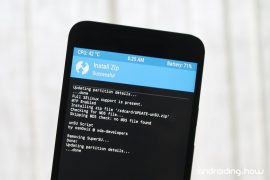
But thanks to user osm0sis over at xda who made a simple SuperSU uninstaller zip file that you can flash via TWRP recovery to completely remove SuperSU and unroot your Android device.
How to Remove SuperSU and Unroot your Android device
[ecko_button target=”blank” size=”6″ radius=”3″ style=”ghost” background=”#a161bf” color=”#333333″ url=”http://downloadmirror.co/Uot/UPDATE-unSU.zip”][icon name=”download” class=”” unprefixed_class=””] Download SuperSU Unroot zip [/ecko_button]
- Download & transfer the UPDATE-unSU.zip file to your device.
- Boot your device into TWRP recovery.
- Tap the Install button on TWRP main screen » select UPDATE-unSU.zip file » and Swipe to confirm flashing the file.
- Wipe cache/dalvik from TWRP.
- Reboot phone.
That’s it. SuperSU should be gone from your device now.
Happy Androiding!

28 responses to “How to Remove SuperSU & Fix “Uninstallation failed” error [Full Unroot]”
how about from magisk to supersu again? i uninstall magisk via flahing from twrp, but my supersu is also gone, when i try install supersu again, theres no error, but i cant get root access, please help
how about from magisk to supersu again? i uninstall magisk via flahing from twrp, but my supersu is also gone, when i try install supersu again, theres no error, but i cant get root access, please help
how about from magisk to supersu again? i uninstall magisk via flahing from twrp, but my supersu is also gone, when i try install supersu again, theres no error, but i cant get root access, please help
how about from magisk to supersu again? i uninstall magisk via flahing from twrp, but my supersu is also gone, when i try install supersu again, theres no error, but i cant get root access, please help
Hello,
I need to unroot my htc one m9 phone, however, I have consistently facing the issue that, supersu needs to be updated, when I tried using your above mentioned method, I am still finding issues like,
E: signature verification failed
E: footer error
I tried copying the .zip file in device storage as well as sd card.
and nothing happens
Hello,
I need to unroot my htc one m9 phone, however, I have consistently facing the issue that, supersu needs to be updated, when I tried using your above mentioned method, I am still finding issues like,
E: signature verification failed
E: footer error
I tried copying the .zip file in device storage as well as sd card.
and nothing happens
Hello,
I need to unroot my htc one m9 phone, however, I have consistently facing the issue that, supersu needs to be updated, when I tried using your above mentioned method, I am still finding issues like,
E: signature verification failed
E: footer error
I tried copying the .zip file in device storage as well as sd card.
and nothing happens
Hello,
I need to unroot my htc one m9 phone, however, I have consistently facing the issue that, supersu needs to be updated, when I tried using your above mentioned method, I am still finding issues like,
E: signature verification failed
E: footer error
I tried copying the .zip file in device storage as well as sd card.
and nothing happens
I just tried this method on my Htc 10 but after this succeeded it still had root access… :/
Any suggestions?
I just tried this method on my Htc 10 but after this succeeded it still had root access… :/
Any suggestions?
I just tried this method on my Htc 10 but after this succeeded it still had root access… :/
Any suggestions?
I just tried this method on my Htc 10 but after this succeeded it still had root access… :/
Any suggestions?
Thanks brother You saved my phone else i had only option of re-flashing stock rom.
thanks alotttt 🙂
Thanks brother You saved my phone else i had only option of re-flashing stock rom.
thanks alotttt 🙂
Thanks brother You saved my phone else i had only option of re-flashing stock rom.
thanks alotttt 🙂
Thank you man! You saved my Redmi Note 3! After an error in uninstalling SuperSu, using the option of the app itself, my phone was just the startup screen. I tried to change rom, but even erasing all data through TWRP, it did not start. This uninstallation only worked. Thank you again!
Thank you man! You saved my Redmi Note 3! After an error in uninstalling SuperSu, using the option of the app itself, my phone was just the startup screen. I tried to change rom, but even erasing all data through TWRP, it did not start. This uninstallation only worked. Thank you again!
Hi, this trick did do the job, well done …
Hi, this trick did do the job, well done …
AI had done all you had said but when I go to install magisk it says that the boot image is patched by other programs. Any help?
AI had done all you had said but when I go to install magisk it says that the boot image is patched by other programs. Any help?
thanks bro, you saved my life :v
OMG it worked u r a life saver
Nuuuuuul Font Tray iT fuck uuuu
I did what u said in the forum but after that the cts profile match from safety net helper is showing failed.
I can’t play pokemon go any help???
AI had done all you had said but when I go to install magisk it says that the boot image is patched by other programs. Any help?
Hi, this trick did do the job, well done …
Thank you man! You saved my Redmi Note 3! After an error in uninstalling SuperSu, using the option of the app itself, my phone was just the startup screen. I tried to change rom, but even erasing all data through TWRP, it did not start. This uninstallation only worked. Thank you again!