
Building a packed stadium in Stadium Simulator 2 takes Fans, Tickets, and Capacity, and the fastest way to stack up on all three is by redeeming codes the developer puts out from time to time. Below you’ll find every code that’s currently working, plus the ones that have stopped paying out.
Working Stadium Simulator 2 Codes
Type these in exactly as shown, since a stray space or wrong capitalization will keep them from going through.
TROPHIES
200 Tickets and a 20% Capacity boost for 2 hours
New
NEWSTADIUM
15,000 Fans and 15,000 Tickets
10KFAVS
10,000 Fans and 10,000 Tickets
250KVisits
Free rewards
100KVisits
4K Fans
1KFavs
400 Capacity
250Likes
500 Capacity
350Likes
350 Capacity
How to redeem codes in Stadium Simulator 2
Redeeming a code takes a few taps once your stadium has finished loading. Follow the steps below in order.
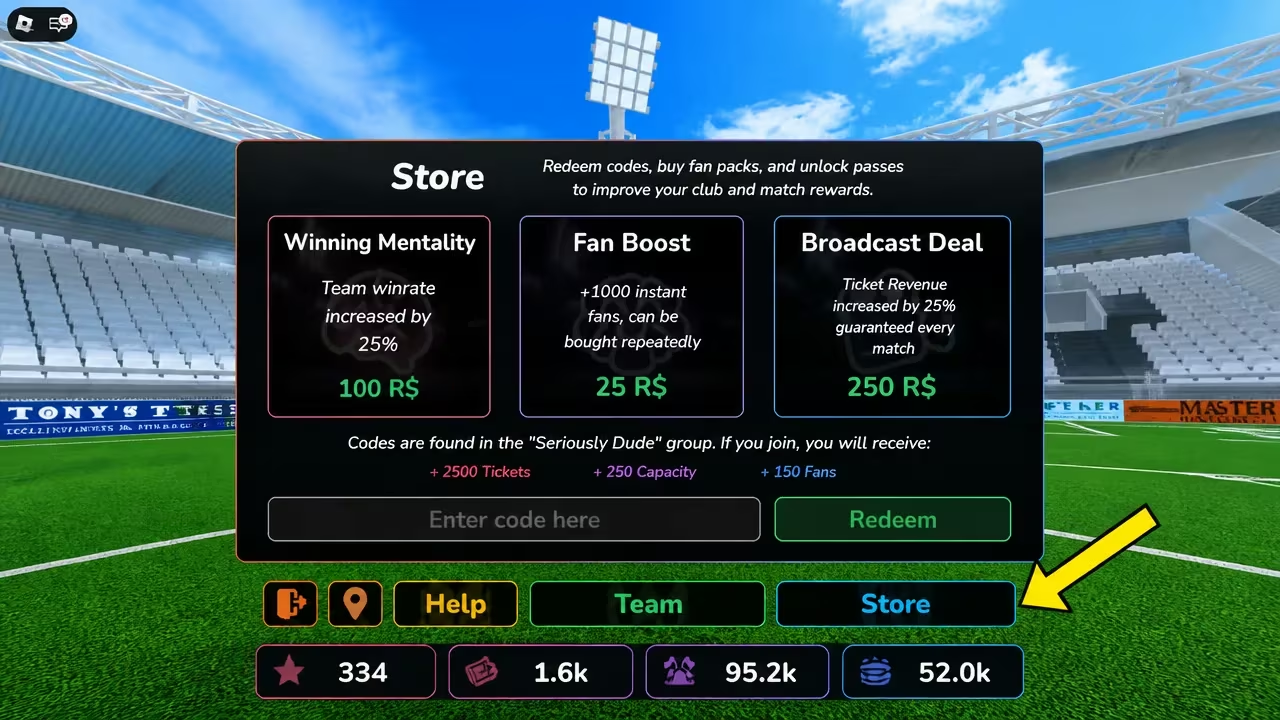
If nothing changes after you hit Redeem, double-check the spelling and capitalization first, since that’s the most common reason a code gets rejected.
Expired Stadium Simulator 2 codes
These codes no longer hand out rewards, so don’t waste time trying them.
GUILDFIX
TRALALA
AUTOBATTLE
THANKYOU
DELAY1
WORLD7
BRAINROT
EVOLUTION
RAIDBOSS
SKIBIDI2026
FUSETIME
REROLL
3KPLAYERS
CRAFTING
RELEASE
2XLUCKWEEKEND
TOWER
UPDATE2
ITALIANBRAINROT
ROLLBACK
15KLIKES
GUILD
DELAY
How to get more Stadium Simulator 2 codes
New codes tend to show up around milestones like Fan or visit counts, favorite goals, and like goals, plus the occasional stadium update. Your best bet for catching them early is joining the game’s official Discord server, where the developer typically posts new codes as soon as they go live. The Roblox community page for the game is also worth a follow for the same reason. We’ll keep checking in and updating the working list above as new codes get added and older ones stop working.
Are Stadium Simulator 2 codes free?
Yes. Every code listed above is free to redeem and only requires that you own an active Roblox account with the game loaded.
Why didn’t my code work?
A code that has expired or one that’s typed with the wrong spacing or capitalization won’t register in the Store menu. Compare it letter for letter against the working list above before trying again.
You can find Stadium Simulator 2 itself on the Roblox experience page if you need to jump back into your stadium and start redeeming.






Leave a Reply