
RE: XL is a Roblox experience where codes hand you a shortcut to Gold, dungeon tickets, XP and mastery boosts, and rare drops like the Requiem Arrow or a Dragon Ball set. You don’t need to grind for every reward when a fresh code can drop it straight into your inventory.
Working RE: XL codes
Here’s every code that’s redeeming rewards right now. Type them in exactly as shown below since RE: XL codes are case-sensitive.
HOTFIXSORRY
Two shop luck, double EXP, two mastery, and one Dragon Ball set
New
FREEGOLDGUYS
15,000 Gold
SUB2REACT
One F Dungeon Ticket
SUB2INVASIONS
One F Dungeon Ticket
RULUCKY
One Heart
FREEMASTERY2
2x XP boost for 30 minutes
OopsSorryForBugs!
One C Ticket and one F Ticket
HalloweenUPDPart1
Requiem Arrow
LUCKYARROW!
Requiem Arrow
NahUhDungeon
One F Ticket
YOUREWEAK!
One Lucky Arrow
HalloweenUpdatePart2
One Lucky Arrow
You know a code worked when the reward shows up in your inventory or your stats update right away (Gold total climbing, a new ticket appearing, or the XP boost icon showing on screen). If nothing changes and you get an error message instead, that code has likely already expired or you’ve mistyped it.
How to redeem codes in RE: XL
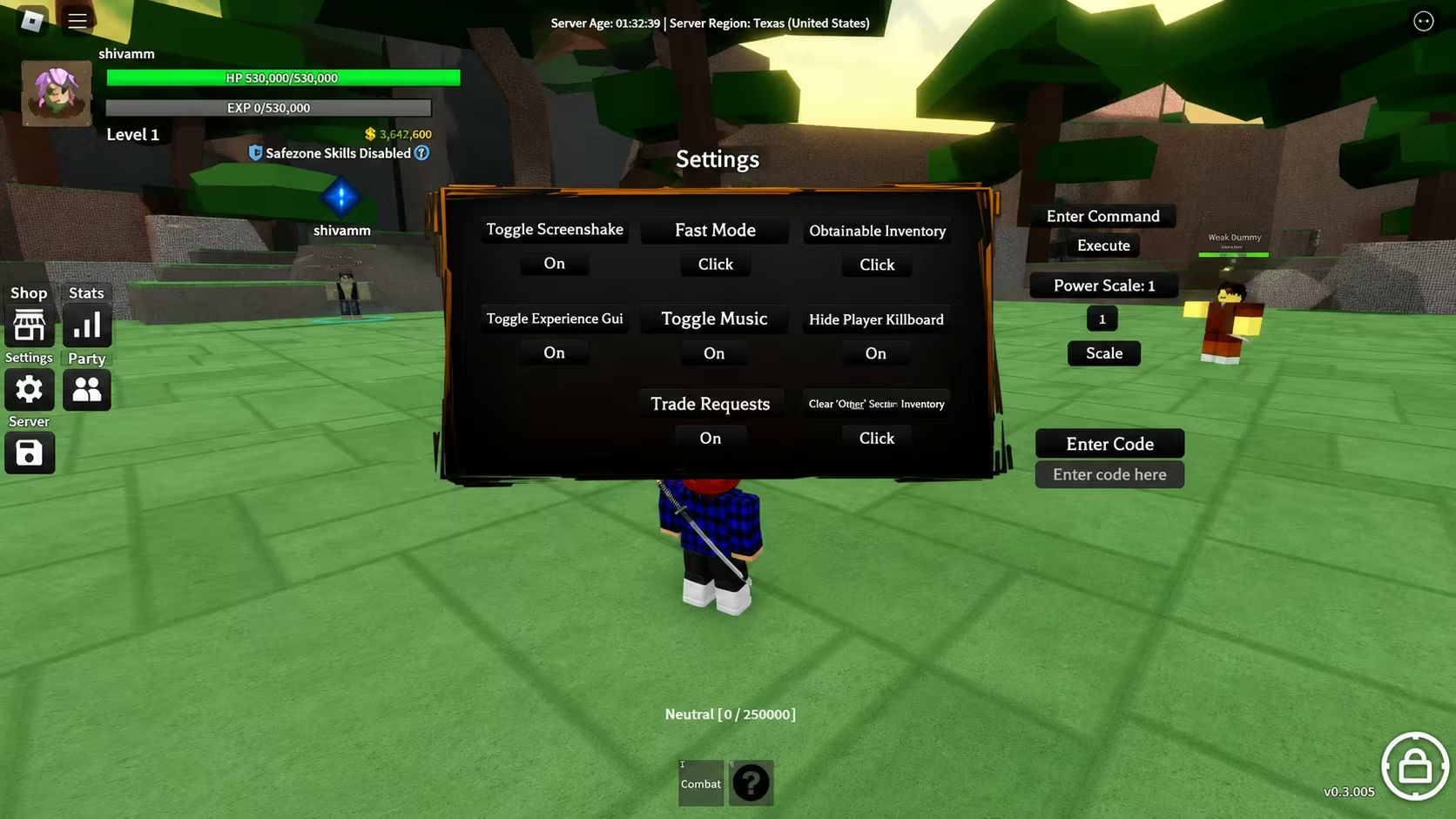
Redeeming codes in RE: XL happens through the settings menu rather than a dedicated codes button, so keep an eye out for the cog icon once you’re in the game.
Expired RE: XL codes
These codes no longer trigger a reward, so don’t waste time typing them in.
AuraUpdate
AstrozGift
DovahsGift
DeathsGift
NisansGift
WELCOMEBACKXL
40KLIKES
SORRY4DELAYS
30KLIKES
5KPLAYERS
FREECODE1
WGMIDW
Sidelight
3KPLAYERS
10KLIKES
Sub2XenoTy
XLUPDATE
GROUP
XLRELEASE
IFOLLOWEGOS
IFOLLOWDESTROY
How to get more RE: XL codes
New codes tend to arrive alongside content drops, milestone celebrations, or as an apology when a bug slips through, judging by names like OopsSorryForBugs! and HOTFIXSORRY. Joining the official RE: XL Roblox community puts you in a good position to catch announcements as soon as the developers post them, since group updates often line up with new code releases.
We checked for new codes and updated this list with the current working and expired sets, removing any codes that stopped functioning.
Why didn’t my code work?
A code that produces no visible change or throws an error has either expired or been typed incorrectly. Double-check spelling, capitalization, and punctuation (some RE: XL codes include an exclamation point), and make sure you’re entering it into the “Enter Code” box in the settings menu rather than the chat.
Redeem the working codes above while they last, and check back on the settings menu whenever the developers post something new.






Leave a Reply