

The Pal Labor Research Laboratory is a base structure that lets you assign Pals to generate Research Manuscripts and unlock permanent, account-wide passive buffs for base production and combat.
The Pal Labor Research Laboratory is a mid-game base structure introduced in the Feybreak update in Palworld. It ties directly into the new Research system, turning your Pals’ idle labor into long-term account-wide upgrades. By assigning Pals with the correct Work Suitability to the lab, you can generate Research Manuscripts and spend them on permanent passive buffs. These buffs improve base production speed, reduce resource costs, and enhance Pal combat stats across every base you own.
- What the Pal Labor Research Laboratory does
- Unlocking and building the lab
- How to assign a Pal to the Research Laboratory and start an upgrade
- Why Pals ignore the Research Laboratory
- Research categories, Work Suitability, and Workload scaling
- Optimizing research and building a dedicated lab base
- Farming Ancient Pal Manuscripts and finding the best Pals
- Frequently Asked Questions
What the Pal Labor Research Laboratory does
The lab functions as a dedicated workbench where Pals generate Research Manuscripts over time. You interact with the station to select specific research nodes, provide the necessary materials, and then leave a Pal to work the bench until the research is complete. Once finished, the resulting passive buff applies account-wide, meaning every base benefits from the upgrade simultaneously. The research tracks cover a wide array of base enhancements, from boosting specific Work Suitability speeds to increasing the attack power of Pals stationed at your base.
Unlocking and building the lab
| Requirements | Details |
|---|---|
| Player Level | 20 |
| Technology Points | 2 |
| Build Materials | 10 Ingots + 10–50 Paldium Fragments (sources disagree; check in-game) |
You unlock the Pal Labor Research Laboratory in the Technology menu at Player Level 20. The recipe itself costs 2 Technology Points. Once unlocked, you can build it at any of your bases.
There is some discrepancy in the reported build materials regarding the Paldium Fragments cost. Some guides list 10 Paldium Fragments, while others list 50. You should anticipate needing between 10 and 50 Paldium Fragments and verify the exact cost in your in-game build menu, as these values can shift with patches.
How to assign a Pal to the Research Laboratory and start an upgrade
STEP 1/6
Select a research node
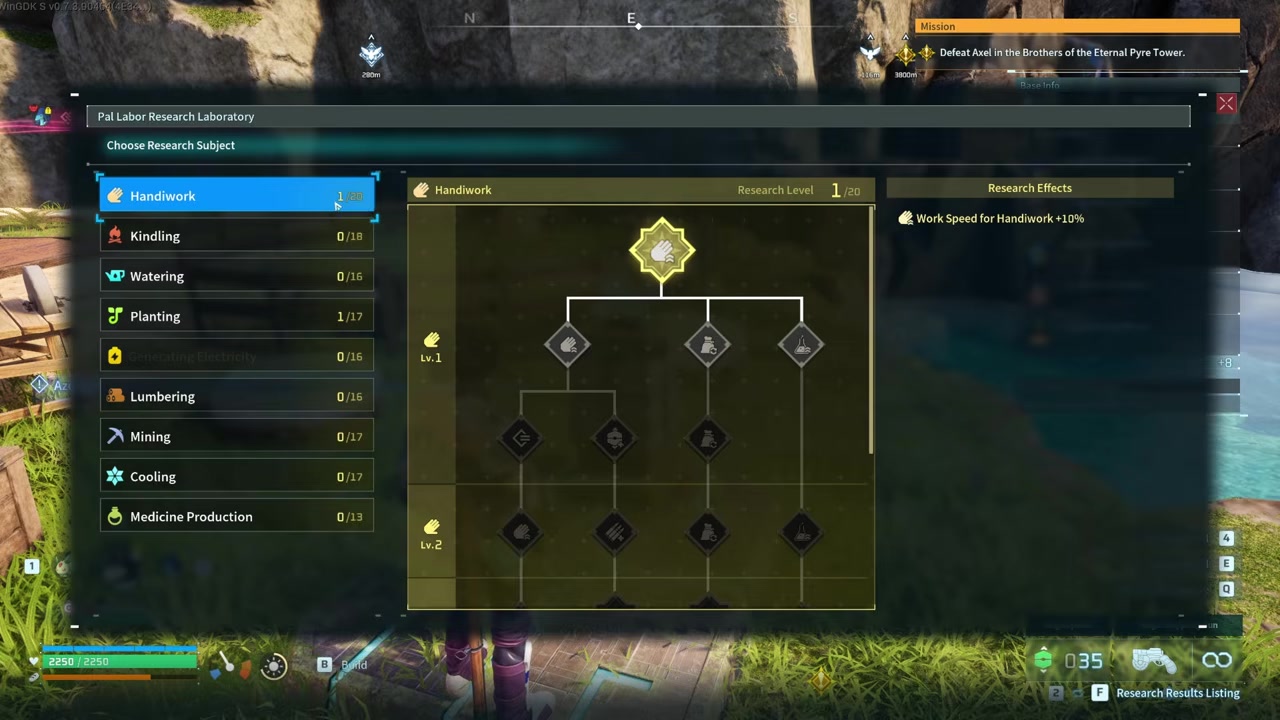
Interact with the laboratory, pick an upgrade, and click to begin research.
STEP 2/6
Check Work Suitability
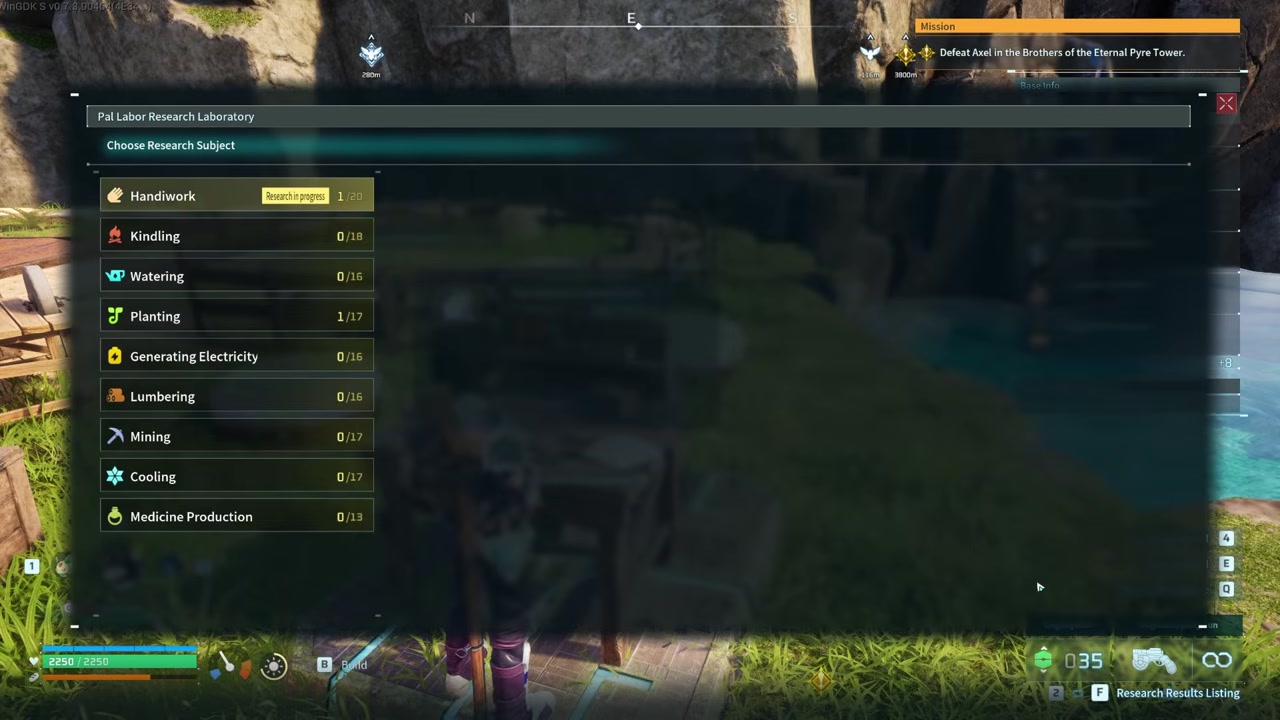
Ensure a Pal with the matching Work Suitability level is present in your base.
STEP 3/6
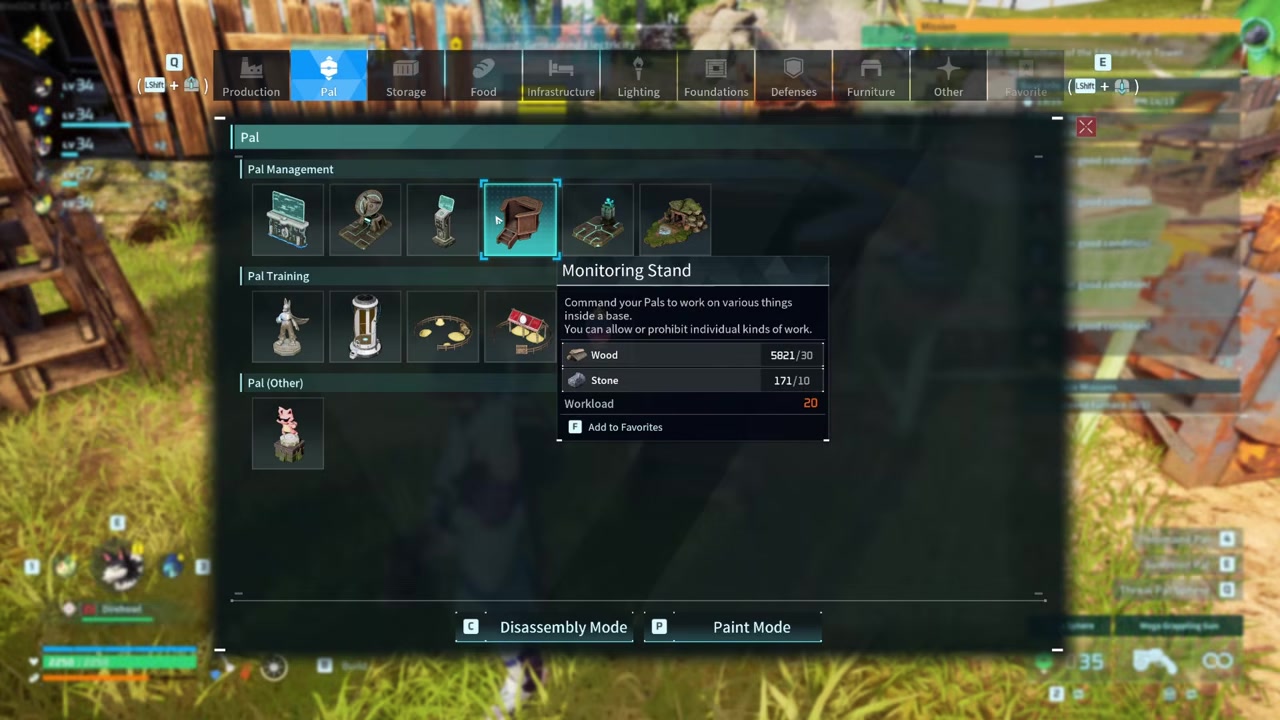
Build the Monitoring Stand
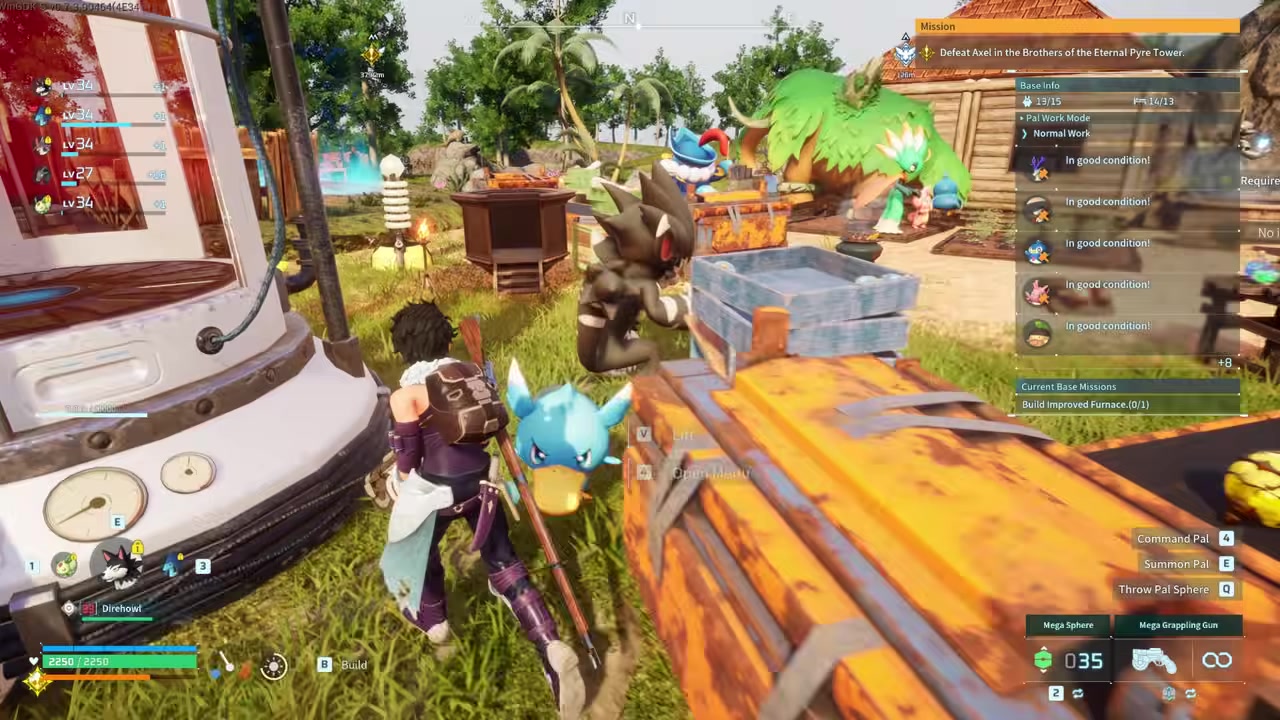
Construct the Level 14 Monitoring Stand from the Pal Management section using Wood and Stone.
STEP 4/6
Open assignment management
Press C at the Monitoring Stand to open the assignment UI.
STEP 5/6
Select the laboratory
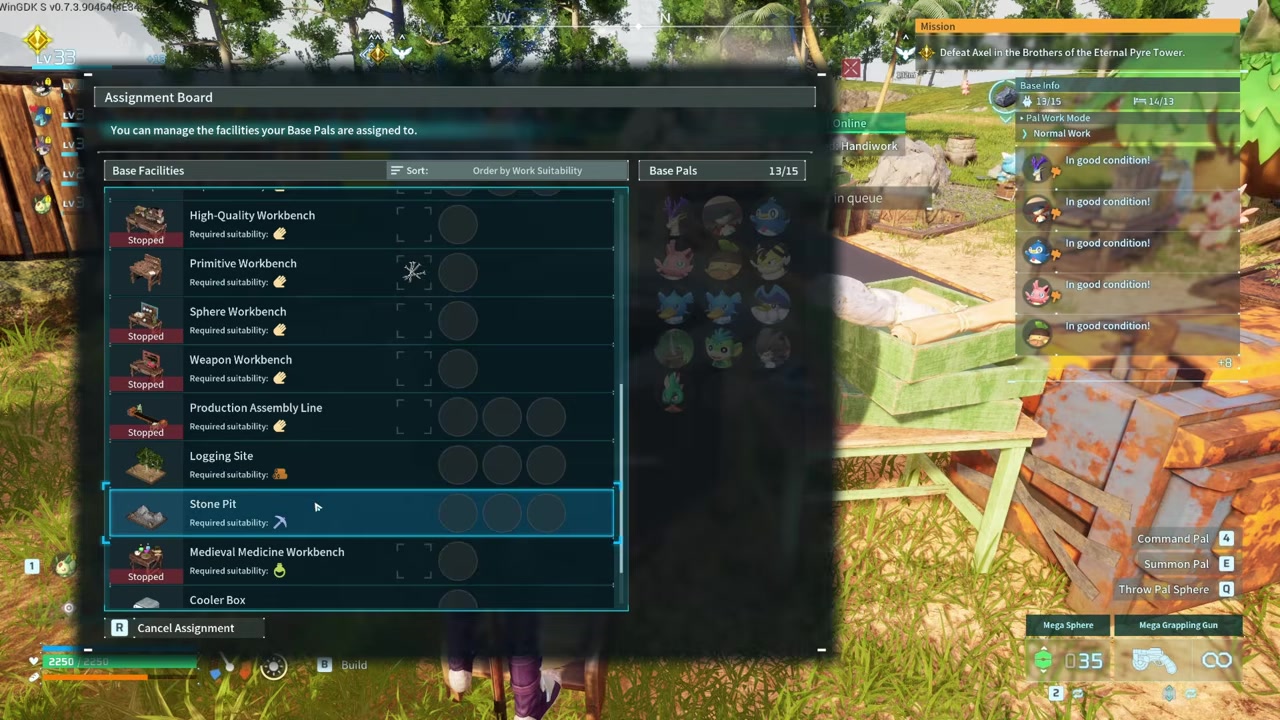
Find and click the Research Laboratory in the assignment list.
STEP 6/6
Click to assign a Pal
Click the chosen Pal to assign them — it is click-then-click, not drag-and-drop.
Video help
Why Pals ignore the Research Laboratory
The most common issue players run into is building the lab, selecting an upgrade, and watching their Pals completely ignore it. This happens because the game treats research as the lowest priority task. If there is anything else for a Pal to do — watering crops, operating a crusher, or transporting items — they will do that first. Pals will only work on the research bench if they have absolutely nothing else available, which rarely happens in a functioning base.
To fix this, you have to manually force a Pal onto the bench using the Monitoring Stand. Unlocked at Level 14 in the Pal Management section of the build menu, the Monitoring Stand costs only Wood and Stone. Once built, interact with it and press C to open the assignment management UI.
From here, the assignment method is a common stumbling block. It is not a drag-and-drop interface. You must first click the Research Laboratory in the assignment UI, and then click the Pal you want to assign to it. Once assigned, the Pal will run over and begin working the bench. Note that removing Pals, dismantling the lab, or frequently fast-traveling can reportedly slow or reset research progress, so it is best to let them work undisturbed.
Build a Monitoring Stand early so you can force-assign Pals to the lab — research is the lowest priority task, and they will never work it automatically while other base chores exist.
Research categories, Work Suitability, and Workload scaling
| Work Suitability Category | Example Research Node | Workload Requirements |
|---|---|---|
| Handiwork | Handiwork Speed Lv1 | 50,000 |
| Various (Base Enhancement) | Pals at Base Enhancement Lv2 | 5,000,000 |
| Lumbering | Lumbering Speed Lv1 | 50,000 |
Research nodes are tied directly to the game’s Work Suitability system. There are twelve Work Suitability categories: Kindling, Planting, Handiwork, Lumbering, Medicine Production, Transporting, Watering, Generating Electricity, Mining, Cooling, Gathering, and Farming.
A Pal’s Work Suitability level must be equal to or greater than the research node’s level. For example, a Pal with Kindling Level 3 can handle Level 1, 2, or 3 Kindling research, but a Level 2 Pal cannot attempt a Level 3 node. The Workload requirements for these nodes are massive, scaling from tens of thousands of points for basic upgrades to millions for advanced account-wide buffs.
Because of these staggering Workload numbers, bringing a high-level Pal is essential. A Pal with a low Work Suitability level will take an eternity to chip away at a 50,000 Workload node, let alone a 5,000,000 one. Some players report that certain research tracks can yield up to roughly 60% more productivity, though exact multipliers — and whether they stack additively or multiplicatively — are not fully verified and may change with future updates.
Optimizing research and building a dedicated lab base
To accelerate your progress, the best approach is to build a dedicated research base. If you place a Pal Labor Research Laboratory in a mixed-use base, your Pals will constantly wander off to tend to farms, transport goods, or operate other workstations. By building a base with multiple labs and stripping away other distractions, you ensure your assigned Pals have nothing else to do but generate manuscripts.
Use the Monitoring Stand to strictly assign your highest-tier Pals to the labs. You should also prioritize unlocking Research Tips nodes, which grant a +10% Research Speed multiplier for specific jobs. With a fully optimized setup, one reported result claims you can generate roughly 15–20 manuscripts every ~6 minutes, though this is anecdotal and will vary based on your Pals, patch version, and exact layout.
Farming Ancient Pal Manuscripts and finding the best Pals
As you progress deeper into the research tree, you will hit nodes that require Ancient Pal Manuscripts. These are mandatory advanced materials. You obtain them by trading Successful Bounty Tokens — dropped by field boss Alpha Humans with red auras — to Vigilante Bounty Officers in settlements. Alternatively, you can acquire them by sending Pals on specific Pal Expeditions, such as the Cave in the Grassland or Volcanic Inferno Cave, from your Pal Expedition Station.
To tackle the massive Workload requirements efficiently, your next step is to assemble a roster of specialists. You will want to consult a tier list of the best Pals for each specific Work Suitability — like finding the highest Handiwork or Kindling Pals — so you can minimize idle time and melt through those multi-million Workload nodes.
Frequently Asked Questions
Why won’t my Pals work at the Research Laboratory automatically?
The game assigns the lowest priority to research. If your Pals have any other tasks available — like farming, mining, or transporting — they will do those first. They will only work the lab if they have absolutely nothing else to do, which is why you must manually assign them.
How do I manually assign a Pal to the Research Laboratory?
Build a Monitoring Stand (unlocked at Level 14), interact with it, and press C to open the assignment UI. Click the Research Laboratory in the list, and then click the Pal you want to assign. It is a click-then-click action, not a drag-and-drop interaction.
What Work Suitability level does my Pal need for research?
Your Pal’s Work Suitability level must be equal to or greater than the research node’s level. A Pal with Level 3 Handiwork can work on Level 1, 2, or 3 Handiwork research, but a Level 2 Pal cannot work on a Level 3 node.
Do the research buffs apply to all my bases?
Yes. The passive buffs unlocked through the Pal Labor Research Laboratory are account-wide, meaning they apply to all of your bases simultaneously.
How do I get Research Manuscripts and Ancient Pal Manuscripts?
Pals generate standard Research Manuscripts simply by working at the lab over time. Ancient Pal Manuscripts are advanced materials obtained by trading Successful Bounty Tokens (from Alpha Humans) to Vigilante Bounty Officers, or by completing specific Pal Expeditions from the Pal Expedition Station.







Leave a Reply