

To turn off the shot meter in NBA 2K27, open Customize HUD from the in-game Options/Quit tab, select Shot Meter Shots, and set its visibility to Off — which also gives a shooting-accuracy boost.
The shot meter is the on-screen gauge that fills as you hold the shoot button, and plenty of players hide it once they know their jump shot by feel. NBA 2K27 keeps that toggle inside the Customize HUD editor, which is also where you reshape, recolor, resize, and reposition the meter if you would rather tune it than remove it. Below is the full path for both, plus the fix for when the meter refuses to disappear.
How to turn off the shot meter in NBA 2K27
The whole toggle lives in the Customize HUD editor, which you can reach mid-game from the pause menu in seconds.
STEP 1/4
Open the Options menu
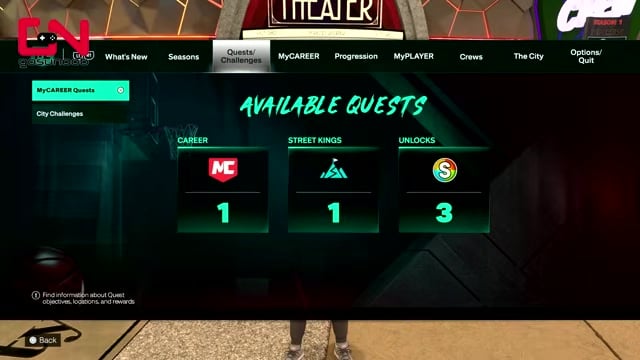
Press the Options button on PS5 or Menu on Xbox, then move to the Options/Quit tab on the far right.
STEP 2/4
Select Customize HUD
Choose Customize HUD from that tab to open the HUD editor.
STEP 3/4
Choose Shot Meter Shots
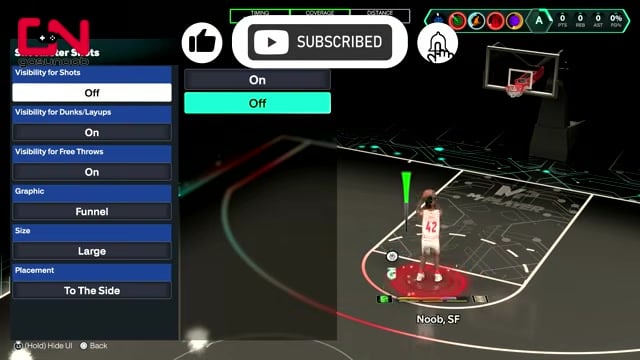
Highlight Shot Meter Shots and press X on PS5 or A on Xbox to open its settings.
STEP 4/4
Switch visibility to Off
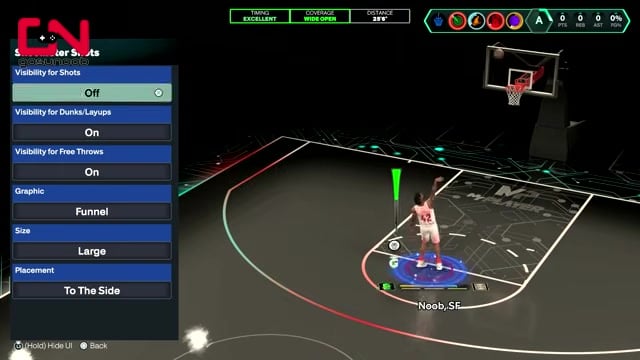
Meter Visibility for Shots to Off to remove the meter during jump shots.
Video help
Changing the meter’s shape, color, and size
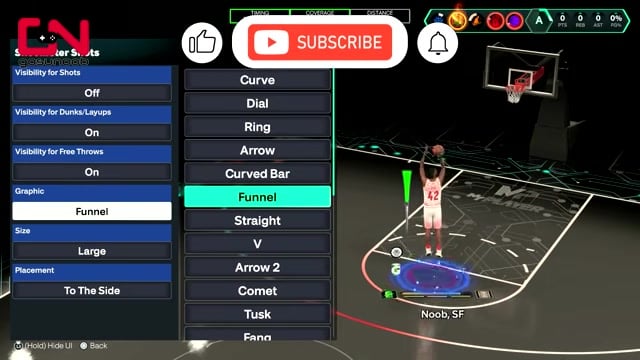
If you would rather keep the meter but make it less distracting, the same Shot Meter Shots panel lets you swap its graphic style. The lineup runs from the compact Funnel and Straight looks to bulkier shapes like Horn, Sword, and the oversized Shooting Star, which balloons across nearly half the screen. A live preview updates as you scroll through them, so you can see each shape sitting on the court before you commit.

Under the style picker you can also change the meter’s color, its size, and where it sits on screen, and the same preview reflects each tweak as you make it. Sizing it down is the quickest way to keep the timing cue you want without letting the gauge crowd your player during a shot.
These menu names come from the pre-launch build, so the exact style labels and the final list that ships with NBA 2K27 on September 4, 2026 may shift slightly from what you see at first.
Setting meter visibility per shot type
| Shot type | Meter setting |
|---|---|
| Shots | Off for the accuracy boost |
| Dunks & layups | Personal preference |
| Free throws | Keep on |
Visibility is not one global switch. You can toggle the meter separately for jump shots, for dunks and layups, and for free throws, which is why a lot of players run a mixed setup instead of an all-on or all-off one.
Key Turning it off for jump shots is the change with a real payoff: doing so is widely reported to add about a 10% boost to the accuracy of your two- and three-pointers, since the game rewards shooting on animation timing rather than leaning on the gauge. That figure comes from the player community rather than official tuning notes, but the direction has held across 2K releases. Dunks and layups are pure preference, and most players keep the meter on for free throws, where a calm timing bar is easy to read.
Turn the meter off for jump shots but keep it on for free throws — you claim the accuracy boost where it matters most while keeping a timing crutch for the shots that are easy to rush.
When the meter still shows after turning it off
If the meter keeps appearing in other modes, set it from the main menu instead so the change carries across the game.
- Open Features from the main menu — Back out to the main menu and select the Features gear icon.
- Select Customize HUD — Open Customize HUD from the Features settings list.
- Turn Shot Meter Shots off — Set Shot Meter Shots to Off here to push the change into modes beyond MyCAREER.
Frequently Asked Questions
Which shot meter style is best if you keep it on?
There is no locked-in best pick, but the compact shapes win for actual games — a simple style like Funnel keeps your release window readable without covering the court, which is why most players treat the giant Shooting Star as a novelty rather than a game setup. If you are still learning your jump shot, bumping the size up a notch on a clean shape makes the timing easier to catch than a smaller, flashier one.
Do you lose shot timing feedback when the meter is off?
No, because timing feedback is a separate setting. Shot Feedback controls the post-shot readout that tells you whether you were early, late, or on time, and it stays active even with the meter hidden. Leave it on (set to all shots) when you disable the meter so you still get a timing cue after every attempt instead of shooting blind.






Leave a Reply