
My University hands out codes that you can trade in for extra cash, and sometimes other in-game perks, without having to grind for them. Redeeming a code takes seconds once one is live, and every reward drops straight into your account after you type it in.
Working My University codes
There are no active codes for My University at the moment. Codes for this game tend to come and go quickly, so check back here as soon as a new one is released and you’ll see it added the moment it’s confirmed working.
How to redeem codes in My University
You won’t find a separate “codes” button in My University. Instead, the code box lives right inside the Settings menu, next to the toggles for Music, SFX, NPC, and Speed Boost. Here’s exactly how to get to it once a code is ready to use.
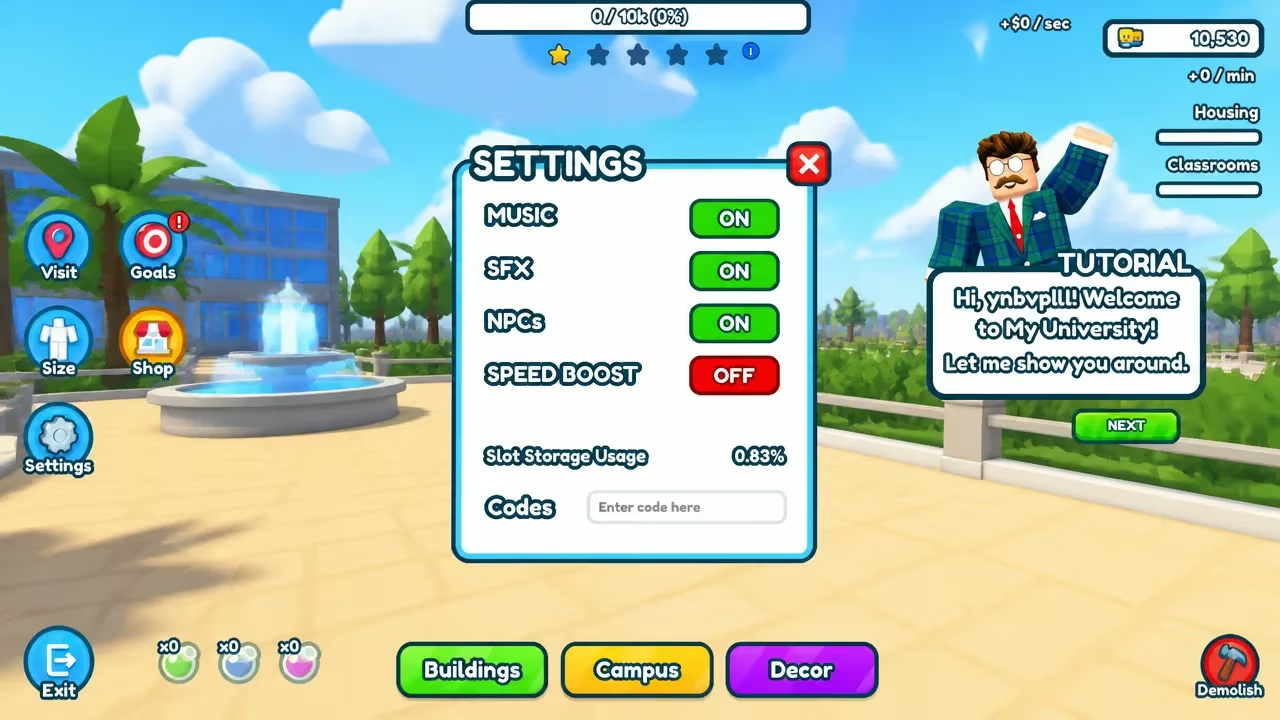
You’ll know it worked when your cash total or inventory updates with the new reward. If nothing happens after you enter a code, rejoin the game once and double-check your spelling before trying again, since a mistyped code or a stray space is usually the culprit.
How to get more My University codes
New codes for My University typically get announced through the game’s official Roblox community, so following it is the most reliable way to catch one as soon as it’s posted. You can find the group here: Seanita Studios Roblox community.
Bookmark this page too, since it gets checked and updated as soon as new codes surface.
Are My University codes free?
Yes. Every code the developer releases is free to redeem and gives you cash or other perks at no cost.
Why didn’t my code work?
A code usually fails because it’s been typed incorrectly or has already expired. Rejoin the game, retype the code carefully into the Settings menu box, and try again.
Since no codes are live for My University right now, there’s nothing to redeem just yet. Once one drops, the Settings menu is exactly where you’ll go to claim it.






Leave a Reply