
Combat Bags in Mistfall Hunter are limited premade loadouts that instantly equip weapons, armor, healing items, and tacticals, making them the best beginner fallback when your stash is weak after deaths.
After a death, Mistfall Hunter can leave you with damaged weapons, recruit armor, missing gear slots, and weak Minor Healing Elixirs. Combat Bags solve that early-game slump by turning a bag count into a usable kit, but they are still consumables you can run out of.
When to use Combat Bags
Combat Bags enter your loadout flow once you clear the tutorial. Use one when your storage box cannot support a real build: no good weapon, no helmet, no bracers, weak armor, or too few heals to justify risking a normal run.
A bag instantly equips a premade setup instead of making you assemble gear piece by piece. That setup can include weapons, armor, accessories, healing elixirs, tactical items, and gems depending on the bag’s tier.
KEY!The beginner rule is simple: Combat Bags are limited counts. They are recovery tools and starter-loadout reserves, not an unlimited free-kit system you can spam forever after every death.
Combat Bag tiers and limits in Mistfall Hunter
| Combat Bag | Loadout | Limit |
|---|---|---|
| Novice Combat Bag | One green weapon and green chest piece, filled helmet and bracer slots, tactical items, and gems on green items. | 10 |
| Advanced Combat Bag | Full green gear set, green weapon, accessories, and 3 better Healing Elixirs. | 5 |
| Pro Combat Bag | Full blue armor, blue weapon, blue accessories, 12 good Healing Elixirs, and better tactical items. | 5 |
| Elite Combat Bag | Full purple armor, purple weapon, purple accessories, 6 high-grade elixirs, and 6 ordinary elixirs. | 5 |
| Custom Combat Bag | Limited-tab preset with different build, gem, and gear combinations from the normal bags. | Separate from normal limits |
Combat Bags scale by rarity. Higher tiers improve weapon and armor quality, add stronger accessories, bring better healing elixirs, and make tactical items and gem rolls more meaningful because more gear pieces can carry useful effects.
The four standard bags sit under Normal: Novice, Advanced, Pro, and Elite. Custom Combat Bags sit under Limited, so they can be easy to miss after a Twig reward.
How to choose and equip a Combat Bag in Mistfall Hunter
Use this flow when you want the game to equip a premade kit instead of building a loadout from storage.
STEP 1/6
Open the inventory
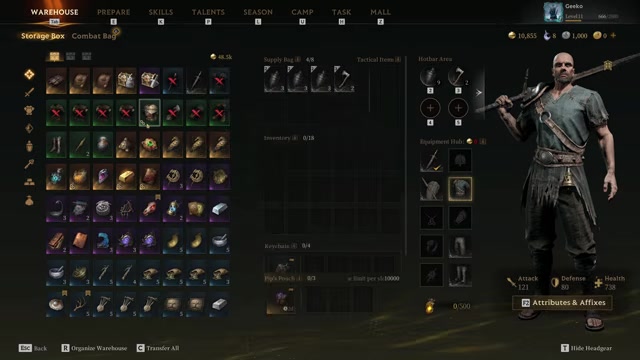
Open your inventory and select the Combat Bag tab at the top next to the storage view.
STEP 2/6
Pick a rarity
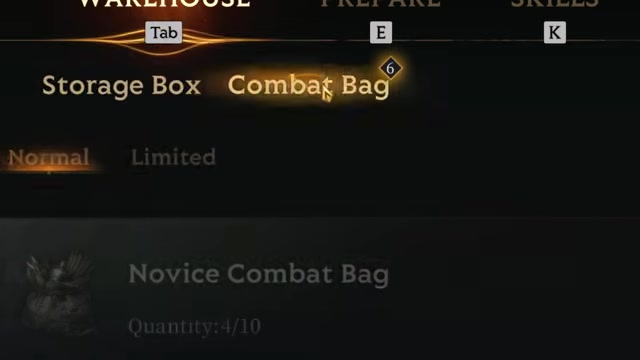
Choose Novice, Advanced, Pro, or Elite from the normal Combat Bag list.
STEP 3/6
Read the build choices
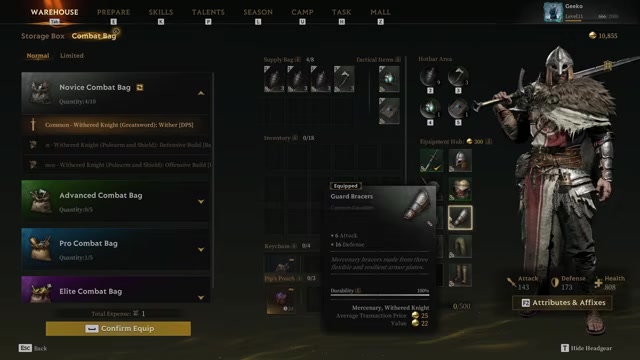
Inspect the listed builds and check the weapon, gear, tactical items, and gems before committing.
STEP 4/6
Choose a weapon you can actually play
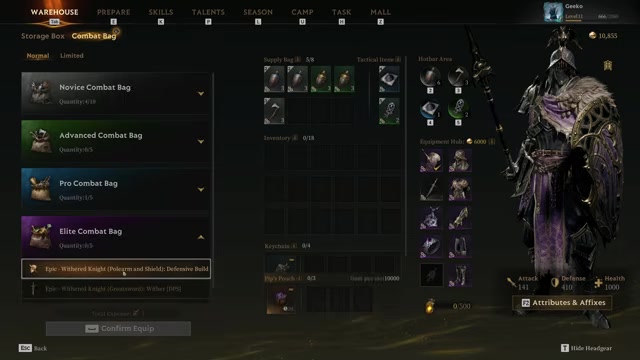
If the displayed options lean toward a weapon you do not use, pick a different build or refresh before entering a run.
STEP 5/6
Refresh unwanted loadouts
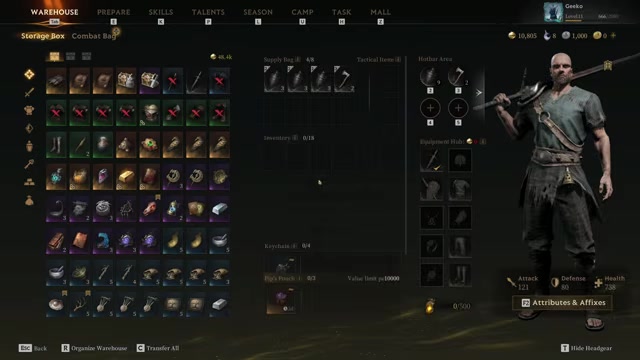
Click the refresh button to reroll every displayed loadout for that selected bag tier for 50 Gyldenblod.
STEP 6/6
Confirm the Combat Bag
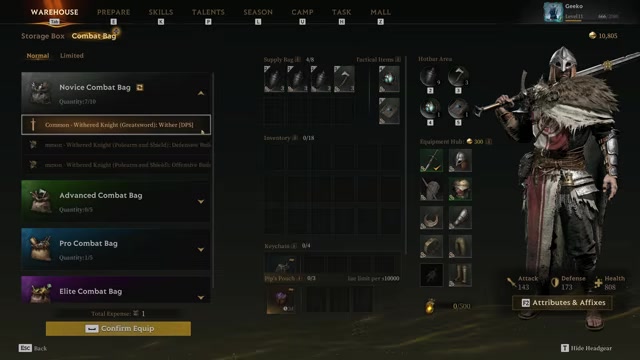
Select the build you want and press Confirm Equip to equip the full premade loadout at once.
Video help
Refreshes, builds, and gem impact
The refresh button fixes a bad set of choices; it does not upgrade the bag itself. Spending 50 Gyldenblod rerolls all loadout choices shown for the selected Combat Bag tier, so one refresh can turn a page of polearm-and-shield options into greatsword options, or the other way around.
For Novice Combat Bags, beginners should care most about the weapon they already know how to use. The build text still helps: some setups lean DPS, balanced PvE/PvP, or PvE, but a Novice bag mainly changes a small set of gems and tactical items.
On Advanced, Pro, and Elite bags, the text, tacticals, and gem spread matter more because a larger share of the kit carries stronger pieces and more gem impact. Do not burn a high-tier bag on a weapon style you cannot execute just because the color is better.
Combat Bag gear locks before launch
Once a Combat Bag is equipped, the loadout is locked for pre-match item editing. You cannot manually add extra healing elixirs, tactical items, armor pieces, weapons, or other gear before entering the match.
You can still loot inside the run. Anything you pick up after loading in is normal run loot, and extracting successfully turns the Combat Bag contents into normal gear in your stash.
After extraction, that gear can be edited like any other loadout: add more heals, change tacticals, swap pieces, or rebuild it around your own storage. Camp buffs are separate, so Victory Wine from Sigrid, including Mortal Tonic, can still be used before launch.
Getting more Combat Bags
| Method | What you can get |
|---|---|
| Twig’s Scavenger Squad missions | Novice bags from free Battlefield Cleanup; better bag chances from upgraded and deeper-zone missions. |
| Custom Combat Bag rewards | Limited-tab bags with slightly different builds, gems, and preset combinations. |
| Season Store purchases | Advanced Combat Bags and Pro Combat Bags bought with Echo of Fate from Fate Chart activity. |
| Path of Glory rewards | Pro Combat Bag at Duskborn after three matches; Elite Combat Bag at Mistwalker after another three matches. |
The strongest early loop is Twig and the Scavenger Squad in camp. Send them out whenever they are idle, then claim the returned rewards into your stash before choosing the next mission.
Battlefield Cleanup is the free starter mission: it takes 2 hours and can return Novice Combat Bags, with a chance at a green Custom Combat Bag. Upgraded missions cost materials and take longer, but push the reward pool upward; deeper zones such as the Anomaly Zone and Danger Zone can offer blue bags, purple gear chances, and higher-value materials.
Failure has not surfaced as a normal Scavenger Squad concern in early play, so your main decision is which timer and reward pool to send them into. If a mission asks for materials such as Fine Runestone, Pathfinder Lantern, Agate, or Holy Silt Astrolabe, tag what you need and farm toward the next dispatch.
The Season tab gives you more control over higher-tier bags than camp missions alone. Use Fate Chart tasks to earn Echo of Fate for the Season Store, and push Path of Glory tiers when you want Pro or Elite rewards instead of waiting on camp returns.
Send Twig’s Scavenger Squad out before every run so real-time missions keep refilling your Combat Bag supply while you play.
Saving and spending bags
Use Novice Combat Bags for practice, recovery runs, and material farming. They are the bag you should be most willing to spend because they are easier to replace and are still much stronger than going in with damaged starter gear.
Save Advanced, Pro, and Elite Combat Bags for group play, harder zones, or attempts where you expect to fight and extract with value. The better the bag, the more painful it is to waste it on a weapon or build plan you are not ready to play.
Sitting at the cap wastes future rewards. If your Novice count is near 10 or a higher-tier count is near 5, spend one before claiming more from Twig, Season Store purchases, or Path of Glory rewards.
Frequently Asked Questions
Can you add extra heals or tactical items to a Combat Bag before entering a match?
No. Once the bag is equipped, you cannot add extra heals, tacticals, weapons, armor, or other gear before the match starts.
Where did my Custom Combat Bag go after Twig brought it back?
Open the Combat Bag menu and switch from Normal to Limited. Custom bags are stored there instead of in the standard Novice/Advanced/Pro/Elite list.
How much does it cost to refresh Combat Bag builds?
It costs 50 Gyldenblod, and the refresh changes every displayed build for the selected bag tier.
What is the maximum number of Combat Bags you can hold?
You can hold 10 Novice Combat Bags and 5 each of the other normal tiers. Custom/Limited bags use their own separate space.
Is a Novice Combat Bag enough for Brandgarde Normal mode?
Yes. A basic Novice Combat Bag reaches 300 equipment value, which meets Brandgarde Normal entry, but it does not meet harder requirements such as 800 equipment value for Chaos.
More questions⤵
What should beginners pick if the Combat Bag shows several builds?
Pick the build with the weapon you can already play. For Novice, that matters more than chasing perfect text or gem rolls; for higher tiers, read the build text and gem spread more carefully.






Leave a Reply