
To create and equip a dunk style in NBA 2K27, open your MyPLAYER’s Animations menu, use the Dunk Style Creator to buy the dunk packages your attributes qualify for with VC, then equip them and re-select your custom style in Animations so it loads in-game.
Dunking in NBA 2K27 is two jobs stacked on top of each other: building a MyPLAYER whose ratings unlock the packages you want, then wiring those packages into a custom dunk style and — the part everyone forgets — re-selecting it so the game loads it. Get the build right and the menu flow is quick. But this year the equipped animation is only half of it, because every dunk requires timing on the Dunk Meter.
The attributes that unlock dunk packages
Dunk packages are gated behind your MyPLAYER’s ratings, and Driving Dunk is the gate that matters most. A high Driving Dunk in the 90s opens the flashy, contact and signature tiers; a build sitting in the 70s or low 80s will not see those animations offered, no matter how much VC it is carrying.
Two more attributes decide which specific packages you can equip. Vertical unlocks the higher-flying flashy and alley-oop animations, while standing dunk handles the under-the-basket power finishes, and your player’s height both opens and locks entries — some packages want a guard-sized frame, others demand a 6’10” big. A dunk-focused build has to spend its attribute points here first, before anything cosmetic, or the Dunk Style Creator stays mostly greyed out.
Key Keep Badge Tokens in mind while you do it. The rebuilt MyPLAYER Builder has you spend tokens to equip badges rather than filling fixed slots, and finishing badges like Posterizer come out of the same budget as the rest of your build — so the attributes that unlock your dunks and the tokens that power them are competing for the same points.
How to create and equip your custom dunk style in NBA 2K27
Enter MyCAREER or The City
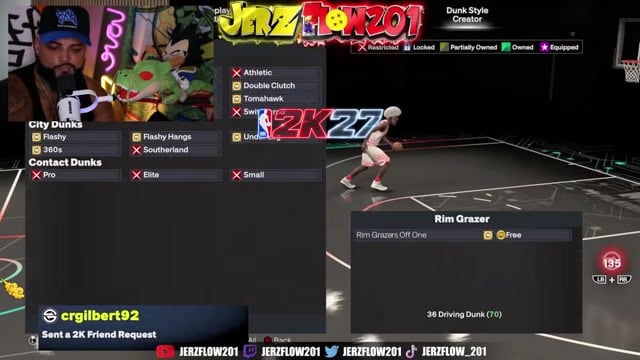
Load into your MyPLAYER hub so the animation menus are available.
Open the Animations menu
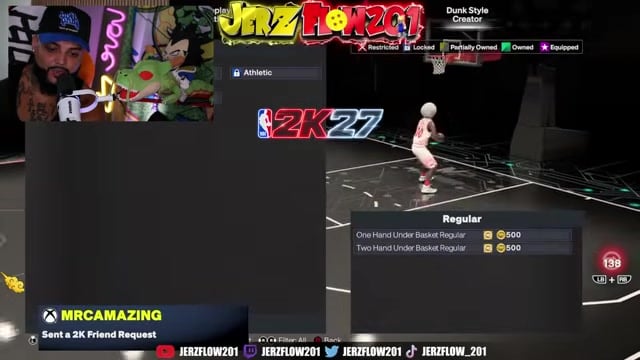
From the MyPLAYER hub, select Animations, then the Gameplay Moves area where dunk styles live.
Open the Dunk Style Creator
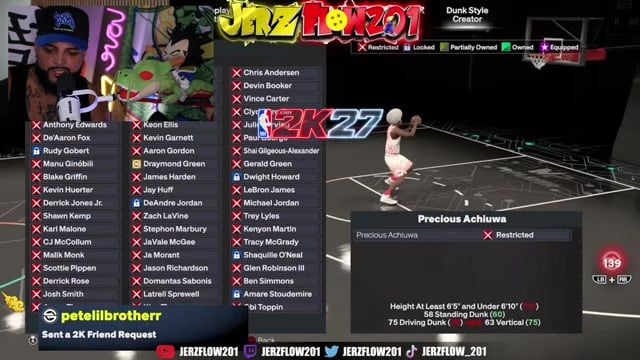
Choose the Dunk Style Creator to browse every moving, standing, contact, alley-oop and signature package.
Buy the packages your build qualifies for
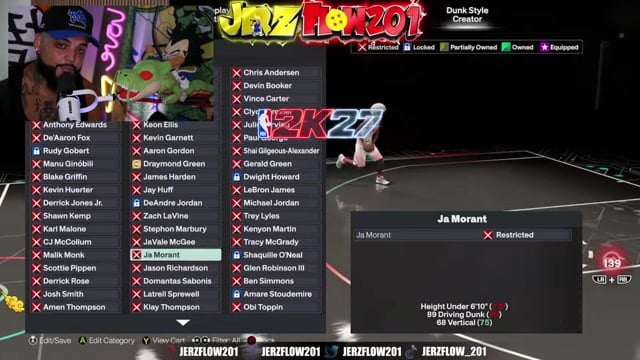
Spend VC on the packages your Driving Dunk, Vertical, standing dunk and height actually unlock — anything you don’t meet the ratings for stays locked.
Equip your packages
Equipping saves your custom style automatically, and the game names it for you.
Re-select your custom style in Animations
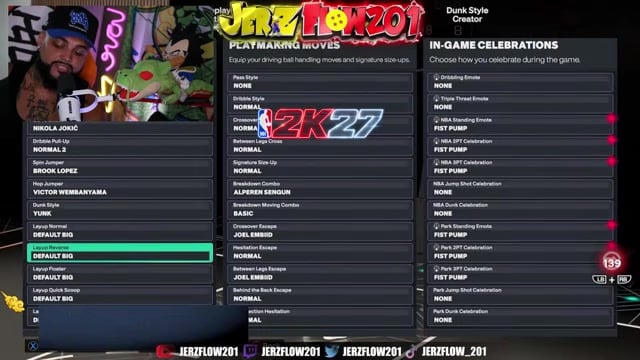
Head back into Animations and pick your named style — the game defaults to the first package you bought, so your dunks won’t show until you switch to the custom one.
Dunk packages and the ratings they need
| Dunk package | Driving dunk | Vertical / standing dunk | Min height |
|---|---|---|---|
| Rim grazer off one (free) | 36 | — | Any |
| Flashy off one (800 VC) | 70 | 50 vertical | Any |
| One-hand under basket | Any | 45 standing | 6’5″ |
| City alley-oop flashy | 70 | 50 vertical | 5’9″ |
| City alley-oop under leg | 85 | 60 vertical | 5’9″ |
| Zion Williamson (signature) | 86 | 60 vertical / 60 standing | 6’5″ |
| Ja Morant (signature) | 89 | 68 vertical | Under 6’10” |
| Karl-Anthony Towns bypass | 70 | 75 standing / 40 vertical | 6’10” |
Early builds should grab the cheap staples first: the rim grazer off one unlocks free at just a 36 Driving Dunk, and the flashy off one at 800 VC is the must-have for almost anyone, needing only a 70 Driving Dunk and 50 Vertical. The signature packages are the elite end — Zion Williamson and Ja Morant both want a Driving Dunk in the high 80s, and Ja Morant’s is capped at under 6’10”, so it’s a guard-and-wing animation rather than a big-man one. Several of these thresholds carry over from last year’s build and may shift slightly at launch, so treat them as the expected requirement rather than a locked number.
Timing the Dunk Meter on every attempt
The headline change this year is that every dunk requires the Dunk Meter. You can no longer run into the lane and auto-slam — each attempt, wide open or heavily contested, has to be timed. The meter is fully dynamic: it reads defensive positioning throughout the gather, expanding the green window when the lane is clear and shrinking it when help arrives on a late closeout. That’s the whole point of the redesign — more realistic outcomes at the rim, and a real timing skill gap on finishes that used to be free. NBA 2K27 releases globally on September 4, 2026, with early access from August 26, and you can read the full mechanics on 2K’s gameplay breakdown.
This is why a perfectly equipped dunk style still bricks if your finishing is thin. On a build with a 65–75 dunk rating, metering every attempt is miserable; even 80 is pushing it, and the 85–87 range is where the meter really starts to feel playable. The lower your rating, the tighter and less forgiving the green window, so the attribute investment from the first section isn’t just about unlocking packages — it’s what makes the meter hittable in the first place.
Keep your equipped dunk list short and clean — fewer, quicker animations gather faster and give the Dunk Meter a bigger, easier green window than long flashy gathers do, especially with a defender closing.
Common dunk-style mistakes in NBA 2K27
The biggest one is forcing meter dunks into traffic — long gathers into a crowded paint turn into strips, blocks and turnovers, and the dynamic meter punishes those late decisions harder than ever. A safer layup is often the correct read. The second is capping Driving Dunk too low: a lot of players settle at 87 to save points and then can’t equip the packages they were building toward — Ja Morant’s signature alone needs 89, so an 87 cap quietly locks it out. And under the new token system, don’t burn Badge Tokens on non-finishing badges if dunking is your identity, or you’ll have the animations equipped with nothing powering them at the rim.
Frequently Asked Questions
Why is my player doing a layup instead of a dunk even after equipping a dunk style?
Start by confirming the custom style is actually selected in Animations, since the game loads your first-purchased package by default. Beyond that, a heavy contest or a mistimed meter will downgrade the animation to a layup on its own, and if your Driving Dunk is too low the game will not offer the dunk at all — it gathers into the safer finish. So the fix is part selection, part rating, and part timing.
Do I have to buy dunk packages with VC, or can any be unlocked for free?
Most packages are VC purchases, but a few unlock free once your ratings qualify — the rim grazer off-one costs nothing once you hit a 36 Driving Dunk. VC never bypasses a requirement, though: a package you don’t meet the ratings for stays locked no matter how much currency you’re holding.
What Driving Dunk rating do I need to unlock contact dunks?
Plan for a Driving Dunk in the 90s to reliably equip the elite and pro contact packages — they’re the last things your build unlocks. High-80s ratings already open several strong signature dunks, but the top contact tiers really do want that 90-plus finishing to appear at all.
Video help






Leave a Reply