

Update (24 May 2016): There have been more than a few updates for Galaxy S6 Edge Plus, including our favorite, Marshmallow, and thus root methods have come and gone and gone by too. So, we are cleaning up this post to provide you a neat and clean guide on Edge Plus root, with a confirmed working root trick. If even this method doesn’t work, sure let us know via comments below.
Update (10 October 2015): Sprint Galaxy S6 Edge Plus root added. Original article continues: If you own the big brother of S6 Edge, the Samsung Galaxy S6 Edge+ then there is some news to cheer you up. The Samsung Galaxy S6 Edge+ root is now available, for most of the models. Earlier, Galaxy Note 5 root was also made available today.
As CF Auto Root no longer works on Samsung devices on Android 5.1.1 update, one has to wait patiently for a custom kernel to be developed and shared, one that is permissive type to allow root access.
Samsung Galaxy S6 Edge+ Root
Let’s discuss the root status of all major Galaxy S6 Edge+ variants here.
Update (March 6, 2016): Full root solution now available for the AT&T S6 edge Plus whose users have been craving for superuser root access since day one. Today’s is your lucky day AT&T S6 Edge Plus users!
Update (September 6, 2015): Thanks to awesome developer g.lewarne, stock Auto root kernel is now available for the S6 Edge+.
Right now, around 8 models are supported, which includes 3 international and 3 Korean models, T-Mobile and Canadian model.
While, root isn’t available for S6 Edge+ at AT&T, Verizon, Sprint and US Cellular.
International Galaxy S6 Edge+ (SM-G928C, G928F and G928i)
Available.
Korean Galaxy S6 Edge+ (SM-G928K, G928S and G928L)
Available.
T-Mobile Galaxy S6 Edge+ (SM-G928T)
Available.
Canadian Galaxy S6 Edge+ (SM-G928W8)
Available.
Sprint Galaxy S6 Edge+ (SM-G928P)
Available.
US Cellular Galaxy S6 Edge+ (SM-G928R4)
Not available. Until a custom kernel supporting root access comes out, wait would continue.
Verizon Galaxy S6 Edge+ (SM-G928V)
Not available. Root would not be available anytime soon probably, because Verizon locks down the bootloader of the device.
AT&T Galaxy S6 Edge+ (SM-G928A)
Available. Have fun!
Downloads
Download stock Auto Root kernel for your device’s model no. from below, and then follow the guide to install it on your device.
- TWRP recovery — Link
- SuperSU kernel — Link
- Odin PC software — Link | File: Odin-3-10-7.zip (1.03 MB)
Supported devices
- SAMSUNG GALAXY S6 Edge+, all those variants whose codename is zenlte
- Don’t try this on other Samsung device than S6 Edge+, like S6 Edge or regular S6
- Don’t try on any other device whatsoever!
Important: Check your device’s codename on its packaging box, or in Settings > About device.
Warning!
Warranty may be void of your device if you follow the procedures given on this page. You only are responsible for your device. We won’t be liable if any damage occurs to your device and/or its components. Also, this trips KNOX, meaning KNOX would stop working on your device, and thus you won’t be able to Samsung Pay, or install enterprise Apps on your device at Office.
Backup!
Backup important file stored on your device before proceeding with the steps below, so that in case something goes wrong you’ll have backup of all your important files. Sometimes, Odin installation may delete everything on your device!
How to Root
Step 1. Download Odin, TWRP and SuperSU file from above.
→ Copy the SuperSU file to your device.
Step 2. Install Galaxy S6 Edge+ driver (method 1 there!) first of all. Double click the .exe file of drivers to begin installation. (Not required if you have already done this.)
Step 3. Extract the Odin file. You should get this file, Odin3 v3.10.7.exe (other files could be hidden, hence not visible).
Step 4. Disconnect your Galaxy S6 Edge+ from PC if it is connected.
- Go to Settings > About device. And then tap on build no. 7 times or until your get the message ‘You’re now a developer’.
- Go back to Settings, scroll down, and tap on ‘Developer options’.
- Look for ‘Enable OEM unlock’ and use its toggle to enable it. Accept the warning by tapping on OK button.
— Also make sure you have disabled the Find My Mobile option completely in Settings > Lockscreen and security settings.
- Power off your Galaxy S6 Edge+. Wait 6-7 seconds after screen goes off.
- Press and hold the three buttons Power + Home + Volume down together until you see warning screen.
- Press Volume Up to continue to download mode.

Step 8. Connect your Galaxy S6 Edge+ to PC now using USB cable. Odin should recognize your Galaxy S6 Edge+. It’s a must. When it recognizes, you will see Added!! message appearing in the Log box in bottom left, and the first box under ID:COM will also show a no. and turn its background blue. Look at the pic below.
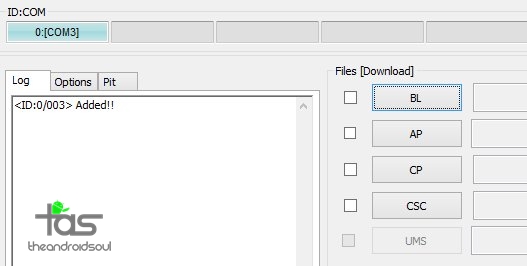
- You cannot proceed until you get the Added!! message, which confirms that Odin has recognized your device.
- If you don’t get Added!! message, you need to install/re-install drivers again, and use the original cable that came with the device. Mostly, drivers are the problem (look at step 2 above).
- You can try different USB ports on your PC too, btw.
Step 9. Load the TWRP file into Odin. For this, click the AP button on Odin and the select the TWRP file in .tar format.
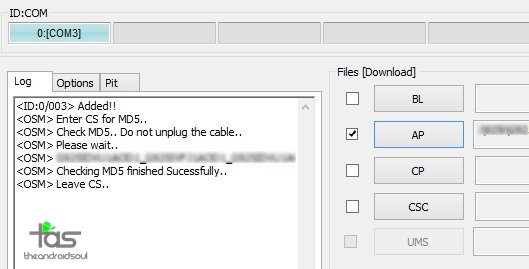
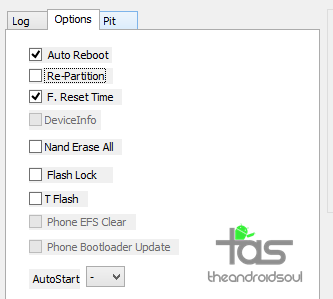

- If Odin gets stuck at setup connection, then you need to do this all again. Disconnect your device, close Odin, boot device into download mode again, open Odin, and then select the firmware and flash it again as said above.
- If you get FAIL in the top left box, then also you need to flash the firmware again as stated just above.
Next, do the Swipe action at bottom to confirm installing the SuperSU file.
Once done, tap on Reboot System button to reboot the Edge Plus.
That’s it. Enjoy the Root access on your Galaxy S6 Edge+!
Need Help?
If you need any help with this, let us know via comments below and we will try our best to help you out. Also, be sure to try alternate kernel if the Link doesn’t work for you.


290 responses to “Samsung Galaxy S6 Edge Plus Root and TWRP Recovery”
G928G ???????????????????????????????????????????????????????????????
Well, I looked again for G928G but couldn’t find any file particularly for it. But because it’s International model like 928i and 928f, you can try the one for 928i — btw, it’s the same file for all International devices.
In case it doesn’t work, and phone stops booting up, flashing a firmware will easily bring it back to normal. So, no risk. Go ahead and try the file below using the guide above. (It’s the same one for G928i and G928f.)
Try this file: https://www.androidfilehost.com/?fid=24052804347808951
arquivo img..? nao ta dando ta com nome de boot .. quaqndo coloco ele zipado da ja quando dezipo nao acha ele
G928G = G928F ok e perfeito, tudo funcionando perfeitamente, parabéns e obrigado, se souber como tirar o aviso de bootloader desbloqueado eu agradeço ok!?
quando seleciono ap nao acha o arquivo nao reconhece por que sera?
G928G = G928F ok e perfeito, tudo funcionando perfeitamente, parabéns e obrigado, se souber como tirar o aviso de bootloader desbloqueado eu agradeço ok!?
quando seleciono ap nao acha o arquivo nao reconhece por que sera?
Has root come out for sm g9287 yet? Been waiting for a while
Has root come out for sm g9287 yet? Been waiting for a while
I am stuck in a boot loop with T-mobile S6 Edge+. It loads to my lock screen and works for a minutes and randomly reboots and continues to do this every time. Please help me, my model # is SM-G928T
Just saw your comment, you still in need of help?
Btw, the kernel is tested and fully working. You sure you did everything right, as said in the guide above?
Also check you downloaded the right file.
I am stuck in a boot loop with T-mobile S6 Edge+. It loads to my lock screen and works for a minutes and randomly reboots and continues to do this every time. Please help me, my model # is SM-G928T
Just saw your comment, you still in need of help?
Btw, the kernel is tested and fully working. You sure you did everything right, as said in the guide above?
Also check you downloaded the right file.
Hi guys I rooted successful however I would like to unroot and go back to how it was before when I brought it I have a sm-g928f but can’t find the software I need any were please help if you can it would mean a lot to me
Open the SuperSU app, go to Settings tab, and use the Unroot option. If you are looking to install an OTA update, then you would need to install stock recovery back.
The root didn’t work on my sm-g928f. It reboots every time I connect to wifi or LTE
Hi guys I rooted successful however I would like to unroot and go back to how it was before when I brought it I have a sm-g928f but can’t find the software I need any were please help if you can it would mean a lot to me
Open the SuperSU app, go to Settings tab, and use the Unroot option. If you are looking to install an OTA update, then you would need to install stock recovery back.
The root didn’t work on my sm-g928f. It reboots every time I connect to wifi or LTE
HEY GUYS FOR THOSE OF YOU STILL IN A BOOT LOOP JUST FLASH TWARP RECOVERY THEN FLASH ANOTHER KERNEL, I KNOW THIS IS BASIC INFO BUT SOME OF YOU MIGHT NOT KNOW IT’S AN EASY FIX SORRY I TRIED POSTING A LINK BUT FOR SOME REASON IT’S NOT LETTING ME SO JUST GO TO XDA DEVELOPERS, SELECT THE YOUR PHONE AND COMPANY AND IT SHOULD COME UP WITH A BUNCH OF DEVELOPERS JOVY23 KERNEL AND IT’S WORKING JUST FINE
Hi, we’ve also added another kernel as an alternative. It’s simple kernel. BTW, which kernel did you try, that worked successfully?
HEY GUYS FOR THOSE OF YOU STILL IN A BOOT LOOP JUST FLASH TWARP RECOVERY THEN FLASH ANOTHER KERNEL, I KNOW THIS IS BASIC INFO BUT SOME OF YOU MIGHT NOT KNOW IT’S AN EASY FIX SORRY I TRIED POSTING A LINK BUT FOR SOME REASON IT’S NOT LETTING ME SO JUST GO TO XDA DEVELOPERS, SELECT THE YOUR PHONE AND COMPANY AND IT SHOULD COME UP WITH A BUNCH OF DEVELOPERS JOVY23 KERNEL AND IT’S WORKING JUST FINE
Hi, we’ve also added another kernel as an alternative. It’s simple kernel. BTW, which kernel did you try, that worked successfully?
Hello i just rooted my T-mobile edge plus and it is in a loop. I follwed all the steps. Please HELP! I can’t use the phone.
Link updated, pls try again.
i have the same problem. I am using tmobile sm-928t and it put my phone into restart mode everytime it connects to tmobile network. I used ever step and same problem. I even used the updated link to reflash new kernel but same problem. ple help me what do I need to do thank you.
What’s your device’s build no.?
Hello i just rooted my T-mobile edge plus and it is in a loop. I follwed all the steps. Please HELP! I can’t use the phone.
Link updated, pls try again.
i have the same problem. I am using tmobile sm-928t and it put my phone into restart mode everytime it connects to tmobile network. I used ever step and same problem. I even used the updated link to reflash new kernel but same problem. ple help me what do I need to do thank you.
What’s your device’s build no.?
I just rooted my sm-g928f and it seems to be rebooting every time I can connect to wifi or LTE… How do I fix it?
I just rooted my sm-g928f and it seems to be rebooting every time I can connect to wifi or LTE… How do I fix it?
I hope G9287 will root ….
I hope G9287 will root ….
sm-g928f root working
sm-g928f root working
Any updates on the Sprint version? Any setbacks when rooting the phone? I am planning to get one from Sprint and rooting it.
Sprint Edge Plus can be rooted easily. We’ve provided the required kernel in downloads section above.
Thanks. Also do you guys have any idea if there is any available programs or whatever regarding the unlimited tethering for rooted s6 edge plus? I’ve been searching all over but with no avail.
Any updates on the Sprint version? Any setbacks when rooting the phone? I am planning to get one from Sprint and rooting it.
Sprint Edge Plus can be rooted easily. We’ve provided the required kernel in downloads section above.
Thanks. Also do you guys have any idea if there is any available programs or whatever regarding the unlimited tethering for rooted s6 edge plus? I’ve been searching all over but with no avail.
I want to know if SM-G928F is working !! What kernel i need to take???
It works on G928F. Download kernel linked right next to device name in download section above.
I want to know if SM-G928F is working !! What kernel i need to take???
It works on G928F. Download kernel linked right next to device name in download section above.
After rooting SM-G928C, Netflix and Google’s “Movies & TV” app won’t play video. Changing ro.product.model from SM-G928C to SM-G928F fixed Netflix, but Google Movies is still broken.
After rooting SM-G928C, Netflix and Google’s “Movies & TV” app won’t play video. Changing ro.product.model from SM-G928C to SM-G928F fixed Netflix, but Google Movies is still broken.
sm- g928g I did root with sm – g928f me and rooting but now can not save passwords wifi, some method to fix
This was already mentioned by Chris H above. Download “Build Prop Editor” (by JRummy Apps Inc.) and set the “ro.securestorage.support” property to “false.”
thanks matty works perfect for me.
sm- g928g I did root with sm – g928f me and rooting but now can not save passwords wifi, some method to fix
This was already mentioned by Chris H above. Download “Build Prop Editor” (by JRummy Apps Inc.) and set the “ro.securestorage.support” property to “false.”
thanks matty works perfect for me.
MI PREGUNTA ES,¿ COMO PUEDO INSTALAR LA ROMS ORIGINAL? QUE HE DESCARGADO EN LA PAGINA OFICIAL. GALAXY S6 EDGE+PLUS SM-G928G YA QUE LO HE INTENTADO VARIAS VECES Y SIEMPRE ME SALE FALLIDO EN ODIN. AP Y NO FUNCIONA.¿ NECESITO ALGÚN PARCHE? PARA QUE FUNCIONA. SI ES ASÍ CUAL ES.TAMBIÉN NO HICE UN RESPALDO DE LA ROMS Y PERDÍ EL EFS Y AHORA NO RECOSE EL CHIPS.ALGUIEN PODRÍA FACILITARME LA VIDA. YA QUE NO SE QUE HACER. GRACIAS.
MI PREGUNTA ES,¿ COMO PUEDO INSTALAR LA ROMS ORIGINAL? QUE HE DESCARGADO EN LA PAGINA OFICIAL. GALAXY S6 EDGE+PLUS SM-G928G YA QUE LO HE INTENTADO VARIAS VECES Y SIEMPRE ME SALE FALLIDO EN ODIN. AP Y NO FUNCIONA.¿ NECESITO ALGÚN PARCHE? PARA QUE FUNCIONA. SI ES ASÍ CUAL ES.TAMBIÉN NO HICE UN RESPALDO DE LA ROMS Y PERDÍ EL EFS Y AHORA NO RECOSE EL CHIPS.ALGUIEN PODRÍA FACILITARME LA VIDA. YA QUE NO SE QUE HACER. GRACIAS.
Hey Krishna, I have a SM-G928W8 and i accidentally downloaded 928-FKLSI-ODIN to it first, and when it restarted i got a “Kernel is not seandroid enforcing” message. The phone turns on fully but it no longer detects SIM cards. I downloaded the 928-T-ODIN.tar and used ODIN again to install it, but the issue still persists. How do I fix this? thanks!
Hey Krishna, I have a SM-G928W8 and i accidentally downloaded 928-FKLSI-ODIN to it first, and when it restarted i got a “Kernel is not seandroid enforcing” message. The phone turns on fully but it no longer detects SIM cards. I downloaded the 928-T-ODIN.tar and used ODIN again to install it, but the issue still persists. How do I fix this? thanks!
I want root my device SM-G9287(HongKong)
Help me, please!
I want root my device SM-G9287(HongKong)
Help me, please!
Any news about G9287 (International Duos)? Did anyone try to use the G928f or G928i or any other that work?
Do you have succeed?
Any news about G9287 (International Duos)? Did anyone try to use the G928f or G928i or any other that work?
Do you have succeed?
my samsung sm-g928a root file need so help me
mine is stuck at boot.img
what do I do?
my samsung sm-g928a root file need so help me
mine is stuck at boot.img
what do I do?
Thank you! I’ve rooted my phone successfully, well almost. The only issue I’ve got is that it randomly restarts (reboots) – no bootloop. Is there any chance to fix it? Thank you!
so if I use flight mode it does not reboot. If I turn flightmode off it is. I can see the home screen for a few seconds and after that it restarts.
Thank you! I’ve rooted my phone successfully, well almost. The only issue I’ve got is that it randomly restarts (reboots) – no bootloop. Is there any chance to fix it? Thank you!
so if I use flight mode it does not reboot. If I turn flightmode off it is. I can see the home screen for a few seconds and after that it restarts.
I root successfuly with Odlin, but when the phone restarts it gets stuck at “Kernel is not seandroid enforcing” error at the top of the screen while the rest is stuck at the Samsung galaxy edge start up screen (black background and white font)
I root successfuly with Odlin, but when the phone restarts it gets stuck at “Kernel is not seandroid enforcing” error at the top of the screen while the rest is stuck at the Samsung galaxy edge start up screen (black background and white font)
When will the SM-G928A link be available ????
When will the SM-G928A link be available ????
It is posible to root Samsung Galaxy S6 Edge Plus DUOS SM-G9287 Build ID is LMY47X.G9287ZHU2AOK5 based on Android 5.1.1 ??? I cant find any tutorial for that version…
It is posible to root Samsung Galaxy S6 Edge Plus DUOS SM-G9287 Build ID is LMY47X.G9287ZHU2AOK5 based on Android 5.1.1 ??? I cant find any tutorial for that version…
how do i stop root for G928T?
how do i stop root for G928T?
I have SM-G928A and I got pass when I rooted it but when I try to use supersu it says binary not installed, help please.
I have the same problem
I have SM-G928A and I got pass when I rooted it but when I try to use supersu it says binary not installed, help please.
I have the same problem
SM-G928A Says Pass But No Binary for SuperSU Help ASAP!!!!!!! Keeps Notifying me that Unathorized changes have been made to your device How can I get rid of this?
You can install the firmware back on your AT&T S6 Edge Plus to bring things back to stock. This will remove flashing of root stuff, and Samsung stock stuff will be back. Any warning you are getting right now will be gone.
First i flashing stock rocovery on SM-G928A and then flashing root file but no any change same as..