

Quick Answer: To release an Aniimo, open the main menu, select Aniimo Management, enter Storage, choose Manage, select the Aniimo you want to release, and confirm the release. Released Aniimo provide Farewell Gifts and count toward Elite Training objectives such as releasing five Aniimo.
Releasing unwanted Aniimo is an important part of managing your collection in Aniimo. The feature lets you clear storage space while receiving Farewell Gifts in return. It also counts toward certain Elite Training objectives, making it useful when working through the Path of Twining progression.
| Detail | Information |
|---|---|
| Feature | Release Aniimo |
| Menu | Aniimo Management |
| Location | Aniimo Storage |
| Required action | Select Aniimo and choose Release |
| Main reward | Farewell Gifts |
| Training objective | Release 5 Aniimo |
| Extra benefit | Frees storage space |
Are there any requirements to release Aniimos?
There are no special level or item requirements to release an Aniimo. The feature can be accessed through Aniimo Management once Aniimo are stored in the collection. If the goal is to complete the Elite Training objective, five Aniimo need to be released.
How to release Aniimo
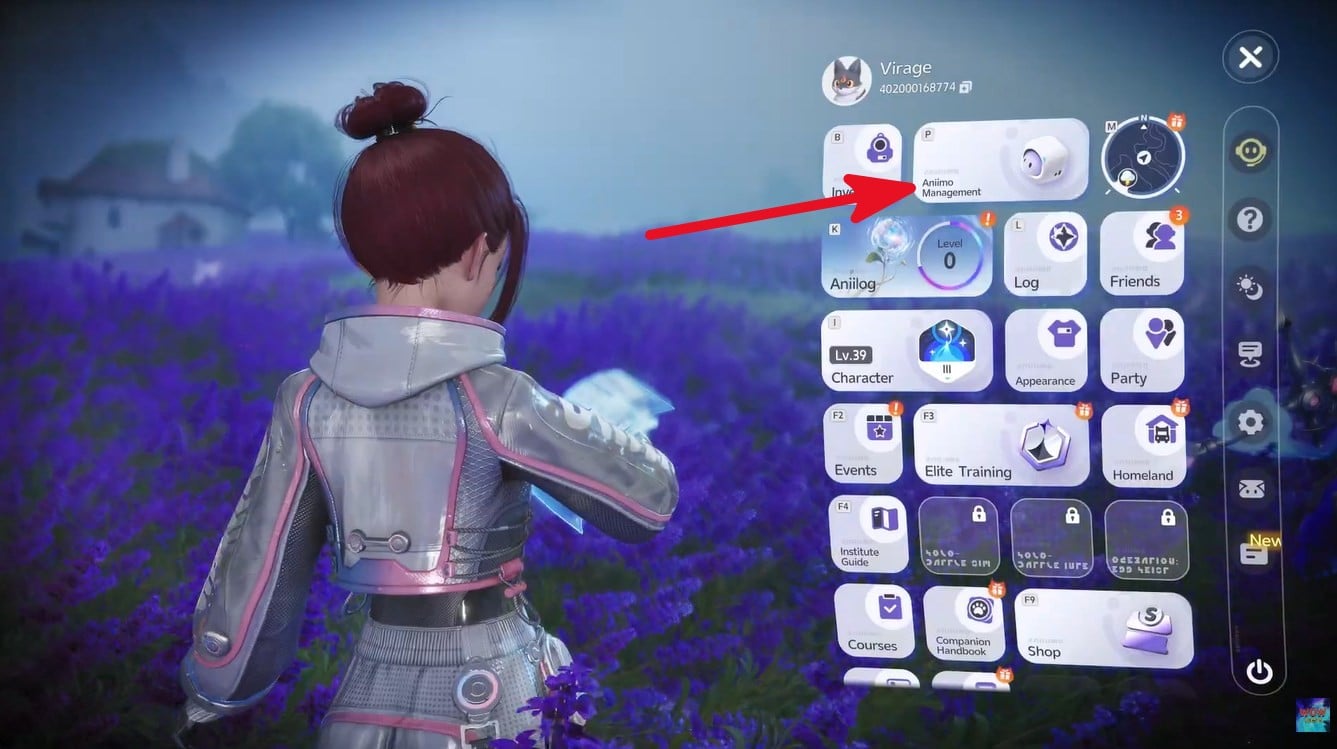
Step 1: Open the main menu
Press Esc to open the pause or system menu. From the available options, select Aniimo Management.
Step 2: Open Aniimo Storage
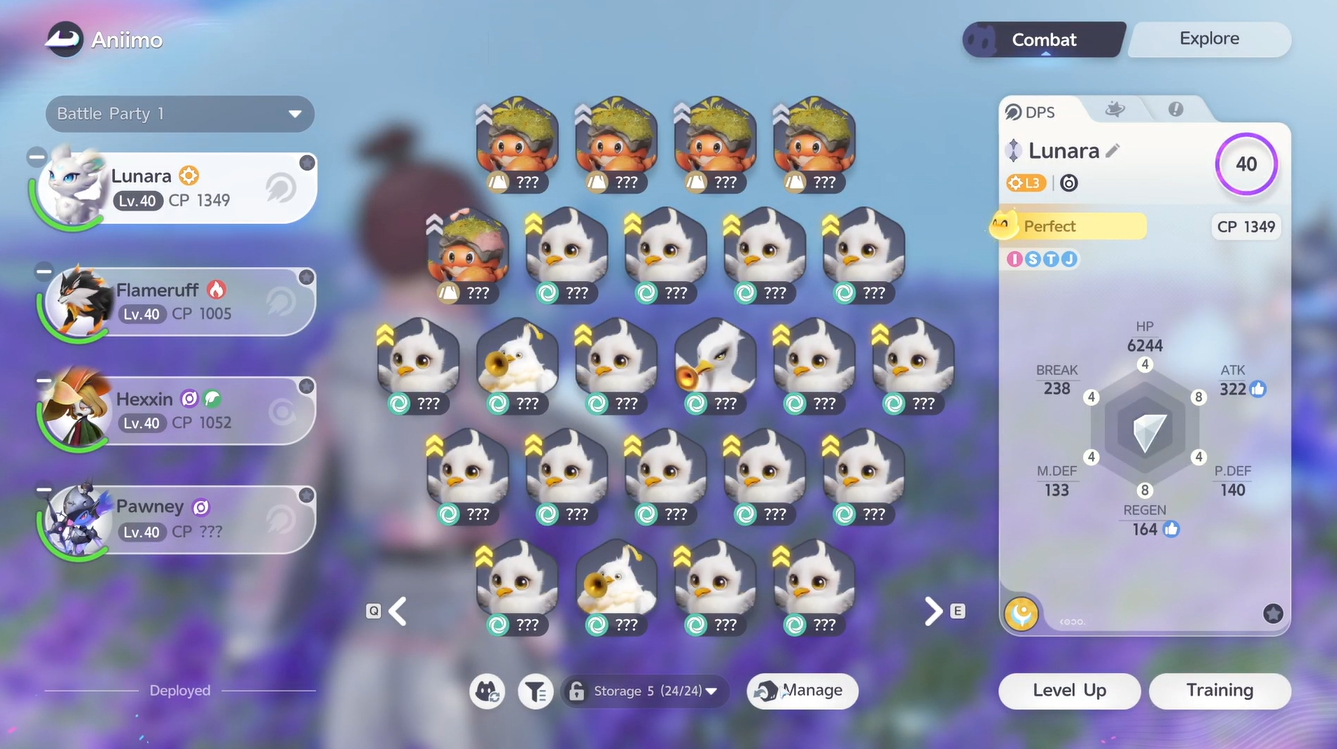
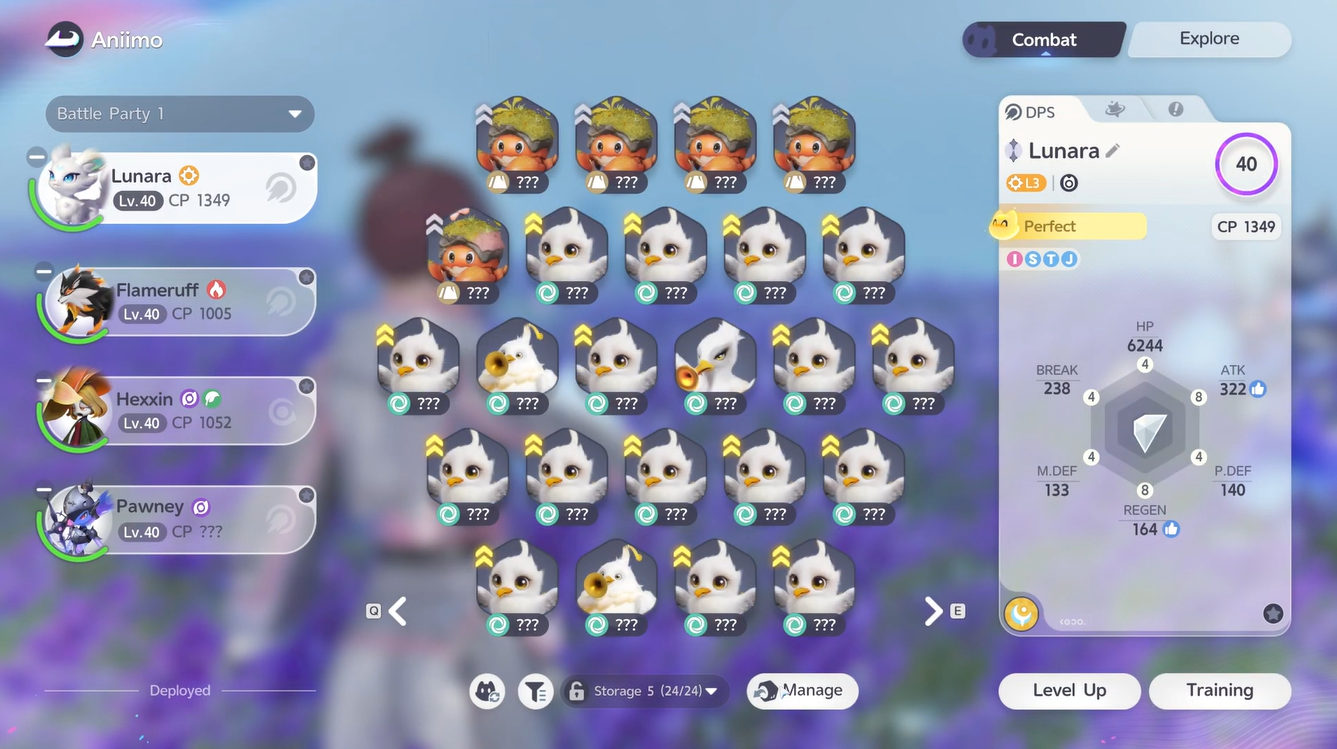
Inside Aniimo Management, navigate to the Aniimo Storage section. This displays the creatures currently stored in the collection.
Step 3: Enter Manage mode
Look at the bottom of the screen and select Manage. This changes the storage screen into selection mode, allowing multiple Aniimo to be chosen at once.
Step 4: Select the Aniimo to release
Select the Aniimo that are no longer needed. Individual creatures can be selected, or use Select all on this page when several Aniimo need to be released at once.
Be careful when using the bulk-selection option. Make sure valuable or rare Aniimo are not selected accidentally.
Step 5: Choose Release
After selecting the desired Aniimo, press the Release button in the bottom-right corner of the screen.
Step 6: Check the release list
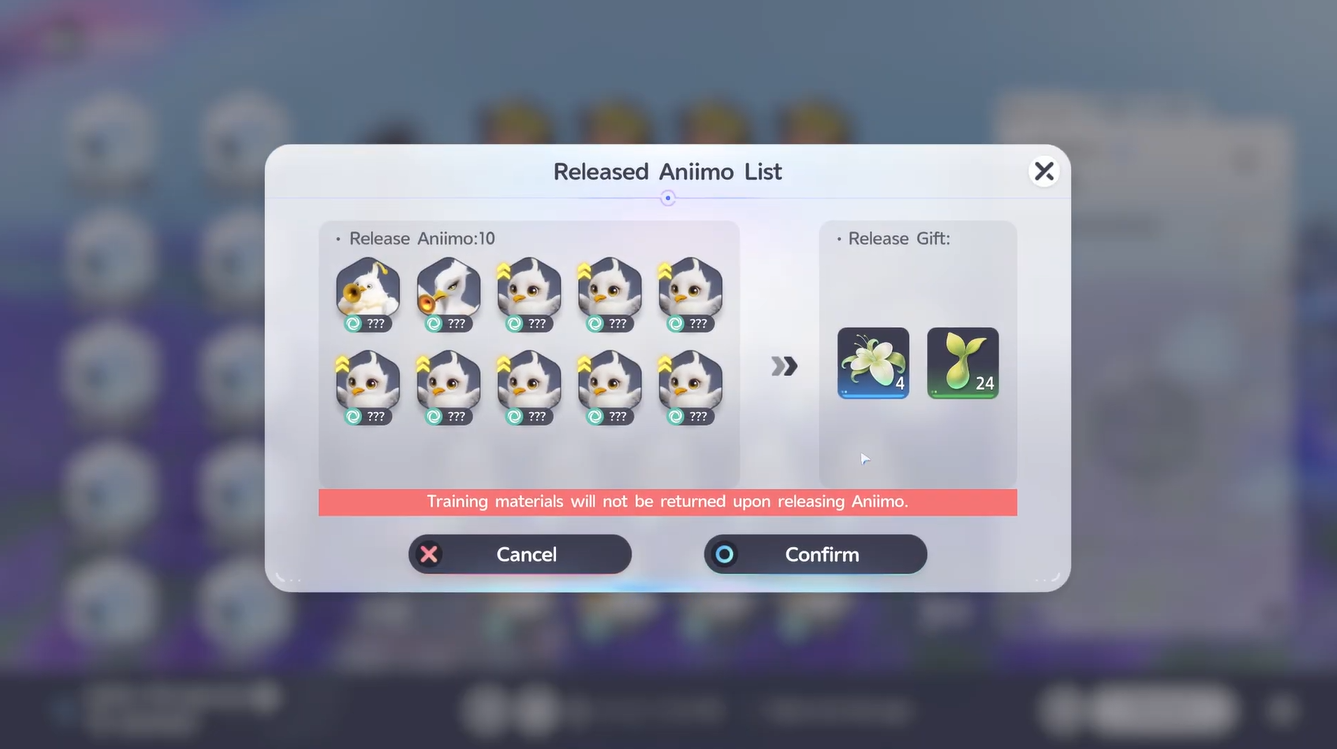
A confirmation screen displays the Aniimo selected for release. Review the list carefully before proceeding, particularly when releasing multiple creatures.
Step 7: Confirm the release
Select Confirm to permanently release the selected Aniimo. The creatures will be removed from storage and the associated Farewell Gifts will be awarded.
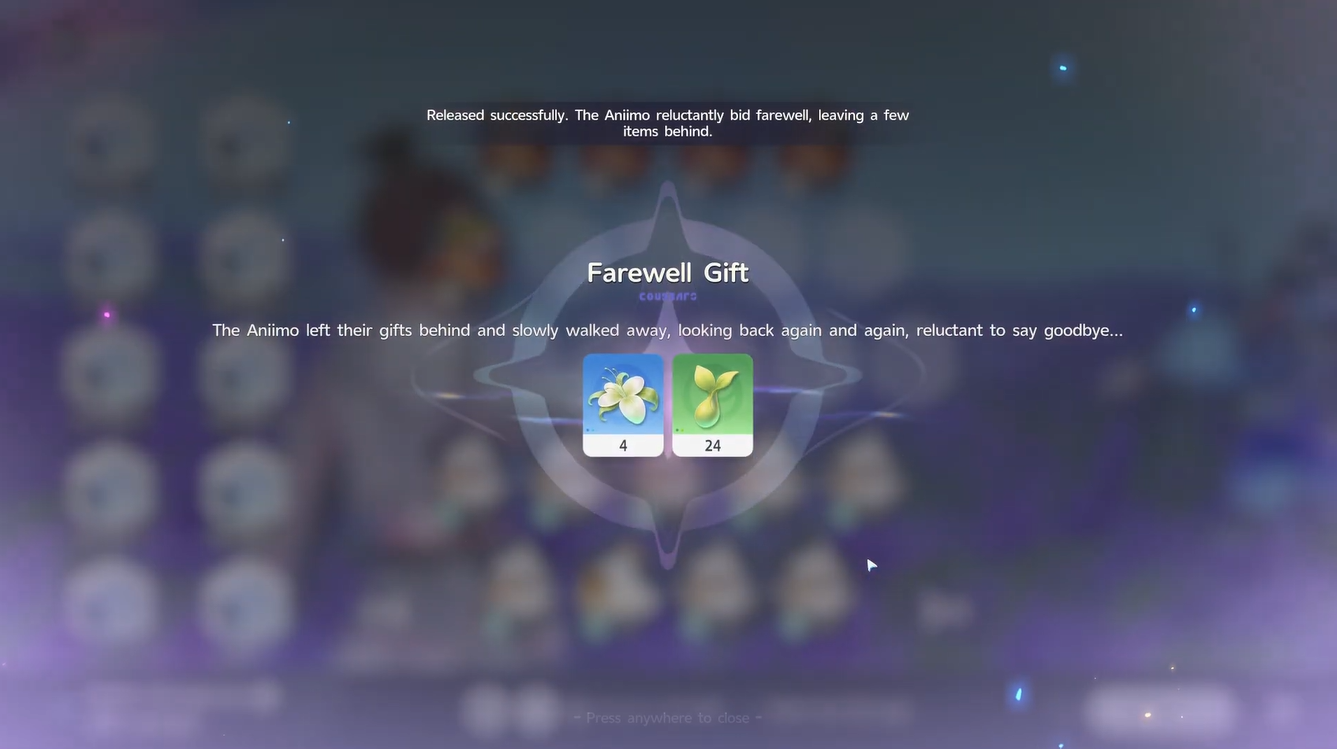
Step 8: Check the rewards
After the release is completed, check the rewards received from the Farewell Gift. Growth Buds are among the useful rewards obtained from releasing Aniimo and can provide Aniimo EXP when used.
Step 9: Complete the Elite Training objective
If the goal is the Elite Training objective, continue releasing Aniimo until the required number has been reached. The objective Release 5 Aniimo can be completed through this same storage-management process.
Completing the objective provides additional progression rewards, including EXP, Gold, Safaris, and Aniipod Pro XS.
Farewell Gift rewards
Releasing Aniimo does more than free up storage space. The game provides Farewell Gifts, with Growth Buds being one of the useful materials obtained through the system.
| Reward | Use |
|---|---|
| Growth Bud | Provides 1,000 Aniimo EXP when used |
| Farewell Gift materials | Rewards obtained from releasing Aniimo; contents can vary |
The exact quantity of rewards can depend on the Aniimo released, so it is better to check the confirmation and reward screens rather than assume every release provides an identical payout.
Elite Training release rewards
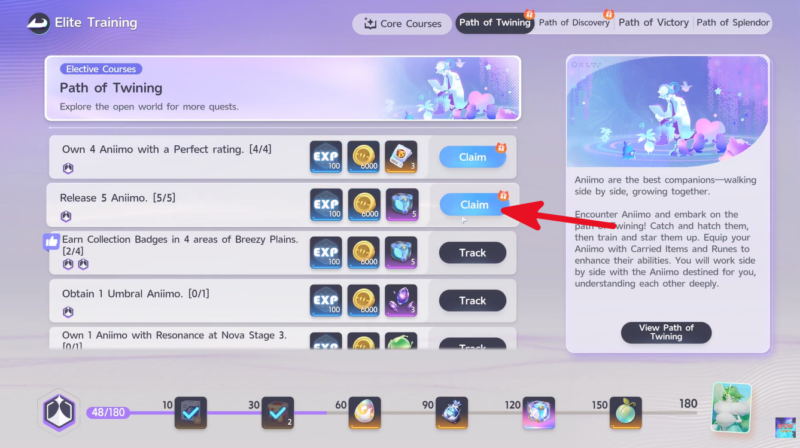
The release requirement can also be useful for progressing through Elite Training. The relevant objective requires releasing five Aniimo.
| Objective | Reward |
|---|---|
| Release 5 Aniimo | 100 EXP |
| 1,000 Gold | |
| 20 Safaris | |
| 5 Aniipod Pro XS |
These rewards are tied to the Elite Training objective, rather than being part of the Farewell Gift itself.
Which Aniimo should you release?
Storage management is most useful when the collection starts filling with duplicates or Aniimo that are no longer needed. Before releasing anything, check its rarity, stats, skills, traits, and potential usefulness for future teams.
Avoid using bulk selection without checking the page first. Rare or high-quality Aniimo can be difficult to replace, while common duplicates are generally more suitable for clearing storage.
Why release Aniimo
The release system serves two purposes. First, it helps free up Aniimo Storage space when the collection becomes crowded. Second, it converts unwanted creatures into useful rewards.
It is also an easy way to make progress toward the Elite Training release objective, so players who already have several unwanted duplicates can combine storage management with quest progression instead of releasing Aniimo solely for space.
Releasing Aniimo is a straightforward storage-management feature with an additional reward benefit. Open Aniimo Management, enter Storage, choose Manage, select the creatures to remove, and confirm the release. The resulting Farewell Gifts can provide useful materials, while releasing five Aniimo also completes the relevant Elite Training objective.






Leave a Reply