
Glove Game 2 is a Roblox arena game where you fight other players with equippable gloves, and the developers hand out codes now and then for free GP and cosmetic emotes. Redeeming them costs nothing and only takes a few seconds once you know where the code box is hiding.
Working Glove Game 2 codes
Three codes are redeemable right now, and each one hands you either GP or a cosmetic emote you can show off in the arena.
SORRYFORDELAYS
100 GP
New
ogspin
Og Spin emote
likethegamepease
50 GP
Tip: Codes are case-sensitive in most Roblox games, so type each one exactly as shown above rather than relying on autocapitalize.
How to redeem codes in Glove Game 2
You don’t need any menu outside the game itself to redeem a code, but the box is tucked away inside the shop rather than sitting on the main screen.
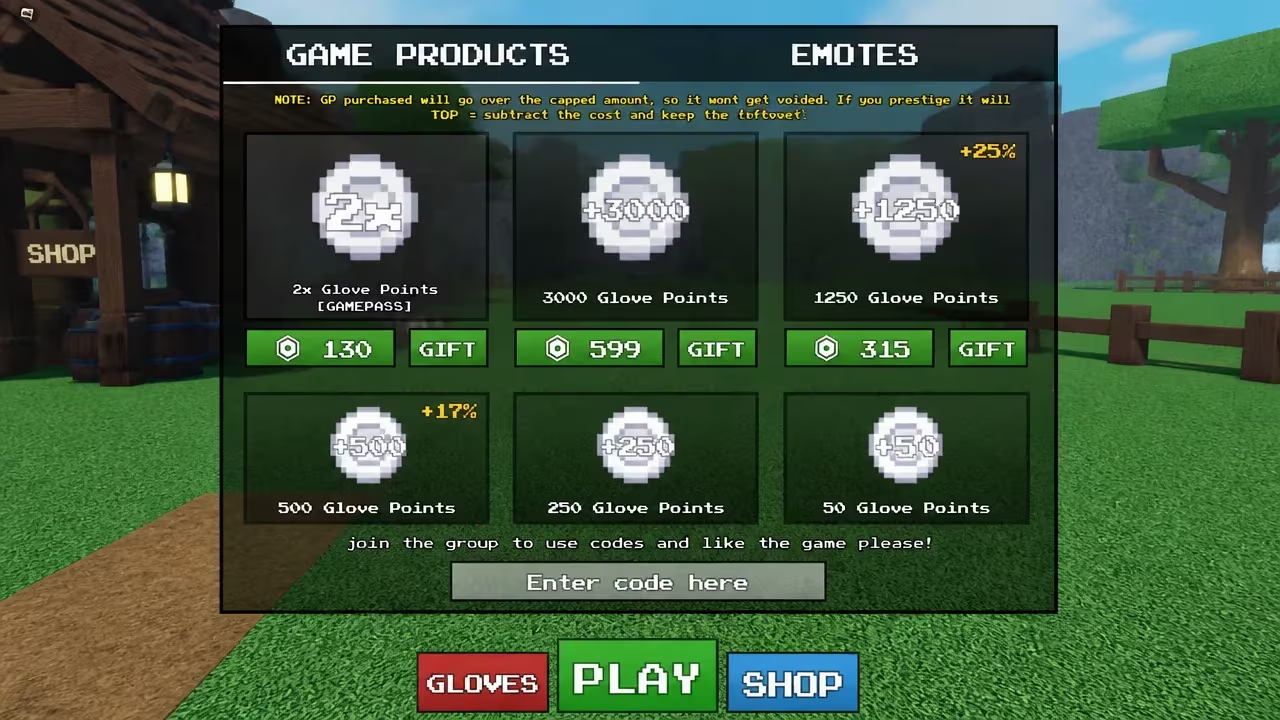
You’ll know a code worked because your GP total updates in the shop menu immediately, and any emote reward shows up in your inventory right away. If the field just clears without your GP changing or an item appearing, the code has expired or you typed it wrong.
Expired Glove Game 2 codes
These codes no longer add anything when you enter them, so don’t waste time on them.
ymaymay
SORRYFORTHEWAIT
How to get more Glove Game 2 codes
New codes for Glove Game 2 tend to show up around updates, and the fastest way to catch them is to keep an eye on the game’s own official channels rather than checking back in-game at random.
Join the ULTRA DICE Discord server, since it’s tied directly to Glove Game 2 and its updates, and codes are typically announced there first. You can also follow the Roblox community group linked to the game for the same announcements. We’ll keep checking for new codes and update the working list above whenever one shows up.
Are Glove Game 2 codes free?
Yes. Every code listed above is free to redeem and simply requires an active Roblox account signed into the game.
Why didn’t my code work?
If typing a code into the shop’s code box doesn’t add GP or an item to your inventory, the code has most likely expired or was entered with a typo.
Check back on this page since we’ll add fresh codes here as soon as the developers release them, so you don’t miss out on free GP or emotes.






Leave a Reply