
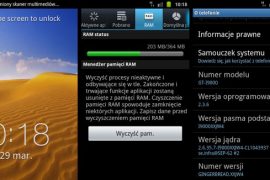
I’m not gonna waste time discussing how Samsung decided to say no to updating Galaxy S, including other single core Galaxy phones to Ice Cream Sandwich Android 4.0, citing hardware limitations. Needless to say, fans were not pleased, resulting in a petition for Samsung to change their minds. Reeling under fan pressure, Samsung decided to release a value pack update that would try to bring some features from ICS, to keep customers happy. Soon after, a value pack firmware was leaked, which bought along a few nice features and additions.
Well, after almost 3 months, Samsung has made good on their promise and finally officially released the final value pack firmware with XXJW4, based on Android 2.3.6. And for those that wanted it, Samsung have finally included TouchWiz (TW) 4, their improved TW UI that debuted with the Galaxy S2. Other additions and improvements are also pretty good, showing that Samsung actually worked hard to give users something they’ll like.
Here’s a look at all the features and improvements in the firmware:
- Face Unlock
- New Kernel with huge RAM (Total RAM: 364 MB)
- Galaxy S II ICS Lockscreen
- Photo Editor
- Built-in TouchWiz 4
- Improved Camera UI + Can capture pictures while shooting a video
- Auto-Rotation is fast – Fast switching from portrait to landscape
- Overall speed improvements
- GPU Performance slightly increased
Now, without further ado, lets take a look at how you can flash the new XXJW4 value pack firmware on your Galaxy S.
Compatibility
This firmware and the guide below are compatible only and only with the Samsung Galaxy S, model number GT-i9000. It’s not compatible with any other device and may render an incompatible device unusable. Check your device model in Settings » About phone.
Warning!
The methods and procedures discussed here are considered risky and you should not attempt anything if you don’t know completely what it is. If any damage occurs to your device, we won’t be held liable.
Pre-Installation Requirements
- This procedure will wipe all your apps, data and settings (but it will NOT touch your SD cards, so don’t worry about those). Backup your Apps and important data — bookmarks, contacts, SMS, APNs (internet settings), etc. This Android backup guide would help you.
- If you have Samsung’s PC software Kies installed, un-install/shut it down completely from the taskbar first because it may interrupt the flashing process.
- Drivers! — it’s important you’ve the proper drivers installed. Download links below:
How to Install XXJW4 Value Pack Firmware on Galaxy S
- Download the XXJW4 firmware.
Download Link | Filename: I9000XXJW4_I9000OXAJW4_XEU.zip | Size: 170 MB - Now, extract the downloaded file I9000XXJW4_I9000OXAJW4_XEU.zip (from step 1) to any folder, you’ll get these 2 files:
- JW4_JW4_JW4.tar
- SS_DL.dll (ignore this file)
- Download Odin which we will be using to flash XXJW4 on the phone.
Download Link | Filename: Odin3 v1.7.exe - Disconnect your phone if it’s connected to PC. Then switch it off. Wait 5-6 seconds for vibration to confirm complete switch off.
- Boot into recovery. To do this, press and hold the Volume_UP + Home + Power till the screen turns on, then let them go. You will boot into recovery soon enough.
- Now, using the volume keys to navigate and the home/power key to select options, select wipe data/factory reset, then select Yes on next screen to confirm. After the data wipe is complete, remove and re-insert the battery, but don’t power it back on.
- Now, put the Galaxy S in Download Mode — press and hold these keys together: Volume_DOWN + Home + Power until a screen saying Download Mode comes up.
- Open Odin (downloaded in step 3) — Odin3 v1.7.exe.
- Connect your phone to PC now. You should get the message “Added!!” under Odin’s message box in the bottom left. If you don’t get this message, then probably there is a problem with drivers. Make sure you’ve proper drivers installed. See point 3 above under Pre-Installation Requirements.
- Now, in Odin, click the PDA Tab, and select the file JW4_JW4_JW4.tar (from step 2.1)
- Important! Do not touch any other button or make any other changes in Odin except selecting the required file as given in step 10.
- Now, hit the START button to begin the flashing process. When it finishes, your phone will automatically reboot, upon which you can unplug the cable. Plus, you’ll get a PASS (with green background) message in the left-most box at the very top of the Odin.
IMPORTANT Note: If ODIN gets stuck at some stage and doesn’t seem to be doing anything, do this — disconnect the phone from the PC, close ODIN, remove battery, re-insert it, turn phone on in Download mode again, and do the procedure again from Step 8. Same if you get a FAIL message in Odin. - In case you encounter any roadblocks flashing XXJW4, let us know in the comments below and we’ll try to help you out.
- Also, in case you wanna root it and install (cwm) clockworkmod recovery on your Galaxy S with XXJW4 firmware, check this page.
Once the phone boots up (first boot will take up to 5 minutes), you’ll be running the official value pack firmware on your Galaxy S i9000, with access to all the new features as listed above. Do let us know how the firmware works and whether you like it or not, in the comments below.
Via XDA






829 responses to “Galaxy S Gets Official Value Pack Firmware — XXJW4. Includes TouchWiz 4!”
hi i m on 2.3.3 now do i need to update to xxjvu first before going to xxjw4 ?
hi i m on 2.3.3 now do i need to update to xxjvu first before going to xxjw4 ?
Bro download link is broken, it stopped on 159.99 Mb after completing 94 percent download…
Bro download link is broken, it stopped on 159.99 Mb after completing 94 percent download…
Bro download link is broken, it stopped on 159.99 Mb after completing 94 percent download…
yet still no problem in rebooting fase…no bootloop
1st minutes works perfect thx a lot… keep in touch
great job guys!
yet still no problem in rebooting fase…no bootloop
yet still no problem in rebooting fase…no bootloop
1st minutes works perfect thx a lot… keep in touch
great job guys!
1st minutes works perfect thx a lot… keep in touch
my friend very nice post tnkx i did it and it goes well, tnkx
my friend very nice post tnkx i did it and it goes well, tnkx
my friend very nice post tnkx i did it and it goes well, tnkx
Thanks a lot for official value pack firmware-XXJW4. Its working very fine. There is no problem still now. Actually i downgrade my i9000 form jellybean.
Thanks a lot for official value pack firmware-XXJW4. Its working very fine. There is no problem still now. Actually i downgrade my i9000 form jellybean.
Thanks a lot for official value pack firmware-XXJW4. Its working very fine. There is no problem still now. Actually i downgrade my i9000 form jellybean.
phn is rebt agn and agn…nw it is not geting on also…plz hlp me…
phn is rebt agn and agn…nw it is not geting on also…plz hlp me…
phn is rebt agn and agn…nw it is not geting on also…plz hlp me…
great job guys!
great job guys!
my WiFi is not working help please!!!!!
my WiFi is not working help please!!!!!
my WiFi is not working help please!!!!!
hello. I followed exactly the steps provided and after 3 minutes I wrote on odin FAIL. The phone remains off and I can not even start somehow. help me please!
hello. I followed exactly the steps provided and after 3 minutes I wrote on odin FAIL. The phone remains off and I can not even start somehow. help me please!
hello. I followed exactly the steps provided and after 3 minutes I wrote on odin FAIL. The phone remains off and I can not even start somehow. help me please!
Can I follow this guide if i’m using a mac not a windows pc?!
Can I follow this guide if i’m using a mac not a windows pc?!
Can I follow this guide if i’m using a mac not a windows pc?!
Thanks a lot AndroidSoul. My Samsung Galaxy GT I9000 works perfectly now. I followed the procedure exactly and it smoothly happened. The phone reboots into recovery mode first for a few seconds and then eventually the phone starts. Though t takes 5 minutes but this wait was worth it. The phone now feels smooth and fast which previously needed several tapping and waiting to do any normal task. Thanks a lot.
Though I have a problem. When I open the market it says “Authentication Required. Please log into your Google Account.” and Gmail says “Your mails will appear shortly” which never did.
Please help.
I have the same problem
Thanks a lot AndroidSoul. My Samsung Galaxy GT I9000 works perfectly now. I followed the procedure exactly and it smoothly happened. The phone reboots into recovery mode first for a few seconds and then eventually the phone starts. Though t takes 5 minutes but this wait was worth it. The phone now feels smooth and fast which previously needed several tapping and waiting to do any normal task. Thanks a lot.
Though I have a problem. When I open the market it says “Authentication Required. Please log into your Google Account.” and Gmail says “Your mails will appear shortly” which never did.
Please help.
I have the same problem
Thanks a lot AndroidSoul. My Samsung Galaxy GT I9000 works perfectly now. I followed the procedure exactly and it smoothly happened. The phone reboots into recovery mode first for a few seconds and then eventually the phone starts. Though t takes 5 minutes but this wait was worth it. The phone now feels smooth and fast which previously needed several tapping and waiting to do any normal task. Thanks a lot.
Though I have a problem. When I open the market it says “Authentication Required. Please log into your Google Account.” and Gmail says “Your mails will appear shortly” which never did.
Please help.
I have the same problem
Thanx guys! Worked perfectly! No boot loop or any other problems
Thanx guys! Worked perfectly! No boot loop or any other problems
Thanx guys! Worked perfectly! No boot loop or any other problems
Hey! Thank you guys 🙂 i had a problem, one time i tried to recovery my factory settings and after all i couldn’t see any text on screen.. this problem is solved. after installation phone rebooted 2 times.. now it’s working and all texts are in places..
but now there is a problem… my home button doesn’t work.. have you any advises?
Hey! Thank you guys 🙂 i had a problem, one time i tried to recovery my factory settings and after all i couldn’t see any text on screen.. this problem is solved. after installation phone rebooted 2 times.. now it’s working and all texts are in places..
but now there is a problem… my home button doesn’t work.. have you any advises?
Hey! Thank you guys 🙂 i had a problem, one time i tried to recovery my factory settings and after all i couldn’t see any text on screen.. this problem is solved. after installation phone rebooted 2 times.. now it’s working and all texts are in places..
but now there is a problem… my home button doesn’t work.. have you any advises?
it keeps rebooting any suggestions?
I previously had it rooted with Hellybean it worked fine but I wanted to go back to stock , i followed all the instructions using odin but it keeps rebooting.
Turn off the phone, boot into recovery by pressing Volume Up + Home + Power, wipe data/factory reset, then restart. It should boot up alright.
Ive tried this but with no luck it keeps rebooting.
Btw on recovery mode, much of the info that come up its in red , its like something is missing .
“E:failed to mount /dbdata (invalid argument) etc etc…
I managed to work it out with another method.my GS IS WORKING AGAIN !! 😉
dude how did you fix the problem?
it keeps rebooting any suggestions?
I previously had it rooted with Hellybean it worked fine but I wanted to go back to stock , i followed all the instructions using odin but it keeps rebooting.
Turn off the phone, boot into recovery by pressing Volume Up + Home + Power, wipe data/factory reset, then restart. It should boot up alright.
Ive tried this but with no luck it keeps rebooting.
Btw on recovery mode, much of the info that come up its in red , its like something is missing .
“E:failed to mount /dbdata (invalid argument) etc etc…
dude how did you fix the problem?
I managed to work it out with another method.my GS IS WORKING AGAIN !! 😉
it keeps rebooting any suggestions?
I previously had it rooted with Hellybean it worked fine but I wanted to go back to stock , i followed all the instructions using odin but it keeps rebooting.
Turn off the phone, boot into recovery by pressing Volume Up + Home + Power, wipe data/factory reset, then restart. It should boot up alright.
Ive tried this but with no luck it keeps rebooting.
Btw on recovery mode, much of the info that come up its in red , its like something is missing .
“E:failed to mount /dbdata (invalid argument) etc etc…
dude how did you fix the problem?
I managed to work it out with another method.my GS IS WORKING AGAIN !! 😉
Help guys!!! My phone keeps rebooting 🙁
Help guys!!! My phone keeps rebooting 🙁
Help guys!!! My phone keeps rebooting 🙁
can i do this on my gt-i900m? please tell me im desperate!
yes, it works on my gt-i9000M. Only difference is that when booting up your phone and in Settings > About Phone, it will say GT-i9000 (without the M)
using Odin v1.82 btw
can i do this on my gt-i900m? please tell me im desperate!
yes, it works on my gt-i9000M. Only difference is that when booting up your phone and in Settings > About Phone, it will say GT-i9000 (without the M)
using Odin v1.82 btw
can i do this on my gt-i900m? please tell me im desperate!
yes, it works on my gt-i9000M. Only difference is that when booting up your phone and in Settings > About Phone, it will say GT-i9000 (without the M)
using Odin v1.82 btw
help my phone,SFT-9000,keeps rebooting, even after wiping data/factory
Any tips?
Did you read the compatibility section..?