
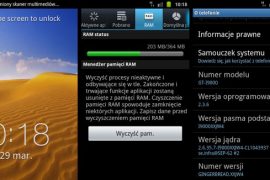
I’m not gonna waste time discussing how Samsung decided to say no to updating Galaxy S, including other single core Galaxy phones to Ice Cream Sandwich Android 4.0, citing hardware limitations. Needless to say, fans were not pleased, resulting in a petition for Samsung to change their minds. Reeling under fan pressure, Samsung decided to release a value pack update that would try to bring some features from ICS, to keep customers happy. Soon after, a value pack firmware was leaked, which bought along a few nice features and additions.
Well, after almost 3 months, Samsung has made good on their promise and finally officially released the final value pack firmware with XXJW4, based on Android 2.3.6. And for those that wanted it, Samsung have finally included TouchWiz (TW) 4, their improved TW UI that debuted with the Galaxy S2. Other additions and improvements are also pretty good, showing that Samsung actually worked hard to give users something they’ll like.
Here’s a look at all the features and improvements in the firmware:
- Face Unlock
- New Kernel with huge RAM (Total RAM: 364 MB)
- Galaxy S II ICS Lockscreen
- Photo Editor
- Built-in TouchWiz 4
- Improved Camera UI + Can capture pictures while shooting a video
- Auto-Rotation is fast – Fast switching from portrait to landscape
- Overall speed improvements
- GPU Performance slightly increased
Now, without further ado, lets take a look at how you can flash the new XXJW4 value pack firmware on your Galaxy S.
Compatibility
This firmware and the guide below are compatible only and only with the Samsung Galaxy S, model number GT-i9000. It’s not compatible with any other device and may render an incompatible device unusable. Check your device model in Settings » About phone.
Warning!
The methods and procedures discussed here are considered risky and you should not attempt anything if you don’t know completely what it is. If any damage occurs to your device, we won’t be held liable.
Pre-Installation Requirements
- This procedure will wipe all your apps, data and settings (but it will NOT touch your SD cards, so don’t worry about those). Backup your Apps and important data — bookmarks, contacts, SMS, APNs (internet settings), etc. This Android backup guide would help you.
- If you have Samsung’s PC software Kies installed, un-install/shut it down completely from the taskbar first because it may interrupt the flashing process.
- Drivers! — it’s important you’ve the proper drivers installed. Download links below:
How to Install XXJW4 Value Pack Firmware on Galaxy S
- Download the XXJW4 firmware.
Download Link | Filename: I9000XXJW4_I9000OXAJW4_XEU.zip | Size: 170 MB - Now, extract the downloaded file I9000XXJW4_I9000OXAJW4_XEU.zip (from step 1) to any folder, you’ll get these 2 files:
- JW4_JW4_JW4.tar
- SS_DL.dll (ignore this file)
- Download Odin which we will be using to flash XXJW4 on the phone.
Download Link | Filename: Odin3 v1.7.exe - Disconnect your phone if it’s connected to PC. Then switch it off. Wait 5-6 seconds for vibration to confirm complete switch off.
- Boot into recovery. To do this, press and hold the Volume_UP + Home + Power till the screen turns on, then let them go. You will boot into recovery soon enough.
- Now, using the volume keys to navigate and the home/power key to select options, select wipe data/factory reset, then select Yes on next screen to confirm. After the data wipe is complete, remove and re-insert the battery, but don’t power it back on.
- Now, put the Galaxy S in Download Mode — press and hold these keys together: Volume_DOWN + Home + Power until a screen saying Download Mode comes up.
- Open Odin (downloaded in step 3) — Odin3 v1.7.exe.
- Connect your phone to PC now. You should get the message “Added!!” under Odin’s message box in the bottom left. If you don’t get this message, then probably there is a problem with drivers. Make sure you’ve proper drivers installed. See point 3 above under Pre-Installation Requirements.
- Now, in Odin, click the PDA Tab, and select the file JW4_JW4_JW4.tar (from step 2.1)
- Important! Do not touch any other button or make any other changes in Odin except selecting the required file as given in step 10.
- Now, hit the START button to begin the flashing process. When it finishes, your phone will automatically reboot, upon which you can unplug the cable. Plus, you’ll get a PASS (with green background) message in the left-most box at the very top of the Odin.
IMPORTANT Note: If ODIN gets stuck at some stage and doesn’t seem to be doing anything, do this — disconnect the phone from the PC, close ODIN, remove battery, re-insert it, turn phone on in Download mode again, and do the procedure again from Step 8. Same if you get a FAIL message in Odin. - In case you encounter any roadblocks flashing XXJW4, let us know in the comments below and we’ll try to help you out.
- Also, in case you wanna root it and install (cwm) clockworkmod recovery on your Galaxy S with XXJW4 firmware, check this page.
Once the phone boots up (first boot will take up to 5 minutes), you’ll be running the official value pack firmware on your Galaxy S i9000, with access to all the new features as listed above. Do let us know how the firmware works and whether you like it or not, in the comments below.
Via XDA






829 responses to “Galaxy S Gets Official Value Pack Firmware — XXJW4. Includes TouchWiz 4!”
I was using Dark knight based on 4.0.4. When I have install this firmware, I am having an starting screen again n again and it won’t getting home screen. After having a Pass status from Odin, I was having an errors: “Fail to mount / dbdata (File exist)” , “copy_dbdata_media: Can’t mount / dbdata your storage not prepared yet. Please UI menu for format and reboot action”.
Please advice asap. Thanks!!!
Don’t worry. Do this: Remove battery for 4-5 seconds and then place it back. Install XXJVS firmware first from this page – https://nerdschalk.com/download-install-xxjvs-firmware-update-galaxy-s-i9000-to-android-2-3-5/
Then install XXJW4 as given above.
Don’t worry. Do this: Remove battery for 4-5 seconds and then place it back. Install XXJVS firmware first from this page – https://nerdschalk.com/download-install-xxjvs-firmware-update-galaxy-s-i9000-to-android-2-3-5/
Then install XXJW4 as given above.
I was using Dark knight based on 4.0.4. When I have install this firmware, I am having an starting screen again n again and it won’t getting home screen. After having a Pass status from Odin, I was having an errors: “Fail to mount / dbdata (File exist)” , “copy_dbdata_media: Can’t mount / dbdata your storage not prepared yet. Please UI menu for format and reboot action”.
Please advice asap. Thanks!!!
Don’t worry. Do this: Remove battery for 4-5 seconds and then place it back. Install XXJVS firmware first from this page – https://nerdschalk.com/download-install-xxjvs-firmware-update-galaxy-s-i9000-to-android-2-3-5/
Then install XXJW4 as given above.
I was using Dark knight based on 4.0.4. When I have install this firmware, I am having an starting screen again n again and it won’t getting home screen. After having a Pass status from Odin, I was having an errors: “Fail to mount / dbdata (File exist)” , “copy_dbdata_media: Can’t mount / dbdata your storage not prepared yet. Please UI menu for format and reboot action”.
Please advice asap. Thanks!!!
Don’t worry. Do this: Remove battery for 4-5 seconds and then place it back. Install XXJVS firmware first from this page – https://nerdschalk.com/download-install-xxjvs-firmware-update-galaxy-s-i9000-to-android-2-3-5/
Then install XXJW4 as given above.
My galaxy s is just rebooting and rebooting after following all the steps, i am running on xxjvu, please help
Remove battery for 4-5 seconds and then place it back. Reboot to recovery mode and do factory reset, then restart phone.
My galaxy s is just rebooting and rebooting after following all the steps, i am running on xxjvu, please help
Remove battery for 4-5 seconds and then place it back. Reboot to recovery mode and do factory reset, then restart phone.
My galaxy s is just rebooting and rebooting after following all the steps, i am running on xxjvu, please help
Remove battery for 4-5 seconds and then place it back. Reboot to recovery mode and do factory reset, then restart phone.
Didn’t work Kapil:
E:failed to mount/dbdata (invalid argument)
E:copy_dbdata_media:Can’t mount/dbdata your storage not prepared yet. Please UI menu for format and reboot actions.
Media files copy failed.
Please help. 🙁
Didn’t work Kapil:
E:failed to mount/dbdata (invalid argument)
E:copy_dbdata_media:Can’t mount/dbdata your storage not prepared yet. Please UI menu for format and reboot actions.
Media files copy failed.
Please help. 🙁
Didn’t work Kapil:
E:failed to mount/dbdata (invalid argument)
E:copy_dbdata_media:Can’t mount/dbdata your storage not prepared yet. Please UI menu for format and reboot actions.
Media files copy failed.
Please help. 🙁
Dear Kapil,
Thank you for your useful tutorial.
But unfortunately I can not connect my Galaxy S to odin.
I have downloaded all the necessary drivers and software as per your suggestion and install.
After rebooting as download mode, odin didn’t recognize the phone (although I have install the drivers for windows).
But charging through USB is ok.
I do not have Kies (though i tried with kies but it can’t recognize my phone and after that i uninstall kies and re-install windows).
My windows version is win7.
Can you help me in this regard.
Waiting for your reply.
Sharif
([email protected])
Restart PC. Power off phone. Remove battery for 5 seconds and then place it back and then go to download mode. Now, try again. Also, try other USB ports on PC, if the above didn’t work, otherwise you’ll have to use somebody else’s PC.
Dear Kapil,
Thanks for your reply. I tried everything. Even I use other USB cables also. Nothing happened. I tried with win XP also. But no result. Is it possible to update through Bluetooth or wifi?
Recently I see my display blinkig. I don’t understand this is for hardware problem or not. I tries reset and remove the batter for while. But nothing happened.
DEAR KAPIL,
Sorry to bother you again.
This is in connection to my below query.
My firmware version is 2.1-update-1, Kernal – 2.6.29 root@SE:disqus -S603#2, Build num-ECLAIR.
Can I update to XXJW4.
Waiting for your reply.
Sharif
That’s okay… your device is compatible with xxjw4, as long as it is model number i9000.
how much ram we get ? :S some saying 367 ur saying 340 and some says 337 =/ i wanna do but i wanna know if we get more ram thn the previous roms
Dear Kapil,
Thank you for your useful tutorial.
But unfortunately I can not connect my Galaxy S to odin.
I have downloaded all the necessary drivers and software as per your suggestion and install.
After rebooting as download mode, odin didn’t recognize the phone (although I have install the drivers for windows).
But charging through USB is ok.
I do not have Kies (though i tried with kies but it can’t recognize my phone and after that i uninstall kies and re-install windows).
My windows version is win7.
Can you help me in this regard.
Waiting for your reply.
Sharif
([email protected])
Restart PC. Power off phone. Remove battery for 5 seconds and then place it back and then go to download mode. Now, try again. Also, try other USB ports on PC, if the above didn’t work, otherwise you’ll have to use somebody else’s PC.
Dear Kapil,
Thanks for your reply. I tried everything. Even I use other USB cables also. Nothing happened. I tried with win XP also. But no result. Is it possible to update through Bluetooth or wifi?
Recently I see my display blinkig. I don’t understand this is for hardware problem or not. I tries reset and remove the batter for while. But nothing happened.
Dear Kapil,
Thank you for your useful tutorial.
But unfortunately I can not connect my Galaxy S to odin.
I have downloaded all the necessary drivers and software as per your suggestion and install.
After rebooting as download mode, odin didn’t recognize the phone (although I have install the drivers for windows).
But charging through USB is ok.
I do not have Kies (though i tried with kies but it can’t recognize my phone and after that i uninstall kies and re-install windows).
My windows version is win7.
Can you help me in this regard.
Waiting for your reply.
Sharif
([email protected])
Restart PC. Power off phone. Remove battery for 5 seconds and then place it back and then go to download mode. Now, try again. Also, try other USB ports on PC, if the above didn’t work, otherwise you’ll have to use somebody else’s PC.
Dear Kapil,
Thanks for your reply. I tried everything. Even I use other USB cables also. Nothing happened. I tried with win XP also. But no result. Is it possible to update through Bluetooth or wifi?
Recently I see my display blinkig. I don’t understand this is for hardware problem or not. I tries reset and remove the batter for while. But nothing happened.
DEAR KAPIL,
Sorry to bother you again.
This is in connection to my below query.
My firmware version is 2.1-update-1, Kernal – 2.6.29 root@SE:disqus -S603#2, Build num-ECLAIR.
Can I update to XXJW4.
Waiting for your reply.
Sharif
That’s okay… your device is compatible with xxjw4, as long as it is model number i9000.
how much ram we get ? :S some saying 367 ur saying 340 and some says 337 =/ i wanna do but i wanna know if we get more ram thn the previous roms
DEAR KAPIL,
Sorry to bother you again.
This is in connection to my below query.
My firmware version is 2.1-update-1, Kernal – 2.6.29 root@SE:disqus -S603#2, Build num-ECLAIR.
Can I update to XXJW4.
Waiting for your reply.
Sharif
That’s okay… your device is compatible with xxjw4, as long as it is model number i9000.
how much ram we get ? :S some saying 367 ur saying 340 and some says 337 =/ i wanna do but i wanna know if we get more ram thn the previous roms
Dear Kapil,
Thanks for your reply. I tried everything. Even I use other USB cables also. Nothing happened. I tried with win XP also. But no result. Is it possible to update through Bluetooth or wifi?
Recently I see my display blinkig/lines on my display always moving. I don’t understand this is for hardware problem or not. I tries reset and remove the batter for while. But nothing happened.
Can you help me in this regard?
Best Regards,
Sharif
Hey, you still unable to flash it using Odin? Maybe try another Odin then, download one from here, Odin3 v1.83 — http://www.mediafire.com/?80hdr07ij033hom
Dear Kapil,
Thanks for your reply. I tried everything. Even I use other USB cables also. Nothing happened. I tried with win XP also. But no result. Is it possible to update through Bluetooth or wifi?
Recently I see my display blinkig/lines on my display always moving. I don’t understand this is for hardware problem or not. I tries reset and remove the batter for while. But nothing happened.
Can you help me in this regard?
Best Regards,
Sharif
Hey, you still unable to flash it using Odin? Maybe try another Odin then, download one from here, Odin3 v1.83 — http://www.mediafire.com/?80hdr07ij033hom
Dear Kapil,
Thanks for your reply. I tried everything. Even I use other USB cables also. Nothing happened. I tried with win XP also. But no result. Is it possible to update through Bluetooth or wifi?
Recently I see my display blinkig/lines on my display always moving. I don’t understand this is for hardware problem or not. I tries reset and remove the batter for while. But nothing happened.
Can you help me in this regard?
Best Regards,
Sharif
Hey, you still unable to flash it using Odin? Maybe try another Odin then, download one from here, Odin3 v1.83 — http://www.mediafire.com/?80hdr07ij033hom
hey kapil do i have to click the repartition ? coz i saw a video he didnt ticked it :S
telme who to follow =S
Nope.. only when you use .pit file in PIT box, should you tick repartition box, not otherwise.
so the video tutorial is correct tht i dnt need to tick the repartition button ? can i follow it ?
i dnt understand wht u mean as the vdo tutorial also used the .pit file but didnt ticked the repartition button thts where im confused alot =/
Then there is some mistake in video. What I said above is 100% right.
And if pit file is selected but repartition is not ticked, then Odin ignores the pit file, and no harm done. But if you don’t select pit file but rock repatition, that’s a problem then, Odin will get stuck.
kapil any answer from u =/ ?
Didn’t I reply to that already? 🙂
Then there is some mistake in video. What I said above is 100% right.
And if pit file is selected but repartition is not ticked, then Odin ignores the pit file, and no harm done. But if you don’t select pit file but rock repatition, that’s a problem then, Odin will get stuck.
ahan thnks 🙂 alot i think il go with ur steps il do tick the repartition option coz same i ticked the repartition option whn i flashed to darkys rom 🙂
but still i didnt understand one thing wht exactly is repartition do ?
ohhh and i almost forgot onething too tht if i wanna go to xxjw4 after installing this do i have to go to recovery mode and clear factory and cache or just i put my cellphone in downloading and do the procedure as told by u by odin 🙂
You know, it’s very simple. just follow the steps above and forget everything else. Don’t do anything extra, don’t do anything less.. just do all steps above and you’ll be fine.
That said, just in case and only if Galaxy S doesn’t boot up after you get PASS in Odin, reboot to recovery mode and do factory reset from there. Then, restart the device.
hey kapil do i have to click the repartition ? coz i saw a video he didnt ticked it :S
telme who to follow =S
Nope.. only when you use .pit file in PIT box, should you tick repartition box, not otherwise.
so the video tutorial is correct tht i dnt need to tick the repartition button ? can i follow it ?
i dnt understand wht u mean as the vdo tutorial also used the .pit file but didnt ticked the repartition button thts where im confused alot =/
Then there is some mistake in video. What I said above is 100% right.
And if pit file is selected but repartition is not ticked, then Odin ignores the pit file, and no harm done. But if you don’t select pit file but rock repatition, that’s a problem then, Odin will get stuck.
hey kapil do i have to click the repartition ? coz i saw a video he didnt ticked it :S
telme who to follow =S
Nope.. only when you use .pit file in PIT box, should you tick repartition box, not otherwise.
so the video tutorial is correct tht i dnt need to tick the repartition button ? can i follow it ?
i dnt understand wht u mean as the vdo tutorial also used the .pit file but didnt ticked the repartition button thts where im confused alot =/
Then there is some mistake in video. What I said above is 100% right.
And if pit file is selected but repartition is not ticked, then Odin ignores the pit file, and no harm done. But if you don’t select pit file but rock repatition, that’s a problem then, Odin will get stuck.
kapil any answer from u =/ ?
Didn’t I reply to that already? 🙂
ahan thnks 🙂 alot i think il go with ur steps il do tick the repartition option coz same i ticked the repartition option whn i flashed to darkys rom 🙂
but still i didnt understand one thing wht exactly is repartition do ?
ohhh and i almost forgot onething too tht if i wanna go to xxjw4 after installing this do i have to go to recovery mode and clear factory and cache or just i put my cellphone in downloading and do the procedure as told by u by odin 🙂
You know, it’s very simple. just follow the steps above and forget everything else. Don’t do anything extra, don’t do anything less.. just do all steps above and you’ll be fine.
That said, just in case and only if Galaxy S doesn’t boot up after you get PASS in Odin, reboot to recovery mode and do factory reset from there. Then, restart the device.
Then there is some mistake in video. What I said above is 100% right.
And if pit file is selected but repartition is not ticked, then Odin ignores the pit file, and no harm done. But if you don’t select pit file but rock repatition, that’s a problem then, Odin will get stuck.
kapil any answer from u =/ ?
Didn’t I reply to that already? 🙂
ahan thnks 🙂 alot i think il go with ur steps il do tick the repartition option coz same i ticked the repartition option whn i flashed to darkys rom 🙂
but still i didnt understand one thing wht exactly is repartition do ?
ohhh and i almost forgot onething too tht if i wanna go to xxjw4 after installing this do i have to go to recovery mode and clear factory and cache or just i put my cellphone in downloading and do the procedure as told by u by odin 🙂
You know, it’s very simple. just follow the steps above and forget everything else. Don’t do anything extra, don’t do anything less.. just do all steps above and you’ll be fine.
That said, just in case and only if Galaxy S doesn’t boot up after you get PASS in Odin, reboot to recovery mode and do factory reset from there. Then, restart the device.
Then there is some mistake in video. What I said above is 100% right.
And if pit file is selected but repartition is not ticked, then Odin ignores the pit file, and no harm done. But if you don’t select pit file but rock repatition, that’s a problem then, Odin will get stuck.
I m still getting heating problems……….
I m still getting heating problems……….
I m still getting heating problems……….
My phone is heating on using internet……….pls hlp me out……….
My phone is heating on using internet……….pls hlp me out……….
My phone is heating on using internet……….pls hlp me out……….
I cannot get gmail working properly, it wont show notifications when new email arriwes. what could be wrong?
Allthoug I’m very happy this new version, works like a dream! Thanks!
I cannot get gmail working properly, it wont show notifications when new email arriwes. what could be wrong?
Allthoug I’m very happy this new version, works like a dream! Thanks!
I cannot get gmail working properly, it wont show notifications when new email arriwes. what could be wrong?
Allthoug I’m very happy this new version, works like a dream! Thanks!
Hi Kapil. I’m currently using the latest CM9 nightly (22/04/2012). In your opinion should I stick with CM9 or try this stock firmware?
Thanks 🙂
Hi Kapil. I’m currently using the latest CM9 nightly (22/04/2012). In your opinion should I stick with CM9 or try this stock firmware?
Thanks 🙂
Hi Kapil. I’m currently using the latest CM9 nightly (22/04/2012). In your opinion should I stick with CM9 or try this stock firmware?
Thanks 🙂
Hello, can someone help me with a little problem..the soft works perfect by the way..how do i rename the folders in aplications menu???? So can i get some help?
Hello, can someone help me with a little problem..the soft works perfect by the way..how do i rename the folders in aplications menu???? So can i get some help?
Hello, can someone help me with a little problem..the soft works perfect by the way..how do i rename the folders in aplications menu???? So can i get some help?
Hello, After I installed the firmware following all the steps, it just reboots and reboots. How can i fix this?
You surely missed some steps. Try again. And make sure you are trying this on Galaxy S i9000, and not on any other phone.
I did the complete installing process, but when it reboots the touch screen doesnt work … :(. Can you help me please?
Hello, After I installed the firmware following all the steps, it just reboots and reboots. How can i fix this?
You surely missed some steps. Try again. And make sure you are trying this on Galaxy S i9000, and not on any other phone.
Hello, After I installed the firmware following all the steps, it just reboots and reboots. How can i fix this?
You surely missed some steps. Try again. And make sure you are trying this on Galaxy S i9000, and not on any other phone.
I did the complete installing process, but when it reboots the touch screen doesnt work … :(. Can you help me please?
I did the complete installing process, but when it reboots the touch screen doesnt work … :(. Can you help me please?
The software runs very fine
great job keep it up
The software runs very fine
great job keep it up
The software runs very fine
great job keep it up
and the battery life sucks as well
wifi disconnects each time on 2.3.6!
Yes for me as well. WiFi disconnects frequently. Can some one please help?
use static ip in ur wifi settings on ur android