
Forsaken lets you replace the default hit sound with almost any audio clip on Roblox, and the community has built up a long list of IDs that plug straight into the game’s settings. Instead of unlocking currency or gear, these codes swap in specific sound effects, from meme lines to classic game hit cues, that play whenever you land a hit or get an elimination.
Working Forsaken Hitsound ID Codes
Every ID below is confirmed to play its sound when entered correctly. Copy the number exactly as it appears, since even a single missing digit will stop it from loading.
103097433252950
Dante’s “too easy” line from Devil May Cry 3
122080570329927
Fatality callout
8255306220
TF2 critical hit sound
76004916986614
Sword swing effect
17731296797
Stagger impact, also used for Limbus Company’s stagger cue
8907573127
Slap
17184045209
Ring loss impact
95377039431461
Prince charge hit
1310127925561718
Mega Knight impact
130791043
Lazer shot
621557962
Kick
3542629272
Finger gun
13195822712
Glass shatter
17049356213
God’s Hand slap
7122613461
Katana slice
6111738677
M1 Garand ping
1455817260
Quake hit
6324692247
Smash Bros heavy hit
18485238570
Street Fighter III parry
90572368511265
BlazBlue “COUNTER!” callout
623904185
Undertale slash
106922303099435
Deltarune damage hit
7527008733
Deltarune Iceshock
6268215176
Splatoon direct hit
3431749479
Half-Life 2 metal pan clang
6314900933
Doomguy grunt
9065287882
Hollow Knight landing thud
7953014104
Battle Cats savage blow
104600850791871
Battle Cats critical hit (alt version)
84022207370828
Limbus Company tremor burst
17678772616
Guild Wars 2 vanquish ding
9867081332
Plants vs. Zombies: Garden Warfare kill sound
119190702537920
Rain World Saint ascension cue
2606662454
Jevil hit effect
4467682848
Street Fighter II-style “Perfect!” hit
How to use Hitsound IDs in Forsaken
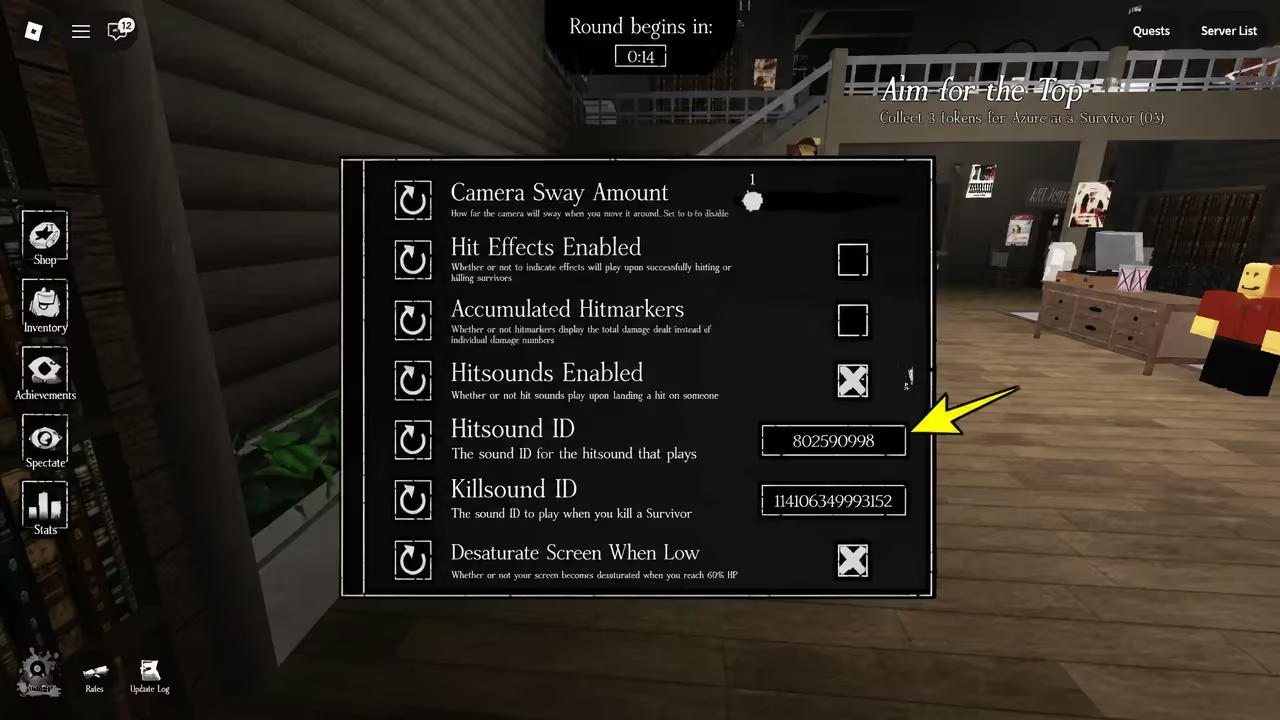
These IDs aren’t promo codes you redeem for a reward screen. They’re Roblox audio asset numbers you plug into the game’s custom hitsound field, and the sound tied to that number becomes your new hit or kill cue.
How to get more Forsaken Hitsound IDs
New hitsound IDs tend to surface as players discover audio assets that still play cleanly on Roblox, so the list changes over time as older uploads get taken down and new ones get shared. You can check in on the game itself through its Forsaken experience page, and the development team’s activity is visible through the Forsaken Dev Team community.
Are Hitsound IDs different from promo codes?
Yes. Promo codes in most Roblox games unlock currency, skins, or boosts through a redeem menu. Hitsound IDs are audio asset numbers you enter into a settings field to change what sound plays on a hit, and they don’t grant any in-game items or currency.
Keep a few favorites saved somewhere outside the game, since audio IDs can stop working if the original upload gets removed from Roblox, and you’ll want a quick replacement ready if that happens.






Leave a Reply