

Flicker is a Roblox experience where you can cash in codes from the developer for free Coins and cosmetic items like Paper Boxes. Redeeming them takes less than a minute, and every code below has been checked so you know exactly what still works.
Working Flicker codes
Punch these in now while they’re still live, since Flicker codes tend to get pulled without much warning.
600KLIKES
200 Coins and 1 Paper Box
New
WEAREBACK
500 Coins
New
How to redeem codes in Flicker
Codes in Flicker are case-sensitive, so copy each one exactly as it’s written above instead of retyping it from memory. Redemption happens right from the lobby, not through a menu or an external site.
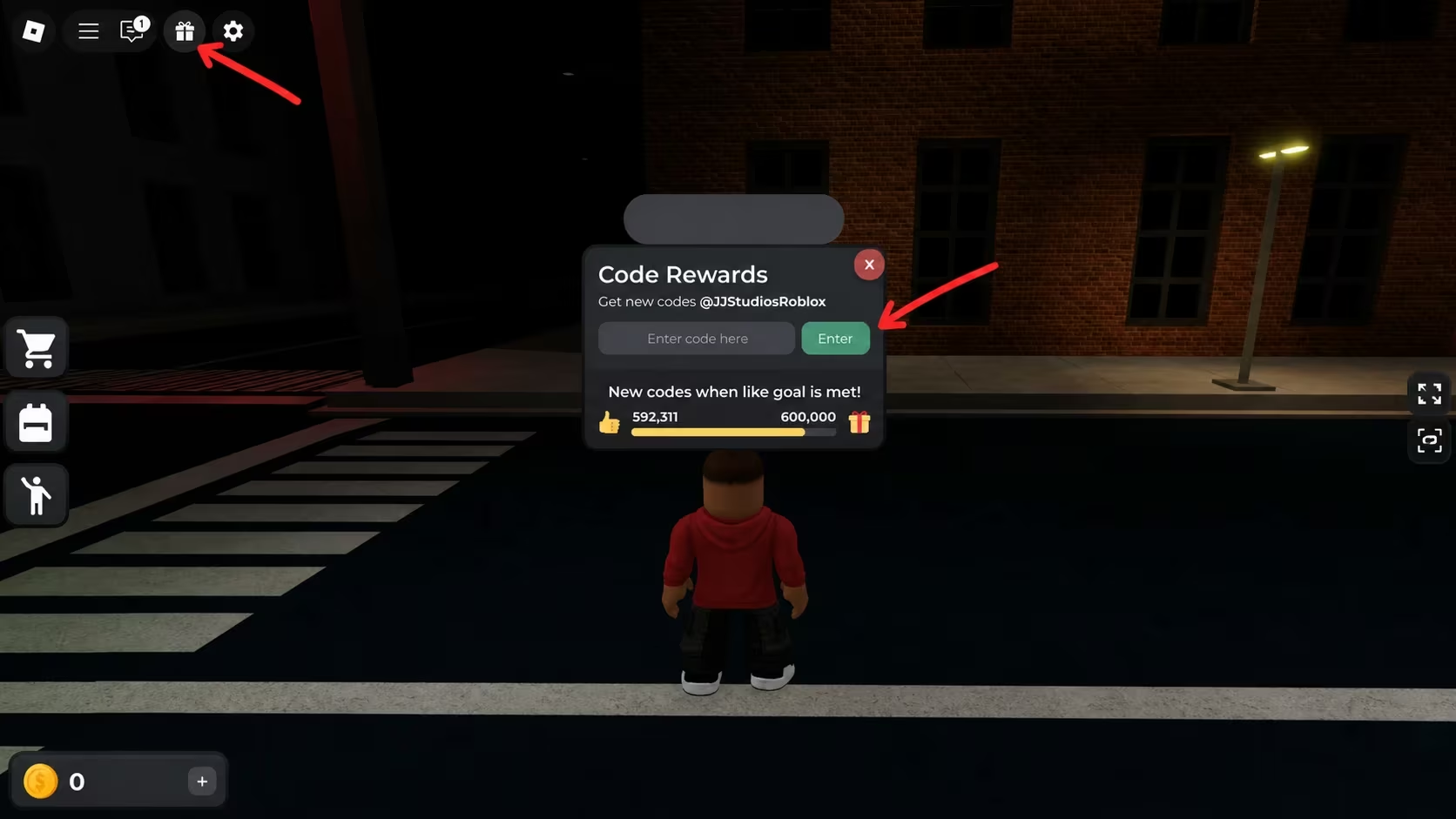
You can jump straight into Flicker through its Roblox experience page if you don’t already have it open.
Expired Flicker codes
These codes stopped working, so don’t waste a redemption attempt on them.
NOT_LIINK
500KLIKES
ITSASECRET
FIRSTCODE
800KLIKES
How to get more Flicker codes
New codes tend to show up around milestones, like Flicker’s like counts on Roblox hitting round numbers, which explains why several past and current codes reference like totals. The developer’s official Discord server is where you’ll catch new codes as soon as they’re announced, so it’s worth joining if you don’t want to miss one.
You can join the official server through this Flicker Discord invite. Once you’re in, check back whenever the game hits a new like milestone, since that’s historically when fresh codes tend to drop.
Why didn’t my code work?
The most common reason is a typo, since Flicker codes are case-sensitive and won’t register if the capitalization doesn’t match exactly. The other reason is that the code has simply expired, which is why it’s worth checking the working list above before trying again.
Working through the list above only takes a couple of minutes, and it’s free Coins and cosmetics for basically no effort. Redeem what’s active now, since there’s no telling how long 600KLIKES and WEAREBACK will stick around.

Leave a Reply