
Choose An Ability is a Roblox battle arena where you pick powers and fight your way through matches, and the developer hands out codes every so often that convert straight into Cash for the in-game Shop. Redeeming them takes a couple of minutes, but you have to join the right community first or the game won’t recognize your account.
Working Choose An Ability codes
Punch these in exactly as shown below, capital letters included, since the redemption box is picky about that.
AverageNozza
90 Cash
New
25KLIKES
Free Cash
New
FREE
250 Cash
New
waifu67
150 Cash
20KLIKES
200 Cash
You’ll know a code went through the moment your Cash total on screen jumps up. If nothing changes, double check the spelling and make sure you’re actually in the game’s community before trying again.
How to redeem codes in Choose An Ability
Codes in Choose An Ability only register if your account belongs to the game’s official Roblox community, so that’s your first move even before you launch the experience.
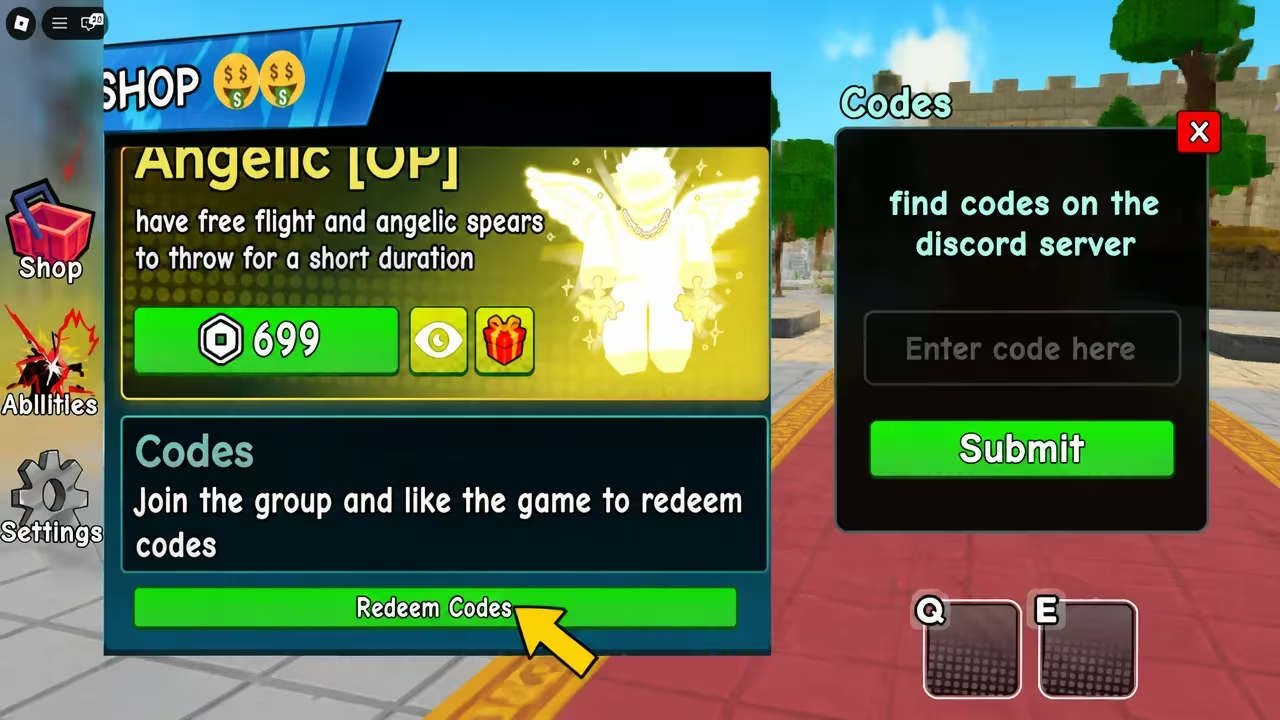
Note: Skipping the community join step is the most common reason a valid code gets rejected, so if a code isn’t landing, check your membership before assuming the code itself is dead.
Expired Choose An Ability codes
This one stopped working, so don’t waste a submit attempt on it.
7500LIKES
How to get more Choose An Ability codes
New codes for Choose An Ability tend to show up around like and follower milestones, so keeping an eye on the developer’s official channels is your best bet for catching them early. Joining the official Discord server puts you in front of announcements as soon as they’re posted, and staying in the Goofy Games Roblox community mentioned above also helps since that’s a requirement for redemption anyway.
Are Choose An Ability codes free?
Yes, every code listed above is free and hands out Cash you can spend in the Shop without paying anything.
Why didn’t my code work?
The most likely reason is that your account isn’t part of the Goofy Games community yet, since the game checks for that before it accepts anything typed into the Redeem Codes box. A typo or an already-expired code causes the same silent failure, so retype it carefully and compare it against the list above.
Cash from these codes stacks up fast if you redeem them all in one sitting, so it’s worth running through the working list the next time you load into the arena.






Leave a Reply