
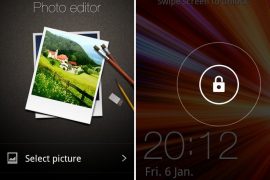
It’s time again, time for another leaked firmware from Samsung for the Galaxy S i9000. This time it’s another 2.3.6 firmware, dubbed as XXJVU, a successor to XXJVT for Open Europe region.
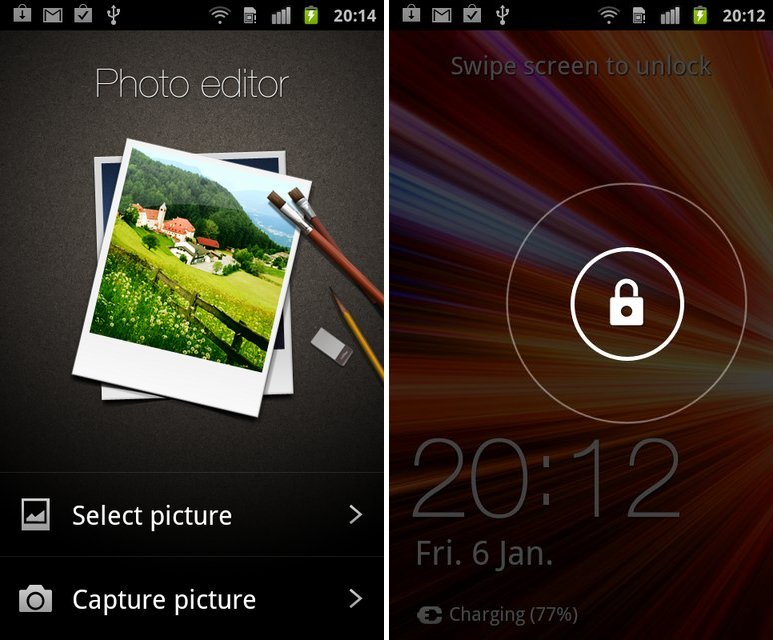
But it’s still not just another firmware for lovely Galaxy S1. Yep! It packs in new Lock Screen from Galaxy Note, a photo editor app from Galaxy S2 and lastly the Ice Cream Sandwich special Face Unlock feature, all besides the usual Android 2.3.6 Gingerbread. Check here to know more about what and what has changed with XXJVU firmware.
We know none of you, if not most of you, are happy with Sammy’s blunt announcement to not support Galaxy S with Android 4.0, but the XXJVU update is a major one which you’ll really enjoy, and should bring smiles on a bit choked faces of many Galaxy S users.
Yeah, we know you wanna try it, so we have a detailed guide right here on how to flash it.
Compatibility
This guide is applicable only for Samsung’s Galaxy S international version (GT-i9000). Check your phone’s version in Settings – About Phone. It has to be “GT-i9000” for this firmware to be compatible with your phone. If it’s not GT-i9000, simply don’t try this ROM on your android handset — don’t even think about it if you care about your android device.
Warning
The methods and procedures discussed here are considered risky and you should not attempt anything if you don’t know completely what it is. If any damage occurs to you or your device, we won’t be held liable — you only will be responsible, you’ve been warned!!!
Pre-Installation Tips:
- Installing/Flashing this ROM will erase your apps and data. So, it’s very important you back them up, before proceeding further. To backup your apps and important data — bookmarks, contacts, SMS, APNs (internet settings), etc. Restore APN settings if Internet isn’t working for you. This Android backup guide would help you. And if you’ve rooted your Galaxy S, you can save application’s data too, using Titanium backup(free app on android market) to backup apps with data. And use this this app only again to restore those apps with data.
- Drivers! — it’s important you’ve the proper drivers installed. Download links below:
- If you have Samsung’s PC software Kies installed, un-install it first because it may interrupt the flashing process. If you’ve installed it for sake of drivers which otherwise weren’t working, make sure you exit the Kies completely before beginning the procedure below.
How To Install XXJVU on Galaxy S i9000 (for experienced users)
Well, it’s pretty easy if you’ve already had fun flashing using Odin a decent number of times already. Download XXJVU (password: samfirmware.com) and install it using Odin3 v1.7. Put the *CODE* file in PDA tab, *Modem* file in Phone tab and *multi CSC* file in CSC tab. Put the .pit file in PIT tab and make sure Re-Partition is ticked too. Hit Start!
If you didn’t get what was said above, don’t worry one bit, a detailed guide for you is just below.
Step-By-Step Guide (for not so experienced users)
Although the guide below is very much detailed, step-by-step and sufficient for you to easily flash the XXJVU firmware on your Galaxy S, but in case if you want to watch a video of how you are going to do it, that is, flashing the XXJVU firmware is flashed using Odin, check out this video showing installation of an earlier firmware ‘XWJVB’ on Galaxy S. The procedure is same, so it would be helpful for those who are new.
- Download XXJVU firmware first. Filename: I9000XXJVU_I9000OXAJVU_OXA.rar. Size: 225.9 MB. Download Link. (password: samfirmware.com)
- Also download this PIT file: s1_odin_20100512.pit
- Extract the downloaded file ‘I9000XXJVU_I9000OXAJVU_OXA.rar’ to get these 3 files:
- CODE_I9000XXJVU_CL851880_REV03_user_low_ship.tar.md5
- GT-I9000-CSC-MULTI-OXAJVU.tar.md5
- MODEM_I9000XXJVU_REV_00_CL1059471.tar.md5
- Download Odin PC Software which we will be using to flash the XXJVU Android 2.3.6 ROM on Galaxy S. Filename: Odin3 v1.7.zip. Size: 192.55 KB. Download Link.
- Extract Odin3 v1.7.zip to get .exe file – Odin3 v1.7.exe. Run it when asked in step 8 below.
- Disconnect your phone if it’s connected to PC. Then Switch it Off. Wait 5-6 seconds for vibration to confirm complete switch off.
- Now, put the Galaxy S in “Download Mode” — press and hold these keys together: Volume_DOWN+Home+Power until a screen saying ‘Download Mode’ comes up.
- Open Odin (from step 5) — Odin3 v1.7.exe.
- Connect your phone to PC now. You should get the message “Added! !” under the Odin’s message box in the bottom left. If you don’t get “Added! !” message, than probably there is a problem with drivers. Make sure you’ve drivers installed (links given above under heading ‘Pre-Installation thoughts’).
- Now, in Odin, select these files at respective tabs (for visual help, see the screenshot at step 11 below):
- Click the PDA Tab, and select CODE_I9000XXJVU_CL851880_REV03_user_low_ship.tar.md5 (from step 3.1)
- Click the Phone Tab, and select MODEM_I9000XXJVU_REV_00_CL1092175.tar.md5 (from step 3.3)
- Click the CSC Tab, and select GT-I9000-CSC-MULTI-OXAJVU.tar.md5 (from step 3.2)
- Click the PIT Tab, and select s1_odin_20100512.pit (from step 2)
- Make sure the ‘Re-Partition’checkbox in ODIN is selected. Also, Auto Reboot and F.Reset Time checkboxes should be selected too. Leave everything else on Odin untouched.
- Double check everything said in step 10 and 11 above. Your Odin’s screen, after selecting all the files and ticking and not-ticking the checkboxes, should look like this:

- Now, hit the START button to begin the flashing process. When it finishes, your phone will automatically reboot, upon which you can unplug the cable. Plus, you’ll get a PASS (with green background) message in the left-most box at the very top of the Odin. (Check screenshot below)

- When it restarts, your Galaxy S will be running the Android OS, v2.3.6 XXJVU firmware.
- Off the screen and then open with the all new Galaxy Note ported lock screen. Find the Photo Editor app in app drawer, a port from Galaxy S2. And check the options for Face Unlock set up — go to Settings » Location and Security » Set Screen Lock. Enjoy!
- Lastly, if internet isn’t working, fill in the correct APN settings under mobile networks settings, under wireless and network settings.
Root and CWM for XXJVU
And before you ask, root for XXJVU isn’t out yet, which it should be in a matter of hours. We’ll update you with same as sson as we come to know of it.
Link to Root Galaxy S on XXJVU (also installs Clockworkmod recovery)
IMPORTANT NOTE: If Odin doesn’t seem to be progressing/doing anything for more than a minute, do the following:
Disconnect the phone from the PC, close ODIN, remove battery, re-insert it, turn phone on in Download mode again, and do the procedure again from Step 6.
Share your thoughts, observations and improvements (and disappointments) you see in the XXJVU firmware in comments below. If you face a problem in installation, don’t hesitate to ask us below.
Via XDA






1,133 responses to “New XXJVU Galaxy S Firmware Leaked. Updates Phone with Value Pack (Face Unlock, Photo Editor and New Lock Screen)”
Thank you for the great guide. Worked like a charm for me.
There is just one thing that doesn’t seem to work. I tried to restore a backup (created it after installing XXJVU) via CWM. What I got is a boot loop. I can’t even boot into recovery anymore. Tried this again after reinstalling XXJVU nd I get the same result with using the recovery console and the CWM manager.
Any suggestions?
First time flasher here!
I flashed the firmware and then rooted it according to the next post. Well, all good but some issues.
1) When I access the gallery, the phone says there are no photos. I had to install ES File Explorer to be able to see the photos I have.
2) If I take a photo, I cannot see it by pressing the preview on the bottom right hand corner on the camera screen.
3) I use the phone in Finnish and there are some language mixed ups sometimes in the menus. For example, when finished charging the battery, it says “vaihdettu” in Finnish which in English means “changed”. Quite funny.
4) A couple of times an Android application has crashed. I don’t remember the name exactly but it is one of those main applications, which always consume a lot of battery. The phone loses all the signal, I get an error message on the screen and I have to restart the phone. Once it happened after a call.
About backing up before flashing, I used Backup Master. It was a bit disappointing that it did not back up my phone book. I lost all my contacts as the phone was wiped clean. Well, I should have known this would happen because it didn’t say “contacts” in the back up options. Have to blame myself for that.
But putting aside the things above, with rooting, the phone is faster than before. The battery life is much better and as I am a newbie in all this, it’s all really exciting to me. Will go for a custom rom soon!
Cheers!
First time flasher here!
I flashed the firmware and then rooted it according to the next post. Well, all good but some issues.
1) When I access the gallery, the phone says there are no photos. I had to install ES File Explorer to be able to see the photos I have.
2) If I take a photo, I cannot see it by pressing the preview on the bottom right hand corner on the camera screen.
3) I use the phone in Finnish and there are some language mixed ups sometimes in the menus. For example, when finished charging the battery, it says “vaihdettu” in Finnish which in English means “changed”. Quite funny.
4) A couple of times an Android application has crashed. I don’t remember the name exactly but it is one of those main applications, which always consume a lot of battery. The phone loses all the signal, I get an error message on the screen and I have to restart the phone. Once it happened after a call.
About backing up before flashing, I used Backup Master. It was a bit disappointing that it did not back up my phone book. I lost all my contacts as the phone was wiped clean. Well, I should have known this would happen because it didn’t say “contacts” in the back up options. Have to blame myself for that.
But putting aside the things above, with rooting, the phone is faster than before. The battery life is much better and as I am a newbie in all this, it’s all really exciting to me. Will go for a custom rom soon!
Cheers!
First time flasher here!
I flashed the firmware and then rooted it according to the next post. Well, all good but some issues.
1) When I access the gallery, the phone says there are no photos. I had to install ES File Explorer to be able to see the photos I have.
2) If I take a photo, I cannot see it by pressing the preview on the bottom right hand corner on the camera screen.
3) I use the phone in Finnish and there are some language mixed ups sometimes in the menus. For example, when finished charging the battery, it says “vaihdettu” in Finnish which in English means “changed”. Quite funny.
4) A couple of times an Android application has crashed. I don’t remember the name exactly but it is one of those main applications, which always consume a lot of battery. The phone loses all the signal, I get an error message on the screen and I have to restart the phone. Once it happened after a call.
About backing up before flashing, I used Backup Master. It was a bit disappointing that it did not back up my phone book. I lost all my contacts as the phone was wiped clean. Well, I should have known this would happen because it didn’t say “contacts” in the back up options. Have to blame myself for that.
But putting aside the things above, with rooting, the phone is faster than before. The battery life is much better and as I am a newbie in all this, it’s all really exciting to me. Will go for a custom rom soon!
Cheers!
I new in this….can i try this on my i9000T???
men, i do that with my i9000m and work’s fine!
but i’m not change my modem! still the same GKG3
try this: http://forum.xda-developers.com/showthread.php?t=1379650
I new in this….can i try this on my i9000T???
men, i do that with my i9000m and work’s fine!
but i’m not change my modem! still the same GKG3
try this: http://forum.xda-developers.com/showthread.php?t=1379650
I new in this….can i try this on my i9000T???
men, i do that with my i9000m and work’s fine!
but i’m not change my modem! still the same GKG3
try this: http://forum.xda-developers.com/showthread.php?t=1379650
hi, im newbie here..i already flash this firmware XXJVU, unfortunately my phone can’t detect my packet data when i tried to connect to internet. but for calling i can. pls advise and help me..
As told in pre-installation tips above, you gotta fill the right APN settings (related to your carrier) in mobile network settings.
hi, im newbie here..i already flash this firmware XXJVU, unfortunately my phone can’t detect my packet data when i tried to connect to internet. but for calling i can. pls advise and help me..
As told in pre-installation tips above, you gotta fill the right APN settings (related to your carrier) in mobile network settings.
hi, im newbie here..i already flash this firmware XXJVU, unfortunately my phone can’t detect my packet data when i tried to connect to internet. but for calling i can. pls advise and help me..
As told in pre-installation tips above, you gotta fill the right APN settings (related to your carrier) in mobile network settings.
alright i did everything then i was supposed to do and then it wasnt going anywhere and so i disconnected from the computer took the batter out and then my phone locked up with the phone and triangle and computer symbols but odin still read my phone so i was about to restart it and it passed but now my phone wont turn on at all HELPPPPP!!!!!!!!!!!! PLEASE
alright i did everything then i was supposed to do and then it wasnt going anywhere and so i disconnected from the computer took the batter out and then my phone locked up with the phone and triangle and computer symbols but odin still read my phone so i was about to restart it and it passed but now my phone wont turn on at all HELPPPPP!!!!!!!!!!!! PLEASE
alright i did everything then i was supposed to do and then it wasnt going anywhere and so i disconnected from the computer took the batter out and then my phone locked up with the phone and triangle and computer symbols but odin still read my phone so i was about to restart it and it passed but now my phone wont turn on at all HELPPPPP!!!!!!!!!!!! PLEASE
Hey all! I think I have bricked my phone.
I tried to flash XXJVU from samfirmware using Odin3 v1.7 as told. I came from a Ginger Real rom. However, while flashing Odin got stuck. So I disconnected my phone from the PC, removed the battery and proceeded to flash again. However, I found that I was unable to turn on my phone anymore. It cannot power up or go intro recovery mode or go into download mode.
Any advice? Or is my phone bricked 🙁
Oh.. it skipped my attention earlier. How is the phone now? You sure your phone was i9000 (modem number, that is).
Anyway, since you mentioned you can no longer boot into download mode, I would advise you to buy USB Jig (from ebay, perhaps) and boot into download mode using that, and flash a firmware again. Jig doesn’t cost much.. just 2-3 dollars, I guess.
Let us know if you need any more help.
Its still bricked! I sure it’s GT-i9000. It says so in the settings as well as in the sticker beneath the battery. I did some research on the usb jig and it appears to be useful only for those with a soft-brick. My phone should be in a hard brick since it doesn’t on, go into download mode or recovery. It just shows a black screen. 🙁
I’m now looking at Jtag but it’s really complicated. sigh
USB Jig will help you. You should really buy a USB Jig and give it a try. I believe it will help you boot into download mode and then you can flash a firmware using Odin.
Hi there, this is easy , i will give you few advices let me know if they work
1. Turn off you device until u hear it vibrating
2. take out your battery, Press Menu, Down Volume and restart button
3. Insert your battery it should be on Download mode, plug it to your PC then Windows will recognize you USB.
Hope i make sense.
Hey all! I think I have bricked my phone.
I tried to flash XXJVU from samfirmware using Odin3 v1.7 as told. I came from a Ginger Real rom. However, while flashing Odin got stuck. So I disconnected my phone from the PC, removed the battery and proceeded to flash again. However, I found that I was unable to turn on my phone anymore. It cannot power up or go intro recovery mode or go into download mode.
Any advice? Or is my phone bricked 🙁
Oh.. it skipped my attention earlier. How is the phone now? You sure your phone was i9000 (modem number, that is).
Anyway, since you mentioned you can no longer boot into download mode, I would advise you to buy USB Jig (from ebay, perhaps) and boot into download mode using that, and flash a firmware again. Jig doesn’t cost much.. just 2-3 dollars, I guess.
Let us know if you need any more help.
Its still bricked! I sure it’s GT-i9000. It says so in the settings as well as in the sticker beneath the battery. I did some research on the usb jig and it appears to be useful only for those with a soft-brick. My phone should be in a hard brick since it doesn’t on, go into download mode or recovery. It just shows a black screen. 🙁
I’m now looking at Jtag but it’s really complicated. sigh
USB Jig will help you. You should really buy a USB Jig and give it a try. I believe it will help you boot into download mode and then you can flash a firmware using Odin.
Hi there, this is easy , i will give you few advices let me know if they work
1. Turn off you device until u hear it vibrating
2. take out your battery, Press Menu, Down Volume and restart button
3. Insert your battery it should be on Download mode, plug it to your PC then Windows will recognize you USB.
Hope i make sense.
Hey all! I think I have bricked my phone.
I tried to flash XXJVU from samfirmware using Odin3 v1.7 as told. I came from a Ginger Real rom. However, while flashing Odin got stuck. So I disconnected my phone from the PC, removed the battery and proceeded to flash again. However, I found that I was unable to turn on my phone anymore. It cannot power up or go intro recovery mode or go into download mode.
Any advice? Or is my phone bricked 🙁
Oh.. it skipped my attention earlier. How is the phone now? You sure your phone was i9000 (modem number, that is).
Anyway, since you mentioned you can no longer boot into download mode, I would advise you to buy USB Jig (from ebay, perhaps) and boot into download mode using that, and flash a firmware again. Jig doesn’t cost much.. just 2-3 dollars, I guess.
Let us know if you need any more help.
Its still bricked! I sure it’s GT-i9000. It says so in the settings as well as in the sticker beneath the battery. I did some research on the usb jig and it appears to be useful only for those with a soft-brick. My phone should be in a hard brick since it doesn’t on, go into download mode or recovery. It just shows a black screen. 🙁
I’m now looking at Jtag but it’s really complicated. sigh
USB Jig will help you. You should really buy a USB Jig and give it a try. I believe it will help you boot into download mode and then you can flash a firmware using Odin.
Hi there, this is easy , i will give you few advices let me know if they work
1. Turn off you device until u hear it vibrating
2. take out your battery, Press Menu, Down Volume and restart button
3. Insert your battery it should be on Download mode, plug it to your PC then Windows will recognize you USB.
Hope i make sense.
if i flash XXJVU can i install cyanogenmod 7 over it
if i flash XXJVU can i install cyanogenmod 7 over it
if i flash XXJVU can i install cyanogenmod 7 over it
HELPPPPPPP!!! cant see my file manager…. pics and videos are visible thru gallery. there is no other icon from where i can access my SD cards
HELPPPPPPP!!! cant see my file manager…. pics and videos are visible thru gallery. there is no other icon from where i can access my SD cards
HELPPPPPPP!!! cant see my file manager…. pics and videos are visible thru gallery. there is no other icon from where i can access my SD cards
hy… i have modified the picture of lockscreen and i wanna go back to stock, but i can’t do that!!!
someone can help me?
hy… i have modified the picture of lockscreen and i wanna go back to stock, but i can’t do that!!!
someone can help me?
hy… i have modified the picture of lockscreen and i wanna go back to stock, but i can’t do that!!!
someone can help me?
hello, I did the first step with the XXJVU Firmware, but when the phone reboot, the touch stopped to work. My phone is the I9000B, I was with a firmware 2.3.3.
Someone know if is possible to my touch screen works again?
my phone is with the same problem, my touch stopped to work … what do I do?
hello, I did the first step with the XXJVU Firmware, but when the phone reboot, the touch stopped to work. My phone is the I9000B, I was with a firmware 2.3.3.
Someone know if is possible to my touch screen works again?
my phone is with the same problem, my touch stopped to work … what do I do?
hello, I did the first step with the XXJVU Firmware, but when the phone reboot, the touch stopped to work. My phone is the I9000B, I was with a firmware 2.3.3.
Someone know if is possible to my touch screen works again?
my phone is with the same problem, my touch stopped to work … what do I do?
Thank you , it works perfectly :’)
Thank you , it works perfectly :’)
Thank you , it works perfectly :’)
my phone was running xxjvp custom rom, and rooted…can i flash this rom?
Yes you can 🙂
hi i just installed this rom,but after that i can not access the internet by google.but i can watch youtube and access the android market and other internet option.only thing i cant open the google browser.please help me,
Hi there, m new on flashing my phone. my phone model is gt-i9000 with firmware version 2.3.5 & gingerbread.xxjvt WILL xxjvu will work properly work on my phone?
and you said for “Open Europe region” i am in asia will my phone will work here? waiting for you reply and any tips then i will work on 2.3.6
Yes it will. You can flash it.
my phone was running xxjvp custom rom, and rooted…can i flash this rom?
Yes you can 🙂
my phone was running xxjvp custom rom, and rooted…can i flash this rom?
Yes you can 🙂
hi i just installed this rom,but after that i can not access the internet by google.but i can watch youtube and access the android market and other internet option.only thing i cant open the google browser.please help me,
hi i just installed this rom,but after that i can not access the internet by google.but i can watch youtube and access the android market and other internet option.only thing i cant open the google browser.please help me,
Hi there, m new on flashing my phone. my phone model is gt-i9000 with firmware version 2.3.5 & gingerbread.xxjvt WILL xxjvu will work properly work on my phone?
and you said for “Open Europe region” i am in asia will my phone will work here? waiting for you reply and any tips then i will work on 2.3.6
Yes it will. You can flash it.
Hi there, m new on flashing my phone. my phone model is gt-i9000 with firmware version 2.3.5 & gingerbread.xxjvt WILL xxjvu will work properly work on my phone?
and you said for “Open Europe region” i am in asia will my phone will work here? waiting for you reply and any tips then i will work on 2.3.6
Yes it will. You can flash it.
the only way i can hear people is with speaker phone whats up with that
the only way i can hear people is with speaker phone whats up with that
the only way i can hear people is with speaker phone whats up with that
Where is the Face Unlock ????
Under settings, I guess in security settings.
thanks
Where is the Face Unlock ????
Under settings, I guess in security settings.
thanks
Where is the Face Unlock ????
Under settings, I guess in security settings.
thanks
if I delete everything from my phone(GT-I9000) with a hard reset by using the usual combination of keys (
Volume_UP+Home+Power) will I be able to follow the steps above without troubles?Thank you!
Even if you don’t delete anything, it will work — just follow the steps carefully.
if I delete everything from my phone(GT-I9000) with a hard reset by using the usual combination of keys (
Volume_UP+Home+Power) will I be able to follow the steps above without troubles?Thank you!
Even if you don’t delete anything, it will work — just follow the steps carefully.
if I delete everything from my phone(GT-I9000) with a hard reset by using the usual combination of keys (
Volume_UP+Home+Power) will I be able to follow the steps above without troubles?Thank you!
Even if you don’t delete anything, it will work — just follow the steps carefully.
Thank you very much this work like a charm!!!