
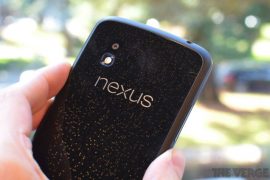
Besides being the first to get updated, the first to showcase newer versions of the Android OS, and of course stirring up a lot of speculation, leaks and hide-and-seek before launch, another common factor across devices in Google’s Nexus family, has been the lack of an SD card slot. Except for the first Nexus ever, the HTC Google Nexus One, no other Nexus device release thereafter has ever been equipped with an external memory card slot, and there have been 5 of them since then, not including the storage-capacity based variants of the Nexus 7.
Nexus users are forced to use the device’s internal storage and depend either on Google’s cloud services or third party cloud services like Dropbox to store the additional content they want to have handy. In some cases, the 8-16GB of storage that’s Nexus phones come with, tends to get tight, if the user is a storage hog. A simple solution to this would be to add an SD card slot. So why does Google continue to churn out fantastic, cutting-edge Nexus devices, but deliberately leave out something as simple and basic as an expandable memory card slot? It is certainly not a limitation of the Android OS, as proven by the multitude of devices out there with SD card slots. Nor is it a limitation of the hardware components used, as devices with lesser-endowed specs are easily able to include support for extra memory. Or is it a way to get people to be more and more dependent on Google Drive?
Last afternoon, Matias Duarte – who is the guru of the Android User Experience, or UX was fielding questions on all things Nexus and Jelly Bean on Google+, and apparently the question of the missing SD card slot on Nexus devices was raised, prompting Matias to provide a simple but logical response, which will clear all the myths that exist around this topic.
Quoting Matias, here’s why Nexus devices do not have SD card slots:
Everybody likes the idea of having an SD card, but in reality it’s just confusing for users.
If you’re saving photos, videos or music, where does it go? Is it on your phone? Or on your card? Should there be a setting? Prompt every time? What happens to the experience when you swap out the card? It’s just too complicated.
We take a different approach. Your Nexus has a fixed amount of space and your apps just seamlessly use it for you without you ever having to worry about files or volumes or any of that techy nonsense left over from the paleolithic era of computing.
With a Nexus you know exactly how much storage you get upfront and you can decide what’s the right size for you. That’s simple and good for users.
So there you have it, right from the source. While there may still be folks who might think otherwise, personally I have grown from wishing I had an SD card slot on a Nexus device, to feeling very pleased that I can store all my required content in just one place instead of two. What are your thoughts on this topic? Would you rather it be kept simple, like Google says, or would you rather have the option to add more memory to your device as and when you deem fit? Hit us with your thoughts in comments below.






66 responses to “Why no SDcard support on Nexus 4, Google’s Matias Duarte explains”
What is so confusing about having two origins of storage. On my S3, i simply keep HD movies, music and backups on the external memory and rest internal. I can keep whole TV seasons on my SD card which i upgraded from an 8GB to a 16GB. Something i would not be able to do if my device had fixed memory. This is the only reason i did not buy a nexus device considering it was cheaper too. I really want a pure android experience, so next time i will get an android phone that has a open binaries like Google Edition S4 for example.
Google says “Think Big” so why does Google is thinking too small about storage memory in nexus devices and providing small space on their flag ship device nexus 4….
I also ran out of space in my nexus 4….
Google says “Think Big” so why does Google is thinking too small about storage memory in nexus devices and providing small space on their flag ship device nexus 4….
I also ran out of space in my nexus 4….
Google says “Think Big” so why does Google is thinking too small about storage memory in nexus devices and providing small space on their flag ship device nexus 4….
I also ran out of space in my nexus 4….
Well the reason provided for lack of external memory is complete nonsense. I wish google would increase the memory to 32GB and 64GB like Apple’s iphones. Otherwise, the Nexus 4 is perfect. 🙂
Well the reason provided for lack of external memory is complete nonsense. I wish google would increase the memory to 32GB and 64GB like Apple’s iphones. Otherwise, the Nexus 4 is perfect. 🙂
Well the reason provided for lack of external memory is complete nonsense. I wish google would increase the memory to 32GB and 64GB like Apple’s iphones. Otherwise, the Nexus 4 is perfect. 🙂