
Seems like Android 5.0 Lollipop update has broken functionality of all the data toggle widgets and apps on the Play Store. And by the looks of things, it seems these apps would require root access to function now on Android 5.0. It remains to be seen what developers come up as a solution to this.
However, unless you just have to toggle data via widgets, Android 5.0 Lollipop comes with a better solution; you can toggle data directly right from the Notification bar. It’ll be a two-click process though.
TOGGLE DATA ON ANDROID 5.0 LOLLIPOP
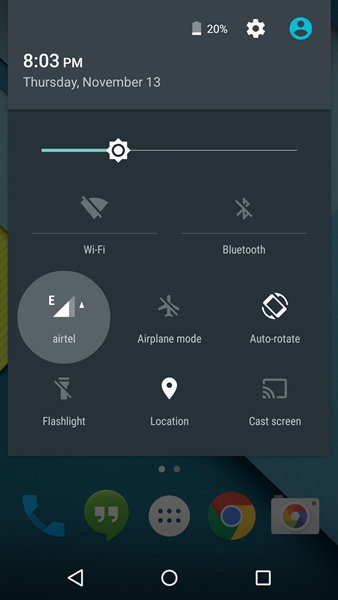
Pull down the notification bar on your Android device running Lollipop and touch the Network icon as shown in screenshot below.
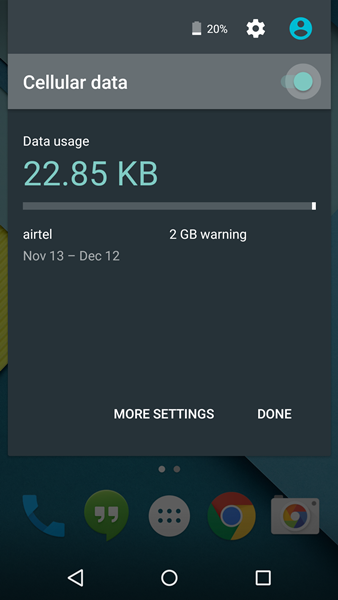
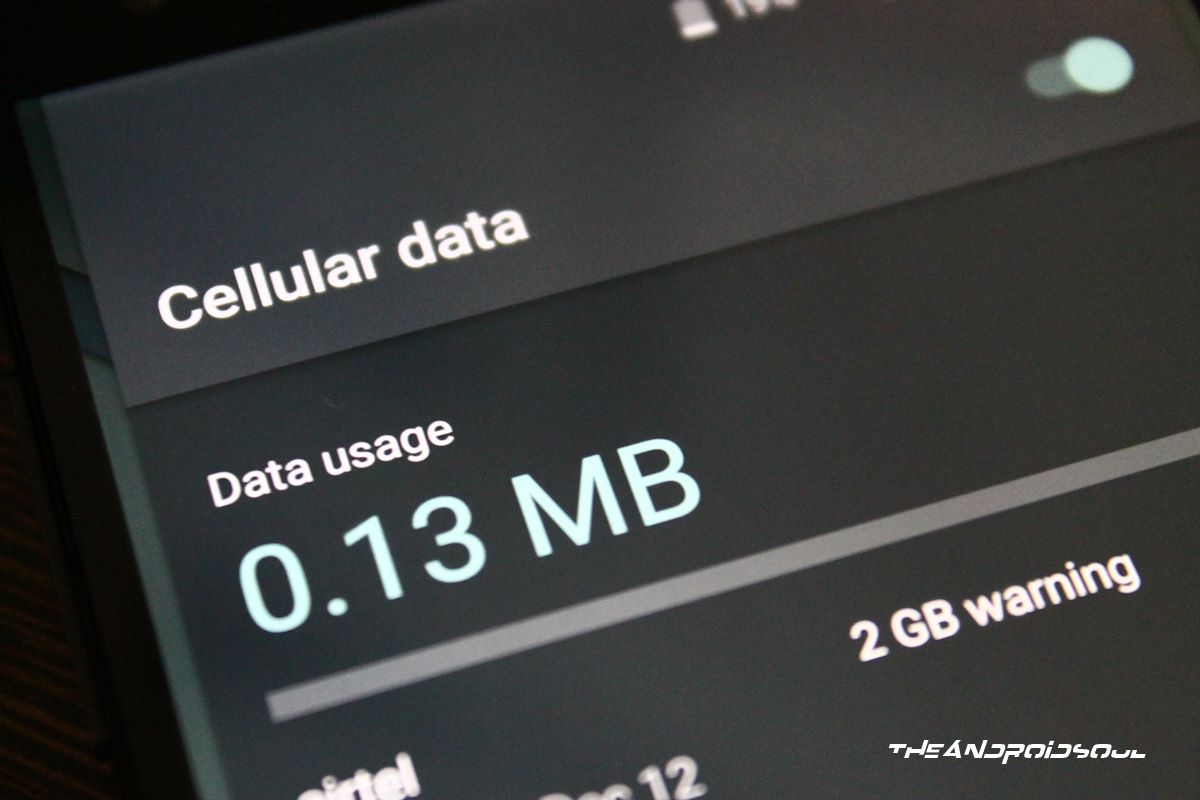
You’ll see a screen showing your Cellular data usage statistics. And there’ll also be a toggle button in upper right side next to “Cellular data”. Touch the Toggle button or the “Cellular data” text itself to toggle data On/Off on your device running Android 5.0 Lollipop.
If you own a Samsung or LG device, then you may have a different notification bar. And you’ll already have the toggles in place like you do on your KitKat based firmware on devices from these manufacturers.
But you need a widget?
Well, for folks among us who’d still prefer to use a widget to toggle data on/off, there’s an app on the Play store that works on Android 5.0 but it requires root access. You can check it out at the Play store link below. The app is Paid on the Play store, however, the developer was kind enough and has provided us a the .apk file for free of the app.
► Toggle Data 5.0 (root) [PAID] | Download Toggle Data 5.0 (root) APK [FREE]




24 responses to “How to Toggle Data On/Off on Android 5.0 Lollipop”
2 swipes and 2 taps. That is a pain in the arsenal!!!
Bigtime. If your phone is locked, though, it is only one swipe and two clicks for some mysterious reason.
root? to much for me. I’m really pissed at this!!!
2 swipes and 2 taps. That is a pain in the arsenal!!!
2 swipes and 2 taps. That is a pain in the arsenal!!!
2 swipes and 2 taps. That is a pain in the arsenal!!!
Bigtime. If your phone is locked, though, it is only one swipe and two clicks for some mysterious reason.
2 swipes and 2 taps. That is a pain in the arsenal!!!
Bigtime. If your phone is locked, though, it is only one swipe and two clicks for some mysterious reason.
root? to much for me. I’m really pissed at this!!!
root? to much for me. I’m really pissed at this!!!
Power toggles and notification toggles don’t work now. Very annoying. Hope someone figures out a nonroot solution.
Power toggles and notification toggles don’t work now. Very annoying. Hope someone figures out a nonroot solution.
Power toggles and notification toggles don’t work now. Very annoying. Hope someone figures out a nonroot solution.
Power toggles and notification toggles don’t work now. Very annoying. Hope someone figures out a nonroot solution.
I couldn’t find a solution for this with the S5 and Touchwiz…
I couldn’t find a solution for this with the S5 and Touchwiz…
I couldn’t find a solution for this with the S5 and Touchwiz…
This is not ‘better’. My 1 click solution has been mutilated for literally no reason.
This is not ‘better’. My 1 click solution has been mutilated for literally no reason.
This is not ‘better’. My 1 click solution has been mutilated for literally no reason.
AT&T Samsung S5 running 5.0, no carrier option in pulldown menu. No apps/widgets work for toggling data. (Hey, Google & AT&T – WTF???!!!)
Solution is: pulldown menu, switch airplane mode on, switch WiFi back on. Requires 3 taps (one to confirm airplane mode) but functional.
AT&T Samsung S5 running 5.0, no carrier option in pulldown menu. No apps/widgets work for toggling data. (Hey, Google & AT&T – WTF???!!!)
Solution is: pulldown menu, switch airplane mode on, switch WiFi back on. Requires 3 taps (one to confirm airplane mode) but functional.
AT&T Samsung S5 running 5.0, no carrier option in pulldown menu. No apps/widgets work for toggling data. (Hey, Google & AT&T – WTF???!!!)
Solution is: pulldown menu, switch airplane mode on, switch WiFi back on. Requires 3 taps (one to confirm airplane mode) but functional.