

We were as surprised as you when we learned that a Marshmallow update for T-Mobile Galaxy Note 5 (SM-N920T) is already out to one user, who cared enough for the rest of Android fans to create and share a system dump out of it. Thankfully though, an Odin flashable TAR has now been made of that dump, which allows you to install the leaked Samsung Android 6.0 Marshmallow update on your own T-Mobile Note 5.
Yes, you would soon have a custom ROM based on leaked official Marshmallow update on other unlocked Note 5 sets like international one (SM-N920C/G/i).
Although this is official Samsung Marshmallow update for Note 5, and isn’t based on AOSP code, this still breaks yours device’s warranty.
That’s because it’s only a system dump, code for system partition, and lacks official boot and recovery images. So, installing this will break KNOX flag, and your device’s warranty along with KNOX security will be gone.
That said, if you love latest OS, then give it a go. If you have rooted or installed TWRP recovery on your Note 5 earlier, then your warranty is already void, and KNOX flag is already broken, so you don’t need to worry about them anymore now.
Downloads
Supported devices
- T-Mobile Galaxy Note 5, model no. SM-G920T
- Don’t try this on any other device whose model no. is not as given above!
Disclaimer
Installing an official firmware through Odin doesn’t void your device’s warranty, but it remains an unofficial process and thus you need to be cautious of it. In any case, you only are responsible for your device. We won’t be liable if any damage occurs to your device and/or its components.
Backup!
Backup important files stored on your device before proceeding with the steps below, so that in case something goes wrong you’ll have backup of all your important files. Sometimes, Odin installation may delete everything on your device!
Step-by-step Guide
- Go to Settings > About device. Now tap on ‘Build no.’ for about 7-8 times, until you get the toast message ‘You’re now a developer’.
- No go back to Settings > Developer options. Now, locate ‘OEM unlock’ option and enable using its toggle button. Tap on OK to accept the pop-up message.
- Power off your Note 5. Wait 6-7 seconds after screen goes off.
- Press and hold the three buttons Volume down + Power + Home together until you see warning screen.
- Press Volume Up to continue to download mode.


- You cannot proceed until you get the Added!! message, which confirms that Odin has recognized your device.
- If you don’t get Added!! message, you need to install/re-install drivers again, and use the original cable that came with device. Mostly, drivers are the problem (look at step 2 above).
- You can try different USB ports on your PC too.
- Info: When you load files into Odin, it checks the md5 of firmware file, which takes time. So, simply wait until that’s done and the firmware file is loaded. Don’t worry if Odin gets unresponsive for a while, it’s normal. Binary size will also show up in Odin.
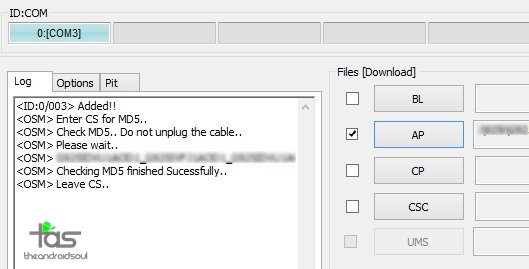
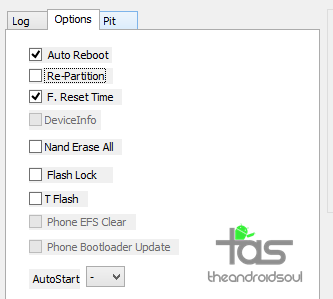

- If Odin gets stuck at setup connection, then you need to do this all again. Disconnect your device, close Odin, boot device into download mode again, open Odin, and then select the file and flash it again as said above.
- If you get FAIL in the top left box, then also you need to flash the file again as stated just above.
- Power off your Note 5. Wait 6-7 seconds after screen goes off.
- Press and hold the three buttons Volume Up + Power + Home together until you see Samsung’s logo. You’ll soon enter recovery mode.
That’s it.
Need help?
Sure let us know via comments below in case you need any help or have any questions over how to install this leaked Marshmallow update on your T-Mobile Note 5.
Via thatotherguy..




One response to “[TAR] Download T-Mobile Galaxy Note 5 Marshmallow update firmware”
what the hell, G920T is s6 fw not note 5(n920t)