
If you are a Twitter user, obviously you must be aware of the 140-character limit of tweets. It’s the distinguishing factor of Twitter yet one of the most infuriating things about it. Consequently, if you want to publish long tweets i.e. tweets that have more than 140 characters, you either have to upload a screenshot of your tweet text written in notes app or split the long tweet into multiple tweets.
However, splitting tweets is a manual and tedious task. You have to split your long tweet into 140 characters then split it into another tweet and so on. Moreover, you have to number it manually like 1/n or 1/3 etc.
Also read: Facebook app: Tips and tricks you should know
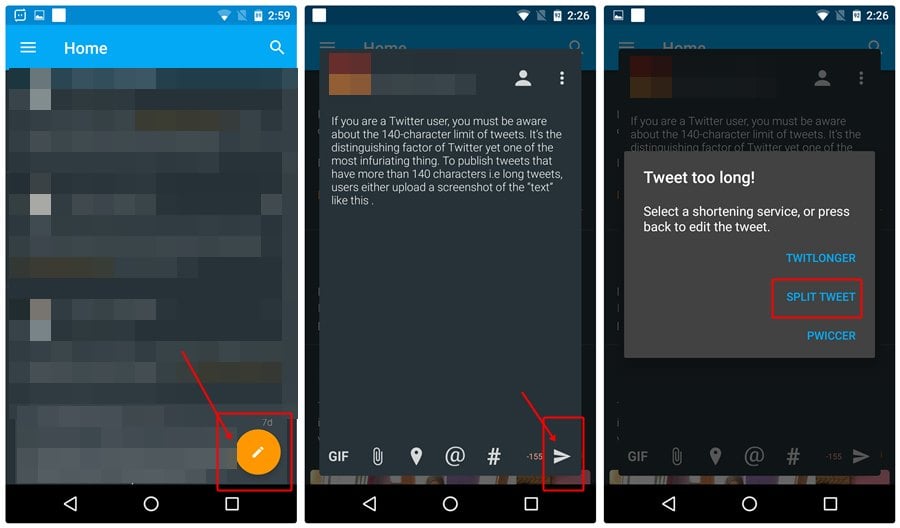
But thanks to the third party app “Talon for Twitter”, it splits and sends long tweets easily. The app automatically splits your long text into multiple 140-character tweets and publishes them with the number series like 1/n where n is the number of tweets, without you having to do anything.
If you are still confused how this works, here is a step-by-step guide for the same.
Also read: Instagram tips and tricks for beginners
Also read: 8 cool new WhatsApp Status Tips and Tricks
Your text is split into small tweets each having 140 characters and published automatically. Awesome, right?
Do you know of an easier or an alternative way? Feel free to share your experience below.