
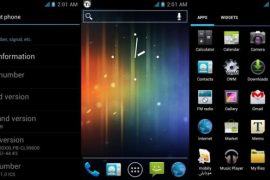
A few days ago, we told you about the latest XXLPB Ice Cream Sandwich firmware leak for the Samsung Galaxy S2. XDA developer althebyani has created a new ICS custom ROM based on XXLPB, mixed with CM9 source, and done away with the TouchWiz UI, to give the ROM a clean, AOSP look. If you prefer AOSP or stock Google UI over Touchwiz, this is definitely one to try out.
A quick peek at the features of Thebyani ROM:
Features :
- Fast booting.
- GPS is fixed.
- Pure ICS.
- Awesome Battery life and smoothness.
- Rooted.
- Added ICS browser.
- Added Memo.
- Added Google Music app.
- Added New boot animation.
Read on to find out how you can get this ROM running on your Galaxy S2
Warning!
The methods and procedures discussed here are considered risky and you should not attempt anything if you don’t know exactly what you are doing. If any damage occurs to you or your device, including a bricked, non-functional device, we won’t be held liable. You have been forewarned!!!
Compatibility
This Rom and the guide below is compatible only and only with Galaxy S2, model number i9100. It’s not compatible with any other device. Check your device’s model number in Settings » About phone.
Download Links
→ Thebyani ICS ROM | Mirror 1 | Mirror 2 | Mirror 3
Filename: Thebyani_V1.0_ICS.zip | Size: 205.9 MB
ROM Info
Developer: althebyani
Original development thread: HERE
Pre-Installation Requirements
- Rooted Galaxy S2 with ClockworkMod recovery installed
- Fully Charged Battery
- This procedure will wipe all your apps, data and settings (but it will NOT touch your SD cards, so don’t worry about those). Backup your Apps and important data — bookmarks, contacts, SMS, APNs (internet settings), etc. This Android backup guide would help you.
How To Install Thebyani ICS ROM on Samsung Galaxy S2
- Download the Thebyani ICS ROM (link provided above) to your desktop
- Transfer the downloaded zip file to the root of SD card on your phone.
- Now power off the phone and reboot to recovery (Hold Volume Up and the Power button together & Release when you see the Samsung Galaxy S2 logo)
- Perform a full Wipe.
- Wipe data / factory reset –> then Select Yes- Wipe data/Factory reset on the next screen
- Wipe Cache Partition –> then Select Yes- Wipe cache partition on the next screen
- From the main menu, select Advanced, and then Wipe Dalvik Cache –>then Select Yes- Wipe Dalvik cache on the next screen
- Now scroll to “Install zip from sdcard” and select it.
- Select “Choose zip from sdcard”. Scroll to the file you transferred in Step 2 and select it.
- Now confirm installation by selecting “Yes — Install Thebyani_V1.0_ICS.zip. The ROM will start installing.
- After the installation is complete, select “go back” and then select “reboot system now” to reboot your phone.
- That’s it!! Enjoy Thebyani Ice Cream Sandwich on your Galaxy S2.
Let us know about your AOSP Ice Cream Sandwich experience in comments below.






30 responses to “Install Android 4.0 on Galaxy S2 with Thebyani Rom with ICS Launcher in Place of Touchwiz”
Too many problems hangs and Exchange fails. Going to go back to AndyX ROM
Too many problems hangs and Exchange fails. Going to go back to AndyX ROM
Will not connect to internet unless on wi-fi !!!
Have installed this and having no issues at all.
Only issue I had was with Chrome Beta but that is with Chrome and not the updated firmware.
Nice build.
Will not connect to internet unless on wi-fi !!!
Having issues with 3G connection. Trying custom apn config.
Yes, that would work — just insert your carrier’s settings.
how do I do that? :s
Maybe you should call your carrier’s helpline and ask the apn settings from them. Then, insert those settings by creating and new apn under mobile and network settings.
okay thanky you 🙂
Have installed this and having no issues at all.
Only issue I had was with Chrome Beta but that is with Chrome and not the updated firmware.
Nice build.
Having issues with 3G connection. Trying custom apn config.
Yes, that would work — just insert your carrier’s settings.
how do I do that? :s
Maybe you should call your carrier’s helpline and ask the apn settings from them. Then, insert those settings by creating and new apn under mobile and network settings.
okay thanky you 🙂
Will this work on S2 LTE (or Skyrocket)?
Nope 🙁
Will this work on S2 LTE (or Skyrocket)?
Nope 🙁
Do you think this is a better build that the Spike.Pure.ICS-v3.0? I’ve been running it for a few days now, and I think it is stable anough for everyday use… Sometimes apps stop responding etc, but of course is to be expected…
Do you think this is a better build that the Spike.Pure.ICS-v3.0? I’ve been running it for a few days now, and I think it is stable anough for everyday use… Sometimes apps stop responding etc, but of course is to be expected…
Does the video camera, and youtube work?
I think it does.
Does the video camera, and youtube work?
I think it does.
Great ROM, ultra fast ICS and great performance… can’t seem to get flash working using Opera tho. Any suggestions?? (i’ve already re-downloaded the adobe flash stuff from the Market)
Great ROM, ultra fast ICS and great performance… can’t seem to get flash working using Opera tho. Any suggestions?? (i’ve already re-downloaded the adobe flash stuff from the Market)
work good
work good