
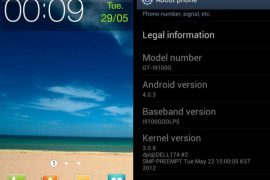
The biggest question on the minds of those who bought the i9100G variant of the Samsung Galaxy S2 was when they would be getting the Ice Cream Sandwich Android 4.0 update (some even thinking they wouldn’t get it at all). That question seemed to have been answered a few weeks back when there were reports of some users getting the update over the air, which turned out to be false.
But Samsung has finally released the Android 4.0 update for the Galaxy S2 i9100G, for real this time. The build number for the ICS update for i9100G is XXLPQ, which is the same major ICS update for original i9100 model too. The XXLPQ ICS update is rolling out to users in India and should see worldwide availability soon. However, if you don’t intend to wait for the update to become available for your I9100G, you can manually flash it using this guide.
NOTE: Even though this firmware is for the Indian i9100G, it should work on i9100G in all countries, but that is not a guarantee. So if you want to play it safe, you should wait for the update to hit your device officially or wait for other regions firmware to become available for manual flashing.
Let’s look at how the i9100G can be updated to Ice Cream Sandwich Android 4.0.3 with XXLPQ firmware.
Compatibility
This firmware and the guide below are compatible only and only with Galaxy S2, model number I9100G. It’s not compatible with the I9100 or any other device. Check your device’s model number in: Settings » About phone.
Warning!
The methods and procedures discussed here are considered risky and you should not attempt anything if you don’t know completely what it is. If any damage occurs to your device, we won’t be held liable.
How to Install XXLPQ Firmware on Galaxy S2 i9100G
- This procedure will wipe all your apps, data and settings (but it will NOT touch your SD cards, so don’t worry about those). Backup your Apps and important data — bookmarks, contacts, SMS, APNs (internet settings), etc. This Android backup guide would help you.
Important! Don’t forget to at least make a backup of your APN settings, which you can restore later if your data connection does not work after installing the ROM. Use the backup guide to find out how. - It’s important you’ve the proper drivers for the phone installed. If you have installed Samsung’s Kies software, you already have the drivers, so download them only if you haven’t installed Kies.
Download Drivers | Alternate Link for Drivers - Download the firmware.
Download Link | Alternate Link 1 | Alternate Link 2
Filename: I9100XWLPD_I9100NEELP4_NEE.zip | Size: 397 MB - Extract the downloaded zip file once to get the following files (you might see the file name end with .tar instead of .md5 as the file extension is usually hidden, so it’s normal):
- I9100GXXLPQ_I9100GODDLP7_I9100GDDLP5_HOME.tar.md5
- SS_DL.dll [ignore this one]
- Download Odin 1.85 from → here.
Filename: Odin 1.85.zip | Size: 199 KB - Extract the contents of the Odin 1.85.zip file to a folder.
- Disconnect your phone if it’s connected to PC, then switch it off.
- Now, put the Galaxy S2 in Download Mode — press and hold these keys together: Volume Down + Home + Power. A Warning! screen will come up; press Volume Up key to continue to enter Download Mode.
- Open Odin — double-click the Odin3 v1.85.exe that you got after extracting the file Odin 1.85.zip.
- In ODIN, click on the PDA button, then select the I9100GXXLPQ_I9100GODDLP7_I9100GDDLP5_HOME.tar.md5 file obtained in step 4.1.
- Important! Do not make any other changes in Odin except selecting the required files as given in step 10. Leave all other options as they are.
- Connect your phone to PC now. You should get the message “Added!” under Odin’s message box in the bottom left.
If you don’t get this message, then probably there is a problem with drivers. Make sure you’ve proper drivers installed (check step 2). Also, uninstall Kies from the Control Panel as well (this will leave the drivers on the computer but remove Kies which can interfere with the procedure). - Now, hit the START button to start flashing of XXLPQ on your Galaxy S2. When the flashing is complete, your phone will automatically reboot — and when you see the Samsung logo, you can safely unplug the cable. Plus, you’ll get a PASS message (with green background) in the left-most box at the very top of the Odin. What to do if Odin gets stuck? If ODIN gets stuck and doesn’t seem to be doing anything, or you get a FAIL message (with red background) in ODIN, disconnect the phone from the PC, close ODIN, remove battery, re-insert it, turn phone on in Download mode again, and do the procedure again from Step 9.
- After you’ve got the PASS message, it’s possible — and okay — that phone might stuck at S logo, and not boot up completely. t’s okay, just follow the steps 14.1 to 14.4, and you will be fine. And, if it boots up fine, without getting stuck at S logo, you’re fine. The Android 4.0 installation has been done successfully. So, do the following if your i9100G doesn’t move beyond the S logo when booting up after getting PASS in Odin (make sureyou wait some good 10-15 mins to confirm that it’s stuck):
- Boot to recovery mode — for which, first power off phone and after screen goes off, wait for 5-6 seconds, and then press and hold Home + Volume Up + Power keys together. Once you are in recovery mode, use volume keys to move the selection up and down and power or home key to select the option.
- Go to Factory Reset and select it. Select Yes on next screen.
- Now, go to Wipe Cache and select it. Confirm Yes on next screen.
- Now, select reboot system now to boot your Galaxy S2 i9100G. It will boot up fine. And you’ll have official Android 4.0, Ice Cream Sandwich firmware on your Galaxy S2 i9100, the XXLPQ. Go to Settings and scroll down and select About Phone and check the info there.
- If you run into any roadblocks while flashing the firmware, let us know and we’ll help you out.
- [Root] For those who want dear root access back, here’s how to root i9100G on XXLPQ ICS firmware.
Congratulations, you’ll successfully updated to the much-awaited Ice Cream Sandwich Android 4.0 firmware on your Galaxy S2 i9100G. Let us know how it works for you, in the comments below.







201 responses to “i9100GXXLPQ — Ice Cream Sandwich Update for i9100G Galaxy S2 Finally Arrives. Flash With Odin Now!”
The hotfile and ifile.it links are 397.9 MB while the rapidshare link is 417MB, even though all have the same filename. Why??
Rapidshare reports the wrong size but when you download it, it will be 397.9 MB as well. So don’t worry. Use either of the three links to download..
I have tried to update my I9100G but it’s failed with RED BACKGROUND message Here are my phone details :
pda: i9100GGXWLC2
Phone:i9100GDDKL1
csc: I9100OXAKPA
Can you please help am eagrly waiting for the ICS update
Here is the log….
Added!!
Enter CS for MD5..
Check MD5.. Do not unplug the cable..
Please wait..
I9100GXXLPQ_I9100GODDLP7_I9100GDDLP5_HOME.tar.md5 is valid.
Checking MD5 finished Sucessfully..
Leave CS..
Odin v.3 engine (ID:19)..
File analysis..
SetupConnection..
Can’t open the serial(COM) port.
All threads completed. (succeed 0 / failed 1)
Removed!!
I think your device isn’t being recognized by Odin. Install drivers again. And try other port on PC after restarting it.
Also, remove Kies if you have it installed.. And try another USB port as well as Kapil suggested..
i also get the same error
install fresh drivers from sammobile.com… i had the same problem n after doing it its working fine… after driver install do remember to restart the pc
ghanta
The hotfile and ifile.it links are 397.9 MB while the rapidshare link is 417MB, even though all have the same filename. Why??
Rapidshare reports the wrong size but when you download it, it will be 397.9 MB as well. So don’t worry. Use either of the three links to download..
The hotfile and ifile.it links are 397.9 MB while the rapidshare link is 417MB, even though all have the same filename. Why??
Rapidshare reports the wrong size but when you download it, it will be 397.9 MB as well. So don’t worry. Use either of the three links to download..
Dear Abhijeet ..first thank you for the great information ..second can you explain to me how to root the phone after upgrading to ICS …..sorry I’m new to android and I need a full explanation. thank you
All you need is this guide — https://nerdschalk.com/root-i9100g-galaxy-s2-on-xxlpq-ice-cream-sandwich-firmware/
All you need is this guide — https://nerdschalk.com/root-i9100g-galaxy-s2-on-xxlpq-ice-cream-sandwich-firmware/
cant enter recovery mode zzzzz
Did you get PASS on Odin after step 13?
Is this method would make my rooted phone unroot?
Yes, this will unroot your phone because it will install the fresh Samsung firmware which comes unrooted. You can root it though, following the last step, 16, in the above guide (just added for those who want root access back).
HELLO Abhijeet..i have tried many time but odin gets stuck…and got a fail message…and also tried all step as u told…but same problem…any solution???
Try this: restart both phone and PC. Switch off phone. Remove battery for 4-5 seconds and then place it back. Then, use any other USB plug to connect phone to computer. Also, if you have desktop, use the USB plug in the back side. Simply try different ports. Do all this and let me know whether it works or not. Also, use the USB cable that came with phone. Also, you can also try using your friend’s PC/laptop for this.
Oh, last thing, if nothing works, turn the phone On, and then enable USB debugging under settings – applications, then try again.
I have tried to update my I9100G but it’s failed with RED BACKGROUND message Here are my phone details :
pda: i9100GGXWLC2
Phone:i9100GDDKL1
csc: I9100OXAKPA
Can you please help am eagrly waiting for the ICS update
I have tried to update my I9100G but it’s failed with RED BACKGROUND message Here are my phone details :
pda: i9100GGXWLC2
Phone:i9100GDDKL1
csc: I9100OXAKPA
Can you please help am eagrly waiting for the ICS update
Here is the log….
Added!!
Enter CS for MD5..
Check MD5.. Do not unplug the cable..
Please wait..
I9100GXXLPQ_I9100GODDLP7_I9100GDDLP5_HOME.tar.md5 is valid.
Checking MD5 finished Sucessfully..
Leave CS..
Odin v.3 engine (ID:19)..
File analysis..
SetupConnection..
Can’t open the serial(COM) port.
All threads completed. (succeed 0 / failed 1)
Removed!!
I think your device isn’t being recognized by Odin. Install drivers again. And try other port on PC after restarting it.
Also, remove Kies if you have it installed.. And try another USB port as well as Kapil suggested..
i also get the same error
install fresh drivers from sammobile.com… i had the same problem n after doing it its working fine… after driver install do remember to restart the pc
Here is the log….
Added!!
Enter CS for MD5..
Check MD5.. Do not unplug the cable..
Please wait..
I9100GXXLPQ_I9100GODDLP7_I9100GDDLP5_HOME.tar.md5 is valid.
Checking MD5 finished Sucessfully..
Leave CS..
Odin v.3 engine (ID:19)..
File analysis..
SetupConnection..
Can’t open the serial(COM) port.
All threads completed. (succeed 0 / failed 1)
Removed!!
I think your device isn’t being recognized by Odin. Install drivers again. And try other port on PC after restarting it.
Also, remove Kies if you have it installed.. And try another USB port as well as Kapil suggested..
i also get the same error
install fresh drivers from sammobile.com… i had the same problem n after doing it its working fine… after driver install do remember to restart the pc
ghanta
ghanta
Dear Abhijeet ..first thank you for the great information ..second can you explain to me how to root the phone after upgrading to ICS …..sorry I’m new to android and I need a full explanation. thank you
All you need is this guide — https://nerdschalk.com/root-i9100g-galaxy-s2-on-xxlpq-ice-cream-sandwich-firmware/
Dear Abhijeet ..first thank you for the great information ..second can you explain to me how to root the phone after upgrading to ICS …..sorry I’m new to android and I need a full explanation. thank you
All you need is this guide — https://nerdschalk.com/root-i9100g-galaxy-s2-on-xxlpq-ice-cream-sandwich-firmware/
cant enter recovery mode zzzzz
Did you get PASS on Odin after step 13?
cant enter recovery mode zzzzz
Did you get PASS on Odin after step 13?
Is this method would make my rooted phone unroot?
Yes, this will unroot your phone because it will install the fresh Samsung firmware which comes unrooted. You can root it though, following the last step, 16, in the above guide (just added for those who want root access back).
Is this method would make my rooted phone unroot?
Yes, this will unroot your phone because it will install the fresh Samsung firmware which comes unrooted. You can root it though, following the last step, 16, in the above guide (just added for those who want root access back).
HELLO Abhijeet..i have tried many time but odin gets stuck…and got a fail message…and also tried all step as u told…but same problem…any solution???
Try this: restart both phone and PC. Switch off phone. Remove battery for 4-5 seconds and then place it back. Then, use any other USB plug to connect phone to computer. Also, if you have desktop, use the USB plug in the back side. Simply try different ports. Do all this and let me know whether it works or not. Also, use the USB cable that came with phone. Also, you can also try using your friend’s PC/laptop for this.
Oh, last thing, if nothing works, turn the phone On, and then enable USB debugging under settings – applications, then try again.
HELLO Abhijeet..i have tried many time but odin gets stuck…and got a fail message…and also tried all step as u told…but same problem…any solution???
Try this: restart both phone and PC. Switch off phone. Remove battery for 4-5 seconds and then place it back. Then, use any other USB plug to connect phone to computer. Also, if you have desktop, use the USB plug in the back side. Simply try different ports. Do all this and let me know whether it works or not. Also, use the USB cable that came with phone. Also, you can also try using your friend’s PC/laptop for this.
Oh, last thing, if nothing works, turn the phone On, and then enable USB debugging under settings – applications, then try again.
HELLO Abhijeet, can I know why the picture above didn’t look like ice cream sandwich interface?How about the build number not change to ice cream sandwich as standard one but just number? is this the stable version? because i’ve seen alot of negative feedback from other user when upgrading. hope to see your comments.
Samsung has kept the TouchWiz interface hence it still looks like Gingerbread. The icons in the status bar are updated if you notice.
How about the ram?why the total ram is reducing?
ICS takes more RAM than Gingerbread. 🙂
HELLO Abhijeet, can I know why the picture above didn’t look like ice cream sandwich interface?How about the build number not change to ice cream sandwich as standard one but just number? is this the stable version? because i’ve seen alot of negative feedback from other user when upgrading. hope to see your comments.
Samsung has kept the TouchWiz interface hence it still looks like Gingerbread. The icons in the status bar are updated if you notice.
How about the ram?why the total ram is reducing?
ICS takes more RAM than Gingerbread. 🙂
HELLO Abhijeet, can I know why the picture above didn’t look like ice cream sandwich interface?How about the build number not change to ice cream sandwich as standard one but just number? is this the stable version? because i’ve seen alot of negative feedback from other user when upgrading. hope to see your comments.
Samsung has kept the TouchWiz interface hence it still looks like Gingerbread. The icons in the status bar are updated if you notice.
How about the ram?why the total ram is reducing?
ICS takes more RAM than Gingerbread. 🙂
Hi there! i upgraded to ICS 4.0.3 yesterday and there are several bugs. First, the screen capture feature (volume down + power button ) does not work and secondly, my RAM dropped from 1GB to 687MB. Please advise. Thank you. ([email protected])
It’s okay. My Galaxy Nexus is a 1 GB RAM guy too and task managers and apps show only 680MB approx. So, now issue. You won’t suffer due to this, the device will keep running as fast as it does. Oh yes, Gnex and i9100G share same processor.
Thanks for the prompt reply. What about the screen capture bug? I tried both methods (volume down + power button) and (home + power button). Please advise. Thank you.
if you are on 4.0.3, then the screen capture is back to GB style, Power
button + Home button. Make sure you press the power button slightly
earlier than Home button, release both button at the same time after 2
second (and not more than 2 second). You might not get it the 1st time,
try again, this is officially confirmed by Samsung, it works on my ICS
4.0.3 SG2.
i get stuck in set up connection..waht should i do?
Hi there! i upgraded to ICS 4.0.3 yesterday and there are several bugs. First, the screen capture feature (volume down + power button ) does not work and secondly, my RAM dropped from 1GB to 687MB. Please advise. Thank you. ([email protected])
It’s okay. My Galaxy Nexus is a 1 GB RAM guy too and task managers and apps show only 680MB approx. So, now issue. You won’t suffer due to this, the device will keep running as fast as it does. Oh yes, Gnex and i9100G share same processor.
Thanks for the prompt reply. What about the screen capture bug? I tried both methods (volume down + power button) and (home + power button). Please advise. Thank you.
if you are on 4.0.3, then the screen capture is back to GB style, Power
button + Home button. Make sure you press the power button slightly
earlier than Home button, release both button at the same time after 2
second (and not more than 2 second). You might not get it the 1st time,
try again, this is officially confirmed by Samsung, it works on my ICS
4.0.3 SG2.
Hi there! i upgraded to ICS 4.0.3 yesterday and there are several bugs. First, the screen capture feature (volume down + power button ) does not work and secondly, my RAM dropped from 1GB to 687MB. Please advise. Thank you. ([email protected])
It’s okay. My Galaxy Nexus is a 1 GB RAM guy too and task managers and apps show only 680MB approx. So, now issue. You won’t suffer due to this, the device will keep running as fast as it does. Oh yes, Gnex and i9100G share same processor.
Thanks for the prompt reply. What about the screen capture bug? I tried both methods (volume down + power button) and (home + power button). Please advise. Thank you.
if you are on 4.0.3, then the screen capture is back to GB style, Power
button + Home button. Make sure you press the power button slightly
earlier than Home button, release both button at the same time after 2
second (and not more than 2 second). You might not get it the 1st time,
try again, this is officially confirmed by Samsung, it works on my ICS
4.0.3 SG2.
i get stuck in set up connection..waht should i do?
i get stuck in set up connection..waht should i do?
Should I root my device before doing this?
Should I root my device before doing this?
Should I root my device before doing this?
Worked!
Also somehow all my apps and were saved
Yes, firmware that come in single file format don’t wipe anything on the phone 🙂
Worked!
Also somehow all my apps and were saved
Yes, firmware that come in single file format don’t wipe anything on the phone 🙂
Worked!
Also somehow all my apps and were saved
Yes, firmware that come in single file format don’t wipe anything on the phone 🙂
Hi ,can u please tell me how to capture screen on this? After ics update ?
Hi ,can u please tell me how to capture screen on this? After ics update ?
Hi ,can u please tell me how to capture screen on this? After ics update ?
my download is being always interpreted and is too slow ? are there any other link or a torrent file prefarably ?
my download is being always interpreted and is too slow ? are there any other link or a torrent file prefarably ?
my download is being always interpreted and is too slow ? are there any other link or a torrent file prefarably ?
https://nerdschalk.com/xxlpq/
is the firmware for the link above same with the 1 here??
and what is mean by “rooted device” ?
is the warranty still valid if update via odin?
( i used my s2 for almost 8months, but i dont even get any notice about software update thru my phone, even though i alrd made it check for update automatically …. what is this problem??)
Yes, I think they are same firmwares, but that one if for i9100 Galaxy S2 and the above one is for i9100G Galaxy S2. Check your device’s model number and install the firmware based on that.
Rooted device is simply a device, an android device for us, on which you have gained root access. By default, access to root is blocked on android, obviously for security reasons, but using various tools and apps and things available, a user can gain root access for chiefly using with root-requiring apps like Titanium Backup, root explorer, etc. Root access lets you (and apps that require it) access system files, modify them, and other stuff.
Warranty is void when you root your android device, and that is also when the service representative spots it, mostly, they just ignore it (because they don’t understand it). But anyway, flashing via Odin may or may not restore warranty. If you have flashed a firmware for your region (and have not rooted it), then your device is as good as one selling out as new. So, there should be no probs with it. But if someone goes into download mode, he would be able to check the binary flash counter, which will show how many times you’ve used Odin on that particular device, which may cause some problems, although that’ a very very rare thing. I would say, generally, flashing via Odin is okay, no need to worry. When taking phone to Samsung store, just flash a regional firmware from Odin and that is it (don’t root it, and, root is gone when you flash a firmware using Odin).
See, I would say this. If you really want to enjoy Ice Cream Sandwich on
your i9100G, simply flash the Odin using above guide. Forget everything
else. When selling the device or returning to Samsung store, simply flash
the latest regional firmware, whether Android 2.3 Gingerbread or Android
4.0 Ice Cream Sandwich, which is available.
Hope that answers all your ques. I think I should make a separate post of
all this, and refer user there 😀
https://nerdschalk.com/xxlpq/
is the firmware for the link above same with the 1 here??
and what is mean by “rooted device” ?
is the warranty still valid if update via odin?
( i used my s2 for almost 8months, but i dont even get any notice about software update thru my phone, even though i alrd made it check for update automatically …. what is this problem??)
Yes, I think they are same firmwares, but that one if for i9100 Galaxy S2 and the above one is for i9100G Galaxy S2. Check your device’s model number and install the firmware based on that.
Rooted device is simply a device, an android device for us, on which you have gained root access. By default, access to root is blocked on android, obviously for security reasons, but using various tools and apps and things available, a user can gain root access for chiefly using with root-requiring apps like Titanium Backup, root explorer, etc. Root access lets you (and apps that require it) access system files, modify them, and other stuff.
Warranty is void when you root your android device, and that is also when the service representative spots it, mostly, they just ignore it (because they don’t understand it). But anyway, flashing via Odin may or may not restore warranty. If you have flashed a firmware for your region (and have not rooted it), then your device is as good as one selling out as new. So, there should be no probs with it. But if someone goes into download mode, he would be able to check the binary flash counter, which will show how many times you’ve used Odin on that particular device, which may cause some problems, although that’ a very very rare thing. I would say, generally, flashing via Odin is okay, no need to worry. When taking phone to Samsung store, just flash a regional firmware from Odin and that is it (don’t root it, and, root is gone when you flash a firmware using Odin).
See, I would say this. If you really want to enjoy Ice Cream Sandwich on
your i9100G, simply flash the Odin using above guide. Forget everything
else. When selling the device or returning to Samsung store, simply flash
the latest regional firmware, whether Android 2.3 Gingerbread or Android
4.0 Ice Cream Sandwich, which is available.
Hope that answers all your ques. I think I should make a separate post of
all this, and refer user there 😀
https://nerdschalk.com/xxlpq/
is the firmware for the link above same with the 1 here??
and what is mean by “rooted device” ?
is the warranty still valid if update via odin?
( i used my s2 for almost 8months, but i dont even get any notice about software update thru my phone, even though i alrd made it check for update automatically …. what is this problem??)
Yes, I think they are same firmwares, but that one if for i9100 Galaxy S2 and the above one is for i9100G Galaxy S2. Check your device’s model number and install the firmware based on that.
Rooted device is simply a device, an android device for us, on which you have gained root access. By default, access to root is blocked on android, obviously for security reasons, but using various tools and apps and things available, a user can gain root access for chiefly using with root-requiring apps like Titanium Backup, root explorer, etc. Root access lets you (and apps that require it) access system files, modify them, and other stuff.
Warranty is void when you root your android device, and that is also when the service representative spots it, mostly, they just ignore it (because they don’t understand it). But anyway, flashing via Odin may or may not restore warranty. If you have flashed a firmware for your region (and have not rooted it), then your device is as good as one selling out as new. So, there should be no probs with it. But if someone goes into download mode, he would be able to check the binary flash counter, which will show how many times you’ve used Odin on that particular device, which may cause some problems, although that’ a very very rare thing. I would say, generally, flashing via Odin is okay, no need to worry. When taking phone to Samsung store, just flash a regional firmware from Odin and that is it (don’t root it, and, root is gone when you flash a firmware using Odin).
See, I would say this. If you really want to enjoy Ice Cream Sandwich on
your i9100G, simply flash the Odin using above guide. Forget everything
else. When selling the device or returning to Samsung store, simply flash
the latest regional firmware, whether Android 2.3 Gingerbread or Android
4.0 Ice Cream Sandwich, which is available.
Hope that answers all your ques. I think I should make a separate post of
all this, and refer user there 😀
https://nerdschalk.com/xxlpq/
is the firmware for the link above same with the 1 here??
and what is mean by “rooted device” ?
is the warranty still valid if update via odin?
( i used my s2 for almost 8months, but i dont even get any notice about software update thru my phone, even though i alrd made it check for update automatically …. what is this problem??)
Yes, I think they are same firmwares, but that one if for i9100 Galaxy S2 and the above one is for i9100G Galaxy S2. Check your device’s model number and install the firmware based on that.
Rooted device is simply a device, an android device for us, on which you have gained root access. By default, access to root is blocked on android, obviously for security reasons, but using various tools and apps and things available, a user can gain root access for chiefly using with root-requiring apps like Titanium Backup, root explorer, etc. Root access lets you (and apps that require it) access system files, modify them, and other stuff.
Warranty is void when you root your android device, and that is also when the service representative spots it, mostly, they just ignore it (because they don’t understand it). But anyway, flashing via Odin may or may not restore warranty. If you have flashed a firmware for your region (and have not rooted it), then your device is as good as one selling out as new. So, there should be no probs with it. But if someone goes into download mode, he would be able to check the binary flash counter, which will show how many times you’ve used Odin on that particular device, which may cause some problems, although that’ a very very rare thing. I would say, generally, flashing via Odin is okay, no need to worry. When taking phone to Samsung store, just flash a regional firmware from Odin and that is it (don’t root it, and, root is gone when you flash a firmware using Odin).
See, I would say this. If you really want to enjoy Ice Cream Sandwich on
your i9100G, simply flash the Odin using above guide. Forget everything
else. When selling the device or returning to Samsung store, simply flash
the latest regional firmware, whether Android 2.3 Gingerbread or Android
4.0 Ice Cream Sandwich, which is available.
Hope that answers all your ques. I think I should make a separate post of
all this, and refer user there 😀
I recently updated my I9100G to ICS , before upgrading when i was playing Temple Run game , the graphics and touch is very good, but after upgrade The screen is shivering, its not stable and also the screen capture also. Is there any resolution for this. The graphics is not working in fast motion .
Oh, that’s lame. If I find sth to improve 3d graphics performance, i’ll surely let you know. Btw, have you played Wind Up Knight game, it’s awesome!