


Root on devices like LG G4 Beat isn’t easy to come by, but thankfully it is available now. The G4 Beat isn’t exactly a popular device which makes gaining the root access all the more joyful to see.
The G4 Beat root trick is super-easy too, unless you have to do it manually as said in the guide below.
The root is confirmed to work on Android 5.1.1. The root setup us pretty easy to begin with, and unless it fails when done automatically, you will have to do it manually, which is a bit tricky.
Once you have root, you can go ahead and install Xposed framework and its modules, or your favorite root requiring apps like Titanium backup, etc.
Downloads
- LF_Rootworm tools — Link | File: LG_Rootworm.zip (4.81 MB)
- LG Flash tool 2014 — Link | File: LG_Flash_Tool_2014.zip (3.12 MB)
Supported devices
- LG G4 Beat, model no. H735
- Don’t try this one any other device of LG or any other company!
Warning!
Warranty may be void of your device if you follow the procedures given on this page. You only are responsible for your device. We won’t be liable if any damage occurs to your device and/or its components.
Backup!
Backup your Android. Backup important files stored on your device before proceeding with the steps below, so that in case something goes wrong you’ll have backup of all your important files.
Step-by-step Guide
- Go to Settings > About phone, and then tap ‘Build number’ 7 times to unlock developer options.
- Go back to Settings, then choose ‘Developer options’. Find the ‘USB debugging’ option and use its toggle button to enable it. Accept warning by tapping on OK button.
You will get a pop-up as shown below on your device when you connect it to PC for the first time after enabling USB debugging. Select ‘Always allow from this computer’ checkbox and then tap on OK button.
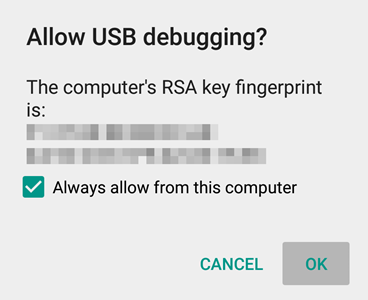
If you don’t get this, it means drivers aren’t installed properly. So, install the driver from step 1 and 2 again.
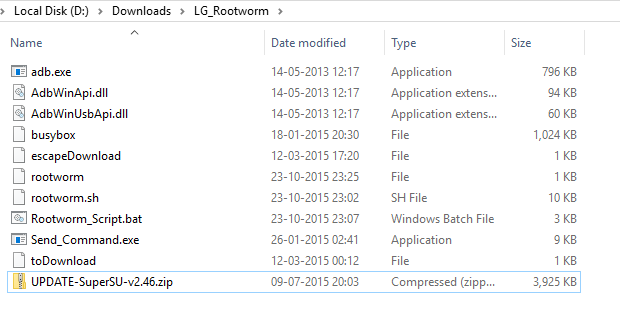
If you are lucky, then the script will automatically do all the job, and once it’s done, your LG G4 Beat will have root access.
Do steps 8-17 below only if the your G4 beat isn’t rooted automatically after step 7.
You don’t need to follow the additional steps if it works automatically. However, if it doesn’t work automatically, then do the following steps to get it done manually.
Keep note of the progress bar. When it’s 5%, the device is in download mode.
- Open that folder first, and then left click on empty white space in the folder.
- Now, while holding shift key, right click on empty white space to get a pop-up as shown below.
- Now choose Open command window here option from that.
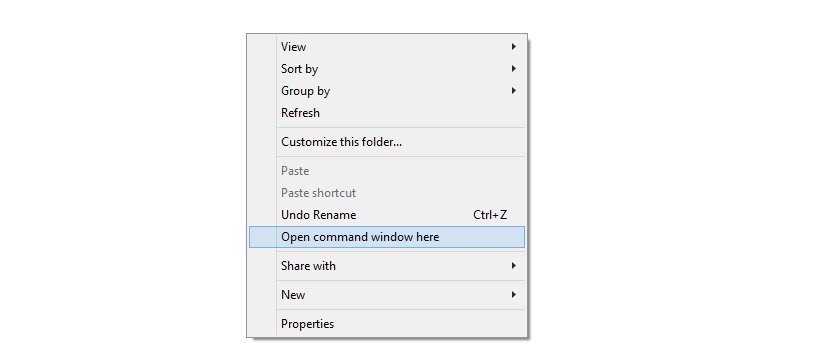
You will see a command window open up, with location directed to folder where you have the send_command.exe file.
SendCommand.exe \\.\COM(yourCOMport) < rootworm
That’s it. The root script should start working now. And when it’s done, your LG G4 Beat should be rooted.
Need help?
If it doesn’t do let us know via comments below, along with screenshot of where it is stuck.
Via konsolen


10 responses to “How to Root LG G4 Beat [G4s/H735]”
where is kdz files?
#FAIL
#FAIL
#FAIL
# please help!!!!!!
LF_Rootworm tools invalid attachment!
Send_files not found
My phone started as a G4 Beat ..
Did this but had a boot loop ..
so reflashed with LG flash tool then it changed to a g4s..
1) installed kingroot.. It said device was not supported but went ahead anyway
2) got root and lost it after reboot
3) ran kingroot again .. and success.
4) replaced kingroot with SUroot ..( google )
5) working like a charm 🙂
Have you installed SuoerSU without turning off your mobile?
lg g4s ???
Stuck on boot screen
How can i install xposedframework
Plzz