
Finish the prologue and reach The Den, then use the Customization terminal, select the character, open Profile, and choose a new Species.
You can revise an operator’s species after the opening portion of Star Wars Zero Company. The option sits inside the same customization menu used to manage the character’s profile and outfits.
Where species customization becomes available
The Customization Facility becomes available after you complete the prologue and return to The Den. Until then, you cannot access the menu needed to change an operator’s species.
Look for the Customization terminal near the Holo-Table and merchant Neesh. It is a small console marked by a floating clothing icon.
How to change an operator’s race or species in Star Wars Zero Company
Key The entire change is handled through the operator’s Profile in the Customization menu.
STEP 1/4
Open Customization
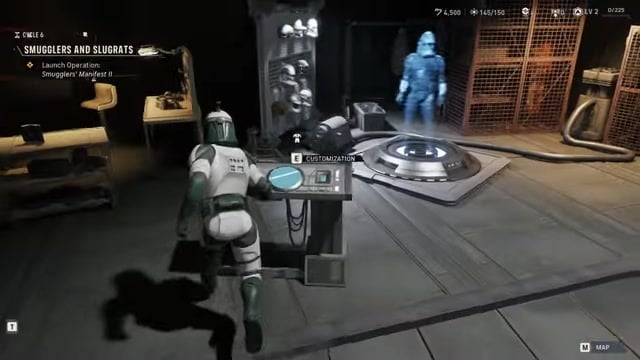
Interact with the Customization terminal to open the Customization menu and view your characters.
STEP 2/4
Select the operator
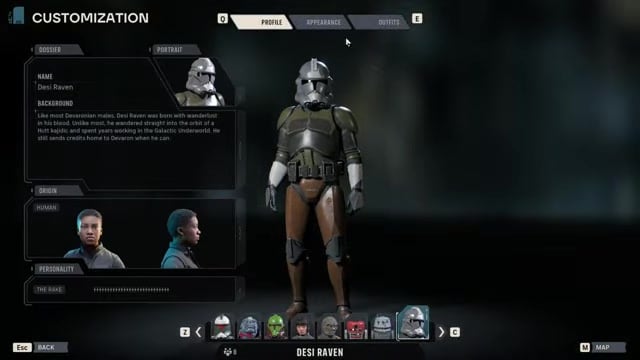
Choose the operator whose species you want to change from the displayed roster.
STEP 3/4
Open Profile
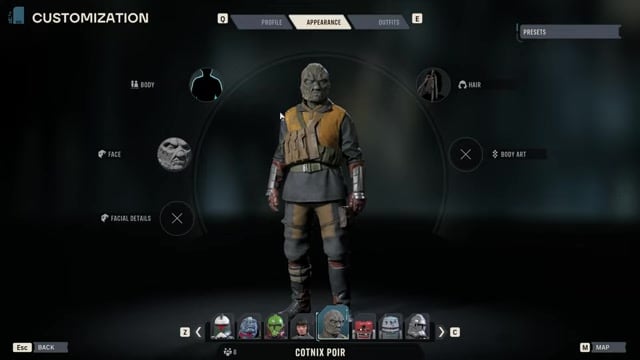
Select Profile, then choose Edit under Origin to access the operator’s species options.
STEP 4/4
Choose a species
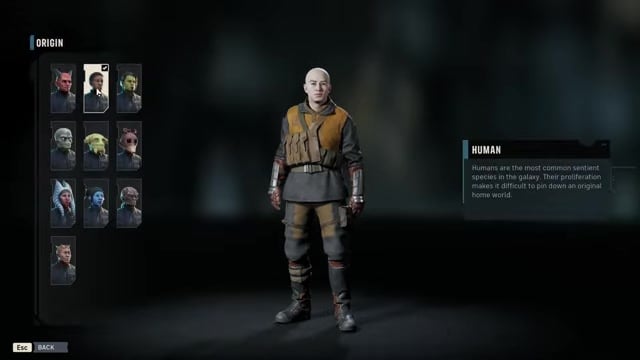
Pick an available species; the demonstrated operator becomes a Clone, but you can choose another option from that character’s list.
Video help
Which characters allow species changes
| Character type | Species customization |
|---|---|
| Hawks | Editable, with a smaller pool that includes Human, Togruta, Twi’lek, Zabrak, Mirialan, and Devaronian. |
| Custom Operators | Editable with a broader origin pool, including additional species and a later-unlocked Clone origin. |
| Authored story characters | May have a fixed species tied to their established identity and backstory. |
Key An operator’s species is cosmetic. It does not alter combat stats, weapon proficiencies, or the character’s battlefield role.
Changing an operator’s class, specialization, or Focus Tree is a separate process. Use the Personnel system for those changes rather than the Species setting under Profile.
Select a humanoid origin before equipping Clone armor; non-humanoid origins cannot use Clone armor pieces.



Leave a Reply