Hacks News

[GUIDE] How To Re-lock Boot loader on Xperia Arc

Even after SE’s explicit mention in their post that the process of unlocking the boot loader is not irreversible — if one unlocks the boot loader, he won’t…

Even after SE’s explicit mention in their post that the process of unlocking the boot loader is not irreversible — if one unlocks the boot loader, he won’t…

137 Comments
[GUIDE] How To Re-lock Boot loader on Xperia Arc
Shivam

Shivam Shivam is our resident designer and web developer who also enjoys writing. He loves to meditate, drive on the freeways and hunt for snipers during his Call Of Duty playtime. Email: [email protected]

Even after SE’s explicit mention in their post that the process of unlocking the boot loader is not irreversible — if one unlocks the boot loader, he won’t be able to re-lock it — XDA member ‘Blagus’ has made it possible. Yeah, the genius has created a small (98 KB) magical file that needs to be flashed using “Flashtool” to re-lock the boot loader. Great!

So now all you (few) people who regret unlocking their boot loader can now re-lock it. After re-locking you’ll be able to use SEUS again to update and repair your phone’s firmware, but you won’t get the “Facebook Like button in Music app” to work as this hack doesn’t restores DRM.

Below is how to re-lock Xperia Arc boot loader:

Requirements:

  1. PC Companion and Update Service installed on your PC
  2. FlashTool_0.2.9.1.exe – Download link
  3. Xperia Relock bootloader.ftf – Download link

Short guide:

Download & extract ‘FlashTool_0.2.9.1.exe’ on your PC, put the ‘Xperia Relock bootloader.ftf’ file inside the ‘firmwares’ folder, and flash. That’s it.

Video Guide:

Step by Step Guide:

  1. Download the files given above in requirements.
  2. Double click on ‘FlashTool_0.2.9.1.exe’ file to extract it, Or you can use free software like ‘7 zip’ to extract it.
  3. Few files and folders will be extracted — the one which we’ll be using for flashing “Xperia Relock bootloader.ftf” files is the “firmwares” folder.
  4. So copy the “Xperia Relock bootloader.ftf” file that you downloaded above, and paste it inside the “firmwares” folder.
  5. Now double click on the “X10FlashTool.exe” file to run the program.
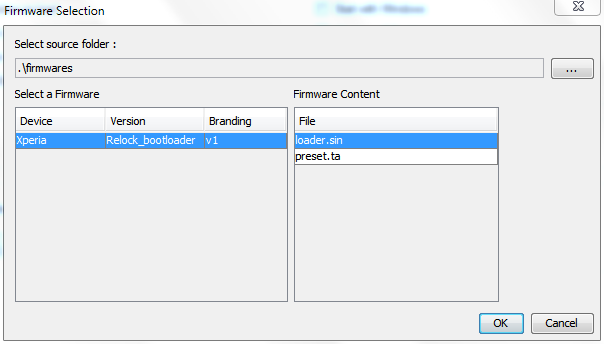
  6. Once the program opens — click on the “Flash” button.
  7. You’ll see a screen like the image given below — click “Ok”!Relock Xperia Bootloader
  8. Now it should ask you to connect your phone to the PC. So first plug the USB cable to PC, then pick up your phone and hold the “Back” key (key at the bottom left on your Arc), and then connect the USB cable to your phone. Remember you’ve to hold the “Back” key while connecting the USB cable to phone.
  9. Once the phone gets connected — Flashtool will automatically start the flashing process.
  10. Keep an eye on the Flashtool’s screen.
  11. And once the process gets finished, disconnect your phone from PC and switch it ON.
Enjoy!

All thanks to XDA member Blagus for making it possible to re-lock the boot loader. Head over to this thread on XDA to thank him for his awesome work.

[info] If you wish to unlock the boot loader again, then the process is similar to what you did the first time. If you help — below is a link to step by step boot loader unlocking guide:

https://nerdschalk.com/how-to-unlock-bootloader-xperia-arc-play-neo-pro/ [/info]
137 responses to “[GUIDE] How To Re-lock Boot loader on Xperia Arc”

  1. Guest Avatar

    That’s a super tips ! does it works also on the play?

  2. Ka Nahl Avatar
    Ka Nahl

    That’s a super tips ! does it works also on the play?

  3. Ka Nahl Avatar
    Ka Nahl

    That’s a super tips ! does it works also on the play?

  4. Guest Avatar

    i also want to ask there is any relocker for Xperia play

  5. Kuldeep Singh Avatar

    i also want to ask there is any relocker for Xperia play

  6. Kuldeep Singh Avatar

    i also want to ask there is any relocker for Xperia play

  7. Guest Avatar

    It worked! I had unlocked the bootloader than i downloaded the updatet and my SE Arc died. Then i did this, it worked! Awsome, thanks alot! 😀

  8. Junior Avatar
    Junior

    It worked! I had unlocked the bootloader than i downloaded the updatet and my SE Arc died. Then i did this, it worked! Awsome, thanks alot! 😀

  9. Junior Avatar
    Junior

    It worked! I had unlocked the bootloader than i downloaded the updatet and my SE Arc died. Then i did this, it worked! Awsome, thanks alot! 😀

  10. Guest Avatar

    why can’t ……help

  11. Vmobilehouse Avatar
    Vmobilehouse

    why can’t ……help

  12. Vmobilehouse Avatar
    Vmobilehouse

    why can’t ……help

  13. Guest Avatar

    Where is the folder ”TEST” ?

  14. Guest Avatar

    The flash tool won’t open!!what do i have t do?

  15. Bagelisa Avatar
    Bagelisa

    The flash tool won’t open!!what do i have t do?

  16. Bagelisa Avatar
    Bagelisa

    The flash tool won’t open!!what do i have t do?

  17. Guest Avatar

    my phone wont connect when its in flash mode
    !!! help 

    1. Shivam Avatar

      Make sure you’ve S1 fastboot drivers installed.

    2. Androiding Staff Avatar
      Androiding Staff

      Make sure you’ve S1 fastboot drivers installed.

    3. Guest Avatar
      Guest

      How does one find S1 fastboot drivers? I’ve googled to very confusing results. PLEASE ASSIST!

    4. Guest Avatar
      Guest

      Look for the drivers in the Flashtool folder. Open the Flashtool folder, go into drivers, and install the drivers there. When installing, when you get the option to select which components to install, tick the Fasboot drivers option as well as the Flashmode drivers option.
      If you don’t find the drivers folder on the Flashtool folder, download the latest version of Flashtool which will have the drivers: http://ul.to/czwoidh5 OR https://hotfile.com/dl/154666641/e4afe0b/flashtool-0.7.1.0-windows.exe.html OR http://fiberupload.com/yskjfslxaiyi/flashtool-0.7.1.0-windows.exe

  18. JOHN Avatar

    my phone wont connect when its in flash mode
    !!! help 

    1. Shivam Avatar

      Make sure you’ve S1 fastboot drivers installed.

      1. Xsilver Avatar
        Xsilver

        How does one find S1 fastboot drivers? I’ve googled to very confusing results. PLEASE ASSIST!

        1. Abhijeet Mishra Avatar
          Abhijeet Mishra

          Look for the drivers in the Flashtool folder. Open the Flashtool folder, go into drivers, and install the drivers there. When installing, when you get the option to select which components to install, tick the Fasboot drivers option as well as the Flashmode drivers option.
          If you don’t find the drivers folder on the Flashtool folder, download the latest version of Flashtool which will have the drivers: http://ul.to/czwoidh5 OR https://hotfile.com/dl/154666641/e4afe0b/flashtool-0.7.1.0-windows.exe.html OR http://fiberupload.com/yskjfslxaiyi/flashtool-0.7.1.0-windows.exe

  19. JOHN Avatar

    my phone wont connect when its in flash mode
    !!! help 

    1. Shivam Avatar

      Make sure you’ve S1 fastboot drivers installed.

      1. Xsilver Avatar
        Xsilver

        How does one find S1 fastboot drivers? I’ve googled to very confusing results. PLEASE ASSIST!

        1. Abhijeet Mishra Avatar
          Abhijeet Mishra

          Look for the drivers in the Flashtool folder. Open the Flashtool folder, go into drivers, and install the drivers there. When installing, when you get the option to select which components to install, tick the Fasboot drivers option as well as the Flashmode drivers option.
          If you don’t find the drivers folder on the Flashtool folder, download the latest version of Flashtool which will have the drivers: http://ul.to/czwoidh5 OR https://hotfile.com/dl/154666641/e4afe0b/flashtool-0.7.1.0-windows.exe.html OR http://fiberupload.com/yskjfslxaiyi/flashtool-0.7.1.0-windows.exe

  20. Guest Avatar

    whee is te folder “test” please repl  am at te final step but i cant find th “test” folder

  21. hamad Avatar

    whee is te folder “test” please repl  am at te final step but i cant find th “test” folder

  22. hamad Avatar

    whee is te folder “test” please repl  am at te final step but i cant find th “test” folder

  23. Guest Avatar

    HELO my xperia arc won’t start, i tried to charge but wont conect to the flash tool, what can i do?

  24. Guest Avatar

    my problem is that i unlock the bootloader, and then i updated over the air, and got brick’ed,wen i want’it to flash whit flashtool,wont conect
    i troed even whit test point but wont worck.
    HELP PLEASE!

  25. Tudosemadalin Avatar
    Tudosemadalin

    HELO my xperia arc won’t start, i tried to charge but wont conect to the flash tool, what can i do?

  26. Tudosemadalin Avatar
    Tudosemadalin

    HELO my xperia arc won’t start, i tried to charge but wont conect to the flash tool, what can i do?

  27. Tudosemadalin Avatar
    Tudosemadalin

    my problem is that i unlock the bootloader, and then i updated over the air, and got brick’ed,wen i want’it to flash whit flashtool,wont conect
    i troed even whit test point but wont worck.
    HELP PLEASE!

  28. Tudosemadalin Avatar
    Tudosemadalin

    my problem is that i unlock the bootloader, and then i updated over the air, and got brick’ed,wen i want’it to flash whit flashtool,wont conect
    i troed even whit test point but wont worck.
    HELP PLEASE!

  29. Guest Avatar

    I WANT TO KISS WHOEVER MADE THIS THREAD, AND YES, ALL CAPS!

  30. SupaGratefulGuest Avatar
    SupaGratefulGuest

    I WANT TO KISS WHOEVER MADE THIS THREAD, AND YES, ALL CAPS!

  31. SupaGratefulGuest Avatar
    SupaGratefulGuest

    I WANT TO KISS WHOEVER MADE THIS THREAD, AND YES, ALL CAPS!

  32. Guest Avatar

    Thanks a bunch to everyone responsible for this, saved my Xperia Neo.

  33. moxalis Avatar

    Thanks a bunch to everyone responsible for this, saved my Xperia Neo.

  34. moxalis Avatar

    Thanks a bunch to everyone responsible for this, saved my Xperia Neo.

  35. Guest Avatar

    does still tampers with the software/hardware? 🙂

    1. Guest Avatar

      relocking*

  36. Ammarbasalamah Avatar
    Ammarbasalamah

    does still tampers with the software/hardware? 🙂

    1. Ammarbasalamah Avatar
      Ammarbasalamah

      relocking*

  37. Ammarbasalamah Avatar
    Ammarbasalamah

    does still tampers with the software/hardware? 🙂

    1. Ammarbasalamah Avatar
      Ammarbasalamah

      relocking*

  38. Guest Avatar

    hi;
    after this process can I update my pda via se pc companion?

    1. Shivam Avatar

      Yeah you can 🙂

    2. Androiding Staff Avatar
      Androiding Staff

      Yeah you can 🙂

    3. Guest Avatar

      thanks m8 : )

    4. Guest Avatar

      hi again…
      m8, I have installed flash tool and downloaded the firmware which is highligted on above (Xperia_Relock_bootloader) and put it in to firmwares folder. however when I start the flashtool and hit to flash button in the program, I can not see the loader.sin at the firmware content. do u have any clue about it. if u can help I would be appriciated.

  39. Serdar Avatar

    hi;
    after this process can I update my pda via se pc companion?

    1. Shivam Avatar

      Yeah you can 🙂

      1. Serdar Avatar

        thanks m8 : )

      2. Serdar Avatar

        hi again…
        m8, I have installed flash tool and downloaded the firmware which is highligted on above (Xperia_Relock_bootloader) and put it in to firmwares folder. however when I start the flashtool and hit to flash button in the program, I can not see the loader.sin at the firmware content. do u have any clue about it. if u can help I would be appriciated.

  40. Serdar Avatar

    hi;
    after this process can I update my pda via se pc companion?

    1. Shivam Avatar

      Yeah you can 🙂

      1. Serdar Avatar

        thanks m8 : )

      2. Serdar Avatar

        hi again…
        m8, I have installed flash tool and downloaded the firmware which is highligted on above (Xperia_Relock_bootloader) and put it in to firmwares folder. however when I start the flashtool and hit to flash button in the program, I can not see the loader.sin at the firmware content. do u have any clue about it. if u can help I would be appriciated.

  41. Guest Avatar

    could you please tell me where the folder “test” is? please i reached the final step and im stuck here

  42. hamad Avatar

    could you please tell me where the folder “test” is? please i reached the final step and im stuck here

  43. hamad Avatar

    could you please tell me where the folder “test” is? please i reached the final step and im stuck here

  44. Guest Avatar

    Please update. After step #10. The Flashtool tells you to enable USB Debugging and also “unknown sources”. It DOESNT tell you after this step to PLUG IT BACK IN straight away and therefore does not complete properly. Cost me about 3 hours… :-

    Anyway, all good now, updated back from CM7.2 to STOCK SE 4.0.2.A.0.42 (living in Australia)

    Thank you very much for the guide!! Loving the stock again 😉

  45. Thankful Avatar
    Thankful

    Please update. After step #10. The Flashtool tells you to enable USB Debugging and also “unknown sources”. It DOESNT tell you after this step to PLUG IT BACK IN straight away and therefore does not complete properly. Cost me about 3 hours… :-

    Anyway, all good now, updated back from CM7.2 to STOCK SE 4.0.2.A.0.42 (living in Australia)

    Thank you very much for the guide!! Loving the stock again 😉

  46. Thankful Avatar
    Thankful

    Please update. After step #10. The Flashtool tells you to enable USB Debugging and also “unknown sources”. It DOESNT tell you after this step to PLUG IT BACK IN straight away and therefore does not complete properly. Cost me about 3 hours… :-

    Anyway, all good now, updated back from CM7.2 to STOCK SE 4.0.2.A.0.42 (living in Australia)

    Thank you very much for the guide!! Loving the stock again 😉

  47. Guest Avatar

    Where is the folder ”TEST” ?

  48. Enrico Avatar

    Where is the folder ”TEST” ?

  49. Enrico Avatar

    Where is the folder ”TEST” ?

  50. Guest Avatar

    not working… tried 10s, but nothing,can’t update via update service or pcc

  51. Hh Avatar

    not working… tried 10s, but nothing,can’t update via update service or pcc

  52. Hh Avatar

    not working… tried 10s, but nothing,can’t update via update service or pcc

  53. Guest Avatar

    Can i relock my xperia ray by this procedure?

  54. Usman Ilyas Avatar

    Can i relock my xperia ray by this procedure?

  55. Usman Ilyas Avatar
    Usman Ilyas

    Can i relock my xperia ray by this procedure?

  56. Guest Avatar

    link don’t work

  57. Pedro Rosado Avatar

    link don’t work

  58. Pedro Rosado Avatar

    link don’t work

  59. Guest Avatar

    how would i know if my arc’s boot loader was successfully re-locked?

    1. Guest Avatar
      Guest

      Just go to phone, then dial *#*#7378423#*#*. after dialing go to service info –> configuration… THEN VUELA! THERE YOU gO!

  60. AJ Saints Avatar
    AJ Saints

    how would i know if my arc’s boot loader was successfully re-locked?

    1. HelpingGuy Avatar
      HelpingGuy

      Just go to phone, then dial *#*#7378423#*#*. after dialing go to service info –> configuration… THEN VUELA! THERE YOU gO!

  61. AJ Saints Avatar
    AJ Saints

    how would i know if my arc’s boot loader was successfully re-locked?

    1. HelpingGuy Avatar
      HelpingGuy

      Just go to phone, then dial *#*#7378423#*#*. after dialing go to service info –> configuration… THEN VUELA! THERE YOU gO!

  62. Guest Avatar

    i m using 2.6.32.9-perf builduser@buildhost#1 kernel and a AOSP ICS beta Rom. will this method work for me? or will i have to first install a stock rom and kernel?

  63. Himanshu124 Avatar
    Himanshu124

    i m using 2.6.32.9-perf builduser@buildhost#1 kernel and a AOSP ICS beta Rom. will this method work for me? or will i have to first install a stock rom and kernel?

  64. Himanshu124 Avatar
    Himanshu124

    i m using 2.6.32.9-perf builduser@buildhost#1 kernel and a AOSP ICS beta Rom. will this method work for me? or will i have to first install a stock rom and kernel?

  65. Guest Avatar

    where’s TEST folder? plzz provide link

  66. Yogesh Middha Avatar
    Yogesh Middha

    where’s TEST folder? plzz provide link

  67. Yogesh Middha Avatar
    Yogesh Middha

    where’s TEST folder? plzz provide link

  68. Guest Avatar

    yoooooooooooou are aweeeesome man
    i love you
    it works on my Xperia Arc S
    now i’m able to update it to the Android 4.0

  69. Суммасщедшый Любовь Avatar

    yoooooooooooou are aweeeesome man
    i love you
    it works on my Xperia Arc S
    now i’m able to update it to the Android 4.0

  70. Суммасщедшый Любовь Avatar

    yoooooooooooou are aweeeesome man
    i love you
    it works on my Xperia Arc S
    now i’m able to update it to the Android 4.0

  71. Guest Avatar
    Guest

    Gracias! ThankU perfect in my xperia RAY

  72. Braanbueno Avatar
    Braanbueno

    Gracias! ThankU perfect in my xperia RAY

  73. Braanbueno Avatar
    Braanbueno

    Gracias! ThankU perfect in my xperia RAY

  74. Guest Avatar
    Guest

    i am using the official ICS 4.0.4 for xperia arc and its rooted, if i relock my bootloader, will it remove my root access?

  75. Raffy Manalaysay Avatar

    i am using the official ICS 4.0.4 for xperia arc and its rooted, if i relock my bootloader, will it remove my root access?

  76. Raffy Manalaysay Avatar

    i am using the official ICS 4.0.4 for xperia arc and its rooted, if i relock my bootloader, will it remove my root access?

  77. Guest Avatar

    need information regarding live with walkman relock http://relockbootlockerwt19i.blogspot.com/

  78. tilu Avatar

    need information regarding live with walkman relock http://relockbootlockerwt19i.blogspot.com/

  79. tilu Avatar

    need information regarding live with walkman relock http://relockbootlockerwt19i.blogspot.com/

  80. Guest Avatar

    Oh my God THANKSSSSSSSSSS YOU VERY MUCH, I test on Xperia Active ST17i and it works excellent, thank you thank u

  81. reggie Avatar
    reggie

    Oh my God THANKSSSSSSSSSS YOU VERY MUCH, I test on Xperia Active ST17i and it works excellent, thank you thank u

  82. reggie Avatar
    reggie

    Oh my God THANKSSSSSSSSSS YOU VERY MUCH, I test on Xperia Active ST17i and it works excellent, thank you thank u

  83. Guest Avatar

    it not just only works, but also simple, thanks so much

  84. Ed Avatar

    it not just only works, but also simple, thanks so much

  85. Ed Avatar

    it not just only works, but also simple, thanks so much

  86. Guest Avatar

    i can’t download
    FlashTool_0.2.9.1.exe

  87. Hugo Boss Avatar

    i can’t download
    FlashTool_0.2.9.1.exe

  88. Hugo Boss Avatar

    i can’t download
    FlashTool_0.2.9.1.exe

  89. Guest Avatar

    hi.. If i’m using custom rom can i relock it back without changing the rom?? i’m now using real ics 5 custom rom. cause i’m afraid if i relock it with custom rom which it needed custom kernel to avoid soft brick will be hardbrick. So my point is can i just relock it back with custom rom??

  90. ANdroidNEWbie Avatar
    ANdroidNEWbie

    hi.. If i’m using custom rom can i relock it back without changing the rom?? i’m now using real ics 5 custom rom. cause i’m afraid if i relock it with custom rom which it needed custom kernel to avoid soft brick will be hardbrick. So my point is can i just relock it back with custom rom??

  91. ANdroidNEWbie Avatar
    ANdroidNEWbie

    hi.. If i’m using custom rom can i relock it back without changing the rom?? i’m now using real ics 5 custom rom. cause i’m afraid if i relock it with custom rom which it needed custom kernel to avoid soft brick will be hardbrick. So my point is can i just relock it back with custom rom??

  92. ANdroidNEWbie Avatar
    ANdroidNEWbie

    hi.. If i’m using custom rom can i relock it back without changing the rom?? i’m now using real ics 5 custom rom. cause i’m afraid if i relock it with custom rom which it needed custom kernel to avoid soft brick will be hardbrick. So my point is can i just relock it back with custom rom??

  93. Guest Avatar

    swthrt love u

  94. ilu Avatar

    swthrt love u

  95. ilu Avatar

    swthrt love u

  96. Guest Avatar

    Successful for Xperia Ray St18i happily running 4.0.4 with this process after using 2 Unofficial Rom’s :p 😉
    buy the way can i again unlock the Bootloader ??? 😉 plz reply

    1. Shivam Avatar

      Yep. No probs in unlocking the bootloader again.

    2. Androiding Staff Avatar
      Androiding Staff

      Yep. No probs in unlocking the bootloader again.

  97. Suraj Avatar

    Successful for Xperia Ray St18i happily running 4.0.4 with this process after using 2 Unofficial Rom’s :p 😉
    buy the way can i again unlock the Bootloader ??? 😉 plz reply

    1. Shivam Avatar

      Yep. No probs in unlocking the bootloader again.

  98. Suraj Avatar

    Successful for Xperia Ray St18i happily running 4.0.4 with this process after using 2 Unofficial Rom’s :p 😉
    buy the way can i again unlock the Bootloader ??? 😉 plz reply

    1. Shivam Avatar

      Yep. No probs in unlocking the bootloader again.

  99. Guest Avatar

    Successful for Xperia mini ST15a. Thank you very mush!

  100. Matt Avatar

    Successful for Xperia mini ST15a. Thank you very mush!

  101. Matt Avatar

    Successful for Xperia mini ST15a. Thank you very mush!

  102. Guest Avatar

    😀 How smooth it was.. I just wonder..!!!!!!!!!!.Some p
    eople are really genius !!! ( Xperia ray st18i)

  103. Hasan Adnan Avatar
    Hasan Adnan

    😀 How smooth it was.. I just wonder..!!!!!!!!!!.Some p
    eople are really genius !!! ( Xperia ray st18i)

  104. Hasan Adnan Avatar
    Hasan Adnan

    😀 How smooth it was.. I just wonder..!!!!!!!!!!.Some p
    eople are really genius !!! ( Xperia ray st18i)

  105. Guest Avatar

    How to unlock again??? And after relocking will bravia engine work correctly???

  106. BOND Avatar

    How to unlock again??? And after relocking will bravia engine work correctly???

  107. BOND Avatar

    How to unlock again??? And after relocking will bravia engine work correctly???