

What to know
- Google Messages has a hidden “Select chats to pin” screen that caps at six chats and lets you drag them into order — separate from the inbox pinning that already allows 20.
- We launched the screen on a Pixel 7 Pro and it renders fully, including a new search box for finding a chat instead of scrolling to it.
- Found in Google Messages beta build messages.android_20260714_00_RC00; the screen is not reachable from the app’s own UI yet.
Pinning a conversation in Google Messages is old news: the feature has been around for years, and Google raised the ceiling to 20 pinned chats last year. But the app also carries a second, much stricter pinning surface that has not been switched on — a dedicated picker titled “Select chats to pin” that only allows six, and lets you drag them into the order you want. We got it on screen, and the newest beta builds it out further with a search box.
The screen is its own activity inside Google Messages, and it is not exported — nothing in the app links to it, so it cannot be opened normally. On a rooted Pixel 7 Pro we launched it directly, and it rendered completely: a “Selected” row at the top, your recent conversations below it with selection toggles, and a Done button.
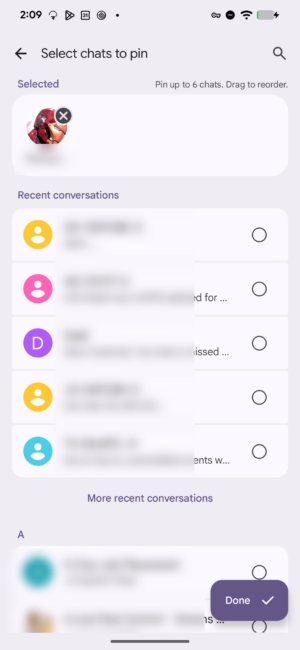 The unreleased “Select chats to pin” screen in Google Messages, showing the six-chat cap and drag-to-reorder.
The instruction line is the giveaway: “Pin up to 6 chats. Drag to reorder.” That six-chat cap is not just wording — it is enforced in the app’s code, which throws up a “Limit reached” message once you select the sixth chat.
How it differs from the pinned conversations you already have
It is easy to assume this is the pinning you already use, but the two behave differently enough that they look like separate surfaces rather than a redesign of the same one.
| Pinned conversations (existing) | “Select chats to pin” (unreleased) | |
|---|---|---|
| Limit | 20 conversations | 6 chats |
| How you pin | Long-press a chat in the inbox, tap Pin | A dedicated picker screen with checkboxes |
| Ordering | Handled by the app | You drag them into order |
| Finding a chat | Scroll the inbox to it | Search box, split into Contacts and Conversations |
| Where it lives | Top of the conversation list | Its own screen, not linked from the app |
| Status | Rolled out | Present in the build, not switched on |
The new part: search
The picker itself is not brand new — it has been in Google Messages builds for over a month. What the latest beta adds is a way to search it, with results split into Contacts and Conversations, plus an empty state when nothing matches. Tapping the magnifier swaps the title for a search field.

Swipe actions gain pin and block
Separately, the same build expands the app’s swipe gestures. Google Messages currently lets you assign Archive or Delete to a left or right swipe; the new strings add pinning and blocking as options, so a chat could be pinned or a sender blocked without opening a menu.
What we don’t know yet
One question stays open: where those six pinned chats would actually appear. The picker sits in the app’s home-screen code and there is a “favorites row” flag nearby, but we could not tie the two together, so the destination is still unconfirmed. The screen also has no entry point in the app yet, which is why you won’t find it on your phone. We’ll keep watching future builds.






Leave a Reply