
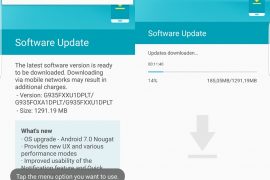
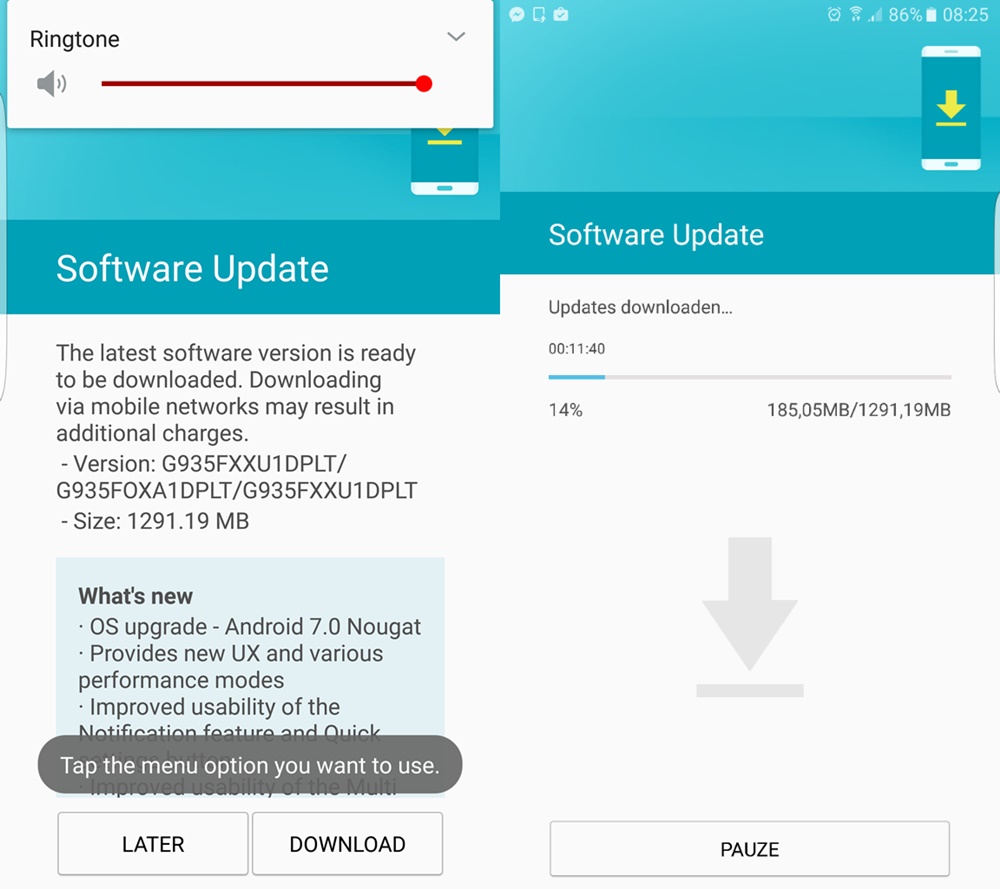
Samsung is finally rolling out the Android 7.0 Nougat update to Galaxy S7 and S7 edge devices. The company released several beta builds before releasing the final build earlier today. To check for OTA update, head to Settings > About device, and look for the ‘system updates’ option there. Tap on ‘check for update’ button to fetch the latest update available if any, including Nougat build. But in case it doesn’t show up, just download and install the Nougat firmware given below to upgrade to Android 7.0 right away, without waiting for OTA.
Today, the Nougat firmware for both the Galaxy S7 and Galaxy S7 Edge have become available for download, installing which gives you an instant upgrade to Android 7.0 build of Samsung, whether you were beta tester or not earlier.
Samsung Nougat firmware download
Note: This is only for model no. SM-G930F and SM-G935F, so don’t try on any other device.
- Galaxy S7 firmware: BTU-G930FXXU1DPLT-20170117160813.zip
- Galaxy S7 Edge firmware: G935FXXU1DPLT_G935FOXA1DPLT_BTU.zip
To download Galaxy S7 / S7 Edge Nougat OTA update, you need to install Nougat firmware provided above, that would be it. Below is a full guide to install the firmware manually using Odin.
How to Install Nougat update on Galaxy S7 and Galaxy S7 Edge
- Download Odin 3.12.3 .zip file and run/open Odin3 v3.12.3.exe file from the extracted files on your PC.
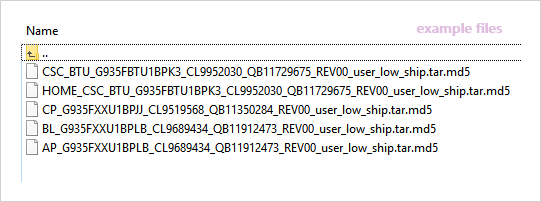
- Download the Nougat firmware for your device from the downloads section above, and unzip the .zip file to get the files starting with AP, CSC, Home_CSC, BL and CP in the beginning of their name. It should look like this (example files).
- Enable OEM unlock on your phone:
- Go to Settings » About phone » and tap Build number seven times to enable Developer options.
- Go back to main Settings page, scroll to bottom and select Developer options from there.
- Under Developer options, look for Enable OEM unlock checkbox/toggle and enable it.
- Boot your device into Download mode:
- Switch off your device.
- Press and hold “Home + Power + Volume down” buttons for a few seconds until you see a warning screen.
- Press Volume Up on the warning screen to accept it and boot into Download mode.
- Once your device is in download mode, connect it to the PC with a USB cable. The Odin window on PC should detect the device and show an “Added!!” message.
- Now we’ll select each firmware file (from files we got in Step 2 above) into the appropriate box in Odin.
- Click on CSC tab and select the firmware file starting with HOME_CSC in its name.
└ Note: Do NOT select the regular CSC file that starts with CSC in its name, as that would replace your CSC and thus would result factory data reset of the device. - Click on CP tab and select file starting with CP in its name.
- Click on BL tab and select the file starting with BL in its name.
- Click on AP tab and select the file starting with AP in its name.
└ Note: DON’T play with any other options on Odin the screen. You’re only required to connect your device and select the firmware files as instructed above.
- Click on CSC tab and select the firmware file starting with HOME_CSC in its name.
- Click the Start button on Odin and wait for it to finish the process. Once it has finished successfully, you’ll see a pass message on the Odin screen.
- Your device will automatically reboot when Odin is done flashing. You can then disconnect your device.
└ It might take some time for the first boot after flashing a stock firmware.

That’s it. Your Galaxy S7 or Galaxy S7 Edge is now rocking Android Nougat update. If you are outside UK, you may install the Nougat firmware for your region once it becomes available.
Let us know in the comments below if you were able to download Galaxy S7 or S7 Edge Nougat OTA update using tips shared above.






238 responses to “How to download Galaxy S7 and S7 Edge Nougat OTA update [Firmware added]”
Bogdan you have g930f or g935f?
Have somebody get the OTA for G930F? Or we need CSC_BTU
You need to flash the CSC_OXA… otherwise you will have to wait for the OTA update for your device.
Great guide! Thanks for this.
Is this file work on g935Fd duos model?? Can you tell me please?
Is this file work on g935Fd duos model?? Can you tell me please? Any one?
It worked flawlessly for me. It change my OXX CSC to BTU and now I’m downloading nougat update. Thanks.
Great guide! Thanks for this.
I have a UK SM-G930F locked to EE (EVR) if I flash the unlocked (BTU) nougat firmware update will it work or do I need to sim unlock it first?
It worked flawlessly for me. It change my OXX CSC to BTU and now I’m downloading nougat update. Thanks.
I have a UK SM-G930F locked to EE (EVR) if I flash the unlocked (BTU) nougat firmware update will it work or do I need to sim unlock it first?
Does this trip KNOX?
I have the G935F locked to EE and it installed fine, only issue is I’ve lost wifi calling, but to be honest, I hardly ever use the phone and have unlimited minutes anyway!!
Wifi calling works great After update. When I use our Telenet tring wifi app to call international than I conclude the Quality is 5 stars. It’s verry good and connection is stabile …
OMG… I just updated my phone G935FD dous.
A big thanks from OMAN n Pakistan.
Guys its completely safe for G935FD model.
Thanks a Lot..
Brother is it safe? I also have G935FD and from Oman. I’m downloading now the BTU and update my phone in a moment. I can’t wait for the OTA from Omantel.
You said earlier at the top (I assumed it was you since the name is similar), that you could not, what did you do then? Did you test with both sim-cards in?
Yep. It’s definitely safe. I am now running on Android 7.0 with my G935FD. Just follow the steps above by the letter and everything will work all right.
Updated Samsung S7 , upgrade worked as described above. Had no issues. Selected dutch language and all ok. Thanks for clear upgrade instruction
Does this trip KNOX?
I have the G935F locked to EE and it installed fine, only issue is I’ve lost wifi calling, but to be honest, I hardly ever use the phone and have unlimited minutes anyway!!
Wifi calling works great After update. When I use our Telenet tring wifi app to call international than I conclude the Quality is 5 stars. It’s verry good and connection is stabile …
OMG… I just updated my phone G935FD dous.
A big thanks from OMAN n Pakistan.
Guys its completely safe for G935FD model.
Thanks a Lot..
Brother is it safe? I also have G935FD and from Oman. I’m downloading now the BTU and update my phone in a moment. I can’t wait for the OTA from Omantel.
You said earlier at the top (I assumed it was you since the name is similar), that you could not, what did you do then? Did you test with both sim-cards in?
Yep. It’s definitely safe. I am now running on Android 7.0 with my G935FD. Just follow the steps above by the letter and everything will work all right.
Updated Samsung S7 , upgrade worked as described above. Had no issues. Selected dutch language and all ok. Thanks for clear upgrade instruction
I cant enable developer options on my device….is there another way to enable oem? I noticed ob one of my devies that dialing a code for device info (*#*#4636#*#* ) gave an option at the bottom of the page for oem unlock..however, it was grey and unable to edit
Can i flush the new or old firmware in recovery?
*flash
I cant enable developer options on my device….is there another way to enable oem? I noticed ob one of my devies that dialing a code for device info (*#*#4636#*#* ) gave an option at the bottom of the page for oem unlock..however, it was grey and unable to edit
Can i flush the new or old firmware in recovery?
*flash
Is this beta firmware or official release?
Is this beta firmware or official release?
Can I install the UK version of this ROM even if my carrier and phone are from south america? thanks for the info.
Me is european GREEK my Rom that I have to S7 and S7 I have the edge Cyprus would work this the English Roma?
Can I install the UK version of this ROM even if my carrier and phone are from south america? thanks for the info.
Me is european GREEK my Rom that I have to S7 and S7 I have the edge Cyprus would work this the English Roma?
Does this also get the new updates and is it possible to go back to go normal android?
Does this also get the new updates and is it possible to go back to go normal android?
Can someone confirm with the SM-G935FD (duos model) and confirm that both sims are working?
Yep. It’s definitely safe. I am now running on Android 7.0 with my G935FD. Just follow the steps above by the letter and everything will work all right.
Thanks Chao. Originally not working. Stucked at setup connection. But then I disable the USB debugging and it is currently downloading.
Can someone confirm with the SM-G935FD (duos model) and confirm that both sims are working?
Yep. It’s definitely safe. I am now running on Android 7.0 with my G935FD. Just follow the steps above by the letter and everything will work all right.
Thanks Chao. Originally not working. Stucked at setup connection. But then I disable the USB debugging and it is currently downloading.
thanks thats great , it worked perfectly
I downloaded the S7 Edge firmaware but when I extract (on Mac) I only get two files (AP and BL). I downloaded twice from different sources and I only get those two files.
thanks thats great , it worked perfectly
I just finish updating my s7edge with Odin nd it’s working perfect with your firmware, I really enjoy the nougat firmware my phone is super fast now. From Nigeria
I downloaded the S7 Edge firmaware but when I extract (on Mac) I only get two files (AP and BL). I downloaded twice from different sources and I only get those two files.
can i install this on my s7 edge dous?
I just finish updating my s7edge with Odin nd it’s working perfect with your firmware, I really enjoy the nougat firmware my phone is super fast now. From Nigeria
can i install this on my s7 edge dous?
INstalled…. Thanks Alot Bro.. may i know, has this Version contains any type of Buggs ???
INstalled…. Thanks Alot Bro.. may i know, has this Version contains any type of Buggs ???
Works 😀 Great. Knox warranty valid 😀 Tnx
Works 😀 Great. Knox warranty valid 😀 Tnx
hey i had this issue, I had the update information and downloaded it. when it had 100%, it just says the the downloaded file was invalid. what should i do? am from philippines, s7 edge, SM-G935FD
Dear,
I have version G935FXXU1BPJJ how can i download the zip Nogut 7.0 version for my hand set reply please
Thank You
hey i had this issue, I had the update information and downloaded it. when it had 100%, it just says the the downloaded file was invalid. what should i do? am from philippines, s7 edge, SM-G935FD
Dear,
I have version G935FXXU1BPJJ how can i download the zip Nogut 7.0 version for my hand set reply please
Thank You
Do i need first root my phone than install nougat?
Do i need first root my phone than install nougat?