
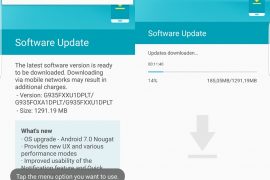
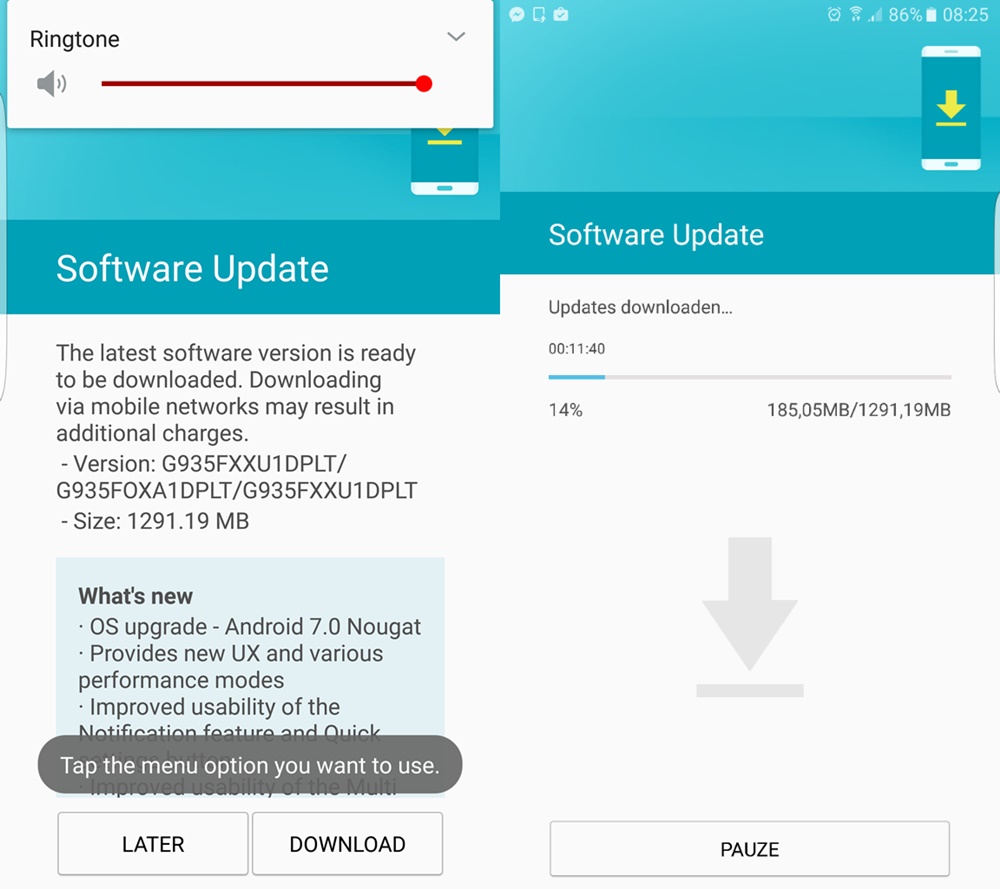
Samsung is finally rolling out the Android 7.0 Nougat update to Galaxy S7 and S7 edge devices. The company released several beta builds before releasing the final build earlier today. To check for OTA update, head to Settings > About device, and look for the ‘system updates’ option there. Tap on ‘check for update’ button to fetch the latest update available if any, including Nougat build. But in case it doesn’t show up, just download and install the Nougat firmware given below to upgrade to Android 7.0 right away, without waiting for OTA.
Today, the Nougat firmware for both the Galaxy S7 and Galaxy S7 Edge have become available for download, installing which gives you an instant upgrade to Android 7.0 build of Samsung, whether you were beta tester or not earlier.
Samsung Nougat firmware download
Note: This is only for model no. SM-G930F and SM-G935F, so don’t try on any other device.
- Galaxy S7 firmware: BTU-G930FXXU1DPLT-20170117160813.zip
- Galaxy S7 Edge firmware: G935FXXU1DPLT_G935FOXA1DPLT_BTU.zip
To download Galaxy S7 / S7 Edge Nougat OTA update, you need to install Nougat firmware provided above, that would be it. Below is a full guide to install the firmware manually using Odin.
How to Install Nougat update on Galaxy S7 and Galaxy S7 Edge
- Download Odin 3.12.3 .zip file and run/open Odin3 v3.12.3.exe file from the extracted files on your PC.
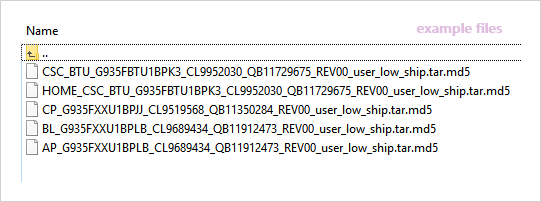
- Download the Nougat firmware for your device from the downloads section above, and unzip the .zip file to get the files starting with AP, CSC, Home_CSC, BL and CP in the beginning of their name. It should look like this (example files).
- Enable OEM unlock on your phone:
- Go to Settings » About phone » and tap Build number seven times to enable Developer options.
- Go back to main Settings page, scroll to bottom and select Developer options from there.
- Under Developer options, look for Enable OEM unlock checkbox/toggle and enable it.
- Boot your device into Download mode:
- Switch off your device.
- Press and hold “Home + Power + Volume down” buttons for a few seconds until you see a warning screen.
- Press Volume Up on the warning screen to accept it and boot into Download mode.
- Once your device is in download mode, connect it to the PC with a USB cable. The Odin window on PC should detect the device and show an “Added!!” message.
- Now we’ll select each firmware file (from files we got in Step 2 above) into the appropriate box in Odin.
- Click on CSC tab and select the firmware file starting with HOME_CSC in its name.
└ Note: Do NOT select the regular CSC file that starts with CSC in its name, as that would replace your CSC and thus would result factory data reset of the device. - Click on CP tab and select file starting with CP in its name.
- Click on BL tab and select the file starting with BL in its name.
- Click on AP tab and select the file starting with AP in its name.
└ Note: DON’T play with any other options on Odin the screen. You’re only required to connect your device and select the firmware files as instructed above.
- Click on CSC tab and select the firmware file starting with HOME_CSC in its name.
- Click the Start button on Odin and wait for it to finish the process. Once it has finished successfully, you’ll see a pass message on the Odin screen.
- Your device will automatically reboot when Odin is done flashing. You can then disconnect your device.
└ It might take some time for the first boot after flashing a stock firmware.

That’s it. Your Galaxy S7 or Galaxy S7 Edge is now rocking Android Nougat update. If you are outside UK, you may install the Nougat firmware for your region once it becomes available.
Let us know in the comments below if you were able to download Galaxy S7 or S7 Edge Nougat OTA update using tips shared above.






238 responses to “How to download Galaxy S7 and S7 Edge Nougat OTA update [Firmware added]”
makasih
Thank you !
is it working on sm-g935fd version
hey shnirob,
I have tried on G935FD.
Its not working.
I have the sm-g935fd in Germany and installed the Nougat UK version. Everything works fine.
does jio volte work?
i have 935fd. installed nougat uk version. volte doent work. do they have volte in uk? why doesnt it support on mine. any idea?
Hi, thanks for this easy tutorial.
sorry for the perhaps dumb question, but is there any difference among the BTU rom and the stock rom which your phone comes with (Probably from a carrier)? I was reading a couple of threads in XDA but couldn’t find any answer, but I read it disables the raw support in some S7 models, and stuff like that.
Apparently it may disable certain carrier-supported features such as VoIP and the likes. I don’t know if this is the only drawback though, it’s possible that there are more.
Will this reset my settings, apps and data?
Yes it did for me but I made a backup via smartswitch beforehand
Works on 935 FD version!!
really? did it work on Dous Model too?
yess is it 🙂
Its not working with me on G935FD.
I have the G830F version and it tells me there is no update available im on marshmallow 6.0.1
Thank you! 🙂
Hm, on the screenshot i see CsC_BTU, but the download version has CsC_OXA, is that alright?
Is this a wrong file or the equal one ? Plz tell me i m just going to download
I dunno. I make everything as stated here, but i can’t download Nougat over the air or over Smartswitch. I am frustrated as fuck. What the heck is this OXA shit?!
makasih
I´m from germany. I did install the latest BTU firmware (BPLB). But there is no update to android 7.0. What´s wrong with that?
Plz tell me if u got any solution thanx
Gib bitte Bescheid sobald du was neues hast..Bei mir exakt das selbe. Melde mich auch, wenn es bei mir was neues gibt. Kurze Frage am Rande, lautete deine CSC_ Datei die du von hier hattest, auch OXA statt BTU? Verwirrt mich leicht.
Ja, die CSC_Datei lautet OXA
Gib mal in der Telefonapp “*#1234#” ein, dann wird dir die CSC angezeigt. Wenn da auch OXA statt BTU steht, hast du definitiv die falsche Datei bekommen.
Gib mal in der Telefonapp “*#1234#” ein, dann wird dir die CSC angezeigt. Wenn da auch OXA statt BTU steht, hast du definitiv die falsche Datei bekommen.
Ja, da steht “G930FOXA1BPLB”
Hast du mir dann einen richtigen Download Link!? Habe die Datei hier, schon 4x heruntergeladen und auch hier über:
updato.com/firmware-archive-select-model?record=8CDD4CDBC73111E69215FA163EE8F90B
JEDES Mal ist da eine verdammte OXA statt BTU Datei, ich dreh durch.
Diese Eingabe erzeugt bei mir eine Fehlermeldung. Wenn ich Software aktualisieren drücke, dann wird mir dort OXA angezeigt.
Was kann ich jetzt machen?
Ja, da steht “G930FOXA1BPLB”
Hast du mir dann einen richtigen Download Link!? Habe die Datei hier, schon 4x heruntergeladen und auch hier über:
updato.com/firmware-archive-select-model?record=8CDD4CDBC73111E69215FA163EE8F90B
JEDES Mal ist da eine verdammte OXA statt BTU Datei, ich dreh durch.
OXA ist kein Problem, ist der Ländercode für England, ich habe die drauf und es gibt keine Probleme, da es sich bei dem Update trotzdem um die europäische Version handelt. BTU wäre die Tschechische Carrierversion. Gehen beide.
Wisst ihr, wie man zurück auf die Android 6 Version gehen kann?
Hey i want to ask a question is i hv sm g930f model can i instal this firmware ? And is there any difrance between stock firmware and btu ????? And in other we haw usualy 1 pda file to flash there are 4 files ? Plz help i m confused 🙁
Is it going to trip KNOX?
No its Samsung beta Ota as long as you don’t root and install a custom recovery you will never trip knox
ya sure, I instal with odin arround 5 rom’s before, and knox was 0 . But once i install this 7.0, my knox is 1 (0x0303) and as a result knox app is dead and even S Health is not working.
F__k Samsung , we have to wait over 4 months for an update… and when we get it “unoficial” (because official is take way to long) we trip knox… great
Works on 935 FD Republic of Moldova !!!
Thank you!!!!!!!!!!!!
Habs über odin geflasht kein update auf android7 bekommen
Works great! 10ks from Romania!
Guys, pls look into the G930F .zip file. The CSC File is wrong, there is an OXA instead of BTU File. The Edge one seems legit, there is BTU.
your download zip file is different compare to your manual here damn.. you have screenshot with CSC_BTU but your zip file has CSC_OXA… so what now? Do we have to reflash our G930F with those files and hope there will be OTA update for nougat 7 or do we flash our smartphones and will loose all data without any reason and without OTA update to nougat 7.0? if you do a manual do it right maaaan !!!!
Exactly the latter. I wipe my phone for NOTHING. OXA crap.
hello nookiezilla..so have you used CSC_OXA or home_CSC_OXA? you dind’t get an OTA update to nougat yet? I haven’t flashed mine yet cause there are so manu confused informations about CSC 🙂
The CSC one, we shouldn’t use the home one.
Thank you !
hello nookiezilla..so have you used CSC_OXA or home_CSC_OXA? you dind’t get an OTA update to nougat yet?
is it working on sm-g935fd version
hey shnirob,
I have tried on G935FD.
Its not working.
does jio volte work?
I have the sm-g935fd in Germany and installed the Nougat UK version. Everything works fine.
i have 935fd. installed nougat uk version. volte doent work. do they have volte in uk? why doesnt it support on mine. any idea?
Hi, thanks for this easy tutorial.
sorry for the perhaps dumb question, but is there any difference among the BTU rom and the stock rom which your phone comes with (Probably from a carrier)? I was reading a couple of threads in XDA but couldn’t find any answer, but I read it disables the raw support in some S7 models, and stuff like that.
Apparently it may disable certain carrier-supported features such as VoIP and the likes. I don’t know if this is the only drawback though, it’s possible that there are more.
Thank you!! Works perfectly on my S7 Edge in Gerany. I received my update directly
it looks like that works fine for G935F but not for G930F yet. Have you used CSC or home_CSC? thx
In odin When it goes to system it hangs and it does not load anymore
Just wait it is rolling out very very soon in eruope right from carrier 7.1.1
Will this reset my settings, apps and data?
Yes it did for me but I made a backup via smartswitch beforehand
Works on 935 FD version!!
really? did it work on Dous Model too?
yess is it 🙂
Its not working with me on G935FD.
I have the G830F version and it tells me there is no update available im on marshmallow 6.0.1
G930F not work oxa CSC
Thank you! 🙂
It worked for me S7 GH930F i used the CSC_OXA… installed and hit the software update manually and so… thnx
What model do you have G930F ?
Yes, my model is G930F the unlocked international version, it worked just fine, im running android 7.0 right now, just have to follow the steps…
Hello friends,
I have a model s7 edge G935FD, I did perfectly till step 6 but when i start step 7 odin give a msg operation failed and now my device is struck in downloading mode.
can I repair it or I just broke down my device.
Please help me friends.
Thanks
You need a PIT file for your model
Usman tum ne ye file duos model pe ki thi flash? To us se struck ho gya?
Yes exactly brother , I have g935fd dous, device is okay n working 100 %.. but i couldn’t change firmware
hey,
from where I can get this PIT file,
please give any link,
did I need to root my phone before this process.
Hm, on the screenshot i see CsC_BTU, but the download version has CsC_OXA, is that alright?
Is this a wrong file or the equal one ? Plz tell me i m just going to download
I dunno. I make everything as stated here, but i can’t download Nougat over the air or over Smartswitch. I am frustrated as fuck. What the heck is this OXA shit?!
Bogdan you have g930f or g935f?
I´m from germany. I did install the latest BTU firmware (BPLB). But there is no update to android 7.0. What´s wrong with that?
Plz tell me if u got any solution thanx
Gib bitte Bescheid sobald du was neues hast..Bei mir exakt das selbe. Melde mich auch, wenn es bei mir was neues gibt. Kurze Frage am Rande, lautete deine CSC_ Datei die du von hier hattest, auch OXA statt BTU? Verwirrt mich leicht.
Ja, die CSC_Datei lautet OXA
Gib mal in der Telefonapp “*#1234#” ein, dann wird dir die CSC angezeigt. Wenn da auch OXA statt BTU steht, hast du definitiv die falsche Datei bekommen.
Ja, da steht “G930FOXA1BPLB”
Hast du mir dann einen richtigen Download Link!? Habe die Datei hier, schon 4x heruntergeladen und auch hier über:
updato.com/firmware-archive-select-model?record=8CDD4CDBC73111E69215FA163EE8F90B
JEDES Mal ist da eine verdammte OXA statt BTU Datei, ich dreh durch.
Diese Eingabe erzeugt bei mir eine Fehlermeldung. Wenn ich Software aktualisieren drücke, dann wird mir dort OXA angezeigt.
Was kann ich jetzt machen?
Gib mal in der Telefonapp “*#1234#” ein, dann wird dir die CSC angezeigt. Wenn da auch OXA statt BTU steht, hast du definitiv die falsche Datei bekommen.
Ja, da steht “G930FOXA1BPLB”
Hast du mir dann einen richtigen Download Link!? Habe die Datei hier, schon 4x heruntergeladen und auch hier über:
updato.com/firmware-archive-select-model?record=8CDD4CDBC73111E69215FA163EE8F90B
JEDES Mal ist da eine verdammte OXA statt BTU Datei, ich dreh durch.
OXA ist kein Problem, ist der Ländercode für England, ich habe die drauf und es gibt keine Probleme, da es sich bei dem Update trotzdem um die europäische Version handelt. BTU wäre die Tschechische Carrierversion. Gehen beide.
Wisst ihr, wie man zurück auf die Android 6 Version gehen kann?
Hey i want to ask a question is i hv sm g930f model can i instal this firmware ? And is there any difrance between stock firmware and btu ????? And in other we haw usualy 1 pda file to flash there are 4 files ? Plz help i m confused 🙁
Is it going to trip KNOX?
No its Samsung beta Ota as long as you don’t root and install a custom recovery you will never trip knox
ya sure, I instal with odin arround 5 rom’s before, and knox was 0 . But once i install this 7.0, my knox is 1 (0x0303) and as a result knox app is dead and even S Health is not working.
F__k Samsung , we have to wait over 4 months for an update… and when we get it “unoficial” (because official is take way to long) we trip knox… great
Have somebody get the OTA for G930F? Or we need CSC_BTU
You need to flash the CSC_OXA… otherwise you will have to wait for the OTA update for your device.
Works on 935 FD Republic of Moldova !!!
Thank you!!!!!!!!!!!!
Habs über odin geflasht kein update auf android7 bekommen
Is this file work on g935Fd duos model?? Can you tell me please?
Is this file work on g935Fd duos model?? Can you tell me please? Any one?
Works great! 10ks from Romania!
Guys, pls look into the G930F .zip file. The CSC File is wrong, there is an OXA instead of BTU File. The Edge one seems legit, there is BTU.
your download zip file is different compare to your manual here damn.. you have screenshot with CSC_BTU but your zip file has CSC_OXA… so what now? Do we have to reflash our G930F with those files and hope there will be OTA update for nougat 7 or do we flash our smartphones and will loose all data without any reason and without OTA update to nougat 7.0? if you do a manual do it right maaaan !!!!
Exactly the latter. I wipe my phone for NOTHING. OXA crap.
hello nookiezilla..so have you used CSC_OXA or home_CSC_OXA? you dind’t get an OTA update to nougat yet? I haven’t flashed mine yet cause there are so manu confused informations about CSC 🙂
The CSC one, we shouldn’t use the home one.
hello nookiezilla..so have you used CSC_OXA or home_CSC_OXA? you dind’t get an OTA update to nougat yet?
Thank you!! Works perfectly on my S7 Edge in Gerany. I received my update directly
it looks like that works fine for G935F but not for G930F yet. Have you used CSC or home_CSC? thx
In odin When it goes to system it hangs and it does not load anymore
Just wait it is rolling out very very soon in eruope right from carrier 7.1.1
G930F not work oxa CSC
It worked for me S7 GH930F i used the CSC_OXA… installed and hit the software update manually and so… thnx
What model do you have G930F ?
Yes, my model is G930F the unlocked international version, it worked just fine, im running android 7.0 right now, just have to follow the steps…
Hello friends,
I have a model s7 edge G935FD, I did perfectly till step 6 but when i start step 7 odin give a msg operation failed and now my device is struck in downloading mode.
can I repair it or I just broke down my device.
Please help me friends.
Thanks
You need a PIT file for your model
hey,
from where I can get this PIT file,
please give any link,
did I need to root my phone before this process.
Usman tum ne ye file duos model pe ki thi flash? To us se struck ho gya?
Yes exactly brother , I have g935fd dous, device is okay n working 100 %.. but i couldn’t change firmware