
What to know
- Android is adding a customizable whole-screen Color filter alongside the existing color correction, which is unchanged and still present.
- You can choose from 12 colors, then adjust separate Hue and Intensity sliders.
- We found the unreleased feature in the Settings app in build cp41.260814.003.b1 on a Pixel 10 Pro Fold.
Android’s accessibility settings already help people adjust how colors appear, but Google is preparing a more personal approach for users affected by light sensitivity, eye strain, or poor text contrast.
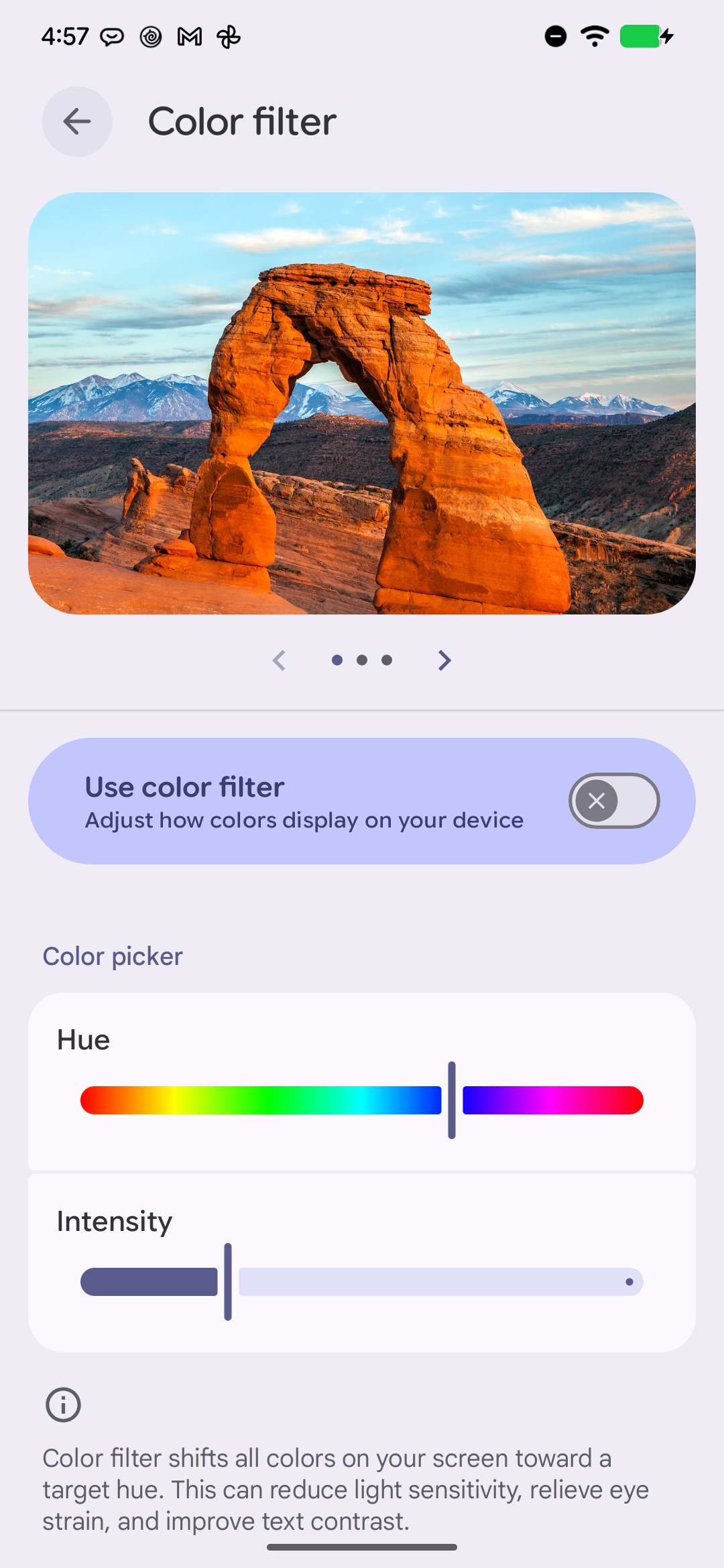
We diffed the Settings app from Android beta cp41.260814.003.b1 on a Pixel 10 Pro Fold and found code for a new Color filter. The feature can tint every color on the screen toward a hue selected by the user. We surfaced the screen on a rooted Pixel 7 Pro running the same build and captured it. The entry point is hard-disabled: ColorFilterPreference.isAvailable() returns false unconditionally, so no flag or setting reveals it in Accessibility. Launching the fragment directly requires root — as the regular shell user the system refuses it. The switch works and its state persists to Settings.Secure.accessibility_color_filter_enabled, but screen colors do not change yet, so the rendering half is still unfinished.
Color filter can tint everything on your screen
The new accessibility option is built around a primary “Use color filter” switch. Its description says the filter shifts all screen colors toward a target hue, rather than applying a narrowly defined correction preset.
Google explicitly presents the feature as a way to reduce light sensitivity, relieve eye strain, and improve text contrast. A separate summary describes it more broadly as a control for adjusting how colors appear on the device.
The new strings, seen below, point to the main switch and explain the filter’s intended accessibility benefits:
A 12-color picker provides the starting hue
After enabling the filter, you will be able to select its target from a picker containing 12 named colors. The available choices span red, orange, yellow, chartreuse green, green, spring green, cyan, azure, blue, violet, magenta, and rose.
That range gives the filter a defined set of starting points across the color spectrum. The code identifies this part of the interface simply as “Color picker.”
Hue and Intensity sliders fine-tune the effect
The color picker is not the only control. the Settings app also contains separate Hue and Intensity sliders, allowing you to refine the selected tint and control how strongly it changes the screen.
Together, the picker and sliders show that this is designed as a user-tunable accessibility filter rather than a single on-or-off color preset.
The custom Color filter is not available to users yet, and we’ll watch future Android builds for signs of its rollout.





Leave a Reply