

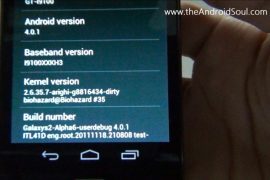
Even though Samsung UK has confirmed on twitter that an official update is in the works to update the company’s superphone Galaxy S2 to latest android version, 4.0, dubbed as Ice Cream Sandwich, we knew we’ll have it way earlier than the official version. We’re true, and we’ve an awesome custom ROM for you below to prove that.
Credits for this custom ROM goes to good team over at XDA, whose elite members are: biohazardious (he started this), gokhanmoral, Pete, Paradoxxx, chadouming, nebkat, Matri ak31, Coentje44, Tegrak, yjwong, Msaraiva, Xplowild and everybody (else).
This custom ROM is a port from the Android 4.0 AOSP code that Google released some days before, and it’s in alpha stage, a bit far from daily life use suitability. But those want to it badly, and have that required dare too, can use this team’s hard work to entertain themselves with ICS goodness by following easy-cheezy guide we’ve produced below.
Compatibility:
[error]This guide is applicable only for Samsung’s Galaxy SII international version (GT-i9100). Check your phone’s version in Settings – About Phone. It has to be “GT-i9100” for this Android 4.0 ROM to be compatible with your phone. Otherwise, simply don’t try this ICS port on your android handset — don’t even think about it if you care about your device.
And, to be very very specific, this is not for Galaxy SII handsets at AT&T (both the first one and Skyrocket), T-Mobile and Sprint.[/error]
Warning!
[warning]The methods and procedures discussed here are considered risky and you should not attempt anything if you don’t know completely what it is. If any damage occurs to you or your device, we won’t be held liable — you only will be responsible, you’ve been warned!!![/warning]
Pre-Installation thoughts:
- Backup your Apps and important data — bookmarks, contacts, SMS, APNs (internet settings), etc. This Android backup guide would help you.
- If you have Samsung’s PC software Kies installed, un-install it first because it may interrupt the flashing process. If you’ve installed it for sake of drivers which otherwise weren’t working, make sure you exit the Kies completely before beginning the procedure below.
- Drivers! — it’s important you’ve the proper drivers installed. Download links below:
What Works/Changelog:
- Touchscreen fix implented!
- Updated kernel (ty bio)
- Made rom amazingly smooth and super fast!
- Updated Android runtime
- Updated Settings
- Updated Build.prop
- Updated libraries
- Added Music2.apk
- Added latest Android Market (not really important cuz we have no wifi >.<)
- New apps from Galaxy Nexus
- Fixed RIL (CALL and SMS)
What Doesn’t Work:
- WiFi
- Bluetooth
- And everything else that is not under ‘what works’
Guide to Update Galaxy S II to Android 4.0 Ice Cream Sandwich (ICS)
You can watch the video below to get the idea of how to install android 4.0 on your Galaxy S II i9100. It shows the installation procedure from recovery after you’ve downloaded and transferred the android 4.0 file to phone’s internal sdcard. See the guide below for complete info.
Step-by-step guide:
- Download the Android 4.0 file (custom rom, that is). The latest version available right now is Alpha7. Download it from here, or here (direct link). (You can check and download the latest version of this ROM here, and then download it and continue the steps given below to flash it successfully, without any worries.)
- You need to have clockworkmod recovery installed on your Galaxy SII – i9100. If you don’t have it, do this:
- Transfer the Android 4.0 file you downloaded in step 1 above to phone’s internal sdcard. Just remember the location where you transfer it — you’ll need it in step 8 and step 10 below.
- Disconnect the phone from computer and power it off. Wait for 6-7 seconds for complete power off.
- Boot into recovery mode. For this, press and hold these 3 buttons together until Samsung’s screen shows up: Volume_UP+Home+Power. Phone will boot into CWM recovery. Use volume keys to scroll up and down between options and power/home key to select an option.
- Wipe system, data and Cache.
- In recovery, go to “mounts and storage”.
- To wipe system, select “format /system”. Choose “Yes – Format” on the next screen.
- To wipe data, select “format /data”. Choose “Yes – Format” on the next screen.
- To wipe cache, select “format /cache”. Choose “Yes – Format” on the next screen.
- Select “Go back” at the bottom to return to recovery’s main menu.
- Now, select “install zip from sd card”. Then, select “choose zip from sd card”. Now, browse through sd card and select the Android 4.0 file you downloaded in step 1 and transferred in step 3 above.
- This will flash the required files on your phone and will reboot your phone into recovery again. This is a slightly different recovery now. You need to flash the Android 4.0 File again.
- Select “install zip from sd card” again and then select “choose zip from sd card”. Browse through sd card and select the Android 4.0 file you downloaded in step 1 and transferred in step 3 above, as you did above.
- This time, the Android 4.0 custom ROM will be flashed/installed actually.
- When the flashing is done, go back and reboot your Galaxy S II by selecting ‘reboot system now’.
- The phone should boot up properly, wait for 5-10 mins. [I’ve tried this two times and first time it worked while second time I had to repeat steps 6 to 12 again, after which it booted successfully. So, initially, if after 10 mins the phone doesn’t boot up (it was stuck on the Galaxy S II screen, for me), press and hold Volume_UP+Home+Power keys together to boot into recovery mode. Do this from whatever screen you are on — no need to pull battery out or switch it off or anything. Just boot into recovery from your current screen, whatever it is. Then, follow steps 6 to 12. The phone should boot up properly next time.]
- [Optional] Support the development and appreciate the hard work put in by the team by donating to the team. Find link here.
- If you’ve any queries, shoot them in comments below. But do read this guide fully before to save both us time.
So, you have the most anticipated version of android, the Ice Cream Sandwich, v4.0, right on your Galaxy S II. This custom ROM will keep updating until it gets perfect, or nearly perfect. So, keep watching this space.
Check the official development page here for latest update and to thnak the devs. And use this discussion page to post your views, read other’s views and discuss the ROM. Keep it cool!
More screenshots:









221 responses to “How to Update Galaxy S II to Android 4.0 Ice Cream Sandwich (ICS)”
Hi,
I followed all the steps above, but forgot to copy the Android 4.0 zip file. I have formatted data, cache and system from the clockwork recovery mode. I dont have the zip file copied to internal storage sd card to proceed further. I am unable to boot to normal mode from here. Kindly help me boot my Galaxy s2 to normal mode so that I can copy the Android zip file and upgrade to ICS 4.0. Any help is very much appreciated as mine is a new phone and I want it back in working condition.
Thanks in Advance.
Pasha
If you’re still stuck, then this might help.
Go to mounts and storage option in recovery and select mount usb storage. Then, connect phone to PC. Your phone sdcard will show up as drive on PC. Paste the file now. Then, select unmount on phone’s recovery mode. Now, continue to next step.
I have exactly the same problem so any help apreciated
I’ve replied to him with a solution. It’s useful to you too, so follow that.
Hi,nnI followed all the steps above, but forgot to copy the Android 4.0 zip file. I have formatted data, cache and system from the clockwork recovery mode. I dont have the zip file copied to internal storage sd card to proceed further. I am unable to boot to normal mode from here. Kindly help me boot my Galaxy s2 to normal mode so that I can copy the Android zip file and upgrade to ICS 4.0. Any help is very much appreciated as mine is a new phone and I want it back in working condition.nnThanks in Advance.nnPashann
If you’re still stuck, then this might help.nnGo to mounts and storage option in recovery and select mount usb storage. Then, connect phone to PC. Your phone sdcard will show up as drive on PC. Paste the file now. Then, select unmount on phone’s recovery mode. Now, continue to next step.
I have exactly the same problem so any help apreciated
I’ve replied to him with a solution. It’s useful to you too, so follow that.
Hi,nnI followed all the steps above, but forgot to copy the Android 4.0 zip file. I have formatted data, cache and system from the clockwork recovery mode. I dont have the zip file copied to internal storage sd card to proceed further. I am unable to boot to normal mode from here. Kindly help me boot my Galaxy s2 to normal mode so that I can copy the Android zip file and upgrade to ICS 4.0. Any help is very much appreciated as mine is a new phone and I want it back in working condition.nnThanks in Advance.nnPashann
If you’re still stuck, then this might help.nnGo to mounts and storage option in recovery and select mount usb storage. Then, connect phone to PC. Your phone sdcard will show up as drive on PC. Paste the file now. Then, select unmount on phone’s recovery mode. Now, continue to next step.
I have exactly the same problem so any help apreciated
I’ve replied to him with a solution. It’s useful to you too, so follow that.
Hi,
I followed all the steps above, but forgot to copy the Android 4.0 zip file. I have formatted data, cache and system from the clockwork recovery mode. I dont have the zip file copied to internal storage sd card to proceed further. I am unable to boot to normal mode from here. Kindly help me boot my Galaxy s2 to normal mode so that I can copy the Android zip file and upgrade to ICS 4.0. Any help is very much appreciated as mine is a new phone and I want it back in working condition.
Thanks in Advance.
Pasha
If you’re still stuck, then this might help.
Go to mounts and storage option in recovery and select mount usb storage. Then, connect phone to PC. Your phone sdcard will show up as drive on PC. Paste the file now. Then, select unmount on phone’s recovery mode. Now, continue to next step.
I have exactly the same problem so any help apreciated
I’ve replied to him with a solution. It’s useful to you too, so follow that.
4.o is work nice but one thing on skype my cam r not working properly can you guide me how can i fix it ?
4.o is work nice but one thing on skype my cam r not working properly can you guide me how can i fix it ?
4.o is work nice but one thing on skype my cam r not working properly can you guide me how can i fix it ?
hey what about galaxy s2 t-mobile ? how to update for t-mobile?n
hey what about galaxy s2 t-mobile ? how to update for t-mobile?
hey what about galaxy s2 t-mobile ? how to update for t-mobile?n
hey what about galaxy s2 t-mobile ? how to update for t-mobile?
the cam and wifi and bluetooth not working ….. and when need to type any thing the keyboard come-out and the screen be black and i dont see any thing …. only keyboard …………u00a0 why any help pleasen
YES, IT HAPPEN FOR ME ALSO. WHAT WE CAN DO NOW?????? ugent
the cam and wifi and bluetooth not working ….. and when need to type any thing the keyboard come-out and the screen be black and i dont see any thing …. only keyboard ………… why any help please
YES, IT HAPPEN FOR ME ALSO. WHAT WE CAN DO NOW?????? ugent
and the screen dont rotate ….. :S … and network connection not go on …. omg …. this is not complete firmware…….. please no one do this software nu00a0
and the screen dont rotate ….. :S … and network connection not go on …. omg …. this is not complete firmware…….. please no one do this software
the cam and wifi and bluetooth not working ….. and when need to type any thing the keyboard come-out and the screen be black and i dont see any thing …. only keyboard …………u00a0 why any help pleasen
YES, IT HAPPEN FOR ME ALSO. WHAT WE CAN DO NOW?????? ugent
the cam and wifi and bluetooth not working ….. and when need to type any thing the keyboard come-out and the screen be black and i dont see any thing …. only keyboard ………… why any help please
YES, IT HAPPEN FOR ME ALSO. WHAT WE CAN DO NOW?????? ugent
and the screen dont rotate ….. :S … and network connection not go on …. omg …. this is not complete firmware…….. please no one do this software nu00a0
and the screen dont rotate ….. :S … and network connection not go on …. omg …. this is not complete firmware…….. please no one do this software
Guys its still alpha testing so expect issue
Guys its still alpha testing so expect issue
Guys its still alpha testing so expect issue
after upgraded can’t works wifi, bluetooth. so no more software become wifi, bluetooth works?
after upgraded can’t works wifi, bluetooth. so no more software become wifi, bluetooth works?
after upgraded can’t works wifi, bluetooth. so no more software become wifi, bluetooth works?
Hi Kapil,
I love the music that you posted on youtube with “Ice cream sandwich(ICS) on galaxy s2 [walkthrough]. Can you let me know which one is that.. 🙂
Besides your steps on upgrade rocks. I have got it right all the time.
Regards,
Adi
Hi Kapil,
I love the music that you posted on youtube with “Ice cream sandwich(ICS) on galaxy s2 [walkthrough]. Can you let me know which one is that.. 🙂
Besides your steps on upgrade rocks. I have got it right all the time.
Regards,
Adi
Hi Kapil,
I love the music that you posted on youtube with “Ice cream sandwich(ICS) on galaxy s2 [walkthrough]. Can you let me know which one is that.. 🙂
Besides your steps on upgrade rocks. I have got it right all the time.
Regards,
Adi
i try this rom on the att skyrocket it install right but when i reboot phone won’t turn on any suggestions
i try this rom on the att skyrocket it install right but when i reboot phone won’t turn on any suggestions
i try this rom on the att skyrocket it install right but when i reboot phone won’t turn on any suggestions
Someone help! I don’t want it anymore^_^ How to get back my android Gingerbread with TouchWiz 4.0???????? answer here [email protected]
Thanks.
Search here for xxkh3 firmware, and install that. It’s based on Gingerbread, with touchviz v4.
Thank you!
Someone help! I don’t want it anymore^_^ How to get back my android Gingerbread with TouchWiz 4.0???????? answer here [email protected]
Thanks.
Search here for xxkh3 firmware, and install that. It’s based on Gingerbread, with touchviz v4.
Thank you!
Someone help! I don’t want it anymore^_^ How to get back my android Gingerbread with TouchWiz 4.0???????? answer here [email protected]
Thanks.
Search here for xxkh3 firmware, and install that. It’s based on Gingerbread, with touchviz v4.
Thank you!
err..may i ask it…if i updated my s2 to android 4.0 ICS will my wifi and camera will not function-ing?
Camera and WiFi both will work absolutely fine.. so don’t worry. Flash the latest Samsung leak ‘XXLPH’ from here – https://nerdschalk.com/xxlph/ which will get you Android 4.0.3 (Ice Cream Sandwich).
Camera and WiFi both will work absolutely fine.. so don’t worry. Flash the latest Samsung leak ‘XXLPH’ from here – https://nerdschalk.com/xxlph/ which will get you Android 4.0.3 (Ice Cream Sandwich).
er….but i saw some comment cant use wifi or bluetooh
Erm..my s2 already update to 4.0 ics but my wifi and bluetooh not working at all….any body can hlp me to solve it?
Did you install XXLPH?
err..may i ask it…if i updated my s2 to android 4.0 ICS will my wifi and camera will not function-ing?
Camera and WiFi both will work absolutely fine.. so don’t worry. Flash the latest Samsung leak ‘XXLPH’ from here – https://nerdschalk.com/xxlph/ which will get you Android 4.0.3 (Ice Cream Sandwich).
er….but i saw some comment cant use wifi or bluetooh
err..may i ask it…if i updated my s2 to android 4.0 ICS will my wifi and camera will not function-ing?
Camera and WiFi both will work absolutely fine.. so don’t worry. Flash the latest Samsung leak ‘XXLPH’ from here – https://nerdschalk.com/xxlph/ which will get you Android 4.0.3 (Ice Cream Sandwich).
er….but i saw some comment cant use wifi or bluetooh
Erm..my s2 already update to 4.0 ics but my wifi and bluetooh not working at all….any body can hlp me to solve it?
Did you install XXLPH?
Erm..my s2 already update to 4.0 ics but my wifi and bluetooh not working at all….any body can hlp me to solve it?
Did you install XXLPH?
I can’t find the file when I root it.. I’ve already cleared all the things..! Now phone won’t turn on.. any options??
Install the XXLPH firmware — nerdschalk.com/xxlph/. It’s the best Samsung firmware right now for Android 4.0, Ice Cream Sandwich. It will fix your phone.
Will this work even if my phone won’t turn on..?
I’m trying to get to ICS. I think what I have done is that I’ve unzipped the Alpha7 file before putting it on.. was this a bad option?
Sorry It does turn on (can get to download mode and Clockworkmod recovery).
I mean it doesn’t go past the “Samsung Galaxy S II (And yellow triangle)” sign.
Yes, that was a bad option… now do as said into that guide and you’ll be okay.
Install xxlph , search here for it.
I can’t find the file when I root it.. I’ve already cleared all the things..! Now phone won’t turn on.. any options??
Install the XXLPH firmware — nerdschalk.com/xxlph/. It’s the best Samsung firmware right now for Android 4.0, Ice Cream Sandwich. It will fix your phone.
Will this work even if my phone won’t turn on..?
I’m trying to get to ICS. I think what I have done is that I’ve unzipped the Alpha7 file before putting it on.. was this a bad option?
Sorry It does turn on (can get to download mode and Clockworkmod recovery).
I mean it doesn’t go past the “Samsung Galaxy S II (And yellow triangle)” sign.
Install xxlph , search here for it.
Yes, that was a bad option… now do as said into that guide and you’ll be okay.
I can’t find the file when I root it.. I’ve already cleared all the things..! Now phone won’t turn on.. any options??
Install the XXLPH firmware — nerdschalk.com/xxlph/. It’s the best Samsung firmware right now for Android 4.0, Ice Cream Sandwich. It will fix your phone.
Will this work even if my phone won’t turn on..?
I’m trying to get to ICS. I think what I have done is that I’ve unzipped the Alpha7 file before putting it on.. was this a bad option?
Sorry It does turn on (can get to download mode and Clockworkmod recovery).
I mean it doesn’t go past the “Samsung Galaxy S II (And yellow triangle)” sign.
Install xxlph , search here for it.
Yes, that was a bad option… now do as said into that guide and you’ll be okay.
is that method gonna work for galaxy R (I9103)???????????? reply soon pls……….
Nope 🙁
is that method gonna work for galaxy R (I9103)???????????? reply soon pls……….
Nope 🙁
is that method gonna work for galaxy R (I9103)???????????? reply soon pls……….
Nope 🙁
what to do??? plz help, i just accidently turned of my samsung during the instalation of XXKH3 process!!!!! (yes yes, the battery was removed) and phone just stoped showng any signs of life…. 😀
however now even those “Volume_UP+Home+Power” can’t help with or without battery…please, help 😀
what to do??? plz help, i just accidently turned of my samsung during the instalation of XXKH3 process!!!!! (yes yes, the battery was removed) and phone just stoped showng any signs of life…. 😀
however now even those “Volume_UP+Home+Power” can’t help with or without battery…please, help 😀
what to do??? plz help, i just accidently turned of my samsung during the instalation of XXKH3 process!!!!! (yes yes, the battery was removed) and phone just stoped showng any signs of life…. 😀
however now even those “Volume_UP+Home+Power” can’t help with or without battery…please, help 😀
how if gt i19100g
s2
It wouldn’t work on i9100G 🙁