

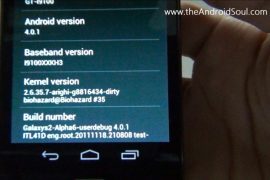
Even though Samsung UK has confirmed on twitter that an official update is in the works to update the company’s superphone Galaxy S2 to latest android version, 4.0, dubbed as Ice Cream Sandwich, we knew we’ll have it way earlier than the official version. We’re true, and we’ve an awesome custom ROM for you below to prove that.
Credits for this custom ROM goes to good team over at XDA, whose elite members are: biohazardious (he started this), gokhanmoral, Pete, Paradoxxx, chadouming, nebkat, Matri ak31, Coentje44, Tegrak, yjwong, Msaraiva, Xplowild and everybody (else).
This custom ROM is a port from the Android 4.0 AOSP code that Google released some days before, and it’s in alpha stage, a bit far from daily life use suitability. But those want to it badly, and have that required dare too, can use this team’s hard work to entertain themselves with ICS goodness by following easy-cheezy guide we’ve produced below.
Compatibility:
[error]This guide is applicable only for Samsung’s Galaxy SII international version (GT-i9100). Check your phone’s version in Settings – About Phone. It has to be “GT-i9100” for this Android 4.0 ROM to be compatible with your phone. Otherwise, simply don’t try this ICS port on your android handset — don’t even think about it if you care about your device.
And, to be very very specific, this is not for Galaxy SII handsets at AT&T (both the first one and Skyrocket), T-Mobile and Sprint.[/error]
Warning!
[warning]The methods and procedures discussed here are considered risky and you should not attempt anything if you don’t know completely what it is. If any damage occurs to you or your device, we won’t be held liable — you only will be responsible, you’ve been warned!!![/warning]
Pre-Installation thoughts:
- Backup your Apps and important data — bookmarks, contacts, SMS, APNs (internet settings), etc. This Android backup guide would help you.
- If you have Samsung’s PC software Kies installed, un-install it first because it may interrupt the flashing process. If you’ve installed it for sake of drivers which otherwise weren’t working, make sure you exit the Kies completely before beginning the procedure below.
- Drivers! — it’s important you’ve the proper drivers installed. Download links below:
What Works/Changelog:
- Touchscreen fix implented!
- Updated kernel (ty bio)
- Made rom amazingly smooth and super fast!
- Updated Android runtime
- Updated Settings
- Updated Build.prop
- Updated libraries
- Added Music2.apk
- Added latest Android Market (not really important cuz we have no wifi >.<)
- New apps from Galaxy Nexus
- Fixed RIL (CALL and SMS)
What Doesn’t Work:
- WiFi
- Bluetooth
- And everything else that is not under ‘what works’
Guide to Update Galaxy S II to Android 4.0 Ice Cream Sandwich (ICS)
You can watch the video below to get the idea of how to install android 4.0 on your Galaxy S II i9100. It shows the installation procedure from recovery after you’ve downloaded and transferred the android 4.0 file to phone’s internal sdcard. See the guide below for complete info.
Step-by-step guide:
- Download the Android 4.0 file (custom rom, that is). The latest version available right now is Alpha7. Download it from here, or here (direct link). (You can check and download the latest version of this ROM here, and then download it and continue the steps given below to flash it successfully, without any worries.)
- You need to have clockworkmod recovery installed on your Galaxy SII – i9100. If you don’t have it, do this:
- Transfer the Android 4.0 file you downloaded in step 1 above to phone’s internal sdcard. Just remember the location where you transfer it — you’ll need it in step 8 and step 10 below.
- Disconnect the phone from computer and power it off. Wait for 6-7 seconds for complete power off.
- Boot into recovery mode. For this, press and hold these 3 buttons together until Samsung’s screen shows up: Volume_UP+Home+Power. Phone will boot into CWM recovery. Use volume keys to scroll up and down between options and power/home key to select an option.
- Wipe system, data and Cache.
- In recovery, go to “mounts and storage”.
- To wipe system, select “format /system”. Choose “Yes – Format” on the next screen.
- To wipe data, select “format /data”. Choose “Yes – Format” on the next screen.
- To wipe cache, select “format /cache”. Choose “Yes – Format” on the next screen.
- Select “Go back” at the bottom to return to recovery’s main menu.
- Now, select “install zip from sd card”. Then, select “choose zip from sd card”. Now, browse through sd card and select the Android 4.0 file you downloaded in step 1 and transferred in step 3 above.
- This will flash the required files on your phone and will reboot your phone into recovery again. This is a slightly different recovery now. You need to flash the Android 4.0 File again.
- Select “install zip from sd card” again and then select “choose zip from sd card”. Browse through sd card and select the Android 4.0 file you downloaded in step 1 and transferred in step 3 above, as you did above.
- This time, the Android 4.0 custom ROM will be flashed/installed actually.
- When the flashing is done, go back and reboot your Galaxy S II by selecting ‘reboot system now’.
- The phone should boot up properly, wait for 5-10 mins. [I’ve tried this two times and first time it worked while second time I had to repeat steps 6 to 12 again, after which it booted successfully. So, initially, if after 10 mins the phone doesn’t boot up (it was stuck on the Galaxy S II screen, for me), press and hold Volume_UP+Home+Power keys together to boot into recovery mode. Do this from whatever screen you are on — no need to pull battery out or switch it off or anything. Just boot into recovery from your current screen, whatever it is. Then, follow steps 6 to 12. The phone should boot up properly next time.]
- [Optional] Support the development and appreciate the hard work put in by the team by donating to the team. Find link here.
- If you’ve any queries, shoot them in comments below. But do read this guide fully before to save both us time.
So, you have the most anticipated version of android, the Ice Cream Sandwich, v4.0, right on your Galaxy S II. This custom ROM will keep updating until it gets perfect, or nearly perfect. So, keep watching this space.
Check the official development page here for latest update and to thnak the devs. And use this discussion page to post your views, read other’s views and discuss the ROM. Keep it cool!
More screenshots:









221 responses to “How to Update Galaxy S II to Android 4.0 Ice Cream Sandwich (ICS)”
how can use wifi and bluetooth on ics 4.0
Not usable right now, wait for an update on it.
We should be happy that development of this tablet has gone so far so quickly. Leaving Nexus S and Galaxy S aside, I think no other phone has got builds that works as much as this one does.
kapil then what to do now?install
Gingerbread 2.3.5 XWKI8 Firmware?
Ohh… yes. That’s what you can do — updating to any Android 2.3 firmware of Samsung.
What you say, was of worth the try?
how can use wifi and bluetooth on ics 4.0
Not usable right now, wait for an update on it.
We should be happy that development of this tablet has gone so far so quickly. Leaving Nexus S and Galaxy S aside, I think no other phone has got builds that works as much as this one does.
how can use wifi and bluetooth on ics 4.0
Not usable right now, wait for an update on it.
We should be happy that development of this tablet has gone so far so quickly. Leaving Nexus S and Galaxy S aside, I think no other phone has got builds that works as much as this one does.
kapil then what to do now?install
Gingerbread 2.3.5 XWKI8 Firmware?
Ohh… yes. That’s what you can do — updating to any Android 2.3 firmware of Samsung.
What you say, was of worth the try?
kapil then what to do now?install
Gingerbread 2.3.5 XWKI8 Firmware?
Ohh… yes. That’s what you can do — updating to any Android 2.3 firmware of Samsung.
What you say, was of worth the try?
I wanna see how the benchmark tests go on this…. thanks…
I wanna see how the benchmark tests go on this…. thanks…
I wanna see how the benchmark tests go on this…. thanks…
Galaxy S I?
Galaxy S I?
Galaxy S I?
* DO NOT EVEN TRY IT* !!! 😛
just tried it….nothing works…not a single thing(atlist didnt for me) !!!
looks very good though 🙂
Agree nothing works. But it is fun:))
* DO NOT EVEN TRY IT* !!! 😛
just tried it….nothing works…not a single thing(atlist didnt for me) !!!
looks very good though 🙂
Agree nothing works. But it is fun:))
* DO NOT EVEN TRY IT* !!! 😛
just tried it….nothing works…not a single thing(atlist didnt for me) !!!
looks very good though 🙂
Agree nothing works. But it is fun:))
Fantastic, but i think ill wait for the Beta Version at least. I kind of like having WiFi…
Can you guys let us mortals know when the next version is out. 🙂
Can’t give you a date when the next version will be out. But, you can subscribe to our daily free email newsletter so that you know it when we post it. Or, simply bookmark the article’s page and check it regularly.
Fantastic, but i think ill wait for the Beta Version at least. I kind of like having WiFi…
Can you guys let us mortals know when the next version is out. 🙂
Can’t give you a date when the next version will be out. But, you can subscribe to our daily free email newsletter so that you know it when we post it. Or, simply bookmark the article’s page and check it regularly.
Fantastic, but i think ill wait for the Beta Version at least. I kind of like having WiFi…
Can you guys let us mortals know when the next version is out. 🙂
Can’t give you a date when the next version will be out. But, you can subscribe to our daily free email newsletter so that you know it when we post it. Or, simply bookmark the article’s page and check it regularly.
why i cannot connect to my storage?
do you NEED to hav sdcard? They should indicated this at the beginning of the article so I know I cant do it.
internal sd card…its built in the galaxy s2
why i cannot connect to my storage?
why i cannot connect to my storage?
do you NEED to hav sdcard? They should indicated this at the beginning of the article so I know I cant do it.
internal sd card…its built in the galaxy s2
do you NEED to hav sdcard? They should indicated this at the beginning of the article so I know I cant do it.
internal sd card…its built in the galaxy s2
Finding update package…
Opening update package…
Installing update…
Checking state of …
assert failed: run_program(“/tmp/updater.sh”) == 0
E:Error in ICS_4.0.1_r1_Beta1.zip
(Status 7)
Installation aborted
WHYYY????
Maybe re-installing the CWM recovery would help.
Maybe re-installing the CWM recovery would help.
Finding update package…
Opening update package…
Installing update…
Checking state of …
assert failed: run_program(“/tmp/updater.sh”) == 0
E:Error in ICS_4.0.1_r1_Beta1.zip
(Status 7)
Installation aborted
WHYYY????
Finding update package…
Opening update package…
Installing update…
Checking state of …
assert failed: run_program(“/tmp/updater.sh”) == 0
E:Error in ICS_4.0.1_r1_Beta1.zip
(Status 7)
Installation aborted
WHYYY????
Maybe re-installing the CWM recovery would help.
Maybe re-installing the CWM recovery would help.
does anyone know it this available for the sprint galaxy s2…..?
does anyone know it this available for the sprint galaxy s2…..?
does anyone know it this available for the sprint galaxy s2…..?
When is an update coming out? Some sort or Beta version maybe where most things if not everything works?
When is an update coming out? Some sort or Beta version maybe where most things if not everything works?
When is an update coming out? Some sort or Beta version maybe where most things if not everything works?
bug cant fix yet??
how to get back to v2.3 ?
Search for xxkh3 on this site and install that firmware.
bug cant fix yet??
bug cant fix yet??
how to get back to v2.3 ?
Search for xxkh3 on this site and install that firmware.
how to get back to v2.3 ?
Search for xxkh3 on this site and install that firmware.
got chinese language?
got chinese language?
got chinese language?
What do you mean by saying:What doesn’t work: Wifi Bluetoooth ..?you mean the wifi can not be used if rooted to 4.0?
What do you mean by saying:What doesn’t work: Wifi Bluetoooth ..?you mean the wifi can not be used if rooted to 4.0?
What do you mean by saying:What doesn’t work: Wifi Bluetoooth ..?you mean the wifi can not be used if rooted to 4.0?
error occure while updating galaxy s2 to icereme sandwitch by zi, file
error— E:signature certificate invalid.
plaa give the solution how i uodate my galaxxy s2.
You need to have clockworkmod recovery installed. Search for it on Internet. Or, search for xxkh3 on our site and install that. Then, root and install clockworkmod (cwm) recovery using our guide linked there at bottom of the xxkh3 install guide. Then, you’ll be good to install ICS.
I have sony ericson xperia arc s i want to upgrade to 4.0 hw should i go please help.!
error occure while updating galaxy s2 to icereme sandwitch by zi, file
error— E:signature certificate invalid.
plaa give the solution how i uodate my galaxxy s2.
You need to have clockworkmod recovery installed. Search for it on Internet. Or, search for xxkh3 on our site and install that. Then, root and install clockworkmod (cwm) recovery using our guide linked there at bottom of the xxkh3 install guide. Then, you’ll be good to install ICS.
I have sony ericson xperia arc s i want to upgrade to 4.0 hw should i go please help.!
error occure while updating galaxy s2 to icereme sandwitch by zi, file
error— E:signature certificate invalid.
plaa give the solution how i uodate my galaxxy s2.
You need to have clockworkmod recovery installed. Search for it on Internet. Or, search for xxkh3 on our site and install that. Then, root and install clockworkmod (cwm) recovery using our guide linked there at bottom of the xxkh3 install guide. Then, you’ll be good to install ICS.
I have sony ericson xperia arc s i want to upgrade to 4.0 hw should i go please help.!