
Topic
ChatGPT
-

How to Check ChatGPT’s Year End Review
ChatGPT now has its own “Wrapped”-style year‑end recap, called “Your Year with ChatGPT,” showing how you used the AI in 2025 with fun stats…
-

GPT‑5.2‑Codex: OpenAI’s Next-Gen AI for Advanced Coding and Cybersecurity
OpenAI has quietly rolled out GPT‑5.2‑Codex, its most advanced coding-focused AI yet, built for complex software engineering and defensive cybersecurity work.
-

ChatGPT Gets New Personalization Sliders for Enthusiasm and Warmth
OpenAI has rolled out new personalization settings that let users directly adjust ChatGPT’s enthusiasm, warmth and emoji use. Accessible via the Personalization menu, the…
-

OpenAI Tightens Chatgpt Rules for Teens with New Safety-Focused Model Update
OpenAI updated its Model Spec with clearer rules for how ChatGPT interacts with teens, plus new parental controls and AI learning guides for families.
-

How to Connect Apple Music to ChatGPT on Web and Mobile
Apple Music is now lives inside ChatGPT as an app that lets you find songs, create playlists, and check out song previews using prompts,…
-

OpenAI Rolls Out Next-Gen Image Generation Inside ChatGPT
OpenAI has launched a major upgrade to ChatGPT Images powered by its new GPT-Image-1.5 model, offering up to four-times faster generation, stronger instruction following,…
-

Explore ChatGPT Apps: Directory and SDK Launch
OpenAI launches ChatGPT App Directory and Apps SDK, enabling seamless third-party app integration within chats.
-

Apple Music Could Soon Be an App in ChatGPT
You’ll soon be able to ask ChatGPT to create Apple Music playlists with natural language.
-

Adobe Photoshop, Acrobat, and Express Are Free to Use in ChatGPT
Adobe Photoshop, Express, and Acrobat now live inside ChatGPT, enabling image and PDF edits via simple text prompts without design expertise or subscriptions.
-

Adult Mode in ChatGPT Will Be Available in Q1 2026
ChatGPT will introduce an “adult mode” in early 2026, once OpenAI can get the age-verification right.
-

OpenAI Launches GPT-5.2! Here’s What’s New
OpenAI has introduced GPT-5.2, a faster, more capable model built to handle complex reasoning, professional workflows, and long-form tasks with improved accuracy and reliability…
-

ChatGPT Voice Now Integrated into Main Chat, Still Using GPT 4o
ChatGPT’s voice feature is now fully integrated into the main chat interface, making it easier to switch between speaking and typing during conversations. Voice…
-

OpenAI Rolls Out Dedicated Shopping Research for ChatGPT Users: Ask, Compare, and Buy!
ChatGPT now includes a dedicated Shopping Assistant for product search, comparisons, and purchasing. Explore how the new Shopping Assistant empowers you to research products,…
-

ChatGPT Launches Group Chats Globally and for Everyone
ChatGPT now supports group chats for up to 20 users, available globally and for all plans, including free.
-
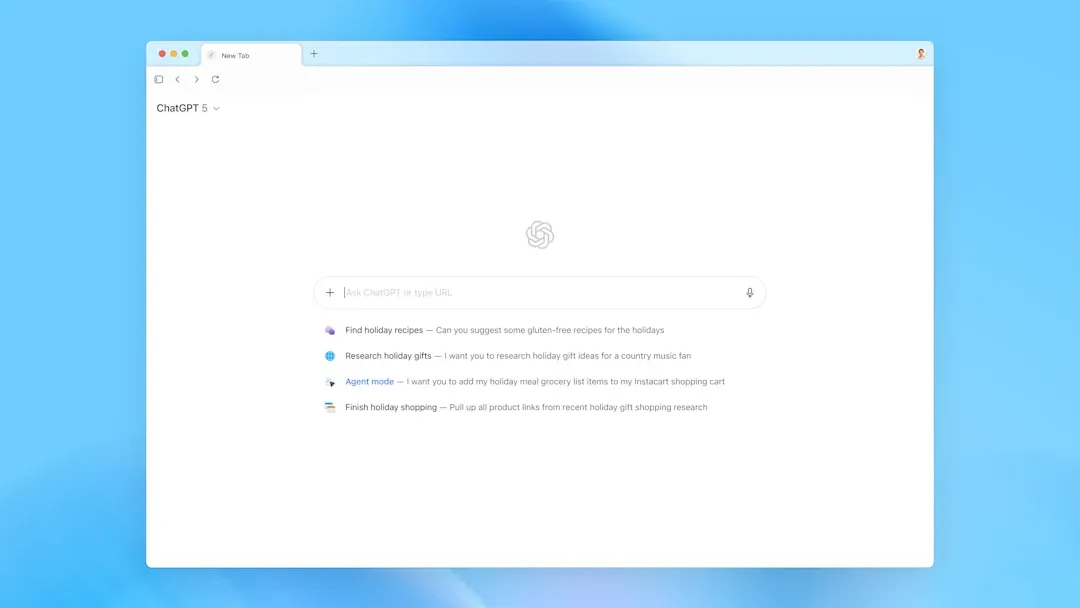
OpenAI Debuts ChatGPT Atlas, Joins the AI Browser Race
OpenAI has launched ChatGPT Atlas, an AI-powered web browser that integrates ChatGPT deeply for smarter browsing, task automation, and personalized experiences.
-

ChatGPT to Allow Erotica for Verified Adults
OpenAI will let adult users generate erotica in ChatGPT starting December, thanks to new age-gating and mental-health tools that treat adults like adults.
-
ChatGPT Is Quietly Testing DMs — and It’s Starting to Look Like a Social App
OpenAI is testing new chat features to make ChatGPT more social, with direct messaging and group chats in the app’s beta, nudging it toward…
-

ChatGPT Users Can Now Connect Directly to Spotify and Zillow Apps in Conversation
OpenAI now lets users interact with Spotify and Zillow inside ChatGPT: create playlists, browse real estate listings — all without leaving the chat.
-

ChatGPT Adds Instant Checkout, Lets You Shop Without Leaving Chat
ChatGPT now allows U.S. users to buy products directly in chat from Etsy and Shopify merchants with its new Instant Checkout feature.
-

Gemini Surpasses ChatGPT on App Store as Nano Banana AI Model Boosts Downloads by 45%
Gemini overtakes ChatGPT on the App Store, driven by its Nano Banana AI model, which led to a 45% surge in downloads. Discover how…