

The recently launched OnePlus X, a semi-budget device from the makers of the original Flagship killer, has now gotten itself an unofficial build of TWRP recovery.
The recovery comes from a member (counter-strike) of an unofficial Chinese OnePlus forum by the name oneplusbbs.com. Thankfully though, it’ll work across all variants of the device, not only the chinese.
Since this is an unofficial build of TWRP recovery for the OnePlus X, don’t expect it to be fully functional. However, the basics of TWRP recovery like flashing a zip file, taking nandroid backup and using MTP while in recovery, of course works well even on this early and unofficial OnePlus X TWRP build.
What you need to get TWRP recovery installed on your OnePlus X is just an unlocked bootloader, which is very likely supported under your device’ warranty, thanks to the humble warranty policy OnePlus usually follows for its devices.
Downloads
- OnePlus X TWRP Recovery: chinese original | English repack
Supported devices
- OnePlus X, codename onyx
- Don’t try this one any other device with codename different than above!
Important: Check your device’s codename on free Android app called Droid Info. If you see the codename mentioned above in the app, then use this recovery, otherwise not. BTW, you can check codename device’s packaging box too.
Warning!
Warranty may be void of your device if you follow the procedures given on this page. You only are responsible for your device. We won’t be liable if any damage occurs to your device and/or its components.
Backup!
Backup important files stored on your device before proceeding with the steps below, so that in case something goes wrong you’ll have backup of all your important files.
Step-by-step Guide
[Note: In step 4 of the guide linked above, use the combination Volume Up + Power button to boot into bootloader mode.]
- Go to Settings > About phone, and then tap ‘Build number’ 7 times or until you see the ‘you’re now a developer’ message pop up.
- Go back to Settings, then choose ‘Developer options’. Find the ‘USB debugging’ option and use its toggle button to enable it. Accept warning by tapping on OK button.
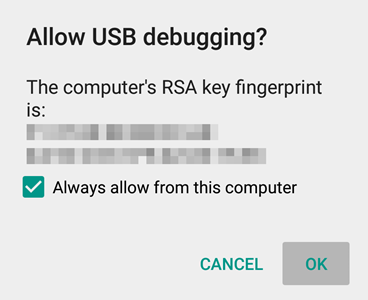
- Open that folder and then left click on empty white space in the folder.
- Now, while holding shift key, right click on empty white space to get a pop-up as shown below.
- Now choose Open command window here option from that.
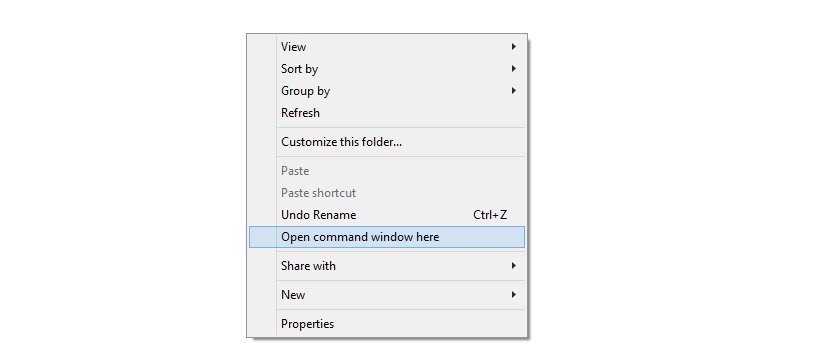
You will see a command window open up, with location directed to folder where you have the twrp recovery file.
- Power off your device and wait for 3-4 seconds after screen goes off.
- Press and hold Power and Volume Up together for 3 seconds and then let go. You’ll enter bootloader mode, also called Fastboot mode.
→ Upon running command below, you should get a serial no. with fastboot written after it. If you don’t get fastboot written on cmd window, then it means you need to reinstall adb and fastboot drivers, or change restart PC, or use original USB cable.
fastboot devices
fastboot flash recovery onyx-twrp.img
fastboot boot onyx-twrp.img
Alternative way to reboot into recovery mode is to power off the device first. And then press and hold Volume down + power button fo 4-5 seconds.
Happy flashing!
Need Help?
And let us know if you need any help regarding installation of TWRP recovery on your OnePlus X. Use the comments section below.
Via oneplusbbs




One response to “[Download] OnePlus X TWRP Recovery”
when trying to enter twrp, command window shows a message ” dtb not found”