We’re talking lots of CM13 ROMs lately, which are giving old devices a touch of Marshmallow update when OEMs have long abandoned them, even though rightly so as in the case of Galaxy Tab 7.7 and Galaxy Grand 2.
Same goes for Nexus 4 too a bit because it’s around 3 years old, but it would have been a lovely exception — and an example — if Google had chosen to update Nexus 4 to Marshmallow officially.
Read: Nexus 4 Marshmallow Update Images
Anyway, we always knew custom ROMs running 6.0 update at heart would drop in sooner than later for Nexus 4, and we have already covered two ROMs, based on Android 6.0 AOSP, to help you Marshmallow update on your Nexus 4.
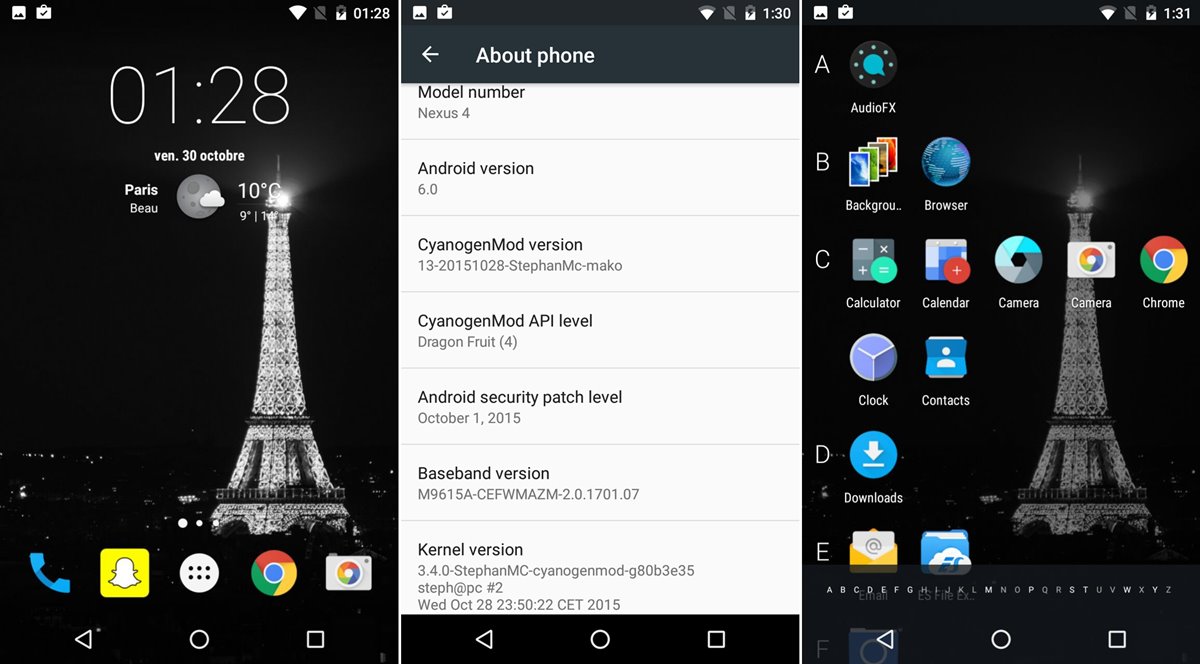
Now, we have the CM13 ROM. With the compatible Gapps, no less, right here for you.
Read: Nexus 4 AOSP ROM TWRP flashable
CM13 is an AOSP based ROM, and is most popular of all custom ROMs, and a base for many ROMs. With Nexus 4 CM13, which is in initial stage of development right now, you don’t have as many features as final builds would have it, but it’s a good shot nevertheless.
Normally, you have to flash a custom kernel first before flashing SuperSU to root Marshmallow, but because developer has already used a custom kernel of permissive type, you only have to flash the SuperSU file to gain root access on Nexus 4 Marshmallow update. See the link below.
Read: How to flash SuperSU for root
Let’s now check out the Nexus 4 CM13 ROM and its installation procedure.
Downloads
- CM13 Marshmallow ROM — Link | File: aosp_mako-ota-eng.franzd.zip (210.8 MB)
- Marshmallow Gapps — Link | File: benzo-gapps-M-20151011-signed-chroma-r3.zip (107.1 MB)
Note: Check the source page here (by stephanmc) for download link of latest release. As the ROM is under heavy development and new features are added and bugs ironed out, it’s good to check for and install the latest release.
Supported devices
- LG NEXUS 4, model D820 and D821
- Don’t try this on any other device than the one having model no. specified above.
Warning!
Warranty may be void of your device if you follow the procedures given on this page. You only are responsible for your device. We won’t be liable if any damage occurs to your device and/or its components.
Backup!
Backup important files stored on your device before proceeding with the steps below, so that in case something goes wrong you’ll have backup of all your important files.
How to Install
Required: You will need to have TWRP recovery installed on your device to be able to install Marshmallow custom ROM and Google Apps (Gapps). Check out our page on Nexus 4 TWRP recovery for flashing Gapps.
- Power off the device. Wait for 4-5 seconds after screen goes off.
- Press and hold Volume Up + Power button together until you see anything on screen. This is bootloader mode, and you will see FASTBOOT written at the top.
- Now, use volume down two times to bring up recovery mode, and then power button to select it and boot into recovery mode.
You will enter recovery mode soon, and should see TWRP recovery. If you see 3e recovery, then you need to install TWRP recovery for this.
That’s it.
Let us know if you need any help with this via comments below.