- What to know
- What Dear Algo actually does on Threads
- Dear Algo – Key facts at a glance
- Where Dear Algo is available and how rollout works
- How to check if Dear Algo is working on an account
- How Dear Algo posts are structured and interpreted
- Example Dear Algo requests and their likely effects
- How to personalize your Threads feed with Dear Algo
- How to manage, track, and undo Dear Algo requests
- Crafting highly effective Dear Algo prompts
- How Dear Algo fits with other Threads controls
- Privacy, visibility, and social dynamics of Dear Algo
- Everyday use cases to get more value from Dear Algo
- Bringing Dear Algo into everyday Threads use
What to know
-
Dear Algo is a new AI-powered Threads feature that lets posts act as “instructions” to your feed for about three days at a time.
-
Personalization works by publishing a public post that starts with “Dear Algo,” followed by what content to show more or less of.
-
Requests are temporary, publicly visible, and can be reposted by others to copy the same feed tuning to their own accounts.
-
Dear Algo is rolling out in the US, UK, Australia, and New Zealand first, with Meta planning a wider international launch later.
Threads just gave its algorithm a listening ear. Instead of quietly hoping the feed “gets” preferences, Dear Algo turns a simple post into a short-term, AI-guided tuning tool. A few words can nudge the algorithm toward live events, niche interests, or away from topics that feel overwhelming, all without digging through settings menus.
What Dear Algo actually does on Threads
Dear Algo is an AI-powered layer on top of Threads’ recommendation system. When a request is posted, the system treats it like a set of instructions and temporarily shifts what surfaces in the For You-style feed.
Meta describes it as a way to tell Threads “what’s important to you in the moment,” so the feed can reflect changing priorities: more of a live NBA game as it unfolds, or fewer posts about a show that hasn’t been finished yet. Rather than replacing the existing algorithm, Dear Algo acts more like a three-day “booster” or “filter” on top of existing signals such as follows and engagement.
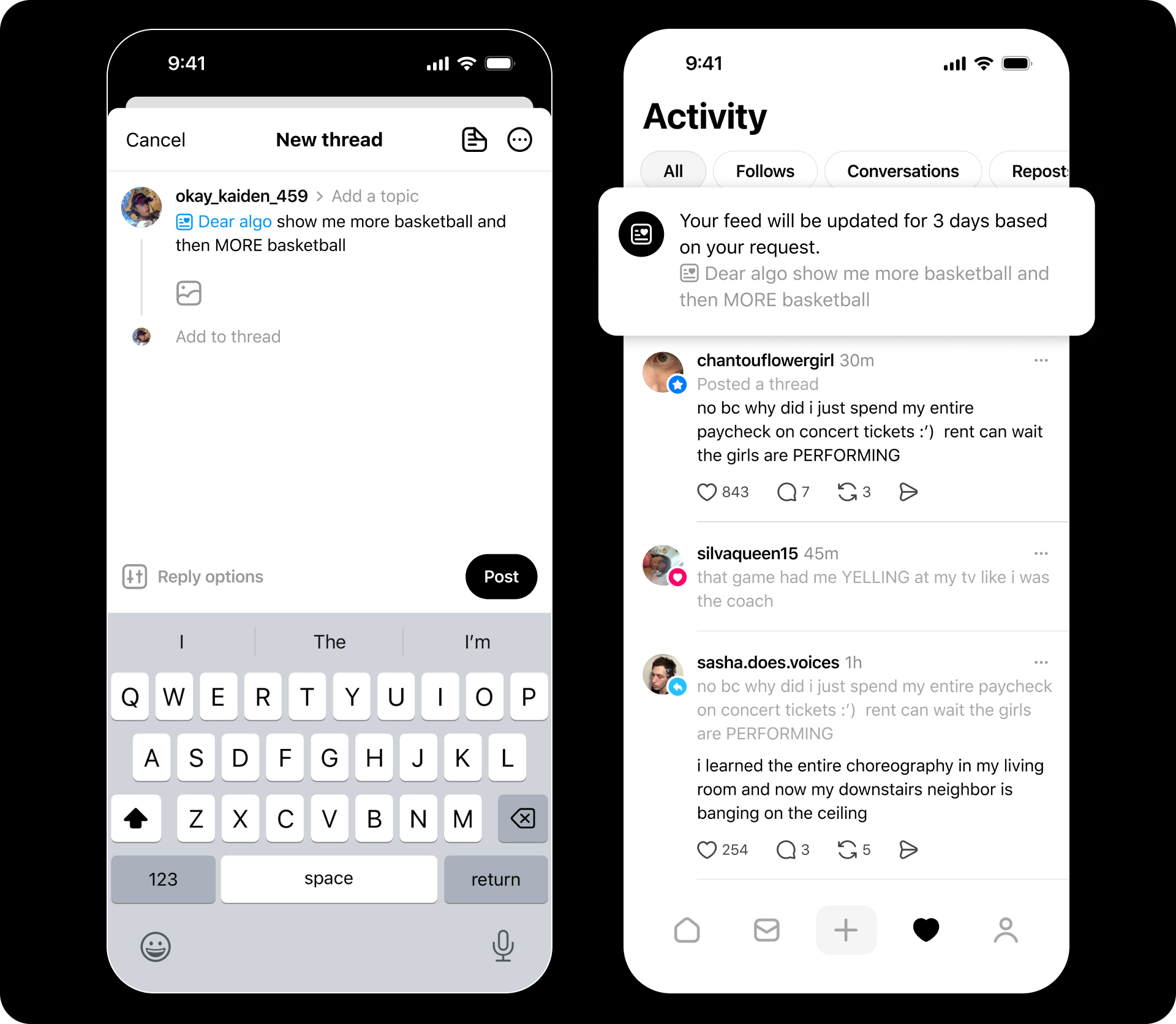
Each request applies for three days, then fades so the feed can remain centered on current conversations. Interaction with the content surfaced during that window still trains the algorithm, so consistent engagement can make some of the changes stick more permanently over time.
Dear Algo – Key facts at a glance
| Aspect | How it works | Details |
|---|---|---|
| Trigger phrase | Public post starting with “Dear Algo” | Phrase should be at the very beginning of the post. |
| Request type | “Show me more” or “show me less” of topics, themes, or content styles | Can target topics, events, genres, or broad moods. |
| Duration | About 3 days | After that, feed returns to its usual ranking unless new requests are made. |
| Visibility | Public by design | Other people can see, reply to, or repost the Dear Algo post. |
| Sharing personalization | Reposting someone’s Dear Algo copies settings for the reposting account | A fast way to adopt someone else’s tuning. |
| Availability (initial) | US, UK, Australia, New Zealand | Meta plans expansion to more countries over time. |
| Management | Requests listed in a dedicated section in settings | Old requests can be revisited or removed. |
Where Dear Algo is available and how rollout works
Meta launched Dear Algo globally as a concept but limited the initial rollout to specific regions. According to Meta’s announcement and multiple reports, Dear Algo is now live for Threads users in:
| Region / Country | Status | Notes |
|---|---|---|
| United States | Available | Included in the first public rollout. |
| United Kingdom | Available | Was part of earlier testing, now in full release. |
| Australia | Available | Included in initial global rollout. |
| New Zealand | Available | Included in initial global rollout. |
| Other countries | Rolling out later | Meta says more regions will follow. |
Threads accounts outside these countries may not yet see Dear Algo effects. The feature relies on a public post, so it technically works only once the backend rollout for that region is active. Until then, a “Dear Algo” post behaves like any other normal Threads post.
How to check if Dear Algo is working on an account
Dear Algo doesn’t show up as a button on day one; the primary interface is the post itself. Still, a couple of indirect checks can confirm whether it’s active.
-
Algorithms responding: After posting a properly structured Dear Algo request, the main feed should noticeably shift within a short period, favoring the requested topics or suppressing those flagged for “less.”
-
Settings section: Meta has begun surfacing Dear Algo history inside Threads’ settings, allowing past requests to be reviewed or removed. If a dedicated section for these posts appears, that’s a strong sign the feature is live.
-
Community signals: Seeing Dear Algo posts from others in the same country, especially from verified or official accounts, suggests the rollout has reached that region.
If no visible feed change appears after a few hours, and nothing related to Dear Algo is listed in settings, the feature may not yet be enabled for that account or region.
How Dear Algo posts are structured and interpreted
Dear Algo posts follow a simple but specific pattern: a greeting to the algorithm plus a clear description of what should appear more or less often. The system parses this natural language to infer the topics, entities, and content styles to emphasize or downrank.
The first requirement is placing “Dear Algo” at the start. After that, the language can be conversational. The underlying AI looks for signals such as:
-
Topics and keywords (e.g., “NBA Finals,” “podcasts,” “K-dramas”)
-
Actions (e.g., “show me more,” “stop showing me,” “less of”)
-
Time-sensitive events (e.g., “tonight’s game,” “this weekend’s election coverage”)
This flexibility is intentional: Meta frames Dear Algo as a way to “tell Threads what’s important … in the moment,” rather than forcing rigid filters or long menus.
Example Dear Algo requests and their likely effects
| Type of request | Example post text | Likely algorithm response |
|---|---|---|
| More of a topic | “Dear Algo, show me more posts about the NBA All-Star weekend.” | Boosts basketball and All-Star content for 3 days. |
| Less of a topic | “Dear Algo, please show me fewer posts about crypto for a while.” | Downranks crypto-related posts temporarily. |
| Event-focused | “Dear Algo, help me follow live updates about the Oscars tonight.” | Surfaces Oscar-related posts and commentary in real time. |
| Mood or vibe | “Dear Algo, I want more wholesome animal videos and fewer stressful news stories.” | Prioritizes lighthearted content, reduces heavy news coverage. |
| Creator / niche interest | “Dear Algo, show me more posts from indie game developers and fewer big studio trailers.” | Highlights smaller creators, downranks some mainstream studio posts. |
| Spoiler-avoidance style | “Dear Algo, stop showing me spoilers for the new sci-fi show until next week.” | Attempts to reduce spoiler-heavy posts around that show for three days. |
How to personalize your Threads feed with Dear Algo
How to write and publish a Dear Algo post
Use this when the goal is to quickly steer the feed toward or away from specific topics for the next few days.
Step 1
Open Threads and navigate to the main composer as if writing a normal post.
Step 2
Start the post with the phrase “Dear Algo” at the very beginning. Keeping this exact sequence makes it easiest for Threads to detect the request.
Step 3
Immediately after “Dear Algo,” describe what is wanted more or less of, in normal language. For example: “Dear Algo, show me more posts about women’s football and fewer about transfer rumors.”
Step 4
Set the post to be public if that option is available. Dear Algo is designed around public posts so others can see and reuse the request.
Step 5
Publish the post and resume scrolling the feed. Over the next short period, the feed should start tilting toward the requested topics and away from those flagged for “less,” with the effect persisting for about three days.
How to reuse someone else’s Dear Algo settings
Reusing another person’s request is handy when their preference is close to what is wanted, for example, a sports journalist’s “game night” setup or a critic’s “no spoilers” phase.
Step 1
Find a public post that clearly starts with “Dear Algo” and whose request matches the desired tuning.
Step 2
Open the post and choose the repost or quote-repost option, depending on how Threads labels it in the interface.
Step 3
Confirm the repost. According to Meta, reposting a Dear Algo request applies the same feed adjustment to the reposting account for about three days.
Step 4
Interact with the content that appears during that period (likes, replies, follows) to strengthen longer-term signals that match those interests.
By layering reposted Dear Algo posts with occasional custom ones, the feed can be tuned for specific events or moods without writing every request from scratch.
How to manage, track, and undo Dear Algo requests
Even though each request expires after three days, Threads is adding ways to keep track of them and dial them back early when needed.
Managing requests via settings
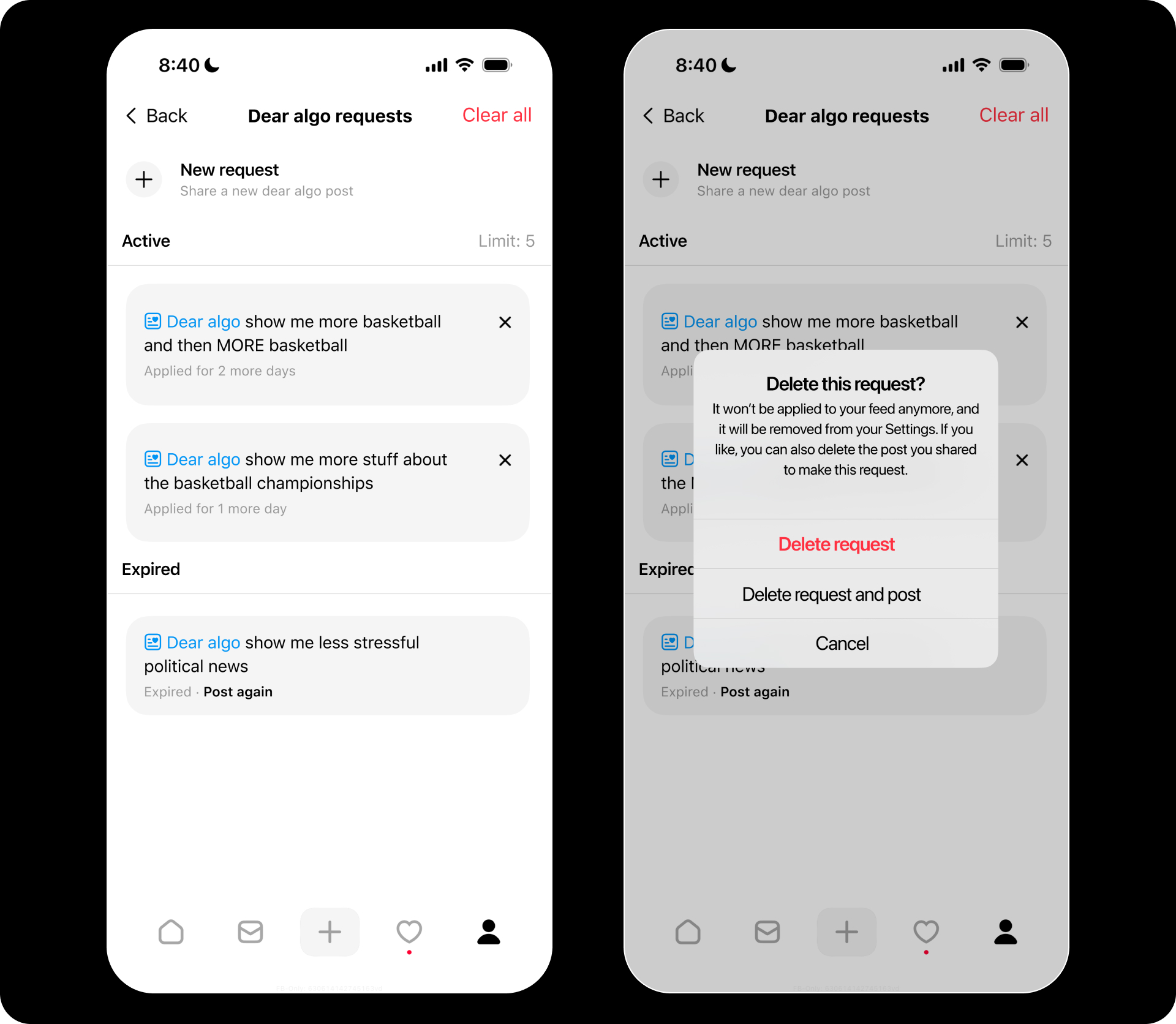
Dear Algo posts can be viewed in a dedicated section of Threads’ settings, where previous requests are listed alongside options to revisit or remove them. While the exact layout may evolve, the general behavior is:
Step 1
Open Threads’ settings from the profile or menu area.
Step 2
Look for a section labeled something like “Dear Algo,” “Feed requests,” or similar language that groups these posts.
Step 3
Review the list of past Dear Algo posts. Selecting one may show the original text, its timing, and whether it is still active within the three-day window.
Step 4
If a request is causing unwanted side effects in the feed, use the available option (such as “remove,” “cancel,” or “delete”) to end its influence ahead of schedule, then confirm the choice.
Step 5
If the results were positive, consider reusing the wording periodically for recurring events (like weekly matches) or building a template that can be quickly updated.
Natural expiration and overlapping requests
Every Dear Algo request is temporary. After roughly three days, its direct influence on the feed stops. That design keeps the system tied to what is current rather than permanently pivoting around a single moment.
Multiple overlapping requests can exist, but Meta has not fully detailed how the system prioritizes them when they conflict. In practice, newer posts are more likely to shape the feed, especially if recent engagement aligns with the latest request. If the feed feels off, posting a fresh, clearer Dear Algo message often works better than trying to micromanage old ones.
Crafting highly effective Dear Algo prompts
Good Dear Algo posts behave a lot like good AI prompts: clear, concrete, and focused. Vague messages can still work, but sharpening them tends to produce better feed adjustments.
Elements of a strong Dear Algo request
-
Clear action: “show me more,” “show me fewer/less,” or “stop showing me” signals direction.
-
Specific topics: Mention concrete subjects, leagues, genres, or communities (e.g., “WNBA playoffs,” “climate science explainers”).
-
Timebound context: Referencing “this week,” “tonight,” or “during election day” can help the algorithm understand urgency.
-
Balance: Combining “more of X” and “less of Y” in the same request can sharpen the result.
Sample prompts to adapt
| Goal | Example Dear Algo post |
|---|---|
| Live sports focus | “Dear Algo, show me more posts about tonight’s Premier League matches and fewer posts about transfer gossip.” |
| Learning a new topic | “Dear Algo, help me find more beginner-friendly posts about learning Python and fewer generic tech memes.” |
| Calmer feed | “Dear Algo, give me more art, photography, and nature posts and less breaking news for the next few days.” |
| Following a conference or event | “Dear Algo, surface talks, live updates, and attendee posts from the [EventName] conference this week.” |
| Creator discovery | “Dear Algo, show me more posts from small indie musicians and fewer from mainstream chart-topping artists.” |
Revisiting and refining this language over time helps train both the algorithm and personal intuition about what produces the best results.
How Dear Algo fits with other Threads controls
Dear Algo is one part of the broader control toolkit on Threads. Existing options like “Not Interested,” muting, and blocking continue to operate in parallel, but their behavior is more enduring and less conversational.
Broadly, the tools stack like this:
| Control type | Scope | Duration / effect | Best use case |
|---|---|---|---|
| Dear Algo | For You-style feed | Strong influence for ~3 days per request | Short-term tuning around events, trends, moods. |
| “Not Interested” | Individual posts/topics | Longer-term downranking of similar content | Quietly reducing recurring annoyances. |
| Mute / block | Specific accounts | Indefinite until reversed | Cutting out problematic or unwanted profiles entirely. |
In practice, Dear Algo is ideal when the desire is to feel a shift right away—“more of this, less of that”—without committing to a permanent change. Traditional controls remain useful for structural clean-up of the feed over weeks and months.
Unlike quiet preference settings, Dear Algo works entirely through public posts. That means every request is visible to followers, strangers, and anyone who searches or browses relevant topics.
This public design serves a purpose: Meta positions Dear Algo as a “community experience,” where people can discover conversations and copy each other’s tuning by reposting requests they like. However, it also raises some practical considerations:
-
Sensitive topics: Requests that mention health issues, personal struggles, or private interests will be public. Keeping wording neutral or abstract can protect privacy.
-
Social signaling: A Dear Algo post doubles as a piece of public speech, shaping how others see the account’s interests.
-
Reposts as endorsement: When someone reposts another’s Dear Algo, it not only copies the tuning but also amplifies the original message socially.
For anything that feels too personal to broadcast, the safer path is to rely more heavily on standard controls such as “Not Interested,” muting, or blocking.
Everyday use cases to get more value from Dear Algo
Dear Algo is most powerful when integrated into regular Threads habits rather than treated as a one-off trick. Some recurring patterns where it shines include:
-
Live events and sports: Before a big match, awards show, or keynote, a tailored Dear Algo post primes the feed to highlight real-time commentary and reactions for the next few days.
-
Spoiler avoidance: When a new episode or game drops, asking for fewer posts with spoilers can reduce accidental reveals while still keeping general chatter visible.
-
Focused learning sprints: During a week of diving into a new skill or field, Dear Algo can turn the feed into a curated reading list of explainers, threads, and expert commentary.
-
Mental load management: Temporarily dialing down heavy news or stressful topics while leaning into art, humor, or hobbies can make scrolling feel less draining.
-
Community exploration: Reposting Dear Algo setups from creators, journalists, or curators helps mirror their information environment and discover the networks they follow.
Experimenting with short, targeted requests and observing how the feed responds quickly builds intuition for when a Dear Algo adjustment is worth posting.
Bringing Dear Algo into everyday Threads use
Dear Algo turns the algorithm from a black box into something closer to a conversation partner. Instead of hoping the feed eventually understands shifting priorities, a short public note can nudge it toward live events, learning goals, or calmer content for a few days at a time.
By crafting clear requests, reusing smart setups from others, and regularly pruning or refreshing old posts in settings, personalization on Threads becomes more intentional and less random. Paired with quieter tools like “Not Interested,” mute, and block, Dear Algo gives granular, moment-by-moment control without sacrificing the real-time feel that keeps Threads engaging.