

For a reason or another, you may often need to extract .dat file from a ROM to .ext4 format. Well, especially on Marshmallow, it’s a tedious task, as was the case on Lollipop.
But thanks to new tool called sprs2ext, your life will be a lot easier if your are a pro Android user who encounters .dat format every now and then. The credit for the tool goes to Ricky Divjakovski, thanks a lot! BTW, his android kitchen is also worth your visit!
Let’s see how you can convert the .dat file to an .ext4 one, using the sprs2ext tool.
Extract or Decompress .dat file to .ext4
For this, type cmd in the address bar and hit enter key. Or use Shift+right click, and then choose Open command window here.
sprs2ext.exe system.transfer.list <filename>.dat
(Of course, replace <filename> to name of your .dat file, Be sure to remove arrow signs too.)
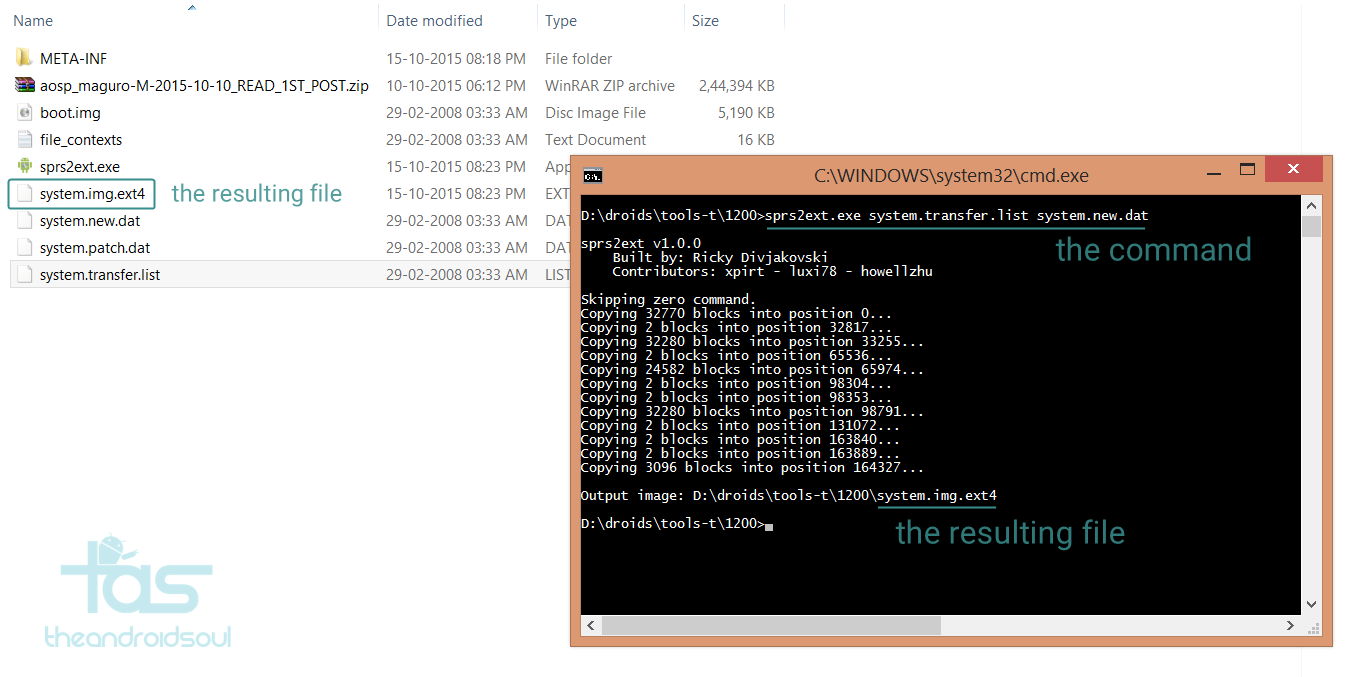
→ That’s Marshmallow ROM for Galaxy Nexus in the screenshot above, btw. Ahem, the legendary Galaxy Nexus, I mean.
Let us know if this doesn’t work out, we’ll try our bets to help you.
6 responses to “How to convert .dat system file to .ext4 format on Marshmallow and Lollipop”
Thank you.
Thank you.
how can I extract the ext4?
how can I extract the ext4?
How can I repack it to system.new.dat
Please reply
How can I repack it to system.new.dat
Please reply