

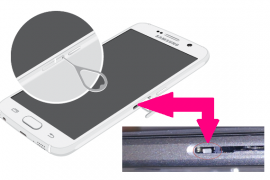
There is a very simple way to identify whether your Galaxy S6 or Galaxy S6 Edge has been bit damaged by liquid, which is most probably water. Every OEM these days ships its Android phones and tablet with such identification measures pre-installed, and the S6 and S6 Edge are no exception.
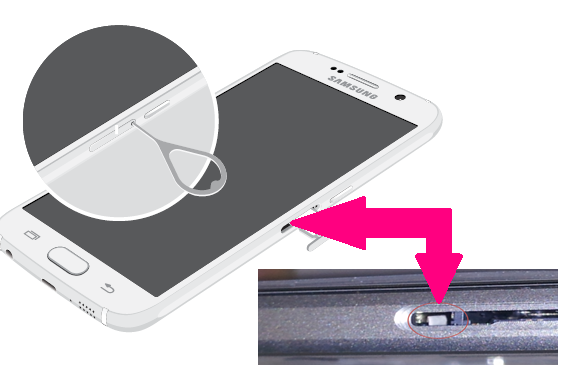
In order to check whether water damage, simply open the SIM tray of your Galaxy S6 or S6 Edge, and look on the inside. You don’t need a torch for this, and you don’t have to look any deep either for this. Simply check out the inner portion for its color. Look for the indicator, which is by default in white color, and is not metal of course.
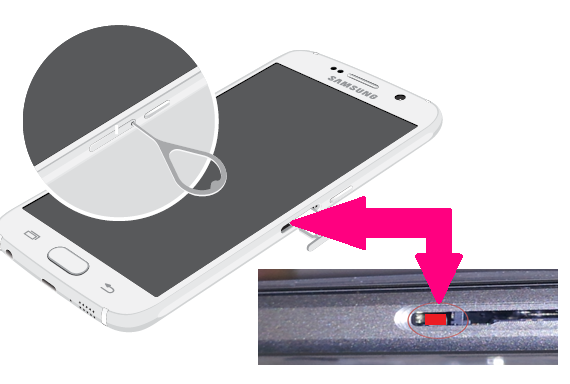
White color indicates that your device is safe, and there is no liquid/water damage. While, if you’re unlucky, you’ll see pink or red color, which simply means that there has been liquid/water damage on your Galaxy S6 or S6 Edge.
Here’s a summary:
- Open the SIM tray first.
- Look for the color of the indicator:
- If you see red or pink color in there, your device has taken water damage.
- If you see white color, there is no water damage on your device.
We hope you are never in a situation where your costliest Galaxy device to date gets hit by water, or any liquid for that matter, but yes, if you are reading this, it probably means your device has already taken some hit, and now you’re keen to verify it. We hope you see white color!
The images below exhibit both of the situations of Liquid Damage Indicator. White color means no damage, the default case. While, pink or red color means water damaged piece, that’s your work!
Galaxy S6 Pics
No Water Damage – White color
Water Damaged – Pink or Red color
Galaxy S6 Edge Pics
No Water Damage – White color

Water Damaged – Pink or Red color

What to do when there’s water damage?
Well, try to dry it up. Power off the phone and put it inside a bag of rice. Keep it there for a day. That should absorb all moisture out of it.
If the device is looking too wet, you can consider placing the device under direct sunlight for some time. Take care to not leave it under sunlight for long time as that could heat up and warm the phone.
There are also some revival kits available online, give them a look too if need be. If nothing works, getting it repaired at service centre is your only option.




119 responses to “How to check Water Damage on Galaxy S6 and S6 Edge”
i was going out to close the gate with the phone in one hand and accidentally slipped out and went into a bucket of maybe 1/2 inch of water… Picked it up quickly (had a hard case on it but still has some open holes. It was fine for a while and didn’t see waterlogged so i went about my day… 2 hrs later i wanted to charge it… after charging for 2% i wanted to plug it into the wall charger but as soon as i did that the phone turned off… had so weird stuff on the screen (light blue screen with “updates” cmd prompt? took the charger out and noticed it had a drop of water so after reading online, i checked the sticker in the sim card slot and it looks white. i put it in a bag of rice for maybe 5 min and it seems to be working fine now… hope this helps!
My samsung galaxy s6 is droped into for about 10 minutes in a fish pot while charging and its not turining on please help
My samsung galaxy s6 is droped into for about 10 minutes in a fish pot while charging and its not turining on please help
Dropped mime down toilet literally 2 seconds picked it out dried it with towel it’s just went black screen with purple light at the top can’t do anything please help
Dropped mime down toilet literally 2 seconds picked it out dried it with towel it’s just went black screen with purple light at the top can’t do anything please help
Shruti: I too couldn’t find the “color” until I used my other phone’s lantern and REALLY looked and hidden in there, to the left of the SIM drawer cavity, was the little tag, red in my case, that indicated that my friend’s phone HAD been damaged by her dropping it into the pool over the weekend. The BRIGHT cell phone light might be what lets you see the tag. Good luck!!
Shruti: I too couldn’t find the “color” until I used my other phone’s lantern and REALLY looked and hidden in there, to the left of the SIM drawer cavity, was the little tag, red in my case, that indicated that my friend’s phone HAD been damaged by her dropping it into the pool over the weekend. The BRIGHT cell phone light might be what lets you see the tag. Good luck!!
After riding under a heavy rain, my phone become wet. When i arrive home and check, it worked normally until 1 minute It said ur phone is overheating. Is there any solution to that problem? My phone is s6 edge
After riding under a heavy rain, my phone become wet. When i arrive home and check, it worked normally until 1 minute It said ur phone is overheating. Is there any solution to that problem? My phone is s6 edge
I accidentally splashed water on my s6 edge plus and now the power button isn’t responding is their any way to fix it without sending it in?
I accidentally splashed water on my s6 edge plus and now the power button isn’t responding is their any way to fix it without sending it in?
My new S6 edge turned off and wouldn’t start up again – I had it checked and was told it had corrosion due to accidental water damage not covered on warranty. When I got my phone back it is working – will the corrosion get worse making the phone faulty again? The water indicator under the sim tray is still white so I’m not sure where this corrosion came from
My new S6 edge turned off and wouldn’t start up again – I had it checked and was told it had corrosion due to accidental water damage not covered on warranty. When I got my phone back it is working – will the corrosion get worse making the phone faulty again? The water indicator under the sim tray is still white so I’m not sure where this corrosion came from
My G^ 6 phone got wet and the split screen keeps popping up and wont go off! I’m so annoyed. It interferes with all of my business it cuts me out when making a call etc etc.
My G^ 6 phone got wet and the split screen keeps popping up and wont go off! I’m so annoyed. It interferes with all of my business it cuts me out when making a call etc etc.
HI. My S6 edge was fell down in water, i picked quickly, the phone is well and sim point is white but its left button is working self again and again which opens background files or apps etc., please suggest any solution..
HI. My S6 edge was fell down in water, i picked quickly, the phone is well and sim point is white but its left button is working self again and again which opens background files or apps etc., please suggest any solution..