
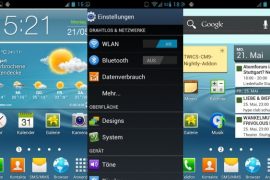
Get all the Galaxy S3 goodies on your Galaxy S and Galaxy S2 with a single add-on pack, made by XDA Senior Member smalldookie, which contains everything from the ringtones, wallpapers, TouchWiz launcher to Galaxy S3 apps and widgets, and more.
Here are some of the features of the add-on pack:
- Modified TouchWiz 4 with SGS3 icons
- SGS3 ringtones, system-sounds, alarm sounds, notification sounds
- SGS3 Live Wallpapers
- Samsung apps like App Store, Memo, Accuweather-widget, Taskmanager, Angry-GPS, Digital-clockwidget, Memo widget
NOTE: The add-on pack is for the CM9 and AOKP ROMs, based on Ice Cream Sandwich Android 4.0. It will NOT work with Samsung stock based ROMs. It might work on other ICS ROMs, but that is not guaranteed.
Let’s take a look at the procedure for installing the Galaxy S3 Add-on Pack on Galaxy S/S2
How to Install Galaxy S3 Add-on Pack on Galaxy S/S2
- Important! Make sure you have CM9 or AOKP ROM installed on your Galaxy S/Galaxy S2.
- Download the latest Galaxy S3 add-on pack from the official development page. The add-on pack file is the same for both the Galaxy S and the Galaxy S2. [Note: Don’t download the file linked in Red button, that is for Galaxy nexus i9250. Download from the link in Blue Button with this text: Galaxy S/S+/Nexus S: TWICS-CM9-Nightly-Addon 1.3 — this is the name of file that you would be using.]
- Copy the downloaded .zip file to the internal SD card on the phone (without extracting it).
- Turn off the phone. Then, boot into CWM recovery. To do so, press and hold the Volume Up + Home buttons while powering on the phone. When the screen turns on, let go of all three buttons.
In recovery, use Volume keys to scroll up and down and power key to select an option. - Select install zip from sdcard, then select choose zip from sdcard. Scroll to the .zip file (copied in step 3) on the sdcard and select it. Confirm installation on the next page by selecting Yes.
- After the installation is complete, select go back and then select reboot system now to reboot your phone.
The Galaxy S3 add-on pack is now installed on your Galaxy S/S2, and you can enjoy all the Galaxy S3 goodies now installed on your phone. Let us know how it works for you, in the comments below.







50 responses to “Galaxy S3 Add-on Pack for Galaxy S i9000 and Galaxy S2 i9100”
will it work with Miui 4??
i m currently on Weui 1.0 SGS
Thanx man it works like a charm
Which file to download from this site :
http://www.mrmad.net/samsung-addon-packet-cm9-i9000-im-sgs3-look-2105 because the post on XDA says download the red button. I have Galaxy S i9000.
Hi there i have downloaded the one that says
Download: red button at mrmad.net but is not perfect, some bugs and screen as well is bugger on my galaxy S
Ya that red button is for Galaxy Nexus and for Galaxy S you need to download the blue button file see the author has updated the post with more info.
will it work with Miui 4??
i m currently on Weui 1.0 SGS
I have Android 4.0 CM9 and TouchWiz from rEmIxRoM based on Latest CM9 20120516 NIGHTLY build.
I have downloaded Nexus_S3_TWICS_Addon thinking that this was the correct one (It seems that I was wrong). I have copied to SD card and then install it from the CWM Recovery. After reboot I was getting a never ending CM9 robot with the animation of the blue tunnel. Then I reboot it again, and I can´t access CWM Recovery screen anymore, and the phone is constantly rebooting. I do can access to the Download Screen (Volume Down + Menu + Power Key). I´m starting to freak out a bit, could you tell me a solution please?
Best regards
I have Android 4.0 CM9 and TouchWiz from rEmIxRoM based on Latest CM9 20120516 NIGHTLY build.
I have downloaded Nexus_S3_TWICS_Addon thinking that this was the correct one (It seems that I was wrong). I have copied to SD card and then install it from the CWM Recovery. After reboot I was getting a never ending CM9 robot with the animation of the blue tunnel. Then I reboot it again, and I can´t access CWM Recovery screen anymore, and the phone is constantly rebooting. I do can access to the Download Screen (Volume Down + Menu + Power Key). I´m starting to freak out a bit, could you tell me a solution please?
Best regards
I don’t know why the developer has pointed out specifically to download the one in red color, because that one is meant for Galaxy Nexus i9250 only.
For the Galaxy S, and the Galaxy S2, you have to download the one with blue button, with this text: Galaxy S/S+/Nexus S: TWICS-CM9-Nightly-Addon… So, download the correct file.
And, have you tried rebooting to recovery this way. First, remove the battery for 4-5 seconds and then place it back. Now, hold Volume Up + Home + Power keys together until you see a Samsung logo. If it boots up in recovery mode, then go to mounts and storage and select mount /sdcard, and connect to PC. This will allow you to transfer the correct file to phone, which you can flash from recovery.
But if you can’t boot into recovery mode, you’ll have to flash a firmware back, and then root and install clockworkmod recovery on it. For this, simply install CM9 rom back, using this guide — https://nerdschalk.com/cyanogenmod-9-cm9-nightly-rom-for-galaxy-s-installation-guide/
Do the above, and let me know.
Hi, thanks for your quick response.
I have no way to go back to CWM Recovery. So I will try to flash it again. The problem now is that the first step to flash the firmware is again going to CWM Recovery mode:
Step 2. Flash the stock XXJW4 firmware by using → this guide.
-> Step 5. Boot into recovery. To do this, press and hold the Volume_UP + Home + Power till the screen turns on, then let them go. You will boot into recovery soon enough.
Maybe this info also help: I came from XXJW4 as well.
Thank you again for your help.
You have to root the jw4 too to get cwm recovery. After you install jw4, use next step in that guide to root it. Then, you will be able into recovery mode and will get clockworkmod recovery. Just follow that guide carefully, you’ll be fine.
Hehe, thanks, I tried to flash with JW4 again with no “wipe data” (as I couldn´t access CWM Recovery), then I got errors in the process like “failed to mount /dbdata” and stuff like that. After that I was affraid to install the Root and CWM Recovery of JW4 and damage it even more. So, at the end I flashed with JVU with the 3 files method and Repartition. And from there I flashed with JW4 and then rEmIxRoM again.
I just read your post, your method sure would work and I wanted to do it but I was not sure at that moment until I have read this.
Thanks a lot for your help, much appreciated.
Best regards
Thanx man it works like a charm
Which file to download from this site :
http://www.mrmad.net/samsung-addon-packet-cm9-i9000-im-sgs3-look-2105 because the post on XDA says download the red button. I have Galaxy S i9000.
Hi there i have downloaded the one that says
Download: red button at mrmad.net but is not perfect, some bugs and screen as well is bugger on my galaxy S
Ya that red button is for Galaxy Nexus and for Galaxy S you need to download the blue button file see the author has updated the post with more info.
Question : How much time does i take for the first boot? My phone does not boot and is stuck in the boot animation for the past 15 minutes.
same problem
I have the same problem
Switch off
Remove battery
Put battery back
Boot into recovery mode
Wipe cache
Reboot
is it right that i have to reinstall the google play store?
I have Android 4.0 CM9 and TouchWiz from rEmIxRoM based on Latest CM9 20120516 NIGHTLY build.
I have downloaded Nexus_S3_TWICS_Addon thinking that this was the correct one (It seems that I was wrong). I have copied to SD card and then install it from the CWM Recovery. After reboot I was getting a never ending CM9 robot with the animation of the blue tunnel. Then I reboot it again, and I can´t access CWM Recovery screen anymore, and the phone is constantly rebooting. I do can access to the Download Screen (Volume Down + Menu + Power Key). I´m starting to freak out a bit, could you tell me a solution please?
Best regards
I have Android 4.0 CM9 and TouchWiz from rEmIxRoM based on Latest CM9 20120516 NIGHTLY build.
I have downloaded Nexus_S3_TWICS_Addon thinking that this was the correct one (It seems that I was wrong). I have copied to SD card and then install it from the CWM Recovery. After reboot I was getting a never ending CM9 robot with the animation of the blue tunnel. Then I reboot it again, and I can´t access CWM Recovery screen anymore, and the phone is constantly rebooting. I do can access to the Download Screen (Volume Down + Menu + Power Key). I´m starting to freak out a bit, could you tell me a solution please?
Best regards
I don’t know why the developer has pointed out specifically to download the one in red color, because that one is meant for Galaxy Nexus i9250 only.
For the Galaxy S, and the Galaxy S2, you have to download the one with blue button, with this text: Galaxy S/S+/Nexus S: TWICS-CM9-Nightly-Addon… So, download the correct file.
And, have you tried rebooting to recovery this way. First, remove the battery for 4-5 seconds and then place it back. Now, hold Volume Up + Home + Power keys together until you see a Samsung logo. If it boots up in recovery mode, then go to mounts and storage and select mount /sdcard, and connect to PC. This will allow you to transfer the correct file to phone, which you can flash from recovery.
But if you can’t boot into recovery mode, you’ll have to flash a firmware back, and then root and install clockworkmod recovery on it. For this, simply install CM9 rom back, using this guide — https://nerdschalk.com/cyanogenmod-9-cm9-nightly-rom-for-galaxy-s-installation-guide/
Do the above, and let me know.
Hi, thanks for your quick response.
I have no way to go back to CWM Recovery. So I will try to flash it again. The problem now is that the first step to flash the firmware is again going to CWM Recovery mode:
Step 2. Flash the stock XXJW4 firmware by using → this guide.
-> Step 5. Boot into recovery. To do this, press and hold the Volume_UP + Home + Power till the screen turns on, then let them go. You will boot into recovery soon enough.
Maybe this info also help: I came from XXJW4 as well.
Thank you again for your help.
You have to root the jw4 too to get cwm recovery. After you install jw4, use next step in that guide to root it. Then, you will be able into recovery mode and will get clockworkmod recovery. Just follow that guide carefully, you’ll be fine.
Hehe, thanks, I tried to flash with JW4 again with no “wipe data” (as I couldn´t access CWM Recovery), then I got errors in the process like “failed to mount /dbdata” and stuff like that. After that I was affraid to install the Root and CWM Recovery of JW4 and damage it even more. So, at the end I flashed with JVU with the 3 files method and Repartition. And from there I flashed with JW4 and then rEmIxRoM again.
I just read your post, your method sure would work and I wanted to do it but I was not sure at that moment until I have read this.
Thanks a lot for your help, much appreciated.
Best regards
i got the constant boot screen – had to restore to a backup from 19th may – gutted – cant work out what ive done wrong?
Question : How much time does i take for the first boot? My phone does not boot and is stuck in the boot animation for the past 15 minutes.
same problem
I have the same problem
Switch off
Remove battery
Put battery back
Boot into recovery mode
Wipe cache
Reboot
is it right that i have to reinstall the google play store?
i got the constant boot screen – had to restore to a backup from 19th may – gutted – cant work out what ive done wrong?
hey buddy,do you know if this works on vk ics rom for galaxy s2?thanks
hey buddy,do you know if this works on vk ics rom for galaxy s2?thanks
This is working great for me but I can’t get pop play to work for my videos. I have a galaxy s i9000. Does this work for my phone or only the nexus
This is working great for me but I can’t get pop play to work for my videos. I have a galaxy s i9000. Does this work for my phone or only the nexus
care to post proper links for i9100 or just remove it from the title?
thanks
Sorry for trouble caused to you, but the link for Galaxy S is the one for S2 too. So, download the Galaxy S one.
care to post proper links for i9100 or just remove it from the title?
thanks
Sorry for trouble caused to you, but the link for Galaxy S is the one for S2 too. So, download the Galaxy S one.
hello i installed the package but i dont like it very much. can i delete the theme of the phone
help me please :(( :(( :((
I have the same problem
hello i installed the package but i dont like it very much. can i delete the theme of the phone
help me please :(( :(( :((
I have the same problem
Great Mod. Just went on to CM9 recently, but was missing stock apps. This has helped with some of them.
the reason you could be missing apps is because you have install a google apps package after flashing cm9
Great Mod. Just went on to CM9 recently, but was missing stock apps. This has helped with some of them.
the reason you could be missing apps is because you have install a google apps package after flashing cm9