
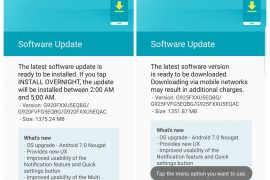
Samsung just released the Android Nougat update for the Galaxy S6 and the Galaxy S6 Edge. The rollout has begun in several European regions and several users have already updated their devices.
Now, we know, a lot of you people who haven’t received the OTA update will be wanting to try out the official Nougat update right this instance. Luckily, we have got our hands on the Odin flashable firmware for the Galaxy S6 and S6 Edge.
Read: Galaxy S6 and S6 Edge Nougat update rolling out
The Galaxy S6 Nougat update comes with build number G920FXXU5EQBG, whereas the Galaxy S6 Edge carries the build G925FXXU5EQBG. We have included download links for both the firmwares below. Make sure you download and flash the correct firmware or you might end up bricking your device.
Download Galaxy S6 and S6 Edge Nougat update
Grab the Galaxy S6 and S6 Edge Nougat firmware from the download link below to manually install the update on your device using Odin software on your PC.
- Galaxy S6 Nougat firmware (G920FXXU5EQBA, only for SM-G920F model, not for SM-G920I)
- Galaxy S6 Edge Nougat firmware (G925FXXU5EQBG, only for SM-G925F model, not for SM-G925I)
Update: The above firmware files are unbranded builds, so that this installs alright for you. We have removed the previous files, which were branded, as they were tied to carrier, and flashing them caused problems to some users. If you still have branded firmware, then rename the .tar.md5 file to .tar file, and then remove the hidden.img file form it, and then install using Odin. It would install branded firmware files alright. But you do not need to that with above firmware files, which are unbranded. For S6, it’s Open build for UAE, while for the S6 Edge, it’s open build for Europe. Open build means unbranded build, in case you’re wondering.
The OTA update zip isn’t available for download as of yet, but we’ll be sure to post it here as and when we get our hands on it. Meanwhile, we suggest you to install the update using the firmware file linked above. Our step-by-step guide will assist you throughout the process of installing the Nougat firmware manually on your device.
How to Install Galaxy S6 and S6 Edge Nougat update firmware
[icon name=”download” class=”” unprefixed_class=””] Download Odin 3.12.3
- Download Odin 3.12.3 .zip file and run/open Odin3 v3.12.3.exe file from the extracted files on your PC.
- Download the Nougat firmware for your device from the downloads section above, and unzip the .zip file to get .TAR.MD5 file.
- Enable OEM unlock on your phone:
- Go to Settings » About phone » and tap Build number seven times to enable Developer options.
- Go back to main Settings page, scroll to bottom and select Developer options from there.
- Under Developer options, look for Enable OEM unlock checkbox/toggle and enable it.
- Boot your device into Download mode:
- Switch off your device.
- Press and hold “Home + Power + Volume down” buttons for a few seconds until you see a warning screen.
- Press Volume Up on the warning screen to accept it and boot into Download mode.
- Once your device is in download mode, connect it to the PC with a USB cable. The Odin window on PC should detect the device and show an “Added!!” message.
- Now click on the AP tab on Odin window and select the firmware file that we got in step 2 above.
└ Note: DON’T play with any other options on the Odin screen. You’re only required to connect your device and select the firmware file as instructed above. - Click the Start button on Odin and wait for it to finish the process. Once it has finished successfully, you’ll see a pass message on the Odin screen.
- Your device will automatically reboot when Odin is done flashing. You can then disconnect your device.
└ It might take some time for the first boot after flashing a stock firmware.
That’s it. Android 7.0 Nougat firmware should be installed on your Galaxy S6 or S6 Edge. Enjoy!
Do let us know if you need any help with Galaxy S6 Nougat update. If you are experience an issue with the update, let us know. We will try our best to get you a fix.







115 responses to “How to download Galaxy S6 and S6 Edge Nougat OTA update and firmware”
Can I flash it to SM-G925I?
Any ETA for the flat S6? Thanks 🙂
Can I flash it to SM-G925I?
nougat firmware for s6 flat, please!
Any ETA for the flat S6? Thanks 🙂
nougat firmware for s6 flat, please!
Odin failed to install the firmware on my G920F. Soft bricked my phone unfortunately.
Odin failed to install the firmware on my G920F. Soft bricked my phone unfortunately.
Successfully installed on Samsung 920FD.
failed on 925F
Try now. Have provided links for open unbranded firmware, should work alright.
Successfully installed on Samsung 920FD.
failed on 925F
Try now. Have provided links for open unbranded firmware, should work alright.
wtf ? Odin fail ! You fucked uo my phone you ASSHOLE !
Do you have the firmware for the 6s edge plus yet? Model 928
I think you would have to wait for about 2-3 weeks before it becomes available for S6 Edge Plus.
Thanks…..managed to feck my phone over!
So how do I fix it?
Have provided links for open unbranded firmware, should work alright now.
wtf ? Odin fail ! You fucked uo my phone you ASSHOLE !
Do you have the firmware for the 6s edge plus yet? Model 928
I think you would have to wait for about 2-3 weeks before it becomes available for S6 Edge Plus.
Thanks…..managed to feck my phone over!
So how do I fix it?
Have provided links for open unbranded firmware, should work alright now.
That version is from Slovenia and from Vodafone…. You shlould say that too
Link updated for open unbranded firmware, should work alright now.
Right it bricked my phone! BUT opened up the tar file with peazip (7zip doesn’t seem to work with odin) deleted hidden.img (the network bloatware I believe.) Turned it back into a .tar file and loaded without a problem
Link to Open builds that are not branded are now provided above. You can try this.
Neither peazip nor 7zip will allow me to delete hidden.img; how did you do it?
That version is from Slovenia and from Vodafone…. You shlould say that too
Link updated for open unbranded firmware, should work alright now.
Right it bricked my phone! BUT opened up the tar file with peazip (7zip doesn’t seem to work with odin) deleted hidden.img (the network bloatware I believe.) Turned it back into a .tar file and loaded without a problem
Link to Open builds that are not branded are now provided above. You can try this.
Neither peazip nor 7zip will allow me to delete hidden.img; how did you do it?
To reinstall original software use Samsung Smart Switch
emergency recovery. Simply type you modelnr. SM….. and serialnumber
and let the software do the rest.
Have provided links for open unbranded firmware, should work alright now. Should work alright now.
To reinstall original software use Samsung Smart Switch
emergency recovery. Simply type you modelnr. SM….. and serialnumber
and let the software do the rest.
Have provided links for open unbranded firmware, should work alright now. Should work alright now.
Can i use this, since it’s unbranded on my Sprint G920P?
No this is only for UNLOCKED VARIANTS. Such as if you bought your phone directly from Samsung. DO NOT USE IF YOUR PHONE IS CARRIER LOCKED.
Also please do read before you work with odin, these files are for g920F (Galaxy S6) or g925F (Galaxy S6 Edge) if the last letter in your model is not an “F” You are going to brick it and if you do please go to sammobile.com for your original firmware and odin that, which will UNbrick your phone ( then please just wait for the update and be thankful your phone works).
Can i use this, since it’s unbranded on my Sprint G920P?
No this is only for UNLOCKED VARIANTS. Such as if you bought your phone directly from Samsung. DO NOT USE IF YOUR PHONE IS CARRIER LOCKED.
Also please do read before you work with odin, these files are for g920F (Galaxy S6) or g925F (Galaxy S6 Edge) if the last letter in your model is not an “F” You are going to brick it and if you do please go to sammobile.com for your original firmware and odin that, which will UNbrick your phone ( then please just wait for the update and be thankful your phone works).
I have downloaded all the relevant info.
Unzipped the file and renamed it to .tar and removed hidden.img
Enabled developer options….
NO “Enable OEM unlock” within development options.
Any help would be appreciated please
Samsung s6 edge/o2/uk
It will not appear if your phone is already unlocked.
I have downloaded all the relevant info.
Unzipped the file and renamed it to .tar and removed hidden.img
Enabled developer options….
NO “Enable OEM unlock” within development options.
Any help would be appreciated please
Samsung s6 edge/o2/uk
It will not appear if your phone is already unlocked.
Thank you Erik. I didnt no that.
Much appreciated.
Thank you Erik. I didnt no that.
Much appreciated.
Unsure if I am doing any of this right. I followed all the steps, up to step 7, where I have pressed start on Odin. However, the “log” reads SetupConnection… and it’s been stuck on that for a good 10 mins I’d say. Do I restart? I don’t know if I have done anything wrong.
Well, phone is fucking bricked. Great. I did it all correctly and at the end I get a FAIL! error. Nice one. So, anybody have any suggestions?
Yes, as I also posted, you may go to the website sammobile.com and look up your original firmware, after downloading that, odin it and just wait for the OTA to arrive.
Unsure if I am doing any of this right. I followed all the steps, up to step 7, where I have pressed start on Odin. However, the “log” reads SetupConnection… and it’s been stuck on that for a good 10 mins I’d say. Do I restart? I don’t know if I have done anything wrong.
Well, phone is fucking bricked. Great. I did it all correctly and at the end I get a FAIL! error. Nice one. So, anybody have any suggestions?
Yes, as I also posted, you may go to the website sammobile.com and look up your original firmware, after downloading that, odin it and just wait for the OTA to arrive.
Worked fine, liked the fact it doesn’t wipe your phone even though I had a custom rom on there.
Worked fine, liked the fact it doesn’t wipe your phone even though I had a custom rom on there.
Can i just ask please (in relation to Tims post), does this wipe your phone (as in erase all contacts, texts, photos etc)? Thanks
Kev if you want to play it safe, it is always best to have TWRP intalled and a full backup as well.
Can i just ask please (in relation to Tims post), does this wipe your phone (as in erase all contacts, texts, photos etc)? Thanks
Thanks for the reply. What is TWRP?
Why is it 1,9GB instead of ~1,3GB?
And the phone is bricked… It’s not working people!
Kev if you want to play it safe, it is always best to have TWRP intalled and a full backup as well.
Thanks for the reply. What is TWRP?
Why is it 1,9GB instead of ~1,3GB?
And the phone is bricked… It’s not working people!
Worked on my Dutch unbranded phone (no OEM unlock needed). Thanks!
Worked on my Dutch unbranded phone (no OEM unlock needed). Thanks!
how long do you have to wait after rebooting my phone just says samsung and then does nothing …
how long do you have to wait after rebooting my phone just says samsung and then does nothing …