


The Samsung Galaxy S6 and S6 Edge in Canada are finally receiving the much awaited Android 5.1.1 update, and while OTA will be out soon — we’re yet to hear anything from carriers — we already have the Android 5.1 firmware available for download for you.
Earlier, Telus has released the 5.1.1 OTA update for its Galaxy S6. And it’s not the only carrier, as Rogers rolled an Android 5.1.1 update too, only to pull it out and halt its distribution for some reason.
The build no. of the Android 5.1 update is G920W8VLU2BOI1 and G925W8VLU2BOI1 respectively btw — ah, we bet the unlucky T-Mobile Galaxy S6/S6 Edge users who received another 5.0.1 update are feeling a little bit more unlucky today.
The updates are meant for Eastlink in Canada but we’re sure the same build no. carrying the Android 5.1 update will be available for other carriers in Canada soon.
If you are game, then know that you are safe to install the firmware for Eastlink on any other Canadian carrier from where you bought your Galaxy S6/S6 Edge, and that includes Bell mobile, Rogers, Virgin Mobile, Koodoo, Videotron, etc. In case it doesn’t work out of the box, you may have to restore your EFS partition for this, so begin only after you ave created backup of EFS and saved it to PC.
The Android 5.1.1 update for T-Mobile Galaxy S6 is long out now, and Canadian users are already left behind for an age now as regards 5.1.1. It’s good to see it finally coming up.
Downloads
- Android 5.1.1 Update firmware:
- Odin PC software — Link | File: Odin3_v3.10.6.zip (1.6 MB)
Supported devices
- CANADIAN GALAXY S6/S6 EDGE, model no. SM-G920W8/G925W8
- Don’t try this on any other device whose model no. is not as given above!
Disclaimer: Installing an official firmware through Odin doesn’t void your device’s warranty, but it remains an unofficial process and thus you need to be cautious of it. In any case, you only are responsible for your device. We won’t be liable if any damage occurs to your device and/or its components.
Backup important files stored on your device before proceeding with the steps below, so that in case something goes wrong you’ll have backup of all your important files. Sometimes, Odin installation may delete everything on your device!
Step-by-step Guide
- Power off your Galaxy S6/S6 Edge. Wait 6-7 seconds after screen goes off.
- Press and hold the three buttons Volume down + Power + Home together until you see warning screen.
- Press Volume Up to continue to download mode.

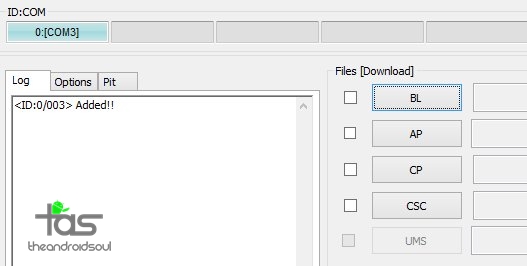
- You cannot proceed until you get the Added!! message, which confirms that Odin has recognized your device.
- If you don’t get Added!! message, you need to install/re-install drivers again, and use the original cable that came with device. Mostly, drivers are the problem (look at step 2 above).
- You can try different USB ports on your PC too.
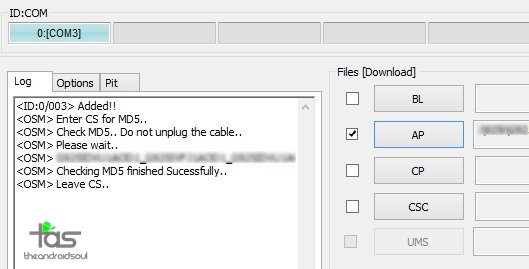
- Info: When you load files, Odin checks the md5 of firmware file, which takes time. So, simply wait until that’s done and the firmware file is loaded. Don’t worry if Odin gets unresponsive for a while, it’s normal. Binary size will also show up in Odin.
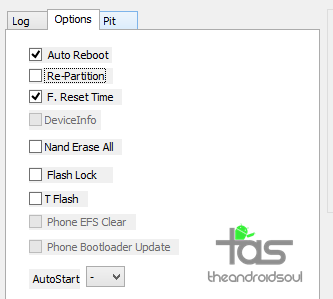
- If Odin gets stuck at setup connection, then you need to do this all again. Disconnect your device, close Odin, boot device into download mode again, open Odin, and then select the file and flash it again as said above.
- If you get FAIL in the top left box, then also you need to flash the file again as stated just above.

That’s it.
Enjoy your Galaxy S6/S6 Edge on Android 5.1.1 update, here’s hoping performance of the device is improved as well.
Root Android 5.1.1 Update
Well, root is already available thanks to previous leaks of 5.1.1 from one or another Canadian carrier. And thankfully, it should work pretty fine on current 5.1.1 firmware too.
Need help? Sure let us know via comments below.






2 responses to “Download Canadian Galaxy S6 and S6 Edge Android 5.1.1 Update [+ Root]”
I have tried rooting my Samsung Galaxy S5 with OneClickRoot (www.oneclickroot.com) and lately i brought a S6 and give to my wife my S5? I am from Philippines those this methods apply on any kind of courier?
I have tried rooting my Samsung Galaxy S5 with OneClickRoot (www.oneclickroot.com) and lately i brought a S6 and give to my wife my S5? I am from Philippines those this methods apply on any kind of courier?