
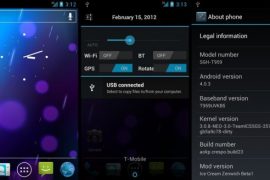
The Samsung Vibrant SGH-T959 gets its fair share of custom ROMs, and now a new Ice Cream Sandwich Android 4.0.3 based ROM has been released for it, named Ice Cream Zenwich. This is a port of the AOKP ROM for the Nexus S (based on the Android Open Kang Project) by XDA developer Br1cK’d, and offers a high number of inbuilt customization options, along with the stock ICS performance sans Samsung’s proprietary TouchWiz UI on top.
Do note that this ROM is still in beta (beta version 1 at the time of this article), so bugs are to be expected, as the AOKP project itself is still under development. Read on to find out how to flash this ROM on your Samsung Vibrant.
Warning!
The methods and procedures discussed here are considered risky and you should not attempt anything if you don’t know exactly what you are doing. If any damage occurs to you or your device, including a bricked, non-functional device, we won’t be held liable. You have been forewarned!!!
Compatibility
This ROM and the guide below is compatible only and only with the Samsung Vibrant, model number SGH-T959. It’s not compatible with any other device and may render an incompatible device unusable. Check your device model in Settings » About phone.
ROM Info
- Developer → Br1cK’d
Known Issues:
- Pressing reboot option in power menu reboots into recovery.
- Auto brightness is buggy
- WiFi tethering may or may not work. (You can use a third-party tethering app from the Market for wifi tethering. Or try this app → here)
- Call mute/un-mute bug for some people wherein on an incoming call your voice may sound very low in volume to the caller. This can be solved by muting then un-muting whenever you pick up an incoming call.
- Calling 911 might not work.
Screenshots:

Pre-Installation Requirements
- Rooted Samsung Vibrant with Clockworkmod Recovery installed.
- Sufficiently charged battery, at least 50% is recommended.
- This procedure will wipe all your apps, data and settings (but it will NOT touch your SD cards, so don’t worry about those). Backup your Apps and important data — bookmarks, contacts, SMS, APNs (internet settings), etc. This Android backup guide would help you
How To Install Ice Cream Zenwich ROM on your Samsung Vibrant T959
- Download the Ice Cream Zenwich ROM from the original development page to your desktop.
- Transfer the downloaded zip file to the root of SD card on your phone.
- Turn off your phone and wait for complete shutdown (wait for capacitive button lights to go off).
- Then, press and hold these 3 buttons together: Volume Up, Volume Down, & the Power button till the screen turns on, then let go of the buttons. You’ll boot into CWM recovery soon enough. In recovery, use Volume keys to scroll up and down and power key to select an option.
- Perform a full Wipe (this will not wipe your SD cards)
- Wipe data / factory reset –> then Select Yes – Wipe data/Factory reset on the next screen.
- Select “mounts and storage“, then select “format system” -> select “Yes” on next screen to confirm. Then, select “go back” to go back to the main recovery menu.
- Now scroll to “Install zip from sdcard” and select it.
- Select “Choose zip from sdcard”. Scroll to the file you transferred in Step 2 and select it.
- Now confirm installation by selecting “Yes — Install **your_rom_file_name**.zip – The ROM will start installing.
- After the installation is complete, select “go back” and then again select “wipe data/factory reset” to wipe again.
- After the wipe is complete, select “reboot system now” to reboot into the ROM.
Important Note: If you are coming from a Stock Samsung ROM, or a Samsung based ROM, the phone might get caught in a bootloop during flashing. In case that happens, just pull the battery, reboot into recovery, wipe data/factory reset and reflash the ROM, and then reboot again, and you should be fine. - That’s it!! Enjoy Ice Cream Zenwich ROM on your Vibrant.
You can visit the original development thread to check for updates and more details. Let us know about your experience and problems (if any) in comments below.





22 responses to “Android 4.0.3 based Custom ROM for Samsung Vibrant — Ice Cream Zenwich”
Works perfect for my Samsung Vibrant. Very good job indeed !
Works perfect for my Samsung Vibrant. Very good job indeed !
Not Getting Mobile Network. I am using it in india
Please Help me..
You need yo flash a modem separately using Odin, one which is compatible with India. Which firmware did you have prior to this?
I had Overstock FW 2.2. Please Let me know, how to do it…
Thanks in Advance 🙂
I would suggest you to install this rom over your current rom. The rom’s name is ICS Passion, and it’s been made by an Indian, so I guess you shouldn’t be having such modem issues at all with this rom. I think you’re knowledgeable enough to download a rom, do wipe stuff from recovery and then install the rom, right? This should fix the network problem.
Link to ICS Passion – http://forum.xda-developers.com/showthread.php?t=1362961
Or,, you can try recommended modems from here – http://forum.xda-developers.com/showthread.php?t=868774
I will Try doing it Kapil… Thanks a Lot…
I tried updating the Rom, But still not able to access the Mobile Network 🙁
This is what he has suggested.
No Service at all after flashing this ROM? No Baseband?Don’t worry, this happens in rare case which can be easily tackled.You have two options:a> ODIN to Stock, Root your phone, Install CM7, Install ICS Passion.b> ODIN to Lidroid, Reboot in Recovery, Wipe all, Install ICS Passion.
Please Let me know which would be better. Moreover i cannot understand his a> or b> Points
He means, you can either do option A, or B.
A is Flashing a Samsung (stock) firmware first using Samsung’s own Odin PC software, then rooting and installing cwm recovery on it, then CM7 custom rom, and then ICS Passion custom rom.
And B is flashing a custom rom called LiDroid using Odin, and then flashing ICS Passion custom rom.
I would recommend B to you.
Do this:
1. Get Odin 1.81 from here – http://forum.xda-developers.com/showthread.php?t=728698
2. Get LiDroid rom from here – http://forum.xda-developers.com/showthread.php?t=1058802 . Follow the instructions on LiDroid’s page. (Use the Odin you downloaded and not from LiDroid)
3. Now, boot into recovery mode, and flash ICS Passion.
I hope that works out for you.
Thanks a Lot Kapil.. Thanks a Ton.
It Worked Finally…. 🙂
Cool 😉
Not Getting Mobile Network. I am using it in india
Please Help me..
You need yo flash a modem separately using Odin, one which is compatible with India. Which firmware did you have prior to this?
I had Overstock FW 2.2. Please Let me know, how to do it…
Thanks in Advance 🙂
I would suggest you to install this rom over your current rom. The rom’s name is ICS Passion, and it’s been made by an Indian, so I guess you shouldn’t be having such modem issues at all with this rom. I think you’re knowledgeable enough to download a rom, do wipe stuff from recovery and then install the rom, right? This should fix the network problem.
Link to ICS Passion – http://forum.xda-developers.com/showthread.php?t=1362961
I will Try doing it Kapil… Thanks a Lot…
I tried updating the Rom, But still not able to access the Mobile Network 🙁
This is what he has suggested.
No Service at all after flashing this ROM? No Baseband?Don’t worry, this happens in rare case which can be easily tackled.You have two options:a> ODIN to Stock, Root your phone, Install CM7, Install ICS Passion.b> ODIN to Lidroid, Reboot in Recovery, Wipe all, Install ICS Passion.
Please Let me know which would be better. Moreover i cannot understand his a> or b> Points
He means, you can either do option A, or B.
A is Flashing a Samsung (stock) firmware first using Samsung’s own Odin PC software, then rooting and installing cwm recovery on it, then CM7 custom rom, and then ICS Passion custom rom.
And B is flashing a custom rom called LiDroid using Odin, and then flashing ICS Passion custom rom.
I would recommend B to you.
Do this:
1. Get Odin 1.81 from here – http://forum.xda-developers.com/showthread.php?t=728698
2. Get LiDroid rom from here – http://forum.xda-developers.com/showthread.php?t=1058802 . Follow the instructions on LiDroid’s page. (Use the Odin you downloaded and not from LiDroid)
3. Now, boot into recovery mode, and flash ICS Passion.
I hope that works out for you.
Thanks a Lot Kapil.. Thanks a Ton.
It Worked Finally…. 🙂
Cool 😉
Or,, you can try recommended modems from here – http://forum.xda-developers.com/showthread.php?t=868774