What to know
- Hytale’s official mod distribution and in‑game integration are currently tied to a partnership with CurseForge, not Modrinth.
- Modrinth staff and community discussions treat Hytale support as a “future/desired” feature, not something live or officially greenlit by Hypixel.
- You can still manually install mods from any source (including files shared by creators who also publish on Modrinth), but the one‑click ecosystem is CurseForge‑centric.
- Nothing stops Modrinth adding technical Hytale support later, but until Hypixel exposes or endorses it, you should plan around CurseForge for a smooth experience.
Hytale has launched into Early Access as a heavily mod‑focused game, but the “official rails” for finding and installing mods run through CurseForge, with Modrinth currently on the outside looking in. If you prefer Modrinth from the Minecraft scene, you will need to temper expectations and be ready to use CurseForge or manual installs for now.
| Topic | Current Situation (Jan 2026) |
|---|---|
| Official mod partner | CurseForge is the officially announced and integrated mod platform for Hytale. |
| In‑game mod browser / one‑click install | Uses a CurseForge‑backed hub and CurseForge app integration, not Modrinth. |
| Client‑side mods | Hypixel does not plan to support arbitrary client‑side mods; focus is on server‑side content and tools. |
| Modrinth status | No native Hytale support yet; Modrinth lists Hytale support as a requested/idea feature. |
| Where day‑one mods are hosted | Early Hytale mods are already live on CurseForge through the Hypixel–CurseForge partnership. |
| How you get most mods today | Via the Hytale–CurseForge ecosystem or by manually placing mod/plugin files into Hytale folders. |
How Hytale’s official mod support works today
Hytale’s developers frame the game as “mod‑first” and ship it with a robust set of built‑in tools: asset editor, model editor, prefab editor, asset node editor, and scenario/mini‑game tooling. Those tools are meant to let you create and package essentially the same kinds of content the developers use internally, from new items and creatures to full custom game modes.

On the distribution side, Hypixel Studios has publicly announced a dedicated partnership with CurseForge. That deal means Hytale mods are browsable via a CurseForge‑powered portal (hytale.curseforge.com), can be installed in one click through the CurseForge app, and are wired into the Hytale client for automatic updates and integrated discovery.
Understanding the current Modrinth situation
Right now, Modrinth does not have official, first‑class Hytale support in the same way it supports Minecraft. There is a live issue on the Modrinth code repository that tracks “Hytale support,” which describes Hytale as “just around the corner” and notes community interest in using Modrinth for Hytale mod distribution, but that issue is still a feature request rather than an implemented integration.
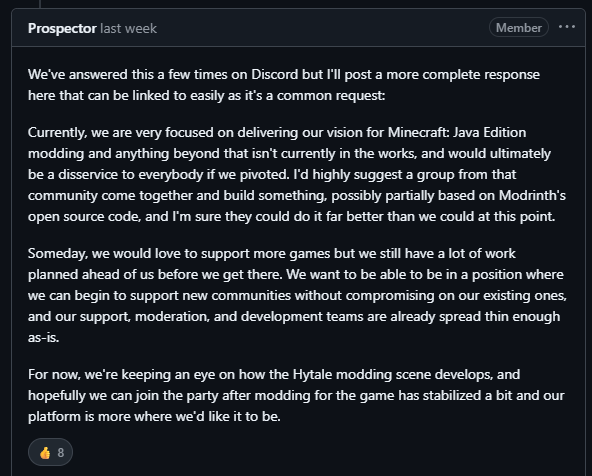
A recent Reddit thread where a Modrinth developer commented about Hytale confirms this cautious state: they indicate that any Hytale integration depends on how the game’s modding APIs and ecosystem shake out and that, in the meantime, players will need to “support the best mod service that comes out of the community,” implicitly acknowledging CurseForge’s official role.
Comment
by
u/Jemplix from discussion
in
HytaleInfo
This aligns with the fact that early big‑name Hytale mods reference CurseForge as the default hub, not Modrinth.
How to install mods now if you prefer Modrinth’s style
Even without native Modrinth support, you can still approach Hytale in a Modrinth‑like way by treating Modrinth simply as a file host and managing installs yourself.
 Shashwat
Step 1: Start from the official CurseForge flow
- Install the Hytale launcher and set up the game as usual, then open the modding tools or mod browser that points into CurseForge.
- Use this to understand folder structure and see how “normal” installs look on your system (for example, where plugin or mods folders live).
Step 2: Learn the Hytale mods folder layout
- Check official modding documentation or the launcher’s help to locate the server and single‑player worlds’ mod/plugin directories.
- Note how packaged content (like plugins) is referenced and loaded at startup so you can mirror that with manually downloaded files.
Step 3: Manually add third‑party mods
- Download .zip, .hyplugin, or whatever packaged format creators share, whether from GitHub, direct downloads, or eventually (hopefully) Modrinth pages.
- Drop those files into the same mods/plugins directory used by CurseForge‑installed content, then restart the game or server to have them load.
Step 4: Use in‑game toggles and server config
- Inside Hytale’s world or server settings, enable or disable specific mods from the mod list if a UI for that is present.
- For hosted servers, use your provider’s file manager or panel to upload mod files into the server’s mods/plugins directory and restart.
This approach mimics what you might be used to with Modrinth’s raw file downloads on other games, even though you do not get a full API integration, modpack format support, or Modrinth‑side dependency resolution in Hytale yet.
How to think about future Modrinth support
From a technical and community perspective, there is nothing inherently preventing Modrinth from adding Hytale as a supported game later. The open feature request and community discussions show clear interest from both modders and players in having a lighter, open‑feeling alternative to CurseForge.
However, several factors will influence how and when that happens for you:
- Hypixel’s stance on client stability and security: The team has said it does not intend to support arbitrary client mods, preferring a stable, uniform client with most customization happening via servers and official tools. That naturally favors tightly controlled integrations like CurseForge over a free‑for‑all launcher ecosystem.
- The depth of the CurseForge partnership: Because Hytale’s UI, launcher, and documentation send players to CurseForge as the central hub, many modders will prioritize publishing there first to maximize visibility and benefit from moderation and analytics tools.
- Modrinth’s own roadmap and resources: Modrinth is community‑driven and has to weigh the engineering effort of supporting a new game (mod formats, metadata, loaders, validation) against demand; current signals are that Hytale is on the radar but not yet implemented.
For now, if you are planning a Hytale modding setup, the practical approach is to lean on CurseForge for discovery and easy installs and treat any Modrinth involvement as optional manual file hosting until a formal integration materializes.
Where this leaves you as a player or creator
If you are a player who prefers Modrinth, you can still:
- Use Hytale’s built‑in tools and CurseForge integration to grab most mods with minimal friction.
- Manually install any extra mods distributed via other channels (including future Modrinth pages) by dropping files into the appropriate folders.
If you are a creator:
- Publishing to CurseForge is the surest way to reach Hytale’s early audience thanks to its official status and in‑launcher exposure.
- You can mirror releases on Modrinth or GitHub as direct downloads, but users will not get one‑click integration or automatic updates from inside Hytale for those copies yet.
The important takeaway is that Hytale’s modding ecosystem is already vibrant at launch, but it is not a multi‑platform free‑for‑all yet. With Doom already running inside Hytale and dozens of mods live on CurseForge at day one, the immediate future of Hytale modding will revolve around the Hypixel–CurseForge ecosystem, with Modrinth as a potential but still hypothetical addition down the line.