A step-by-step guide to finding the seismic damage ECHO log in Borderlands 4’s Fault Hunting side mission.
- What to know
- Context: Fault Hunting side mission and collectible logs
- How to start Fault Hunting and find the cave
- How to find Seismic Damage ECHO Log (step-by-step)
- Troubleshooting: When the log doesn’t appear
- Additional pointers for collecting ECHO Logs overall
- What to do after collecting the ECHO log
What to know
- The seismic damage ECHO log is found during the Fault Hunting side mission in Borderlands 4.
- Start by speaking to Leopold in the Society for Amateur Seismology Enthusiasts north of Moxxi’s bar in Carcadia Burn.
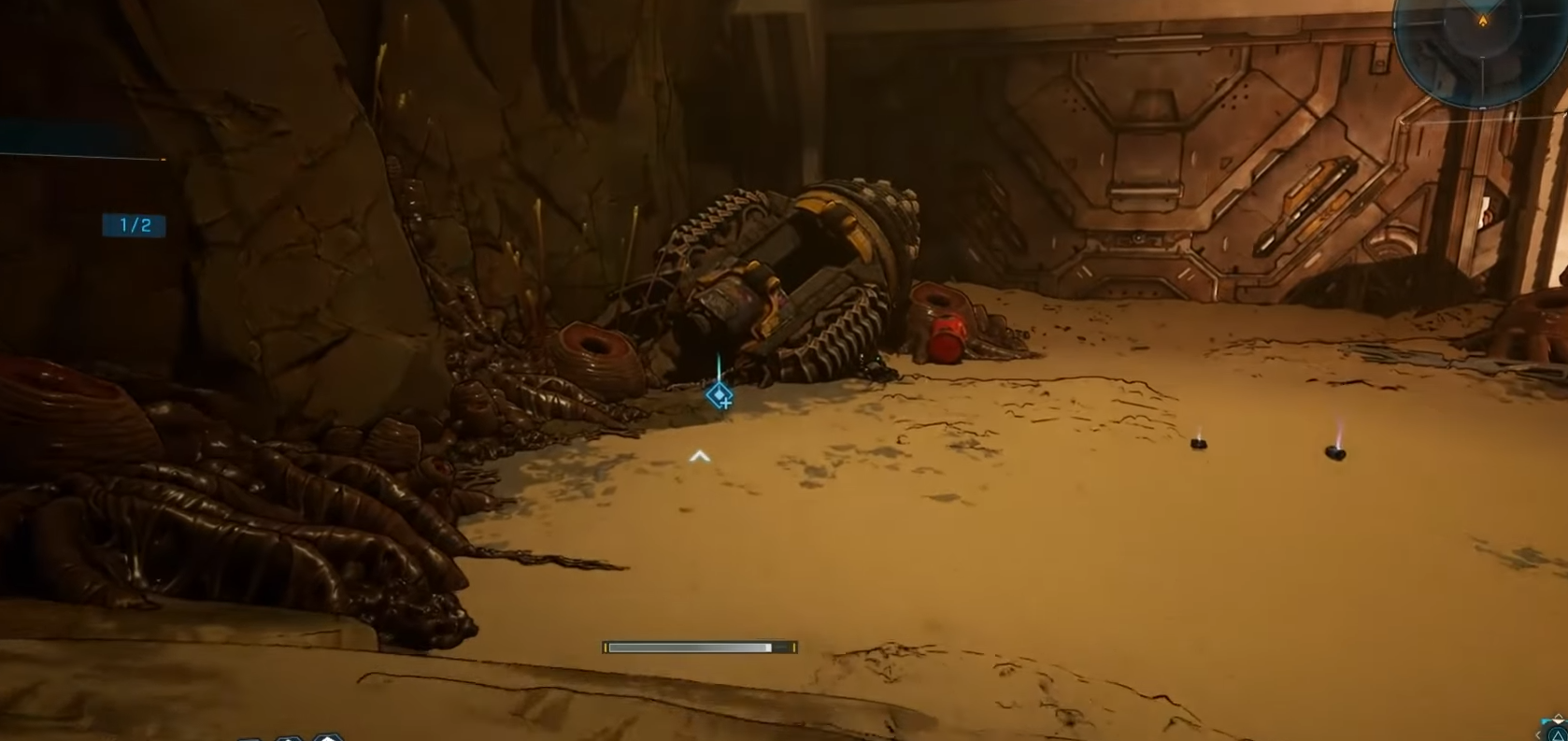
- You must enter the cave at the coordinates given, defeat Creeps, and locate the ECHO log near a destroyed drill.
- The ECHO log is located near a glowing green bulkhead door inside the cave.
The seismic damage ECHO log plays an important role in the Fault Hunting side mission where players investigate strange tremors in Carcadia Burn. The log provides lore and mission progress, so finding it is essential. Below is a detailed, step-by-step guide through the Fault Hunting mission route, plus tips in case the log doesn’t immediately appear.
Context: Fault Hunting side mission and collectible logs
“Fault Hunting” is a side mission in Borderlands 4 where part of the objectives includes locating clues in a damaged facility area. One of these clues is the Seismic Damage ECHO Log.
ECHO Logs are collectible audio recordings spread through the game world. Some are placed in fixed locations, others are tied to mission areas, and a few are not counted in area completion.
How to start Fault Hunting and find the cave
Begin at the Society for Amateur Seismology Enthusiasts, situated north of Moxxi’s bar in the Carcadia Burn region.

Speak to Leopold to receive details on tremors occurring in the area and the side mission.

Leopold will give coordinates to a large cave entrance northeast from the society. The entrance is hard to miss.

How to find Seismic Damage ECHO Log (step-by-step)
Step 1: Accept or advance “Fault Hunting” until you reach the relevant area
Ensure you have the Fault Hunting side mission active and are at the stage where you’ve cleared enemies in the destroyed lab or facility zone. The log appears in that area.
Step 2: Clear all enemies in the area
Enemies must be defeated so the area is safe to explore for collectibles. The log won’t appear while the area is contested.
Step 3: Identify the sealed door landmark
Within the cleared area, locate the sealed door (a door you can’t currently open). The log is positioned relative to this.

Step 4: Look to the left side of that sealed door and search the ground
The Seismic Damage ECHO Log lies on the ground to the left of that sealed door. Walk around the left side and look carefully (on the ground or near debris).

Step 5: Use ECHO Location Scan if needed
If you have unlocked the pin for this ECHO Log on your map, highlight it and activate your ECHO Location Scan. That gives a guiding line to the exact spot.
This is especially helpful if the log is partially obscured.
Step 6: Interact / collect the log
When you walk near the correct spot, your prompt to collect the ECHO Log should appear. Pick it up to register it as “Seismic Damage.”

Summary table for the seismic damage ECHO log location
| Step | Description | Location |
|---|---|---|
| Start mission | Speak to Leopold at Seismology Society | North of Moxxi’s bar, Carcadia Burn |
| Find cave entrance | Follow coordinates northeast | Large cave entrance in Carcadia Burn |
| Enter cave and jump | Leapfrog platforms and use air vent | Inside the cave |
| Defeat enemies | Kill Creeps | Inside cave area near the drill |
| Pick up ECHO log | Find seismic damage log on ground | Near destroyed drill, cave |
| Examine bulkhead door | Investigate green glowing door | Near ECHO log |
Troubleshooting: When the log doesn’t appear
- If the log doesn’t show even after clearing the area, ensure your mission is in the correct stage (i.e. after enemy clears).
- Restarting or reloading the mission area may sometimes fix missing collectible issues.
- Some players report that certain mission-based logs are glitchy or don’t count toward the tally.
- Use the ECHO Log list in your inventory and filter by “Missions” to check whether “Seismic Damage” is already recorded (sometimes it’s marked but not obvious).
Additional pointers for collecting ECHO Logs overall
| Tip | Why it helps |
|---|---|
| Unlock pins for ECHO Logs | It enables using the ECHO Location Scan to guide you more precisely |
| Explore after mission objectives | Some logs only appear after certain triggers or clears |
| Use map & filters in echo log menu | Helps track which logs remain or are mission-tied |
What to do after collecting the ECHO log
- After picking up the seismic damage log, check the large bulkhead door nearby.
- The door glows green and appears to be an Order construct but is off any known maps as it is meant to stay hidden.
- Interacting with this door advances the mission narrative.
Once you follow the above procedure—clearing the area, locating the sealed door, checking to its left, and using the scan if needed—you should successfully collect the Seismic Damage ECHO Log. Even if the log is mission-tied and doesn’t always count toward area completion, it should register in your ECHO Log inventory under the Fault Hunting mission.