


- What to know
- Storehouse system details in Nioh 3
- Where you can access the storehouse in Nioh 3
- How to access the storehouse through a shrine
- How to move weapons and gear into storage
- How consumables are handled differently
- Why experienced players rely heavily on the storehouse
- Common mistakes when moving items
- Managing large inventories efficiently
- Storehouse capacity and long-term planning
What to know
- The Storehouse is separate from your active inventory and does not count toward your carry limit.
- You can only access it outside active missions, typically at a Shrine or from the overworld menu.
- Usable consumables cannot be manually moved, but overflow automatically goes to storage.
- Weapons, armor, and valuable gear can be manually transferred anytime you’re at a Shrine.
In Nioh 3, inventory management is a core part of progression. As you farm missions, clear side quests, and defeat Yokai, you’ll quickly hit your carry limit. Instead of selling or dismantling valuable gear, you can move it into the Storehouse to keep it safe without cluttering your active slots.
If you’re farming Legendary or high-rarity drops, understanding how this system works will save you constant backtracking.
Storehouse system details in Nioh 3
| Feature | Details |
|---|---|
| Access Point | Shrines or overworld menu only |
| Available During Missions | No |
| Counts Toward Inventory Cap | No |
| Supports Manual Transfers | Weapons, armor, accessories |
| Consumables | Auto-transfer when exceeding cap |
| Purpose | Long-term gear storage and build management |
The Storehouse acts as your long-term vault. Many experienced players use it to hold alternate builds, high-rarity gear for future tempering, or items intended for soul matching later.
Where you can access the storehouse in Nioh 3
You cannot move items into storage mid-mission. The game restricts full inventory management to safe areas. That means you must first pray at a Shrine or return to the overworld hub. Shrines act as both checkpoint and inventory management hubs, making them the primary place to transfer gear. If you try to manage storage while actively deployed in a mission zone, the option simply won’t appear.
How to access the storehouse through a shrine
When you’re ready to transfer items, follow the proper sequence to ensure the Storehouse becomes available.
Step 1
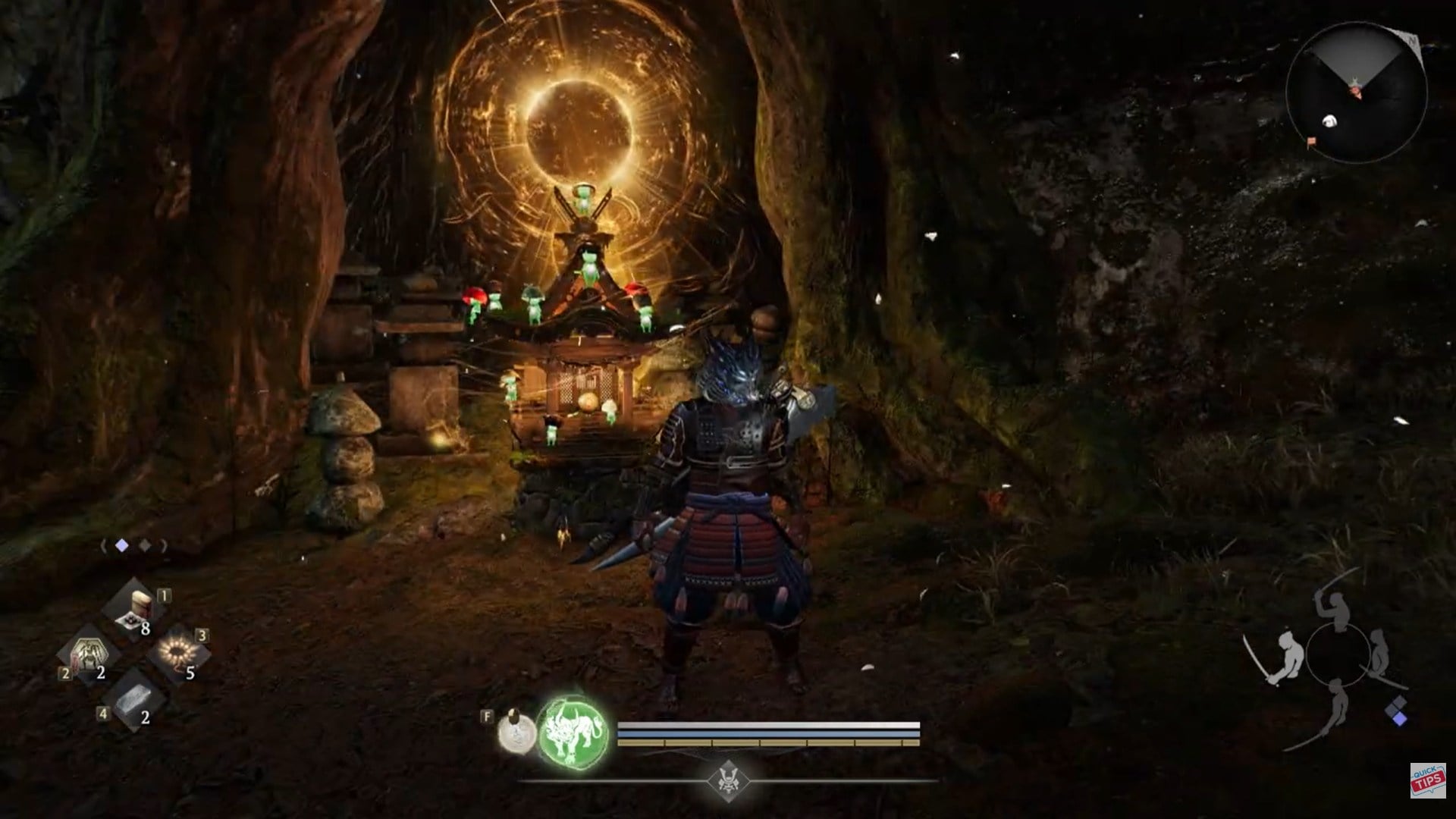
Approach any Shrine in a safe area and hold the interaction key (default: E on PC) to pray. This activates the Shrine menu and links you to your broader management options.
Step 2
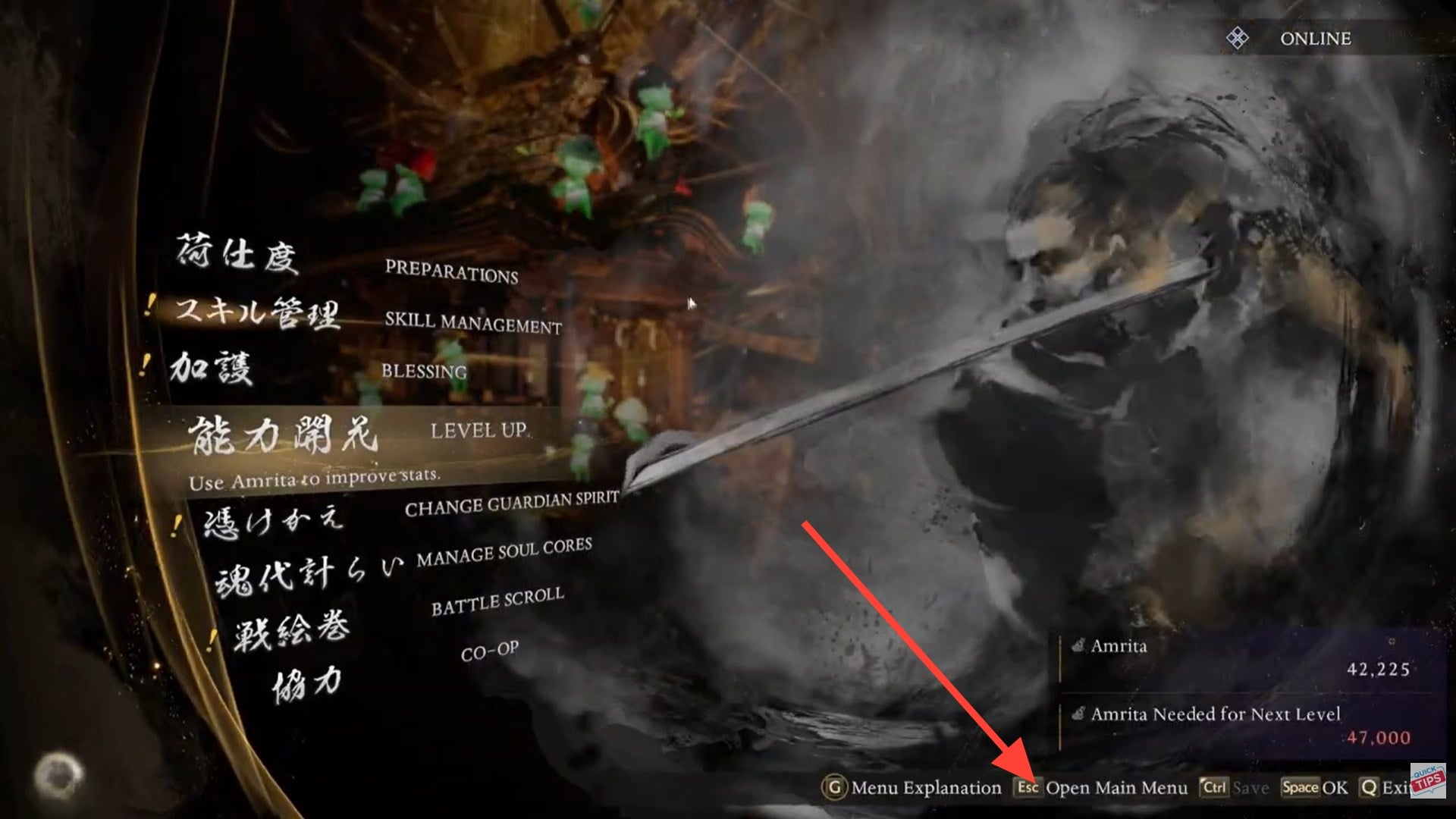
After praying, press Escape to open the main system menu. This is required because the Storehouse is accessed through the broader inventory interface rather than directly from the Shrine interaction wheel.
Step 3
Navigate to the Items or Gear section. At the top or within the interface, you’ll see an option labeled “Switch to Storehouse.” Selecting this confirms that you are now viewing storage rather than your active carry inventory.
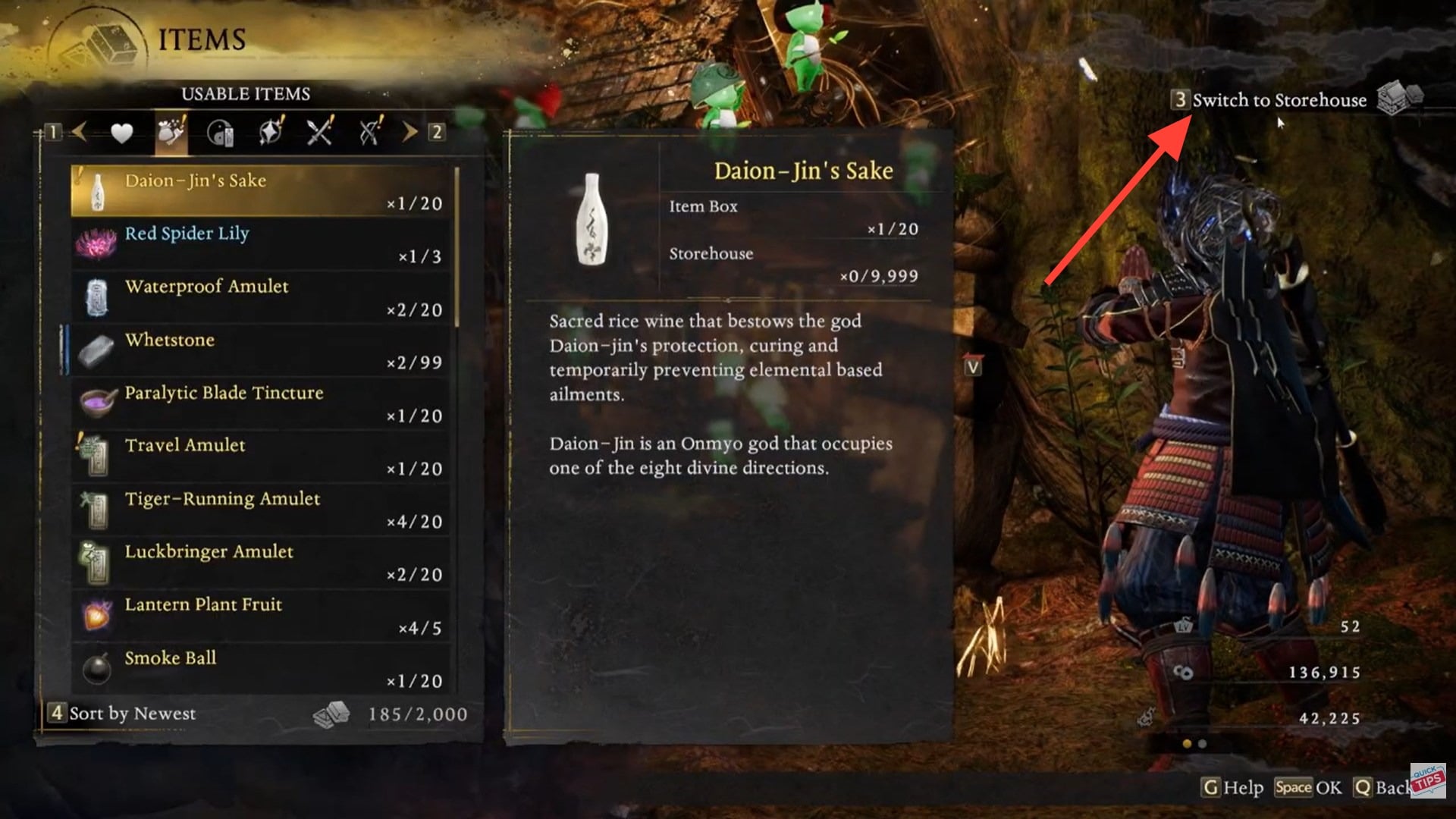
At this point, you are fully connected to the Storehouse.
How to move weapons and gear into storage
Once you’re inside the inventory interface and connected to the Storehouse, transferring items is straightforward.
Step 1
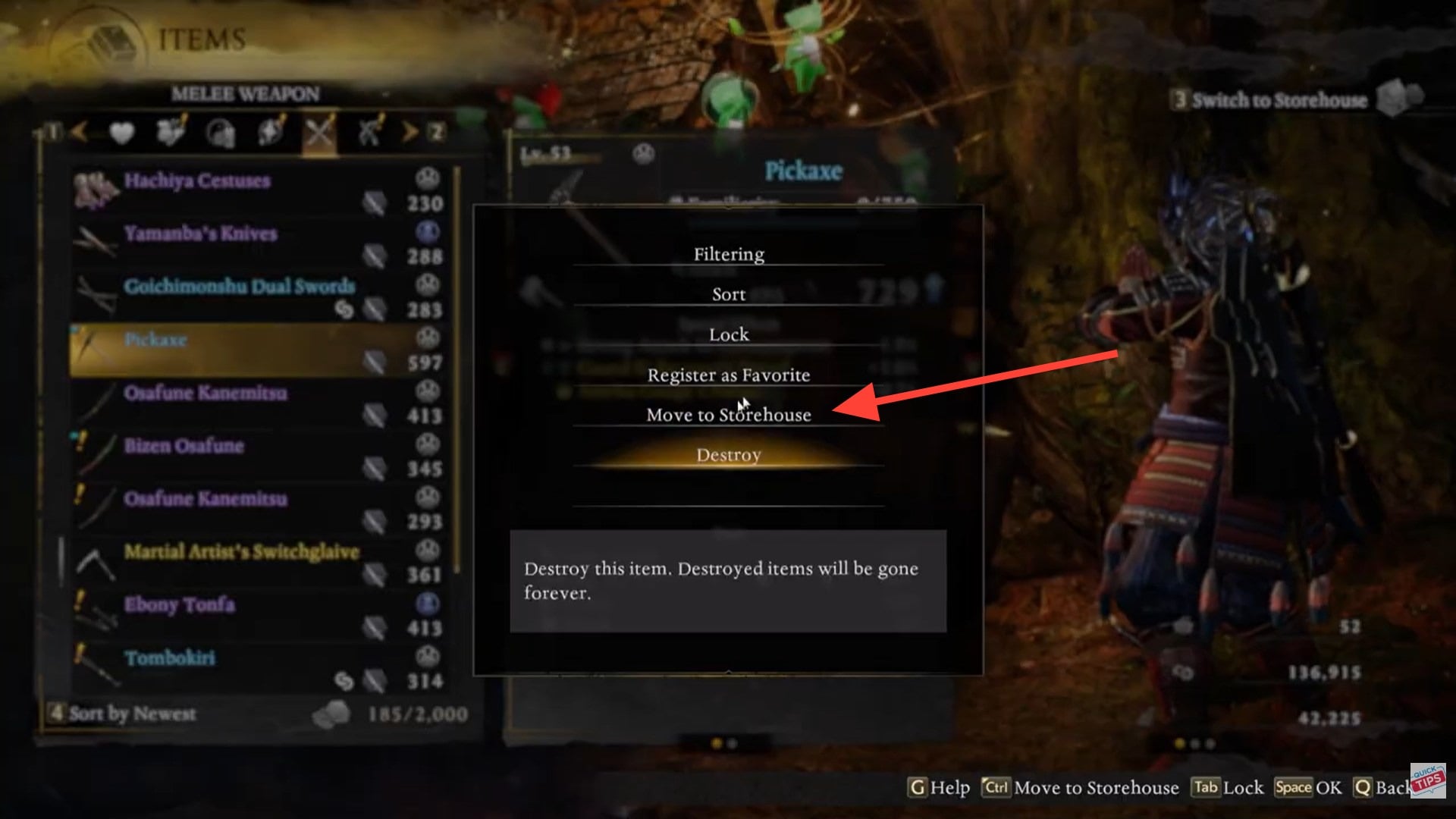
Highlight the weapon, armor piece, or accessory you want to store. Many players prioritize Legendary or set-based gear they aren’t currently using but plan to build around later.
Step 2
Select the option labeled “Move to Storehouse.” Confirm the transfer.
The item will immediately disappear from your active inventory and reappear in storage. Importantly, this frees up carry capacity instantly, which is essential when farming high-drop missions.
Advanced players often move duplicate high-rarity items into storage before dismantling lower-tier drops, ensuring they preserve potential future build pieces.
How consumables are handled differently
Consumables such as usables, elixirs, ammunition, and quick-slot items follow a different system. You cannot manually move them to storage. Instead, they occupy dedicated slots in your inventory.
If you acquire more consumables than your carry capacity allows, the excess automatically transfers to the Storehouse. This automated overflow system prevents waste but removes manual control.
| Item Type | Manual Transfer Allowed | Automatic Overflow | Notes |
|---|---|---|---|
| Weapons | Yes | No | Best stored manually |
| Armor | Yes | No | Ideal for alternate builds |
| Accessories | Yes | No | Store high-stat rolls |
| Consumables | No | Yes | Auto-stored when full |
This system ensures consumables remain accessible during missions while preventing loss of surplus drops.
Why experienced players rely heavily on the storehouse
In loot-heavy action RPGs like Nioh 3, inventory caps are intentionally tight to encourage decision-making. However, dismantling everything immediately is rarely optimal.
Players frequently store:
- Set gear pieces for future build experimentation
- High-rarity duplicates for tempering or soul matching
- Event-exclusive or rare mission rewards
- Alternate elemental weapons for boss-specific encounters
Because stored items do not count toward your carry weight, the Storehouse becomes a strategic tool rather than just extra space.
Common mistakes when moving items
One common misunderstanding is attempting to access storage during active missions. If you do not see the “Switch to Storehouse” option, you are likely still inside mission deployment.
Another mistake is forgetting that consumables cannot be manually transferred, which leads some players to believe the feature is broken. It is functioning as designed.
Finally, some players accidentally dismantle or sell items before realizing they could have safely moved them into storage first. Always check your inventory capacity before mass dismantling.
Managing large inventories efficiently
As you progress and farming intensity increases, you should develop a rhythm:
After finishing a mission, immediately pray at a Shrine, move high-value items to the Storehouse, dismantle low-tier gear, and then proceed. This cycle keeps your carry slots optimized.
Many high-level players recommend sorting by rarity or level before transferring items. That way, you avoid storing unnecessary low-stat equipment.
Storehouse capacity and long-term planning
Mastering the Storehouse system in Nioh 3 is less about storage and more about build efficiency. By consistently transferring valuable gear and understanding how consumables auto-store, you maintain clean inventory flow and avoid unnecessary dismantling. If you farm often, this system becomes essential rather than optional.
While the Storehouse offers significantly more space than your carry inventory, it is not infinite. Over time, you may need to periodically review stored gear and clear outdated items.
Because Nioh 3’s loot system heavily favors frequent upgrades, gear becomes obsolete quickly unless tied to a specific build synergy. Treat the Storehouse as strategic reserve space, not permanent hoarding storage.




