- What to know
- How to enable Update 4 Part 1 pre-release in the launcher
- Multiple instances and save safety rules
- How to use backups to restore or repair a world
- How mod management works now inside world settings
- Building changes you will notice quickly
- Item, equipment, and world interaction tweaks
- Quality-of-life changes for inventory, crafting, and reporting
- Creator tools, modding, and world-gen updates
- How to use the new quick-drop inventory method
- What this update means for modded servers and voice chat
- Where Hytale is headed with Update 4
What to know
- You can now run multiple instances of the game at once, but you should avoid opening the same world simultaneously to reduce corruption risk
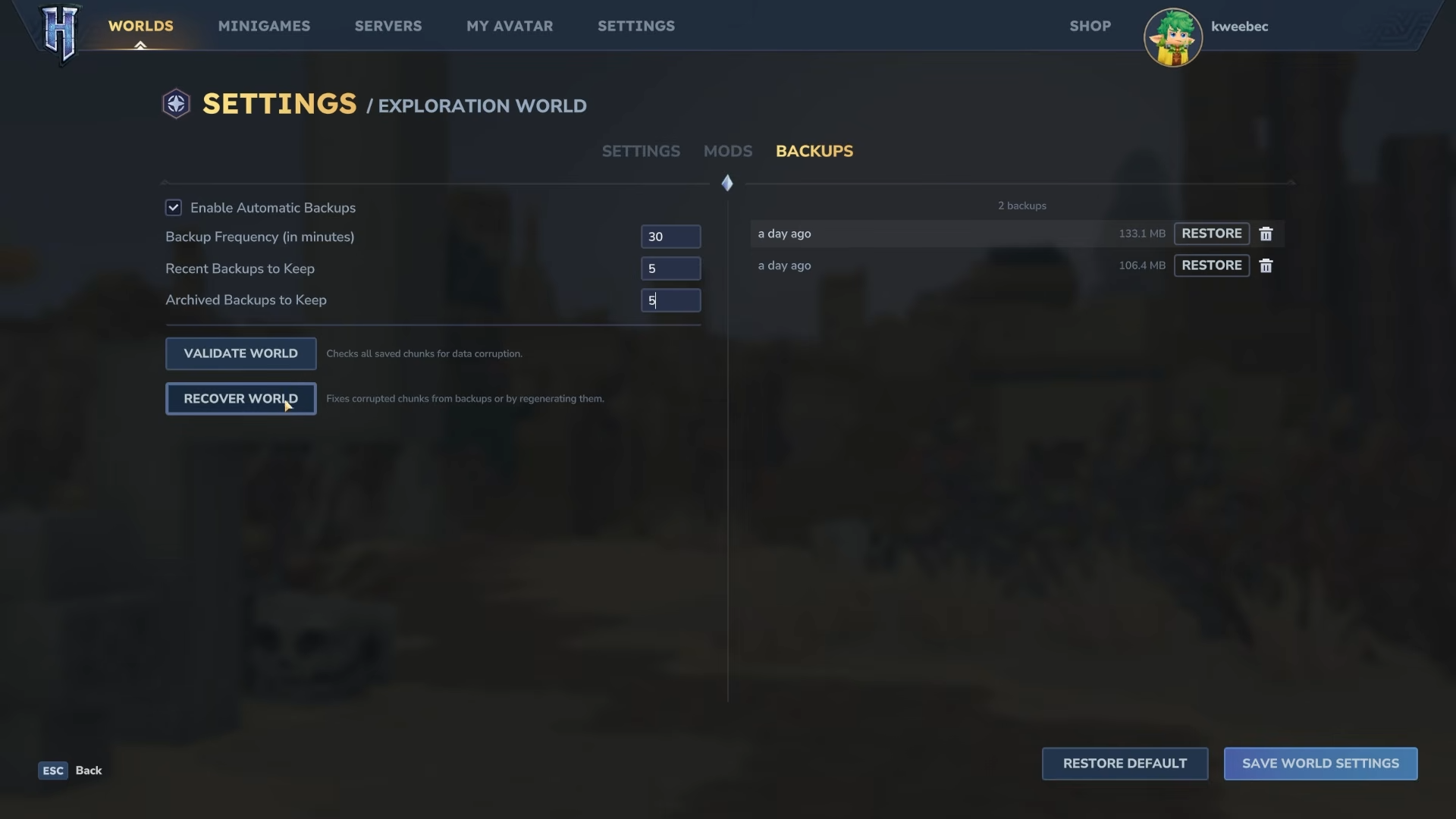
- World backup and recovery tools have expanded, including options to validate and restore corrupted worlds or regenerate problem chunks
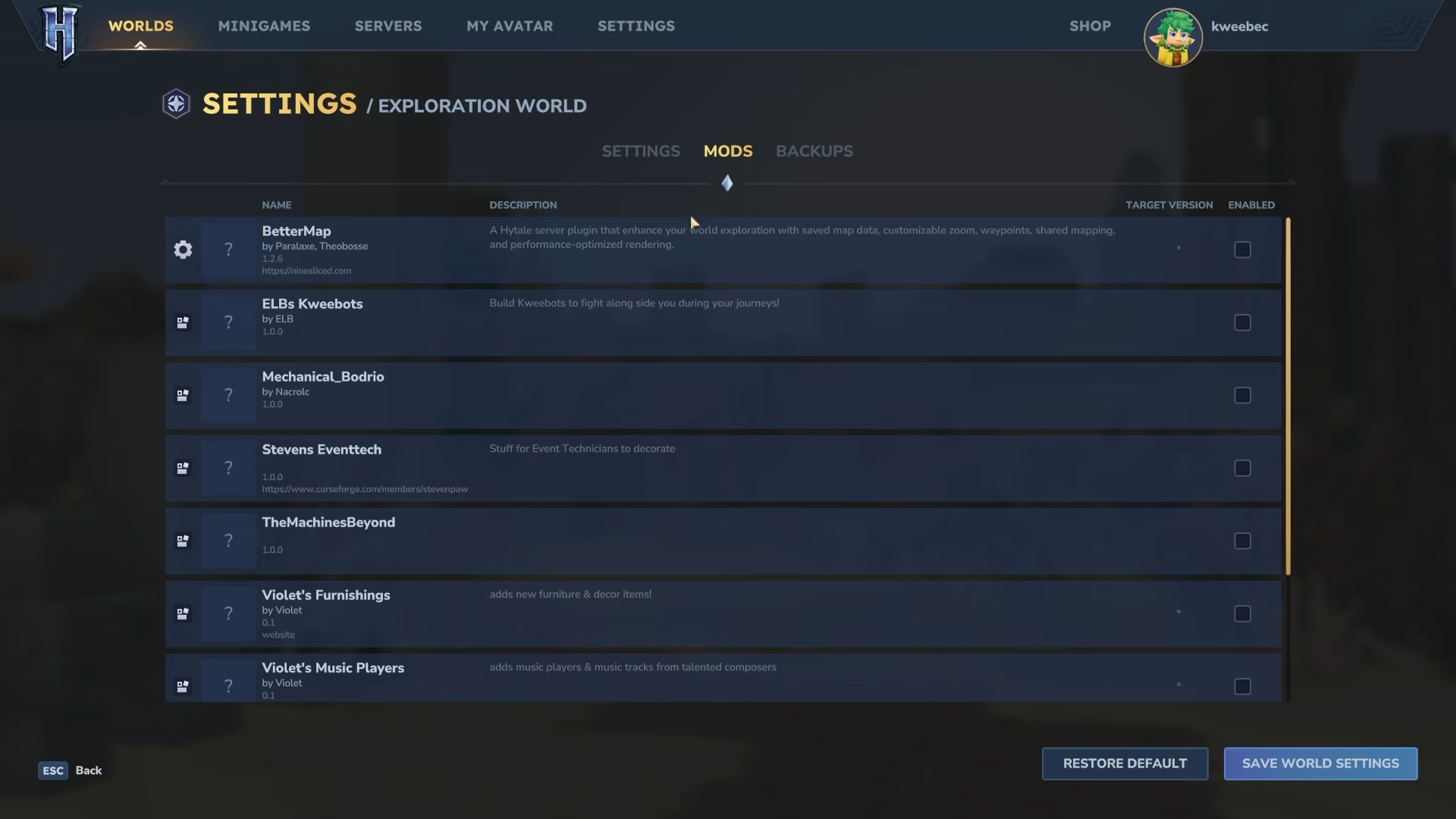
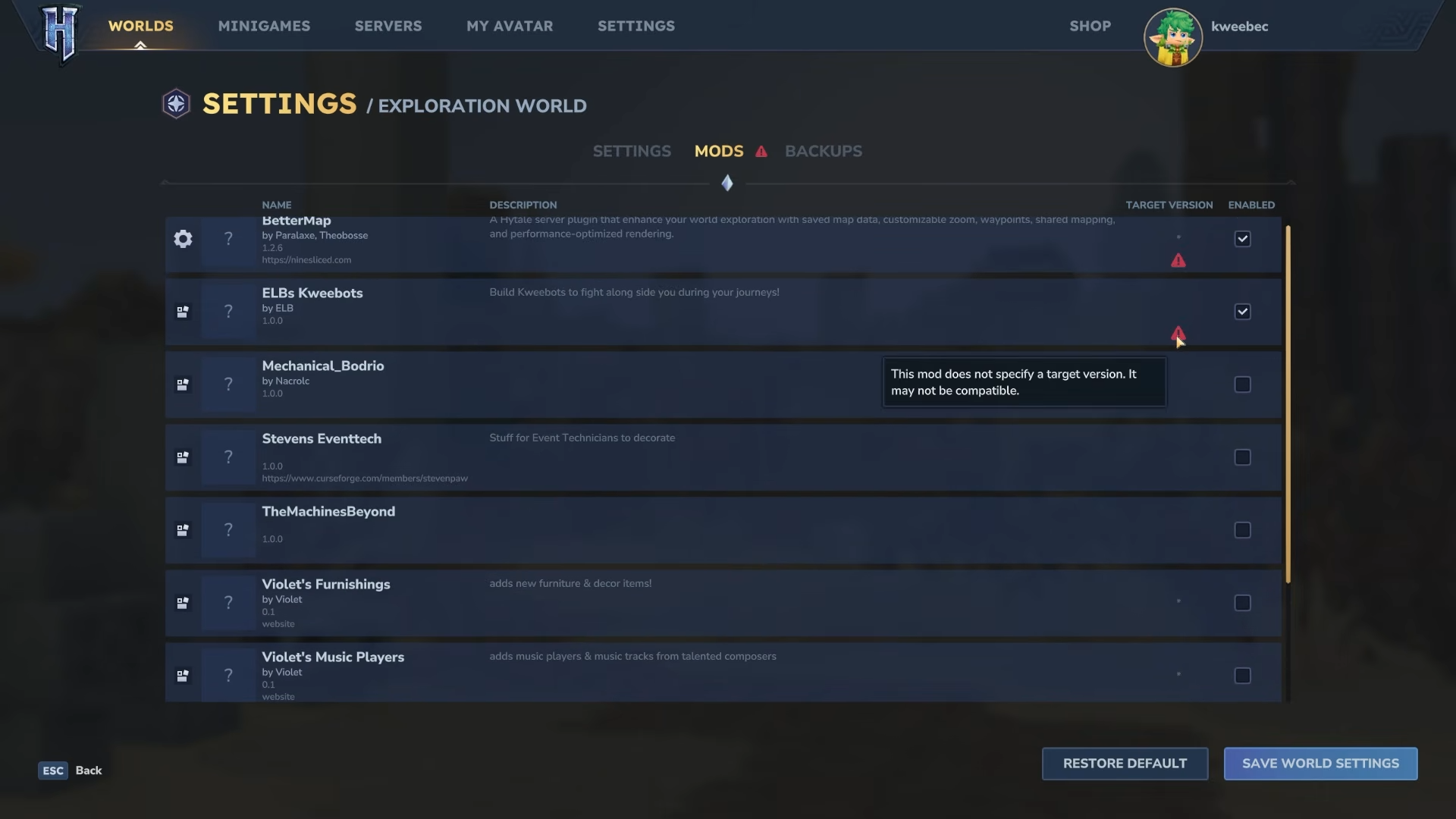
- Mod management has been reorganized and improved with clearer compatibility warnings and version details
- There are targeted quality-of-life, building, audio, world-gen, and bug-fix changes, plus backend prep work for proximity voice chat
Hytale‘s Update 4 Part 1 is positioned as a lighter pre-release drop, but it still brings a surprisingly wide spread of fixes and usability improvements. If you play on servers, build in creative, or rely on mods, this one is especially relevant because it touches the systems you interact with every session.
| Area | What’s new | Why it matters |
|---|---|---|
| Launcher and versions | Update 4 Part 1 is a pre-release build you enable from the launcher settings via the version dropdown | Lets you opt into features early, but it can affect mod compatibility |
| Multi-instance support | Multiple instances can run at once | Helpful for testing and multi-account setups; avoid opening the same world twice |
| Mods | Mod management UI moved into world settings; shows versions, icons, and compatibility warnings | Faster troubleshooting when a mod targets a different game version |
| Servers | Hosts can set a fallback server for unexpected disconnects | Improves multiplayer resilience during instability |
| Backups and recovery | Backup management interface with toggles, timers, restore points, and corruption validation and recovery options | Big safety net against broken saves and corrupted chunks |
| Building | Support and connectivity changes for windows, roofs, chandeliers, and decorative supports | Fewer annoying placement rules, smoother building workflows |
| Quality of life | Faster inventory dropping, crafting bench info improvements, reporting tool permission option | Less friction for inventory cleanup, crafting management, and bug reporting |
| Tools and modding | NPC path visualization, undo group sizing, brush rotation settings and scripted rotation behavior | Better creator control and debugging |
| World generation | Oasis portal spawns adjusted, Oasis biome performance improved | More reliable spawning and smoother performance in that area |
| Bug fixes | Many small and a few notable fixes across items, blocks, portals, tools, and crashes | Fewer edge-case problems in normal play and creation |
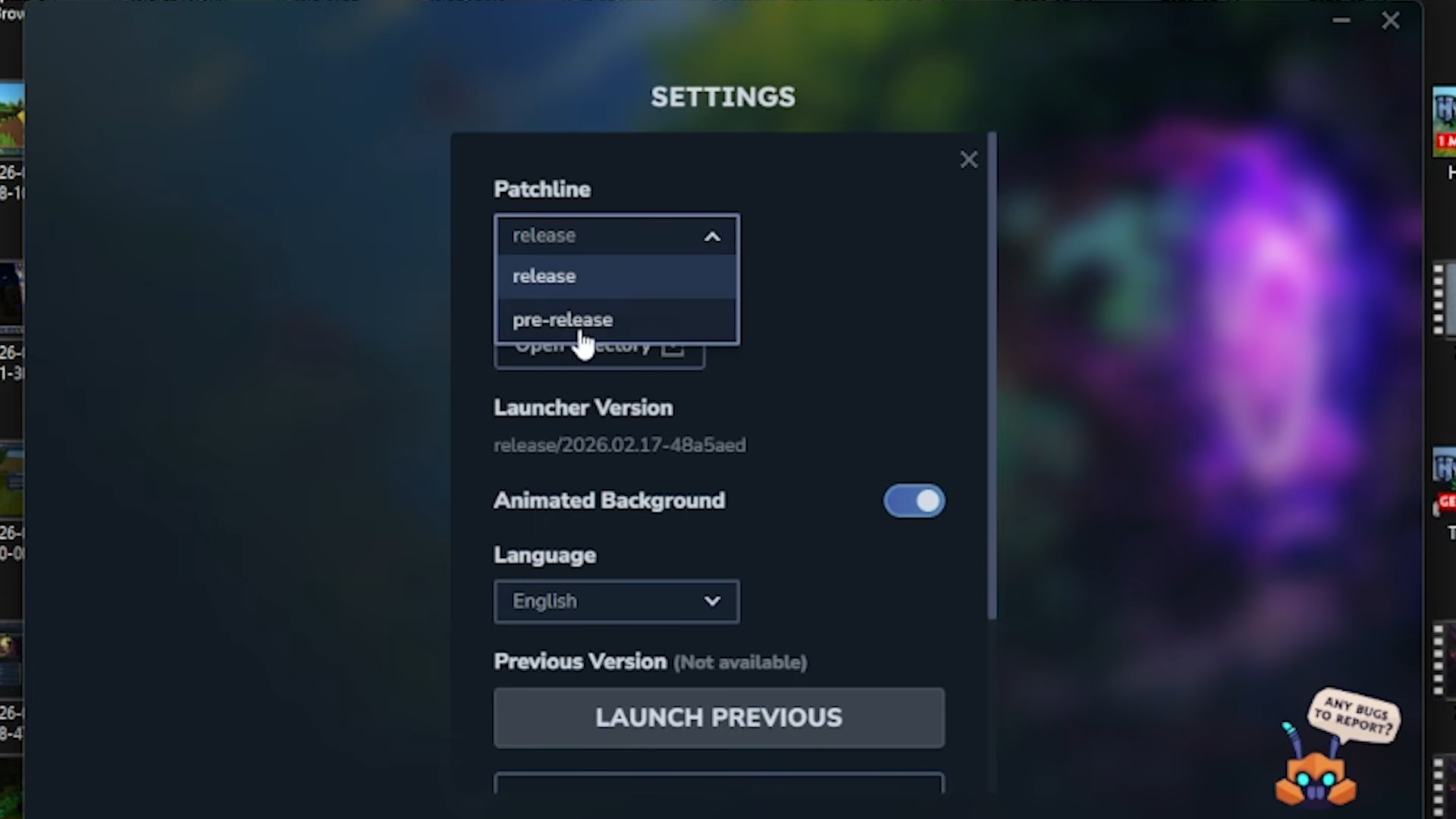
How to enable Update 4 Part 1 pre-release in the launcher
Step 1
Open the Hytale launcher and go into the launcher settings.
Step 2
Find the version dropdown menu.
Step 3
Select the pre-release version for Update 4 Part 1.
Step 4
Launch the game and double-check your mods before joining a server or loading important worlds, since version bumps can require mod updates.
Multiple instances and save safety rules
This build re-enables the ability to run multiple instances of Hytale at the same time. The key limitation is that you should not open the same world in multiple instances simultaneously, because it increases the chance of save corruption.
How to use backups to restore or repair a world
Step 1
In the menu, right-click the world you want to manage.
Step 2
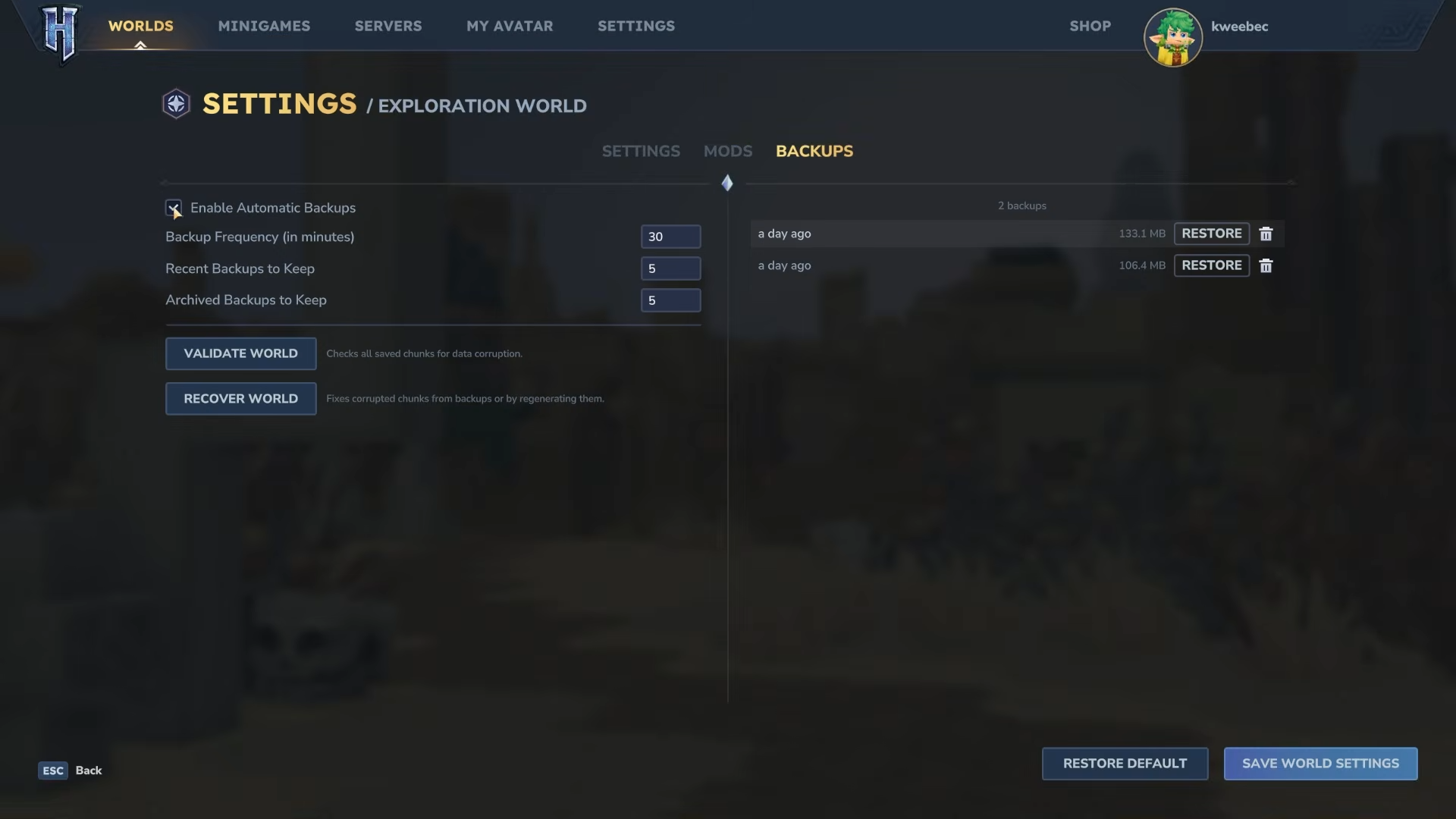
Open the backup management interface.
Step 3
Turn backups on or off depending on whether you want automatic protection for that world.
Step 4
Set the auto-backup interval in minutes to match how often you want snapshots created.
Step 5
If something goes wrong, restore an older save from a previous backup (including saves from days or even months back if they exist).
Step 6
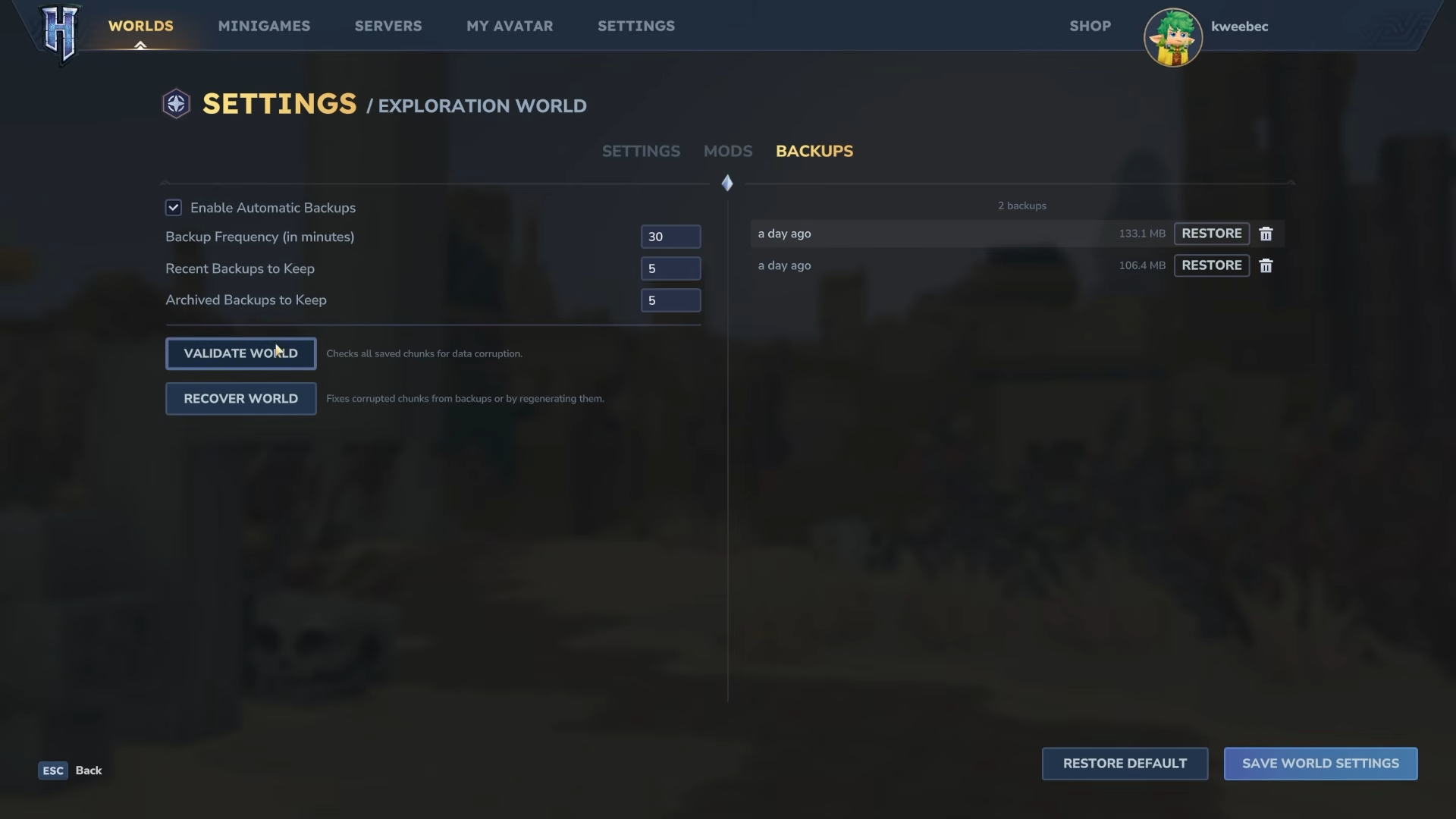
If the world is corrupted, use the recovery and validation flow: go through the multi-step process that checks the problem chunks.
Step 7
Choose your recovery approach for affected chunks: either regenerate them as new-world chunks, or replace them with chunks from a backup save.
How mod management works now inside world settings
Step 1
Open your world settings and navigate to the dedicated mod management section.
Step 2
Review mod versions, icons, and the extra details now shown per mod.
Step 3
Look for the warning icon that appears when a mod targets a game version different from the one you currently have loaded.
Step 4
If you host or play on a modded server, coordinate updates around version changes so players do not get stuck with mismatches on patch day.
Building changes you will notice quickly
Several changes aim to reduce friction while building and decorating.
- Windows and cloth roof blocks no longer require other blocks to support them, which makes early builds and roof detailing less finicky
- Chandeliers can now hang from more block types, so you have more freedom with ceilings and interior themes
- Decorative chain and brick beams can support more decorative blocks hanging from them, improving connectivity for signs, décor, and suspended builds
- The lumberjack lamp can now be placed facing different directions, which helps you align lighting cleanly
Item, equipment, and world interaction tweaks
A few smaller gameplay adjustments stand out because you’ll feel them during normal play.
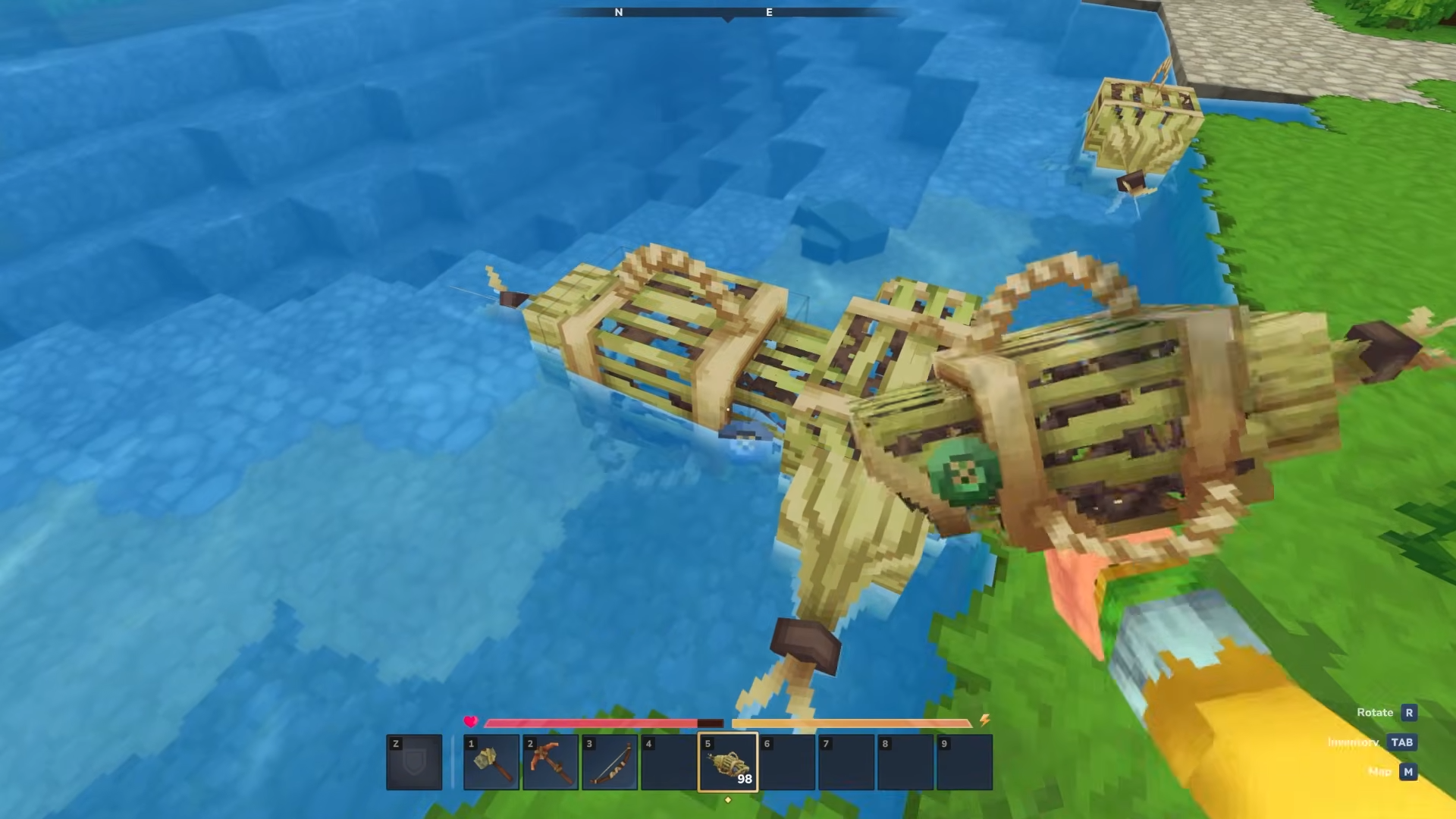
- Fishing traps can be placed closer to other blocks in shallow water and will always show their placement preview like other blocks
- The bow can no longer be drawn if you have no ammunition
- Hatchets, pickaxes, and shovels now lose durability when used on wood
- Blue winter seaweed produces bubbles you can use for oxygen to breathe underwater, and the oxygen amount it provides has been adjusted
- Some avatar cosmetic names were cleaned up with simple renames
Quality-of-life changes for inventory, crafting, and reporting
If you loot a lot or build a lot, these are the kinds of tweaks that quietly improve every session.
- You can hold the drop item button and mouse over items to quickly drop stacks in adventure mode, or destroy them in creative mode
- Crafting benches now show item rarity and how many items are queued for crafting
- The in-game reporting tool includes an option you can check to grant permission for follow-up contact about the bug report
- Bandwidth usage for the world map was reduced significantly, and the input system received cleanup work
Creator tools, modding, and world-gen updates
This part of the update leans into creator workflows and technical foundations.
- A new debug flag lets you visualize NPC pathing so you can see where they plan to walk
- Builder tools now have undo group size quick settings to make undoing large edits easier
- Creative brushes can use a default rotation angle and axis, and scripted brushes can rotate shapes based on rotation angle, axis, and origin
- Oasis portal spawning was reconfigured so players spawn within the Oasis basin, and the Oasis biome was updated for better performance
- Elemental golems received animation and interaction updates, and moose movement was slowed by 20 percent
How to use the new quick-drop inventory method
Step 1
Open your inventory.
Step 2
Hold the drop item button.
Step 3
Move your cursor across items you want to remove.
Step 4
In adventure mode, this drops stacks; in creative mode, it destroys them.
What this update means for modded servers and voice chat
If you run modded servers, the main pain point is that rapid version updates can temporarily break mods until authors bump compatibility, even if no major rewrites are needed. There is also explicit backend preparation underway for proximity voice chat, with expectations that it is coming soon, potentially during the broader Update 4 cycle.
Where Hytale is headed with Update 4
This pre-release is framed as a smaller step while bigger chapter-style updates are being built up over multiple weeks. The idea being discussed is that future updates may bundle multiple features under a cohesive theme, more like a focused expansion for specific zones, factions, mobs, or environmental shifts rather than isolated additions.
If you care most about stability tools, backups, creator workflows, and server resilience, Update 4 Part 1 is worth trying right away on non-critical worlds. If your priority is a heavily modded server experience, you may want to wait until your essential mods confirm compatibility for this pre-release version.