What to know
- Common during high server load in early access, affecting patch downloads and file application.
- Relaunching the launcher often resumes progress without data loss.
- Run as administrator to fix permission issues; clear patch folders if needed.
- Wait for server stabilization if fixes fail.
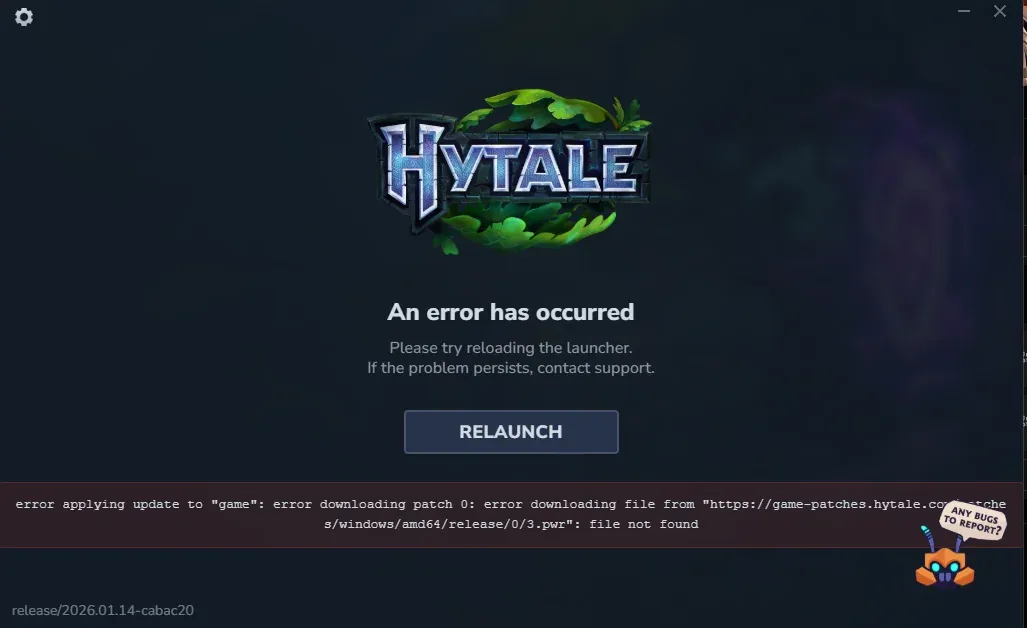
Recent Hytale patches trigger “error applying update,” “error downloading patch,” and “file not found” issues due to server overload and local glitches, but you can resolve most cases yourself.
Fix 1: Relaunch launcher
Close the Hytale launcher fully via Task Manager to ensure no background processes linger. You encounter this error often during peak early access times, but the launcher caches downloads for safe retries.
Comment
by
u/Familiar-Prize5757 from discussion
in
HytaleInfo
Step 1: Use the Relaunch button
- Click “Relaunch” when the error appears to return to the home screen.
- Hit “Install” again; it verifies files and resumes missing patches.
- Repeat 3-5 times—many players report success without restarting your PC.
Step 2: Fully restart the launcher
Exit completely and reopen; it picks up from the last verified patch.
This handles temporary server hiccups common since January 2026 launch.
Fix 2: Run launcher as administrator
Right-click the Hytale launcher executable and select “Run as administrator.” This grants permissions to write patch files, fixing “file not found” locally. On Windows, confirm via Task Manager if it’s elevated.
Fix 3: Clear corrupted patch files
- Press Windows + R, type %AppData%, and navigate to the Hytale folder.
- Delete the “Patch” folder if present, then restart your computer.
- Relaunch to download fresh files—avoids bugs from partial downloads.
Additional troubleshooting steps
- Check antivirus quarantine for Hytale files and add exceptions.
- Flush DNS: Run “ipconfig /flushdns” in Command Prompt as admin.
- Free disk space if update size exceeds available storage.
- Verify internet stability; switch networks if needed.
These steps resolve 90% of cases quickly, letting you jump into Hytale’s worlds. Persistent issues often clear with Hypixel hotfixes or off-peak retries.